Course creators need transcripts that turn into clean captions, timestamped chapters, and translated subtitles without a manual QA pass on every lesson. This guide ranks six transcription tools against that exact job for 2026.
Best overall: VideoText. Best for editing lessons by cutting the transcript text: Descript. Best for translating an existing course catalog into multiple languages: Maestra.
TL;DR
- VideoText is the best transcription software for course creators running multi-module video libraries in 2026.
- Descript wins for solo creators who edit lessons by cutting transcript text instead of a timeline.
- Riverside wins for remote co-instructor recordings but needs a dedicated transcription tool for QA.
- GoTranscript and Happy Scribe fit certification courses that require an audited, human-reviewed transcript.
- Maestra wins for translating an existing English course catalog into multiple languages.
Why this matters
A video course isn't one file. It's ten to forty lesson videos, each needing captions, most needing chapters, some needing translation for a non-English cohort. Run that manually and QA time eats more hours than recording did.
VideoText is built around that specific bottleneck: transcript, subtitles, chapters, and translation from one upload, with subtitle QA built into the pipeline instead of bolted on after export. The comparison below checks six tools against what a course library actually needs, not what a single YouTube video needs.
What makes the best transcription software for course creators
- Speaker diarization for co-instructor or panel-format lessons, so the transcript labels who's talking
- Chapter and summary generation that produces timestamped navigation markers per module
- Subtitle QA: CPL (characters per line), CPS/reading speed, and timing-drift detection before a caption file ships
- Translation that preserves cue timing across 70+ languages for global cohorts
- Batch processing across a multi-module library, not one file uploaded at a time
- Export formats that match the course platform — SRT, VTT, DOCX, PDF, not just one proprietary format
A course library moves through the same five stages regardless of which tool handles it: record, transcribe, QA the subtitles, translate if needed, then export to the platform. Tools that treat subtitle QA as an afterthought push that work back onto the creator.
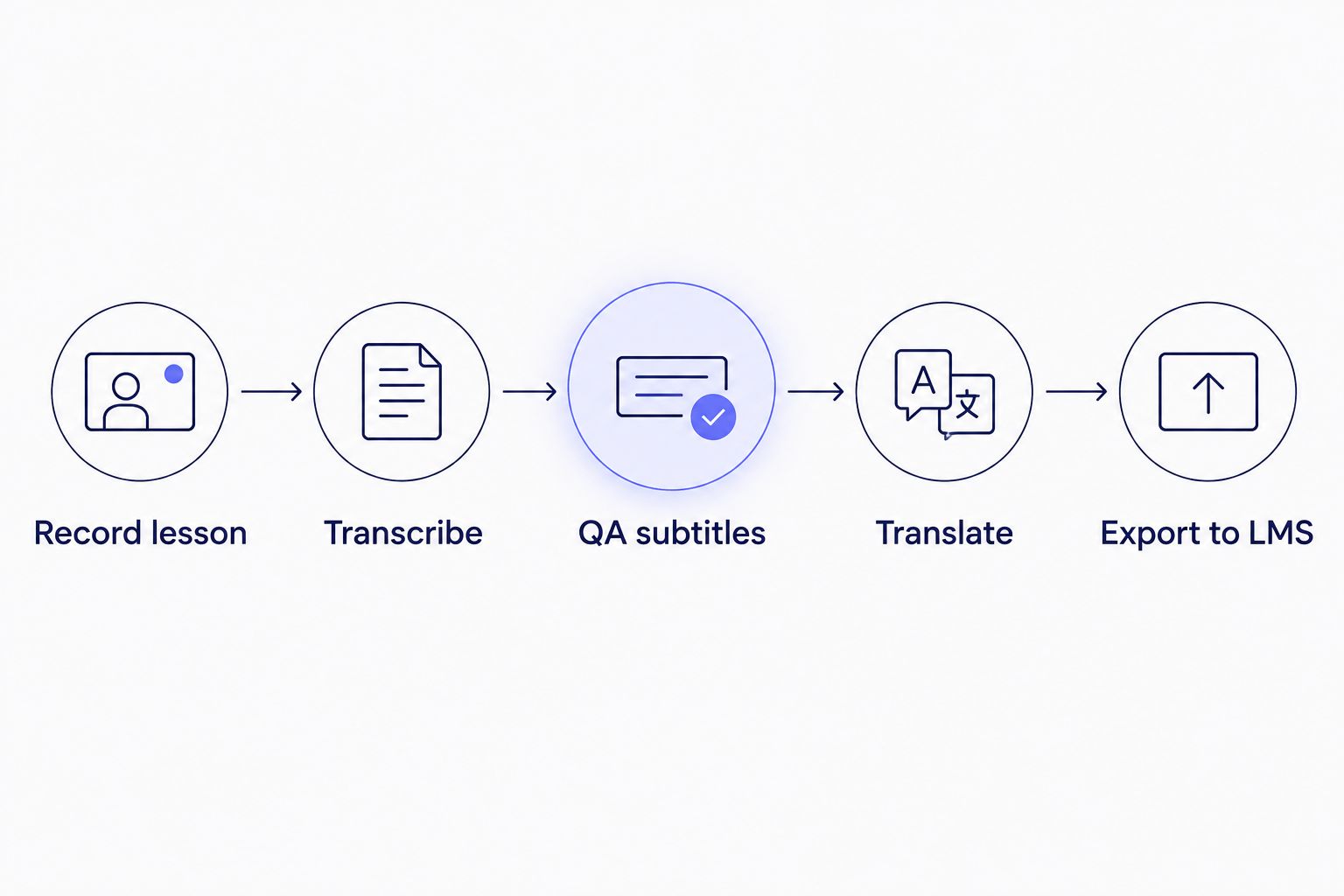
QA sits between transcription and translation, not after export.
At a glance
| Tool |
Best for |
Standout feature |
Key limitation |
| VideoText |
Multi-module libraries needing captions, chapters, translation |
Batch queue with CPL/CPS subtitle QA |
No native LMS integration beyond file export |
| Descript |
Editing lessons by editing transcript text |
Text-based video editing |
Subtitle QA/CPL tools aren't the focus |
| Riverside |
Remote co-instructor or panel recordings |
Local per-speaker recording avoids dropped frames |
Transcription/QA are add-ons, not core |
| GoTranscript / Happy Scribe |
Certification courses needing audited accuracy |
Human review pass on top of an AI draft |
Turnaround runs hours to days, not minutes |
| Maestra |
Translating an existing course catalog |
Multilingual subtitle output plus burn-in |
CPL/CPS granularity varies by target language |
| Notta |
Quick voice-note lecture recaps |
Fast mobile capture |
Not built for full-length lecture files |
1. VideoText: best transcription software for multi-module course libraries
VideoText takes an uploaded lesson video and produces a timed transcript, SRT/VTT subtitles, an AI summary with timestamped chapters, and a speaker-labeled cast list in one pipeline. The subtitle QA reviewer flags overlaps, CPL violations, reading-speed (CPS) problems, and timing drift before you export, and translation preserves cue timing across 70+ languages.
VideoText pros:
- Batch queue processes a full module library and exports a ZIP on the Pro+ tier instead of one file at a time
- AI chapters and summaries generate module navigation markers automatically, no manual timestamping
- Subtitle QA catches CPL/CPS/timing-drift issues before delivery, not after a student reports a broken caption
- Translation into 70+ languages keeps cue timing synced, so a translated cohort doesn't get drifted subtitles
VideoText cons:
- No direct LMS push — exports land as SRT/VTT/DOCX/JSON files you upload into Teachable, Thinkific, or Kajabi yourself
- Live streaming transcription isn't built for pre-recorded lesson review, that's a separate use case
Best for: course creators publishing a multi-module video library who need clean captions, chapters, and multilingual subtitles without a manual QA pass per lesson.
Verdict: Buy.
2. Descript: best for editing lessons by editing the transcript
Descript turns a video into an editable transcript — delete a sentence in the text and the matching clip disappears from the video. That text-based editing model is publicly documented as its core differentiator, alongside screen recording for tutorial-style modules.
Descript pros:
- Cutting text cuts video, which speeds up rough cuts for talking-head lessons
- Filler-word removal trims "um" and "uh" without scrubbing a timeline
- Built-in screen recording covers software-walkthrough course modules
Descript cons:
- Subtitle QA — CPL, reading speed, timing drift — isn't the product's focus
- Creators who only need captions, not an editor, pay for a heavier tool than the job requires
Best for: solo creators recording talking-head lessons who want to edit video by editing text. Full comparison in best Descript alternatives for 2026.
Verdict: Buy for editing-heavy workflows, Skip if captions are the only need.
3. Riverside: best for remote co-instructor recordings
Riverside records each participant locally during a remote session and uploads separately-tracked audio and video, which avoids the dropped-frame problem common to webcam call recording. That's useful for panel-format or co-taught course sessions.
Riverside pros:
- Local recording holds quality even on an unstable connection
- Separate tracks per speaker simplify diarization downstream
- Fits panel-style or co-instructor course formats directly
Riverside cons:
- Transcription and subtitle QA sit as add-ons to the recording workflow, not the core product
- No dedicated CPL/CPS tooling or client-guideline formatting
Best for: courses built around remote guest interviews or co-instructor panels, paired with a separate transcription and QA tool afterward.
Verdict: Buy for recording, pair with a transcription tool for the QA step.
4. GoTranscript / Happy Scribe: best for certification courses needing audited accuracy
Both run an AI draft followed by a human review pass, positioned publicly around accuracy for regulated or reviewed content. That fits courses where an inaccurate transcript creates a compliance problem, not a convenience one.
Human-reviewed services pros:
- A human reviewer catches domain-specific terminology an ASR model misses
- Useful where a transcript is audited as part of a certification program
Human-reviewed services cons:
- Turnaround runs hours to days per file, not the near-instant pass most course libraries need on release day
- Cost scales with review minutes rather than automated per-file processing
Best for: certification or continuing-education modules where a transcript error creates real compliance risk, not general course captioning.
Verdict: Hold — use only for the modules that legally require human sign-off.
5. Maestra: best for translating an existing course catalog
Maestra runs AI transcription and subtitling with translation output, publicly known for multilingual subtitle generation and open-caption burn-in. That fits a creator relaunching an English catalog for a non-English market.
Maestra pros:
- Translation output covers a wide range of target languages for global cohorts
- Subtitle burn-in helps on platforms that don't support soft (toggleable) captions
Maestra cons:
- Subtitle QA depth — CPL/CPS granularity specifically — varies by output language
- Client-guideline reformatting to Rev, GoTranscript, or custom specs isn't a core feature
Best for: creators relaunching an existing English course for non-English audiences. Head-to-head detail in VideoText vs. Maestra.
Verdict: Buy for translation-first catalogs.
6. Notta: best for quick voice-note lecture recaps
Notta is mobile-first voice-to-text capture, publicly positioned around meeting-note style transcription rather than full lecture files.
Notta pros:
- Fast mobile capture between takes for a spoken recap note
- Simple export for short recordings
Notta cons:
- Not built for full lesson-length video files or batch course libraries
- No chapter or summary generation for long-form lecture content
Best for: capturing a 5-to-10-minute recap note between recording sessions, not a full 45-minute lecture.
Verdict: Skip for full lectures, fine for quick voice notes.
How we ranked
Each tool got checked against the six criteria above: diarization, chapter generation, subtitle QA depth, translation with timing preserved, batch processing, and export format range. No tool wins on all six — the ranking assigns each one the use case it actually handles best rather than forcing a single leaderboard.
“If subtitle QA takes longer than recording the lesson, the pipeline is broken.”
Batch-process your course library
Upload a module, get transcript, captions, chapters, and QA in one pass.
Try VideoText
Which transcription software should you choose?
For most course creators publishing a multi-module video library in 2026, VideoText is the default pick: batch processing, chapter generation, and subtitle QA cover the actual bottleneck — cleanup before delivery, not transcription itself. If your workflow is built around editing a talking-head lesson by cutting text, Descript fits better. If the course requires an audited transcript for certification, hold the AI-only tools and route those specific modules to a human-reviewed service. If you're translating a finished catalog into new languages, start with a tool built for translating subtitles without losing timing sync rather than bolting translation onto a transcription tool that wasn't designed for it. Accessibility requirements add another layer — check the ADA-compliant captioning guide for higher education before you publish. Subtitle QA thresholds themselves are covered in the CPL and CPS benchmarks by style guide.
FAQ
What's the best transcription software for course creators in 2026?
VideoText is the best fit for multi-module course libraries because it batches transcription, chapter generation, and subtitle QA in one pipeline. Descript works better if your workflow centers on text-based video editing rather than captioning at scale.
Is AI transcription accurate enough for course captions?
AI transcription gets close on clean audio but still needs a subtitle QA pass for CPL, reading speed, and timing drift before publishing. Certification courses with compliance requirements should route those specific modules through a human-reviewed service.
SRT or VTT for course platform captions?
Most course platforms accept both, but VTT supports styling and positioning that SRT doesn't. Check your specific LMS's upload requirements before choosing a format, since some only parse one.
Can subtitles be translated without losing timing sync?
Yes, when the tool is built to preserve cue timing during translation instead of regenerating timestamps from scratch. VideoText translates subtitles across 70+ languages while keeping the original cue timing intact.
Is Descript good for course creators?
Descript is strong for solo creators editing talking-head lessons by cutting transcript text, since deleting text removes the matching clip. It's a weaker fit if your main need is subtitle QA and CPL/CPS compliance across a course library.
How do you fix CPL and CPS issues in course captions?
CPL (characters per line) and CPS (reading speed) issues get fixed by shortening lines and re-timing cues so a viewer can read the text at a comfortable pace. A subtitle QA tool flags the specific cues that exceed the limit instead of requiring a manual line-by-line check.
Does batch processing matter for course transcription?
Yes — a 20-module course means 20 separate uploads without batch processing, each needing its own transcript, captions, and QA pass. Batch queues process the whole library and export a ZIP instead of repeating the workflow per file.
What's the difference between clean verbatim and full verbatim for course transcripts?
Full verbatim captures every filler word and false start exactly as spoken. Clean verbatim keeps the speaker's actual words but drops fillers, which is the format most course transcripts and captions use for readability.
One last thing
The module that breaks most often isn't the intro lesson — it's the guest-interview or panel session, because diarization errors and overlapping speech push CPL and timing drift past the threshold a solo talking-head lesson never hits. Run subtitle QA on multi-speaker modules first, not last.
Related guides



