Higher education closed captioning is synchronized text added to lectures, course videos, webinars, and live classes with the aim of giving students equivalent access to speech and meaningful audio. This 2026 guide explains the legal standard, the required QA checks, and where the Videotext captioning workflow fits for freelancers and media agencies serving colleges.
TL;DR
- Closed captioning for higher education must satisfy WCAG 2.1 AA under the DOJ Title II web rule.
- Larger public entities face an April 24, 2026 deadline; smaller entities and special districts face April 26, 2027.
- Videotext is best for higher education captioning workflows that need ASR, subtitle repair, translation, QA, and SRT/VTT export.
- Automatic captions require review for words, timing, speaker labels, meaningful sounds, CPL, CPS, and line breaks.
- Closed captions remain selectable; burned-in open captions cannot be switched off by the viewer.
Key compliance facts
WCAG 2.1 AA
Required technical standard
DOJ Title II web rule
April 24, 2026
Larger-entity deadline
April 26, 2027
Later compliance deadline
70+ languages
Supported subtitle languages
Why closed captioning matters for higher education
The Department of Justice Title II web rule requires state and local government web content and mobile apps to conform to WCAG 2.1 Level AA. Public colleges and universities fall within Title II. Private colleges can have separate obligations under ADA Title III and Section 504 when they receive federal financial assistance.
The Title II deadline is April 24, 2026 for state and local governments serving populations of 50,000 or more. It is April 26, 2027 for governments below that threshold and special district governments. The relevant population is the public entity population used by the rule, not course enrollment. Each institution needs to confirm which deadline governs its public entity.
WCAG 2.1 addresses prerecorded captions under Success Criterion 1.2.2 and live captions under Success Criterion 1.2.4. It does not prescribe one vendor, file type, accuracy percentage, characters-per-line limit, or reading-speed limit. Compliance depends on whether captions communicate the spoken content and relevant audio information accurately enough to provide equivalent access.
For working captioners, the constraint is volume. Lecture capture, faculty webinars, student orientation, public events, and archived course media can create separate queues with different deadlines. A repeatable 2026 workflow prevents every recording from becoming a custom project.
A closed-captioning workflow for higher education
Use the following seven-step process for new recordings and remediation work. Keep the source media, transcript, caption file, and QA record together so later edits do not restart the job.
Inventory media before prioritizing
Build the inventory manually before selecting software. Record the owner, location, duration, caption status, audience, and last review date for each asset. Separate active instructional media from content that is no longer assigned or published.
- List videos in the LMS, lecture-capture platform, department drives, and public channels
- Mark each asset as uncaptioned, automatically captioned, human-reviewed, or unknown
- Separate prerecorded lectures from live events because different WCAG criteria apply
- Record whether the video has an SRT, VTT, embedded caption track, or burned-in text
- Prioritize current required courses and active student accommodation requests
Set caption rules for every course
Write one campus or client style sheet before production begins. WCAG defines the accessibility outcome, while the style sheet defines how captioners handle line breaks, speaker changes, sound labels, punctuation, and technical terms.
Use clean verbatim when fillers and abandoned starts add no meaning. Keep full verbatim when the assignment, accommodation, research method, or legal context requires speech exactly as delivered. Never remove uncertainty, disagreement, or wording that changes the academic meaning.
- Choose clean or full verbatim for each content type
- Set a maximum CPL, meaning characters per line
- Set a maximum CPS, meaning characters per second
- Define how speakers and meaningful sounds are identified
- Create a glossary for names, acronyms, formulas, and course terminology
- Specify SRT, VTT, or both as the delivery format
Generate ASR draft captions
Automatic speech recognition converts speech into timed text. It creates a draft faster than typing from a blank document, but it does not remove the need for editorial review. Dense terminology, overlapping voices, weak audio, accents, proper names, and equations require close attention.
Videotext accepts video, audio, YouTube media, or browser voice recordings and produces timed transcript segments plus SRT and VTT caption output. The same workspace supports speaker diarization, summaries, chapters, keyword navigation, and multiple export layouts.
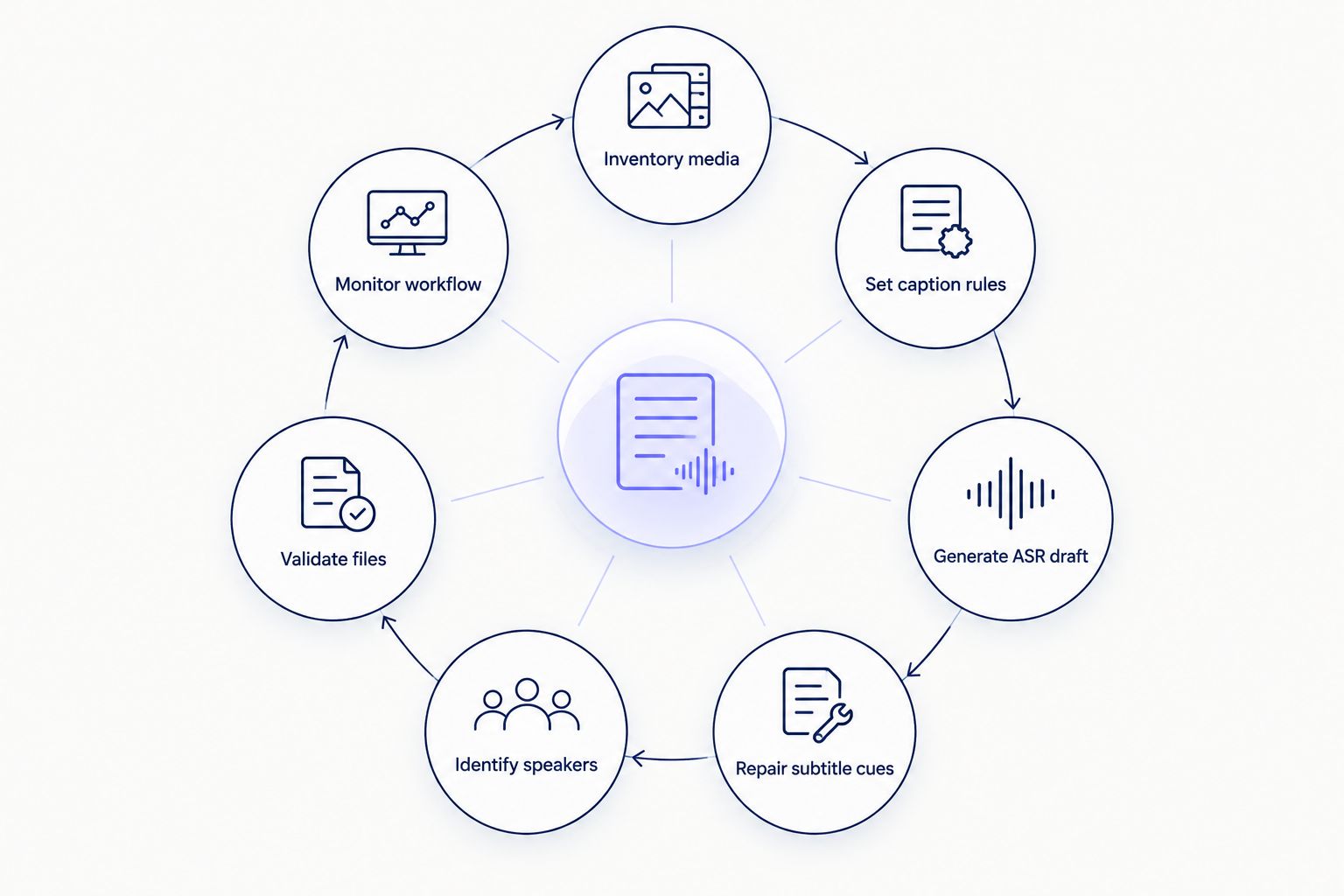
Captioning is a review cycle, not a one-time ASR export.
- Upload the highest-quality available media file
- Generate timed text with speaker detection enabled when multiple people speak
- Review the opening cues before processing the full assignment queue
- Add course terminology to the review checklist
- Preserve the unedited ASR draft for comparison and audit purposes
Repair subtitle cues before review
Text accuracy is only one part of caption quality. A correct sentence can still fail the viewer if it appears late, disappears too quickly, overlaps another cue, or breaks at an unreadable point.
CPL measures the number of characters on one displayed line. CPS measures how quickly the viewer must read a cue. These are editorial controls, not numerical ADA requirements. For a concrete external reference, Netflix English timed-text guidance uses a 42-character line limit and a 20-CPS limit for adult programs. A college can adopt different limits, but it must apply them consistently and test readability.
A QA workspace can flag timing drift, overlaps, gaps, scene-cut spans, grammar problems, long lines, and high reading speed. The reviewer still decides whether a proposed correction preserves the lecture meaning.
- Correct substitutions, omissions, repeated words, names, and technical vocabulary
- Split lines at grammatical boundaries rather than arbitrary character positions
- Repair cues that begin late or remain after the speaker stops
- Remove unintended overlaps and check deliberate simultaneous speech manually
- Recheck CPL and CPS after every text edit
- Watch the corrected section with sound before approving it
Identify speakers and meaningful sounds
Captions must identify information a viewer cannot obtain from dialogue alone. This includes a speaker change that is not visually clear and sounds that affect meaning, such as applause, an alarm, or laughter after a disputed statement.
Multi-speaker seminars and panel recordings benefit from speaker diarization software. Diarization separates voices into speaker tracks. A reviewer then replaces generic labels with names or roles confirmed by the recording.
- Label speakers when identity is not visually clear
- Place speaker labels consistently at the start of the relevant cue
- Describe meaningful sounds without adding interpretation
- Check cross-talk manually because diarization can confuse overlapping voices
- Confirm names against the course roster or event materials
Validate and publish accessible files
Run a technical and editorial check before upload. SRT is a plain-text caption format with numbered cues and timestamps. WebVTT, usually saved as VTT, supports web video and additional cue formatting. Platform support determines which file belongs in the final package.
For public course channels, compare the platform workflow with tools covered in this guide to subtitle generators for YouTube. Do not treat platform-generated captions as approved solely because a caption track exists.
- Validate timestamp syntax and cue order
- Confirm the platform recognizes the uploaded caption track
- Test caption controls with keyboard-only operation
- Check synchronization at the beginning, middle, and end
- Confirm captions remain available in the published student view
- Retain the approved SRT or VTT outside the video platform
Monitor the 2026 workflow
Captioning policy fails when responsibility ends at upload. Media changes, faculty replace recordings, platforms reprocess files, and corrected captions can be separated from the final video. Assign an owner for each queue and define what triggers another review.
Translation is part of the same control process. Videotext supports subtitle and transcript translation across 70+ languages while preserving cue timing. The translated text still needs language review plus new CPL, CPS, and line-break checks because sentence length changes between languages.
- Record who approved each caption file and when
- Recheck captions when the source video changes
- Track failed uploads and missing caption tracks
- Review translated captions with a qualified language reviewer
- Keep source and translated caption files under version control
- Audit active course media before each academic term
Compare higher education captioning options
No single production model removes human responsibility. Select the model according to volume, subject complexity, turnaround requirements, and the amount of internal QA capacity.
| Option |
Best for |
Main advantage |
Key limitation |
| Manual in-house captioning |
Small queues with highly specialized terminology |
Direct control over language and course context |
Slow for large backlogs and dependent on staff availability |
| External captioning service |
Institutions that want production handled outside the campus team |
Transfers transcription and initial formatting work |
Corrections still need an internal owner who understands the course |
| LMS or video-platform automatic captions |
Immediate draft access for newly uploaded media |
Captions appear inside the existing publishing system |
Draft quality and QA controls vary; publication does not prove conformance |
| Videotext ASR plus subtitle QA |
Freelancers and media agencies managing recurring higher education files |
Combines transcription, cue repair, guideline formatting, translation, and export |
Jargon-heavy audio and ambiguous speakers still require human review |
| Hybrid workflow |
Large institutions dividing routine and specialist content |
Routes simple files through automation and complex files to specialists |
Requires clear triage rules and consistent QA across teams |
Videotext closed captioning is best for freelance captioners and media agencies serving higher education that need ASR, subtitle repair, QA, and SRT/VTT export in one workflow. Its limitation is the same one every ASR-based option has: software can identify likely errors, but a responsible reviewer must verify academic meaning and accessibility.
Process a lecture recording
Generate timed text, review subtitle issues, and export SRT or VTT.
Start captioning
Common mistakes higher education teams make
Treating an ASR file as the final caption file
Automatic captions are drafts. A complete review covers spoken words, speaker identity, meaningful sounds, synchronization, cue duration, CPL, CPS, punctuation, and line breaks. Publishing without that pass transfers the cleanup burden to the student.
Confusing transcripts with captions
A transcript records spoken content as continuous or segmented text. Captions synchronize text and relevant audio information with video. Posting a transcript beside a lecture does not satisfy a requirement for synchronized captions when WCAG requires captions for that media.
Applying one deadline to every institution
The April 24, 2026 and April 26, 2027 Title II deadlines depend on public-entity classification and population. Enrollment is not the threshold. Private institutions also need to assess obligations outside Title II rather than assuming the public-entity schedule controls them.
Ignoring timing after correcting the words
Changing a caption can increase its reading speed, disturb line balance, or extend text beyond the spoken phrase. Run timing and readability checks again after text edits, translation, or video trimming.
Burning captions into every video
Burned-in text creates open captions that viewers cannot disable or restyle. Use a selectable caption track when the platform supports it. Reserve burn-in for delivery contexts that specifically require open captions, while retaining an editable SRT or VTT source file.
FAQ
What is closed captioning for higher education?
Closed captioning for higher education is synchronized, selectable text for lectures, course videos, webinars, and live classes. It communicates speech plus meaningful audio information needed to understand the content.
What WCAG standard applies to public colleges in 2026?
The DOJ Title II web rule requires WCAG 2.1 Level AA for covered state and local government web content and mobile apps. Public colleges and universities must map their media and platforms to that requirement.
When is the higher education ADA captioning deadline?
The Title II deadline is April 24, 2026 for public entities serving 50,000 people or more and April 26, 2027 for smaller entities and special district governments. The threshold concerns the public entity population, not student enrollment.
Are automatic captions ADA compliant?
Automatic captions are not automatically compliant or noncompliant based on how they were created. The published result must provide equivalent access, which normally requires review of text, timing, speakers, sounds, and presentation.
Is a transcript enough instead of captions?
No, a separate transcript does not replace synchronized captions when prerecorded or live captions are required. Transcripts remain useful for search, notes, and alternate access, but they perform a different function.
Should colleges use SRT or VTT files?
Use the format supported by the destination platform. SRT covers common numbered caption cues, while VTT is designed for web video and can support additional cue information.
How much does higher education captioning cost?
There is no single supported cost figure because the inputs do not include current service or software rates. Budget depends on recorded hours, audio complexity, turnaround, translation, remediation volume, and human QA time.
Can colleges translate captions without changing timestamps?
Yes, caption translation can preserve the existing cue timings. The translated file still needs review because longer or shorter wording can create new CPL, CPS, and line-break problems.
One last thing
Keep the approved caption file separate from the video platform. An LMS migration, replaced recording, or platform reprocessing step can remove or overwrite captions. The source transcript, final SRT or VTT, translation files, glossary, and approval record form the reusable accessibility asset.
That archive also makes 2026 remediation faster. When a professor trims the opening or replaces one section, the captioner can repair timing and affected cues instead of transcribing the entire lecture again.
Related guides



