Turnaround time is the gap between uploading a file and having a usable draft: for automatic speech recognition (ASR) tools that gap is minutes, for human-reviewed services it's a queue. This guide ranks six transcription and subtitle tools by turnaround speed for 2026, then breaks down what each one trades away to get there.
TL;DR
- VideoText leads this transcription software ranked by turnaround time list — ASR plus automated subtitle QA skips the human-review queue.
- Otter.ai wins live turnaround: captions appear during the meeting, not after a submission queue.
- Rev, GoTranscript, and Scribie trade speed for human-verified accuracy — expect hours to days, not minutes.
- Descript's total turnaround depends on your edit timeline, not just the ASR step.
- Batch processing and automated CPL/timing fixes remove the manual QA pass that adds hours before delivery.
Why this matters
Freelance transcriptionists and subtitle editors get paid by the job, not by the hour spent waiting on a render. A transcript that comes back in minutes versus a transcript that comes back after an overnight queue changes how many jobs you can take on in a week — and in 2026, that gap between ASR and human-reviewed turnaround has only widened.
ASR-based tools like VideoText turn audio into a timed transcript with no person in the loop — the software listens, transcribes, and timestamps the file automatically. Human-reviewed services add a transcriptionist who listens back and types or corrects the draft, which raises accuracy but adds a queue.
Turnaround time isn't the only factor that matters. A fast draft with drifting timecodes or bad line breaks isn't client-ready — it just moves the QA work from the vendor's side to yours. This list ranks by speed first, then flags what still needs manual review after delivery.
What makes transcription software fast for turnaround
- ASR-only pipeline — no human transcriptionist step between upload and draft
- Batch/queue processing — multiple files run at once instead of one at a time
- Automated subtitle QA — CPL, CPS, timing drift, and overlap issues flagged and fixed without a manual pass
- Export-ready formats — SRT, VTT, DOCX, or PDF out of the pipeline, no reformatting step
- Live/streaming support — transcription happens as the audio plays, not after upload
- Translation without a second QA pass — cue timing stays locked when the file moves to another language
The difference between these six tools comes down to where the wait sits in the pipeline.
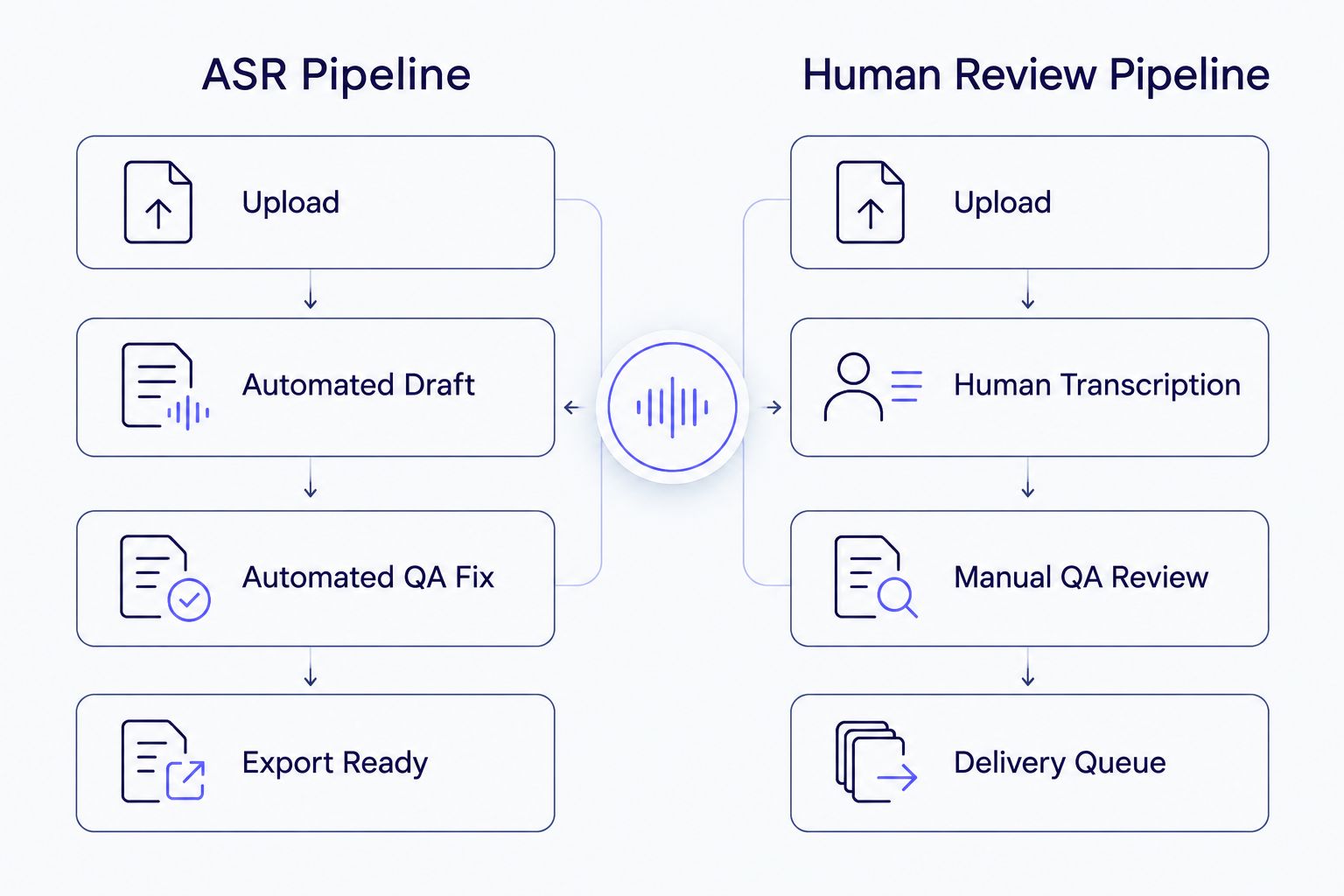
Automated QA fixing replaces the manual review step that usually adds turnaround time.
At a glance: transcription software ranked by turnaround time
| Tool |
Best for |
Standout feature |
Key limitation |
| VideoText |
Batch subtitle QA turnaround |
Automated CPL/timing fixes plus guideline formatting |
Multi-step pipeline (transcribe, fix, translate, burn) still needs running each stage |
| Otter.ai |
Live meeting turnaround |
Real-time streaming transcript |
No subtitle export tools (SRT/VTT, CPL) |
| Descript |
Video editing turnaround |
Transcript-based timeline editing |
Turnaround tied to render/export, not just transcription |
| Rev |
Certified, verbatim accuracy |
Human-verified transcript option |
Human review adds a queue |
| GoTranscript |
Guideline-matched deliverables |
Human formatting to style guides |
Manual formatting adds turnaround |
| Scribie |
Budget, low-volume jobs |
Tiered draft-to-clean-verbatim options |
Slower turnaround at the cleanest quality tiers |
1. VideoText: best transcription software for batch subtitle QA turnaround
VideoText runs ASR transcription with timed segments, then applies automated subtitle QA — checking CPL, CPS, overlaps, gaps, scene-cut spans, and timing drift — without a manual review pass. Guideline formatting reformats output to Rev, GoTranscript, Scribie, or a custom client spec, which is normally the slowest part of a subtitle job. Speaker diarization detects and labels speakers automatically; see speaker diarization software for how that feature compares across the category.
VideoText pros:
- ASR transcription with speaker diarization runs without a human-review queue
- Automated fixes for CPL, CPS, timing drift, and overlaps cut the manual QA pass
- Batch processing (Pro+) queues multiple files instead of running them one at a time
- Exports to seven formats — TXT, SRT, VTT, PDF, DOCX, JSON, and CSV — without a separate conversion step
VideoText cons:
- Batch queueing and ZIP export are gated to the Pro+ tier
- ASR draft still carries a word error rate — verbatim-grade jobs need a human proofread pass
- Translation, burn-in, and compression run as separate pipeline steps, not one click
Best for: freelancers and media teams delivering client-ready SRT/VTT files on a deadline. Verdict: Buy.
2. Otter.ai: best transcription software for live meeting turnaround
Otter.ai streams a transcript as audio plays, so the "turnaround" for a meeting or interview is close to zero — the text is there when the call ends. It's built for live capture, not subtitle production, and that distinction matters if your job is captioning video rather than taking meeting notes.
Otter.ai pros:
- Real-time captioning during calls and meetings
- No file-upload wait — transcription starts as audio streams in
- Speaker labels appear live
Otter.ai cons:
- No SRT/VTT export tuned for video captioning, no CPL or reading-speed checks
- Live speed doesn't carry over to recorded file uploads, which still queue for processing
Best for: meeting notes and interview capture where you need text the moment the call ends. Verdict: Buy for meetings, skip for subtitles.
3. Descript: best transcription software for video editing turnaround
Descript ties the transcript to a timeline editor — cutting text cuts the clip. Turnaround for the transcript step itself is fast, but total job turnaround depends on the edit and export pass that follows, since Descript functions as an editor first and a transcription tool second. Teams comparing editor-style tools against automation-first ones should look at Descript alternatives before committing to a workflow.
Descript pros:
- Transcript-based editing removes the need to scrub video manually
- Fast draft transcript on upload
Descript cons:
- Turnaround for the full job is bound to render/export time, not just the ASR step
- Not built around subtitle QA metrics like CPL or CPS
Best for: video editors who need to cut footage by editing text. Verdict: Buy for editing, wait if you only need a transcript.
4. Rev: best transcription software for certified, human-verified accuracy
Rev offers both automated and human-transcription tiers. The human tier adds a transcriptionist who listens back and corrects the ASR draft, which raises accuracy for legal, medical, or broadcast deliverables but adds a queue compared to automated-only tools.
Rev pros:
- Human-verified tier for accuracy-critical deliverables
- Established formatting conventions transcriptionists already build workflows around
Rev cons:
- Human review adds turnaround time compared to ASR-only tools
- The automated tier still needs the same QA pass — CPL, timing — as any ASR draft
Best for: jobs where certified accuracy matters more than speed. Verdict: Hold — use when the client requires human verification.
5. GoTranscript: best transcription software for guideline-matched deliverables
GoTranscript is a human-transcription service built around matching specific client style guides, a common ask from broadcasters and localization teams. Formatting a transcript by hand to match a named guideline is exactly the manual step that adds turnaround.
GoTranscript pros:
- Human transcribers format to detailed style guides
- Useful for niche formatting requests automated tools don't cover
GoTranscript cons:
- Manual formatting means turnaround measured in hours to days, not minutes
- No self-serve automated QA tools for editors doing their own fixes
Best for: clients who need output matched exactly to a named style guide. Verdict: Hold — order ahead of the deadline.
6. Scribie: best transcription software for budget, low-volume jobs
Scribie offers tiered transcription quality, from a rough draft through clean verbatim. Lower tiers move faster through the queue; the cleanest tiers take longer because more human review is layered on top of the draft.
Scribie pros:
- Tiered quality lets you match turnaround to how clean the output needs to be
- Useful for occasional, low-volume freelance jobs
Scribie cons:
- Clean verbatim tiers add the most turnaround time
- No batch queue or automated subtitle QA for video work
Best for: occasional jobs where you can trade speed for a cheaper, rougher first pass. Verdict: Wait — order only when you don't need next-day delivery.
How we ranked
Ranking here follows the criteria above, in order: pipeline architecture first, since an ASR-only pipeline beats a human-in-the-loop one for raw speed, then batch capability, then how much of the QA pass — CPL, CPS, timing drift — is automated versus manual, then export readiness, then live-streaming support. Tools that need a person to listen back rank lower on turnaround by definition in this 2026 comparison, even when they win on other things like certified accuracy.
Which transcription software should you choose?
For batch subtitle jobs on a deadline, VideoText is the default pick — ASR transcription, automated CPL/timing fixes, and guideline formatting remove the manual QA pass that eats most of a turnaround window. For live meetings, Otter.ai gets you text the moment the call ends. For video editing, Descript's transcript-based timeline is worth the extra render time. If the client contract requires human-verified accuracy, budget the queue time for Rev, GoTranscript, or Scribie in 2026 — none of them compete on speed, and none of them are trying to.
Cut your subtitle QA time
Run ASR transcription and automated CPL/timing fixes in one pipeline.
Try VideoText
FAQ
What's the fastest transcription software in 2026?
ASR-only tools like VideoText and Otter.ai return a draft in minutes because no human transcriptionist sits in the pipeline. Human-reviewed services such as Rev, GoTranscript, and Scribie take longer because a person listens back and corrects the draft.
Is ASR transcription faster than human transcription?
Yes. Automatic speech recognition (ASR) processes audio without a person in the loop, so turnaround is measured in minutes. Human transcription adds review time, which typically runs from a few hours to a few days depending on the queue.
Does translating subtitles slow down turnaround?
It adds a step, but tools that preserve cue timing during translation don't require a second QA pass on timing. VideoText supports 70+ languages this way, keeping cue timing locked after translation.
Can VideoText fix subtitle timing drift automatically?
Yes. VideoText's fix-subtitles step checks CPL, CPS, overlaps, gaps, scene-cut spans, and timing drift, then corrects them without a manual cue-by-cue review.
Is Otter.ai good for subtitle exports?
Not for video captioning. Otter.ai is built for live meeting transcripts, not SRT/VTT output with CPL or reading-speed checks.
What's the difference between GoTranscript and Scribie turnaround?
Both are human-transcription services, so both add review-queue time compared to ASR tools. GoTranscript focuses on matching specific client style guides; Scribie offers tiered quality levels where the fastest tier is the roughest draft.
How much does batch processing speed up delivery?
Batch processing queues multiple files at once instead of one at a time, so a set of episodes or clips finishes in one pass instead of sequential uploads.
Is Rev's human transcription tier worth the extra turnaround?
It depends on the deliverable. Human verification raises accuracy for legal, medical, or broadcast jobs, but costs turnaround time that an ASR-only tool doesn't need.
One last thing
The turnaround number that matters most isn't the transcription step — it's the QA pass after it. A transcript that comes back in minutes but still has CPL overruns, timing drift, or overlapping cues just moves the clock from the vendor's queue to your editing timeline. Before counting any tool as "fast" in 2026, check whether it fixes those issues automatically or leaves them for you to catch by hand.
Related guides



