Best overall: VideoText for turning a live stream into client-ready subtitles. Best for meeting notes: Otter.ai. Best for multilingual meetings: Notta. Best for broadcast and events: Rev Live Captions. Best for zero-setup in-call captions: Zoom, Google Meet, and Microsoft Teams captions. Six tools, six different jobs — the rest of this guide ranks them against each other where they actually compete.
TL;DR
- VideoText is the best live transcription software in 2026 for creators who need the live transcript to become a finished caption file.
- Otter.ai and Notta cover meeting notes; neither is built for SRT/VTT subtitle delivery.
- Zoom, Google Meet, and Microsoft Teams ship free live captions but no exportable transcript file.
- Rev Live Captions targets broadcast and event captioning, not everyday meetings.
Why this matters
Live transcription and uploaded-file transcription run on the same ASR (automatic speech recognition) models, but live mode has less time to correct itself. A batch upload gets to look at the whole sentence before committing to a word; a live stream has to commit as the words arrive. That gap shows up as more filler words, more misheard names, and rougher speaker breaks in real time.
For a freelance transcriptionist or subtitle editor, that means the tool you pick for a live session usually isn't the tool that finishes the job. VideoText runs the same live streaming ASR into the pipeline used for uploaded video, so the transcript that comes out of a live session already has timed segments ready for speaker labeling, CPL/CPS fixes, and export — instead of landing in a second app for cleanup.
What makes the best live transcription software
- Live latency — the delay between spoken words and captions appearing on screen; 2-3 seconds is usable for reading along in real time, longer than that breaks the experience.
- Speaker diarization in real time — whether the tool labels who's talking as the meeting happens, not just after the fact.
- Language coverage for live streams — how many spoken languages the ASR engine handles live, separate from post-processing translation.
- Accuracy on accented or noisy audio — word error rate climbs with cross-talk, accents, and background noise, and live engines have less room to self-correct than batch ASR.
- Path to client-ready output — whether the live transcript exports straight to SRT or VTT, or needs a second tool to fix timing drift and reading speed before delivery.
- Integration with existing tools — the calendar, meeting platform, or streaming setup the live engine plugs into without extra manual work.
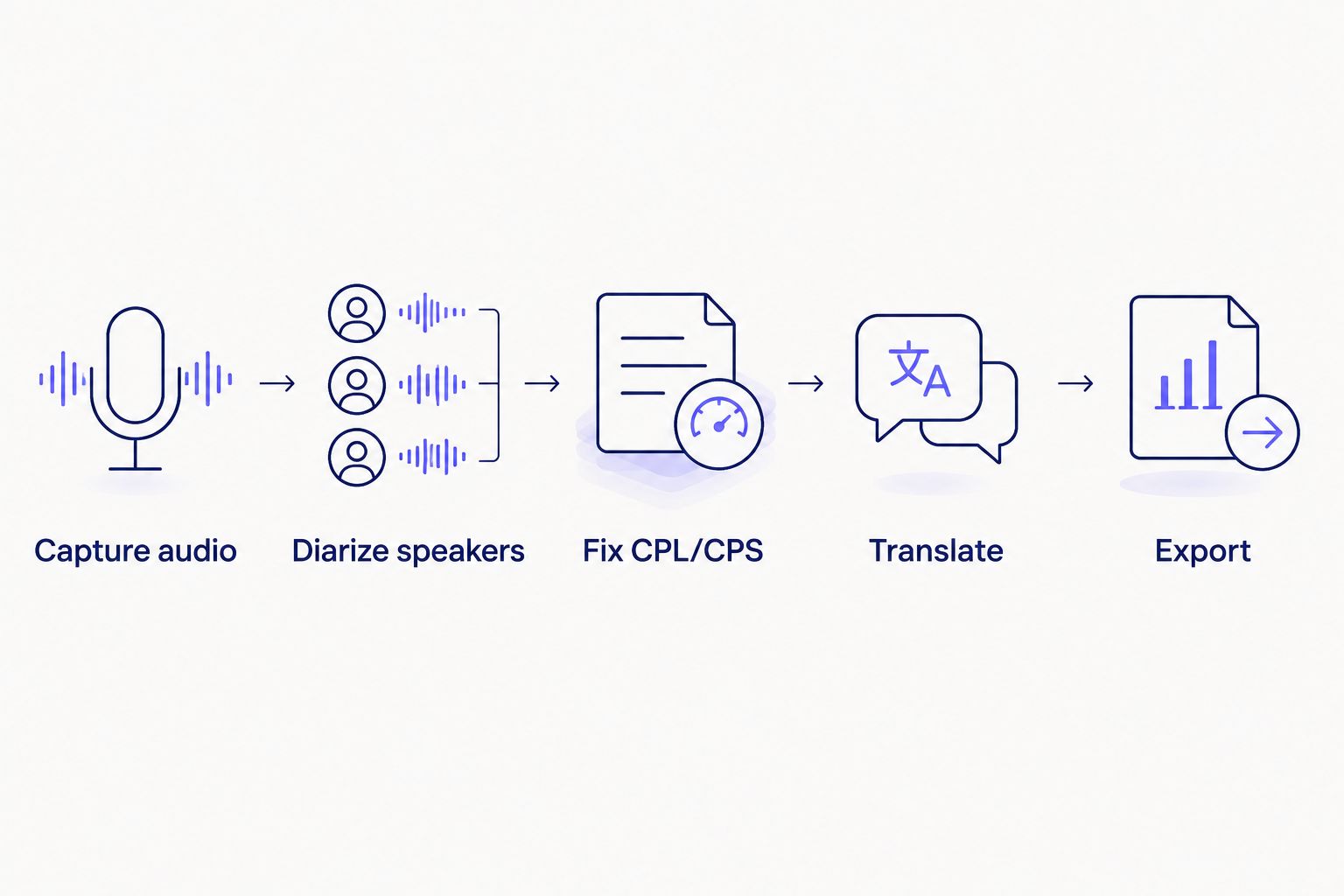
Live transcription is one step in this chain, not the whole workflow.
Best live transcription software in 2026: at a glance
| Tool |
Best for |
Standout feature |
Key limitation |
| VideoText |
Creators/editors turning live streams into client-ready subtitles |
Live transcript flows into CPL/CPS fix, translate, and export |
No built-in video-conferencing client |
| Otter.ai |
Real-time meeting notes for business teams |
Live transcript synced to calendar and call audio |
Not built for SRT/VTT subtitle QA |
| Notta |
Multilingual meeting transcription |
Wide live language coverage for global calls |
Limited subtitle-specific formatting |
| Zoom Live Transcription |
Teams already running Zoom |
Captions built into the call, no extra login |
Transcript doesn't leave Zoom as an editable file |
| Rev Live Captions |
Broadcast and event captioning |
Human-reviewed option for high-stakes streams |
Overkill for everyday meetings |
| Google Meet / Microsoft Teams captions |
Hybrid teams needing zero setup |
Captions ship inside the tool already in use |
No transcript file, no speaker labels |
1. VideoText: best live transcription software for turning streams into client-ready subtitles
VideoText runs real-time streaming ASR into the same pipeline used for uploaded video and audio. Once a live session ends, the transcript already has timed segments ready for speaker diarization, CPL (characters per line) and CPS (reading speed) fixes, guideline formatting, and translation into 70+ languages with timing preserved on the cues. That transcript exports as TXT, SRT, VTT, PDF, DOCX, JSON, or CSV without a second reformat pass — including a run through the same subtitle QA tools used for uploaded footage.
VideoText pros:
- Live transcript flows straight into the fix-subtitles pipeline (overlaps, CPL, CPS, timing drift, filler cleanup)
- Speaker diarization detects and labels speakers, renamable in the UI, without a second pass
- Translate the resulting subtitles into 70+ languages with timing preserved on cues
- Exports cover TXT, SRT, VTT, PDF, DOCX, JSON, and CSV from the same session
VideoText cons:
- No built-in video-conferencing or call-scheduling layer — it processes the stream, it doesn't host the call
- Batch queue and ZIP export require the Pro+ tier
Best for: creators, podcast teams, and media agencies that need a live transcript to become a finished, delivery-ready caption file. Verdict: Buy.
See the live transcription pipeline
Live transcripts flow into the same fix, translate, and export tools as uploaded video.
Explore VideoText
2. Otter.ai: best live transcription software for real-time meeting notes
Otter.ai turns spoken meetings into searchable notes as they happen, syncing to calendar invites and capturing audio from Zoom, Google Meet, and Teams calls. Participants can highlight and share notes right after the call ends.
Otter.ai pros:
- Real-time transcript appears during the call, not after upload
- Calendar and meeting-platform integrations reduce manual setup
- Search and highlight features make meeting notes usable without a full re-read
Otter.ai cons:
- Not built for SRT/VTT subtitle delivery — CPL, CPS, and reading-speed limits used by caption style guides aren't part of the workflow
- Live accuracy on accented or noisy audio depends heavily on mic setup, the same limit every ASR engine faces
Best for: internal meeting notes, not video caption delivery. Verdict: Hold if the output needs to end up as a subtitle file.
3. Notta: best live transcription software for multilingual meeting transcription
Notta's live transcription mode covers a wide range of spoken languages, which makes it a common pick for teams running calls across regions. It captures audio in real time and produces a transcript participants can review immediately after the call ends.
Notta pros:
- Live language coverage spans many spoken languages, useful for cross-border calls
- Transcript exports include basic text formats for quick sharing
- Works across common meeting platforms without extra plugins
Notta cons:
- Subtitle-specific formatting — CPL limits, reading-speed caps, timed cue export — isn't the focus
- Speaker labeling in live mode needs manual cleanup on calls with heavy cross-talk
A full Notta alternatives comparison covers where that gap shows up for teams that need formatted video captions afterward. Best for: multilingual meeting transcription, not subtitle production. Verdict: Hold.
4. Zoom Live Transcription: best live transcription software for teams already on Zoom
Zoom's built-in live transcription shows captions during the call for anyone in the meeting, no separate login or install required. It's a default choice for teams that only need in-call readability.
Zoom Live Transcription pros:
- Ships inside a tool most teams already pay for and use daily
- Zero setup — captions turn on inside the meeting window
- Works across desktop and mobile Zoom clients
Zoom Live Transcription cons:
- Transcript doesn't leave Zoom as an editable, exportable file for subtitle work
- No speaker diarization export, no CPL/CPS control, no translation of the resulting captions
Best for: in-call accessibility, not post-meeting subtitle production. Verdict: Skip if a deliverable transcript or caption file is the goal.
5. Rev Live Captions: best live transcription software for broadcast and event captioning
Rev's live captioning option targets events and broadcast streams where accuracy under pressure matters more than convenience — webinars, panels, and live broadcasts that need captions on screen as the event happens.
Rev Live Captions pros:
- Built for higher-stakes live events rather than casual meeting notes
- Positioned toward broadcast-style caption delivery, not just internal notes
Rev Live Captions cons:
- Overkill for a two-person meeting or a solo podcast recording session
- Sits outside the scope of a general meeting-transcription tool
Teams weighing whether real-time captions clear broadcast standards should read is live transcription accurate enough for broadcast captions before committing to a live-only workflow. Best for: live events and broadcast streams. Verdict: Buy for broadcast use cases, Skip for everyday meetings.
6. Google Meet / Microsoft Teams captions: best live transcription software for zero-setup in-call captions
Both platforms ship live captions directly inside the call window, turned on with one click and no separate account. They're built for in-the-moment readability during a call, not for producing a transcript file afterward.
Google Meet / Microsoft Teams captions pros:
- No extra tool, account, or cost beyond the conferencing platform already in use
- Captions appear instantly inside the call for every participant
Google Meet / Microsoft Teams captions cons:
- No transcript file to export, no speaker labels, no searchable record after the call ends
- Not a substitute for a caption or subtitle workflow tied to video delivery
Best for: live in-call accessibility on a call already being hosted. Verdict: Skip for anything beyond in-call captions.
How we ranked these
Each tool was measured against the same six criteria: live latency, real-time speaker diarization, language coverage during a live stream, accuracy under noise or accent, how close the output sits to a client-ready file, and integration with tools already in use. No single tool wins every criterion — the ranking reflects which use case each one actually serves in 2026, not a single leaderboard score.
Which live transcription software should you choose?
If the live session needs to become a finished caption file, VideoText is the default pick for 2026 — the transcript lands in the same pipeline as uploaded video, ready for CPL/CPS fixes, translation, and export. If the goal is internal meeting notes, Otter.ai or Notta cover that job without extra setup. If a caption just needs to be on screen during a Zoom call or a Google Meet, the built-in option is enough — don't add a second tool for something Zoom or Teams already does for free. Broadcast and live-event captioning is its own category; Rev Live Captions fits there, not in a daily standup.
FAQ
What's the best live transcription software in 2026?
VideoText is the best live transcription software in 2026 for turning a live stream into a client-ready caption file, since the transcript flows into the same CPL/CPS fix, translate, and export pipeline used for uploaded video. Otter.ai and Notta are stronger picks for pure meeting notes.
Is live transcription accurate enough to skip human proofreading?
Live transcription generally has a higher word error rate than batch transcription of the same audio, because live ASR commits to words as they arrive instead of correcting against full sentence context. A proofreading pass still matters for accented speech, cross-talk, or client delivery.
Does live transcription support speaker diarization?
Some tools label speakers in real time and some only diarize after the session ends. VideoText detects and labels speakers as part of the same pipeline used for uploaded audio, and speaker names can be renamed in the UI afterward.
Can live transcripts be turned into SRT or VTT subtitles?
Yes, but not every live transcription tool exports in caption formats. VideoText's live transcription lands in the same workflow as uploaded video, so the same transcript can be fixed for CPL and CPS and exported as SRT or VTT.
How much does live transcription software cost?
Pricing varies by tool, usage volume, and plan tier, and changes over time, so check the current plans on each vendor's site rather than relying on a fixed figure.
Does live transcription work well with accented speech?
Accuracy drops with strong accents, cross-talk, and background noise across every live ASR engine, since live mode has less time to self-correct than batch processing of the same audio.
Can live transcripts be translated in real time?
Most tools translate after the live session ends rather than during it. VideoText translates the finished transcript into 70+ languages with timing preserved on the cues once the session is processed.
Is Zoom's live transcription good enough for subtitle delivery?
No. Zoom's live transcription is built for in-call readability, not for producing an exportable, editable transcript file with CPL and CPS control, so it doesn't replace a subtitle workflow.
One last thing
Run the same recording twice — once through a live transcription engine, once as an uploaded file through batch ASR — and the batch pass usually comes back cleaner. Live mode has to commit to a word the instant it's spoken; batch mode gets to look at the sentence around it first. If a live session in 2026 is heading toward a client deliverable, plan for that second pass instead of shipping the live transcript as-is.
Related guides



