VideoText and Maestra both turn raw audio and video into text, but they solve different last-mile problems. Choose VideoText if your bottleneck is subtitle QA — fixing CPL, CPS, timing drift, and reformatting cues to a client's delivery guideline before you send a file out. Choose Maestra if you need built-in AI dubbing and voice cloning to localize a video into another spoken language, not just translate the captions sitting under it.
TL;DR
- VideoText wins on subtitle QA, CPL/CPS fixes, and guideline formatting for Rev, GoTranscript, and Scribie specs in 2026.
- Maestra wins on AI dubbing and voice cloning when a project needs a dubbed audio track, not just translated subtitles.
- Both run ASR-based transcription with speaker-timed segments — transcription accuracy is a tie, not a differentiator.
- VideoText exports to 7+ formats (TXT, SRT, VTT, PDF, DOCX, JSON, CSV) with API, Zapier, and Chrome extension automation.
- videotext vs maestra comes down to workflow: QA and client-ready delivery versus dubbed localization.
Numbers that matter
70+ languages
Subtitle translation coverage
VideoText, timing preserved on cues
7+ formats
Export formats supported
TXT, SRT, VTT, PDF, DOCX, JSON, CSV
Why this matters
A transcript is not a deliverable. A subtitle file with overlapping cues, lines over the character-per-line limit, or timing drift against scene cuts gets bounced back by a client or a QA reviewer, and that rework costs more time than the original transcription did.
Maestra and VideoText start from the same place — ASR turns speech into timed text — and diverge on what happens after. If you're a freelance subtitle editor spending your evenings running a checklist against Netflix TTSC-style specs, the software that fixes CPL and CPS automatically saves real hours. If you're localizing a training video into five spoken languages with lip-synced audio, dubbing capability matters more than cue formatting.
VideoText vs Maestra at a glance
| Dimension |
VideoText |
Maestra |
| Best for |
Freelance editors and agencies doing client-ready subtitle QA |
Teams needing dubbed, voice-cloned video localization |
| Pricing model |
Tiered plans, batch/ZIP export on Pro+ |
Tiered subscription plans |
| Standout feature |
In-browser cue editor with CPL/CPS/drift detection |
AI dubbing and voice cloning |
| Transcription & ASR |
Timed-segment ASR transcription |
Timed-segment ASR transcription |
| Speaker diarization |
Detect, label, rename speakers in UI |
Speaker labeling supported |
| Subtitle QA & timing fixes |
Dedicated fix engine: overlaps, CPL, CPS, gaps, drift |
Not a dedicated QA workflow |
| Guideline formatting |
Reformat to Rev, GoTranscript, Scribie, custom specs |
Not a named feature |
| Subtitle translation |
70+ languages, cue timing preserved |
Multi-language translation supported |
| Dubbing / voice cloning |
Not offered |
Core feature |
| Export formats & automation |
TXT, SRT, VTT, PDF, DOCX, JSON, CSV; API, Zapier, Chrome extension |
Export and API options available |
Both handle core transcription well
VideoText and Maestra both run ASR pipelines that produce timed-segment transcripts from uploaded video, audio, or voice recordings. Neither has a published accuracy figure worth comparing head-to-head as of 2026, so treat raw transcription as a tie and judge the two tools on what happens to that transcript next.
VideoText is the better subtitle QA tool (by a lot)
This is the dimension VideoText is built around. The fix-subtitles workflow catches overlapping cues, characters-per-line (CPL) violations, reading-speed (CPS) problems, gaps, scene-cut span errors, timing drift, grammar issues, bad line breaks, and leftover filler words — then applies fixes without a manual pass through every cue.
The in-browser QA review syncs the cue editor to the video itself, flagging issues as you scrub through rather than making you guess where drift happened. Maestra does not market a comparable dedicated subtitle QA engine; it's built around transcription and translation output, not a cue-by-cue defect checklist. If you handle subtitle generator tools for YouTube work where CPL and reading speed decide whether a caption file passes review, this gap is the whole decision.
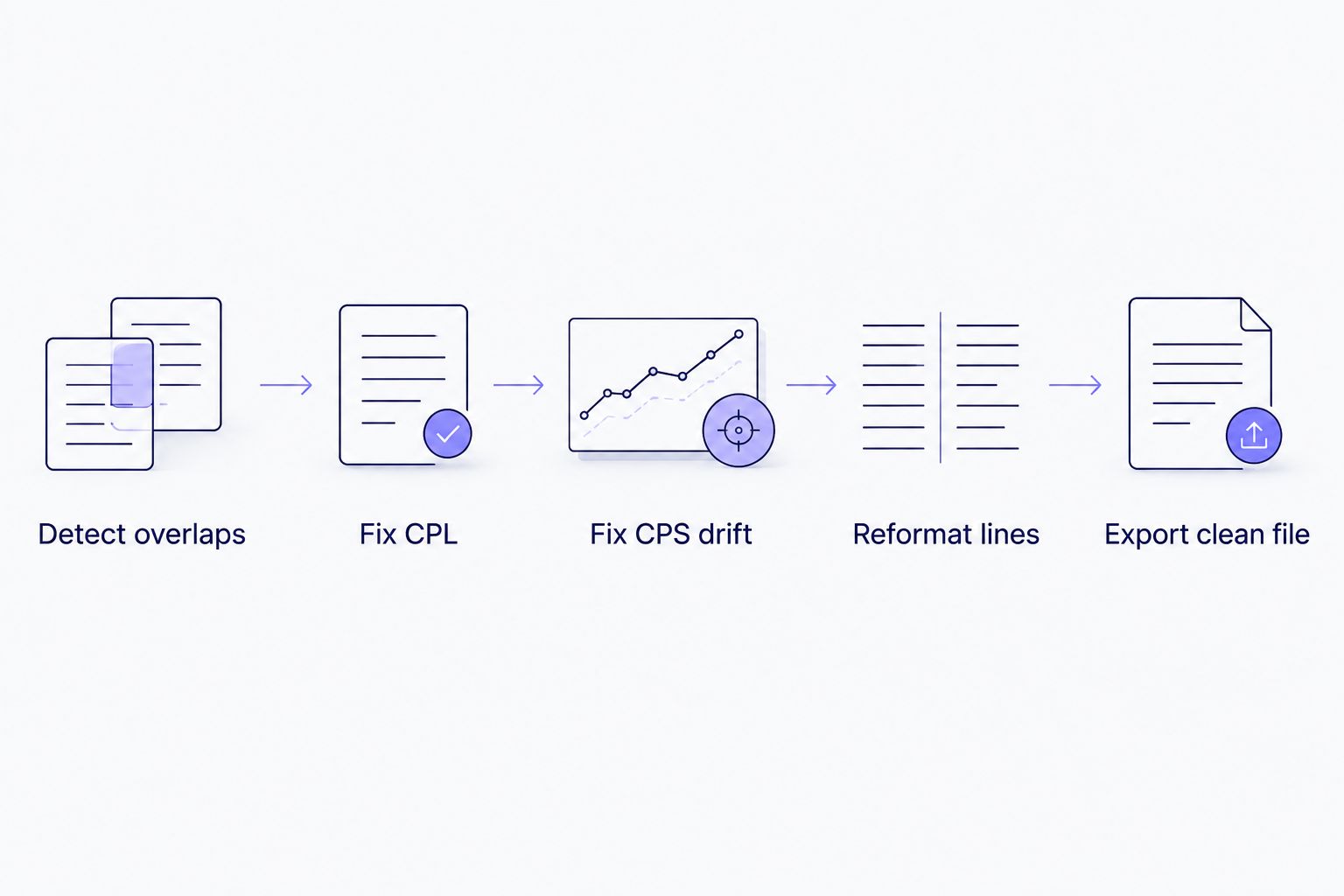
Subtitle QA moves from detection to a client-ready export without a manual cue-by-cue pass.
VideoText wins on guideline formatting
Reformatting a transcript to match Rev, GoTranscript, Scribie, or a custom client spec is a named workflow in VideoText — "make it client ready" reformats line breaks, timing, and speaker layout to match the target guideline directly. This is the step that usually eats the most QA time for freelance transcriptionists working across multiple client accounts with different formatting rules.
Maestra does not list guideline-specific reformatting as a core feature. If your work moves between clients who each specify their own subtitle format, this is a real time difference, not a cosmetic one.
Both detect speakers, but the workflows differ
Speaker diarization — detecting who's talking and labeling each segment — is supported in both tools. VideoText lets you rename detected speakers directly in the UI so the final transcript reads with real names instead of "Speaker 1" and "Speaker 2." Maestra also supports speaker labeling in its transcript output.
Call this one a tie on the base capability. If diarization accuracy on multi-speaker podcast or interview audio is the deciding factor for your workflow, check the speaker diarization software comparison for a closer look at how detection holds up across noisy audio.
VideoText offers more subtitle translation control
VideoText translates subtitles and transcripts across 70+ languages while preserving cue timing — the translated text lands on the same timestamps as the original, so you're not re-timing cues after translation. Maestra also supports multi-language translation of its output.
The difference shows up in the next section, because translation and dubbing solve different problems.
Maestra is the better dubbing tool
Maestra positions AI dubbing and voice cloning as a core feature — generating a dubbed audio track in a target language rather than only translating the on-screen captions. VideoText does not offer dubbing or voice cloning; its translation output stays in subtitle and transcript form.
If a project needs a video that sounds native in Spanish, German, or Japanese rather than one that's simply subtitled in those languages, Maestra covers a step VideoText doesn't attempt.
VideoText offers more export and automation options
VideoText exports to TXT, SRT, VTT, PDF, DOCX, JSON, and CSV, including timecode and speaker-layout variants, and connects to workflows through an API, Zapier, and Chrome extensions that can automate transcription, fixing, translation, burning, and compression. Batch processing with ZIP export is available on Pro+ plans for multi-file queues.
Maestra supports export and API access as well, but doesn't publish the same breadth of named export formats or a Zapier integration. For freelancers juggling client deliverables across formats, format flexibility saves a manual conversion step per file.
Pricing: predictability vs flexibility
Neither tool publishes pricing figures worth quoting here since plans change, so compare the models instead of numbers. VideoText runs tiered plans with batch processing and ZIP export unlocked at the Pro+ tier — a predictable structure where heavier usage (batch queues, automation) sits behind a higher tier. Maestra also runs a tiered subscription structure.
The practical question isn't which number is lower — check current pricing directly on each site — it's whether your usage pattern is single-file QA work (favors a predictable flat tier) or high-volume batch automation (favors checking what's actually included at each tier before committing).
See the VideoText QA workflow
Upload a file and check the subtitle fix and export flow firsthand.
Try VideoText
Final verdict
Choose VideoText if you're a freelance subtitle editor or agency QA lead who spends hours checking CPL, CPS, and timing drift by hand before delivery, and you need output reformatted to a specific client guideline like Rev or GoTranscript. VideoText wins this scenario outright in 2026.
Choose Maestra if you're localizing video content into spoken audio in another language — training videos, marketing content, or dubbed media — and voice cloning or lip-synced dubbing is a requirement, not a nice-to-have. Maestra wins that scenario.
Scorecard
| Dimension |
Winner |
| Transcription & ASR |
Tie |
| Speaker diarization |
Tie |
| Subtitle QA & timing fixes |
VideoText |
| Guideline formatting |
VideoText |
| Subtitle translation |
VideoText |
| Dubbing / voice cloning |
Maestra |
| Export formats & automation |
VideoText |
FAQ
Is VideoText better than Maestra for subtitle QA?
Yes, for subtitle QA specifically — VideoText runs a dedicated fix engine for CPL, CPS, overlaps, gaps, and timing drift that Maestra doesn't offer as a named workflow. Maestra focuses more on transcription and dubbing output.
Does Maestra offer AI dubbing?
Yes, AI dubbing and voice cloning are core Maestra features for generating a dubbed audio track in a target language. VideoText does not offer dubbing or voice cloning.
What is the best tool for fixing subtitle timing drift in 2026?
VideoText's fix-subtitles workflow detects and corrects timing drift, gaps, and scene-cut span errors directly in the cue editor. This is a dedicated feature, not a side effect of translation or transcription.
Does VideoText support client-specific subtitle guidelines?
Yes. VideoText reformats transcripts and subtitles to match Rev, GoTranscript, Scribie, or a custom guideline, which cuts manual reformatting time before delivery.
How many languages does VideoText support for translation?
VideoText translates subtitles and transcripts across 70+ languages while preserving the original cue timing, so translated text lands on the same timestamps.
Can Maestra fix CPL and CPS issues in subtitle files?
Maestra doesn't market a dedicated CPL/CPS fix workflow the way VideoText does. It's built around transcription, translation, and dubbing rather than cue-by-cue QA.
Which tool has better speaker diarization?
Both VideoText and Maestra detect and label speakers. VideoText lets you rename detected speakers directly in the UI, which helps when a transcript needs real names instead of generic speaker labels.
Does VideoText support batch processing?
Yes, VideoText offers multi-file batch processing and ZIP exports on Pro+ plans, useful for agencies processing multiple client files at once.
One last thing
The videotext vs maestra decision usually isn't close once you know which step actually eats your time. If it's cue-by-cue QA against a client spec, VideoText's fix engine and guideline formatting remove a manual pass entirely. If it's producing a dubbed audio track in another language, that's a feature VideoText doesn't build for and Maestra does — check both against the specific deliverable in front of you before 2026 budgets lock in a single tool.
Related guides



