Notta handles live meeting transcription well: join a Zoom, Teams, or Google Meet call, get a real-time transcript, and walk away with an AI summary before the call even ends. It stops being enough the moment your work is video or audio content that needs client-ready subtitles — SRT/VTT files with correct CPL (characters per line), no timing drift, and formatting matched to a client's style guide. The best Notta alternative in 2026 is VideoText if you produce subtitles and transcripts for delivery; Otter.ai if you need live capture across more meeting platforms; Descript if your workflow is editing video by editing the transcript.
TL;DR
- VideoText wins for notta alternatives in 2026 when the job is subtitle QA, SRT/VTT cleanup, and client-guideline formatting.
- Otter.ai stays closest to Notta's use case: live meeting transcription and AI summaries.
- Descript fits teams editing video by cutting the transcript, not the timeline.
- Rev covers human-verified transcripts when ASR accuracy alone isn't enough.
- None of these tools replace Notta for calendar-integrated meeting bots — that's still Notta's core strength.
What the alternatives actually cover
70+
Languages VideoText translates subtitles into
7+
Export formats VideoText supports
Why this matters
Notta is a meeting-transcription tool first. It joins calls, transcribes speech, and hands you a summary. That's a different job from producing a subtitle file that passes QA — checking CPL limits, fixing reading-speed (CPS) violations, closing gaps between cues, and reformatting to a Rev, GoTranscript, or Scribie-style guideline before delivery.
If you're a freelance transcriptionist, subtitle editor, podcast producer, or media agency shipping caption files to clients in 2026, that gap matters more than which tool has the cleaner meeting UI. VideoText is built around that exact gap: fixing subtitle drift and cutting QA time before delivery, not summarizing a Zoom call.
Notta alternatives at a glance
| Tool |
Best for |
Standout feature |
How it differs from Notta |
| Notta |
Live meeting transcription |
Real-time capture in Zoom/Teams/Google Meet |
Baseline — meeting-first, not subtitle-file-first |
| VideoText |
Subtitle QA and client-ready delivery |
CPL/CPS/timing-drift fixing plus guideline reformatting |
Built for SRT/VTT output, not live meeting capture |
| Otter.ai |
Live meeting transcription across more apps |
Real-time collaboration on the transcript during the call |
Closest overlap with Notta's core use case |
| Descript |
Editing video by editing the transcript |
Transcript-based timeline editing |
A video editor first, transcription is a feature inside it |
| Rev |
Human-verified transcripts and captions |
Human transcriptionists in the pipeline, not ASR-only |
Adds a human QA layer Notta doesn't offer |
1. VideoText: best for subtitle QA and client-ready delivery
VideoText takes uploaded video/audio (or a voice recording) through ASR transcription, then into subtitle cleanup: overlaps, CPL, CPS, gaps, scene-cut spans, timing drift, filler cleanup, and grammar. The output reformats to Rev, GoTranscript, Scribie, or a custom client guideline, which is the step that actually shortens QA time before delivery.
Speaker diarization detects and labels speakers, and you can rename them in the UI — useful for multi-guest podcasts and interview transcripts. The speaker diarization tooling sits in the same pipeline as the subtitle fixer, so a labeled transcript and a clean SRT come from one pass, not two tools.
Where VideoText shines
- In-browser cue editor synced to video with automatic issue detection (CPL, CPS, gaps, drift)
- Guideline formatting to match Rev, GoTranscript, Scribie, or a custom client spec
- Translation across 70+ languages with cue timing preserved
- Batch processing and ZIP exports for multi-file jobs
- Exports to TXT, SRT, VTT, PDF, DOCX, JSON, and CSV
Where VideoText falls short
- No native meeting-bot integration to auto-join Zoom, Teams, or Google Meet calls the way Notta does
- Built around uploaded media and recordings, not live calendar-linked capture
Best for: freelance subtitle editors, transcriptionists, podcast teams, and agencies delivering client-ready SRT/VTT and transcript files.
| Dimension |
Notta |
VideoText |
| Live meeting capture |
Built-in (Zoom/Teams/Google Meet) |
Not the focus |
| Subtitle QA (CPL/CPS/drift) |
Not the focus |
Dedicated cue editor with issue detection |
| Client-guideline formatting |
Not offered |
Rev/GoTranscript/Scribie/custom presets |
| Subtitle translation with timing kept |
Limited |
70+ languages, cue timing preserved |
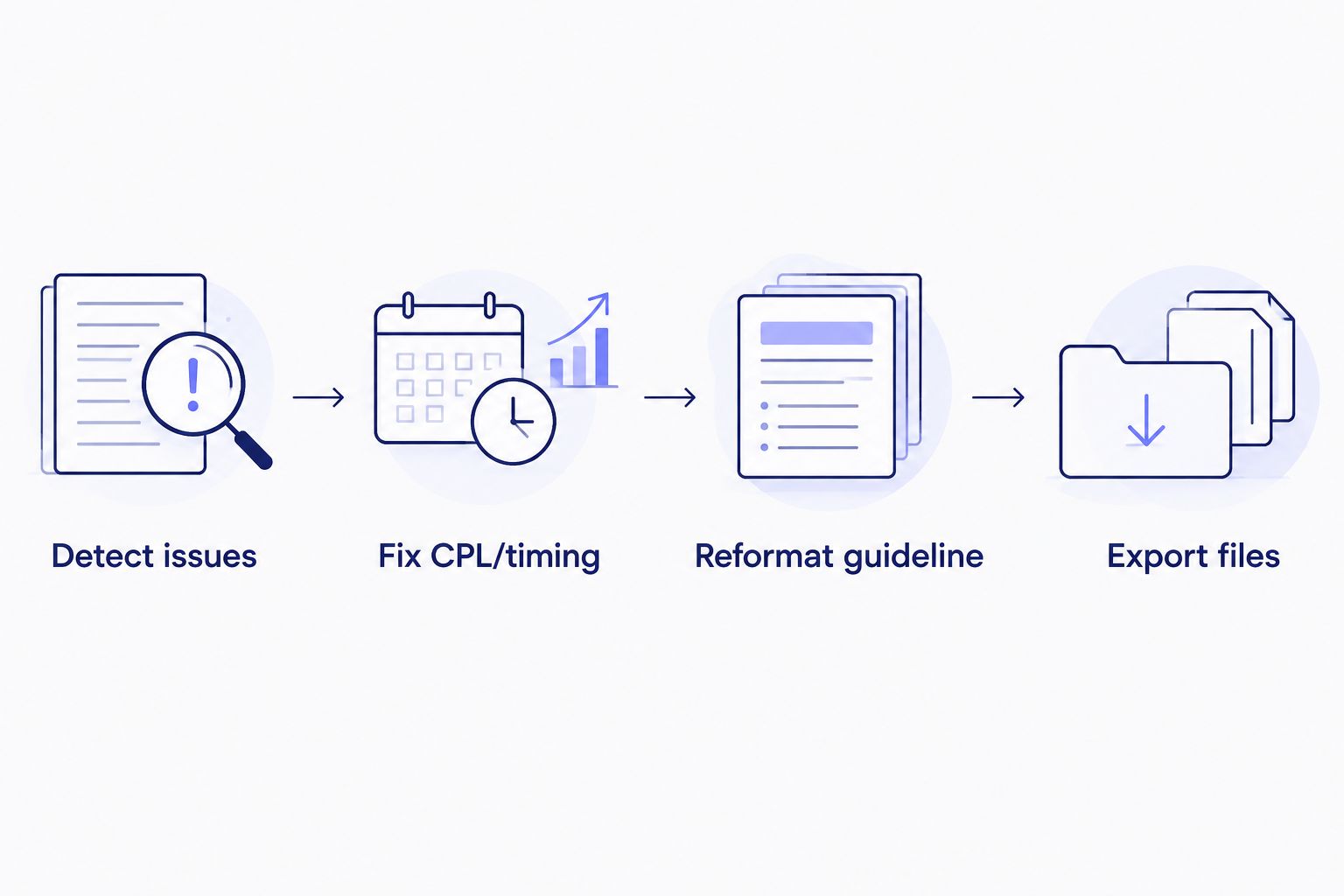
Detection and reformatting happen before export, not after a client rejects the file.
Fix subtitle drift before delivery
Run CPL, CPS, and timing checks on your next SRT/VTT export.
Try VideoText
2. Otter.ai: best for live meeting transcription
Otter.ai is the closest direct swap for Notta's core use case: it joins live calls, transcribes in real time, and lets collaborators highlight and comment on the transcript during the meeting. If the job is meeting notes and action items, not subtitle files, Otter.ai and Notta solve the same problem from slightly different angles.
Where Otter.ai shines
- Real-time collaborative transcript during the call, not just after
- Integrates with common calendar and meeting apps for auto-join
Where Otter.ai falls short
- No CPL/CPS subtitle QA tooling — it's not built to produce SRT/VTT files for video delivery
- No client-guideline reformatting for caption production workflows
Best for: teams whose main output is meeting notes and summaries, not subtitle files.
| Dimension |
Notta |
Otter.ai |
| Live meeting capture |
Built-in |
Built-in |
| Real-time collaborative editing |
Limited |
Strong |
| Subtitle/SRT output |
Not the focus |
Not the focus |
3. Descript: best for editing video by editing the transcript
Descript's transcript doubles as a video timeline: delete a word in the text and the corresponding clip cuts from the video. That's a fundamentally different workflow from Notta's meeting-capture model — Descript is a video editor with transcription built in, not a transcription tool with editing bolted on.
Where Descript shines
- Transcript-based video editing removes manual timeline scrubbing for simple cuts
- Useful for podcast and video creators doing rough cuts from a transcript
Where Descript falls short
- Not built around live meeting capture the way Notta is
- Subtitle QA (CPL, CPS, guideline formatting) isn't its focus — it's positioned as an editor, not a caption-compliance tool
Best for: creators and podcast teams who want to cut video by cutting text. A fuller breakdown sits in the Descript alternatives comparison.
Best for: video editors working from a rough transcript cut, not live meeting note-takers.
4. Rev: best for human-verified transcripts and captions
Rev adds a layer Notta doesn't: human transcriptionists reviewing or producing the transcript, not ASR alone. For legal, medical, or broadcast work where ASR errors carry real cost, that human layer is the reason teams pick Rev over an ASR-only tool.
Where Rev shines
- Human review reduces the word-error-rate risk that comes with ASR-only output
- Established guideline formats that other transcription vendors (including VideoText) can match on request
Where Rev falls short
- No live meeting capture — you upload a recording after the fact, you don't join the call
- Turnaround depends on human transcriptionist availability, not instant ASR output
Best for: transcription jobs where accuracy requirements rule out ASR-only output.
Why people switch from Notta
- The output is a meeting summary, not a subtitle file. Producing SRT/VTT captions for a video means running CPL and CPS checks Notta isn't built to do.
- No client-guideline reformatting. Agencies delivering to Rev, GoTranscript, or Scribie-style specs need that reformatting step built in, not done by hand after export.
- Subtitle burn-in and video work aren't in scope. Creators publishing to YouTube need captions matched to platform requirements — covered in the YouTube subtitle generator comparison — which sits outside a meeting-transcription tool's job.
When staying with Notta is the right call
If your actual workload is internal meetings — standups, client calls, interviews you need summarized fast — Notta's real-time capture and AI summary still solve that problem directly in 2026. Switching tools to gain subtitle QA features you'll never use isn't a fix, it's an extra subscription. The switch makes sense specifically when the deliverable becomes a subtitle file or a transcript that has to pass a client's formatting guideline.
FAQ
What is the best Notta alternative in 2026?
VideoText is the best Notta alternative in 2026 for subtitle QA and client-ready transcript delivery; Otter.ai is the closest alternative for live meeting transcription.
Is VideoText better than Notta for subtitles?
Yes for subtitle production: VideoText fixes CPL, CPS, and timing drift and reformats to client guidelines, which Notta doesn't offer. Notta stays stronger for live meeting capture.
Does Notta produce SRT or VTT files?
Notta's core workflow is meeting transcription and summaries, not dedicated subtitle-file QA. Tools built around SRT/VTT cleanup, like VideoText, handle CPL and timing-drift checks Notta doesn't focus on.
Can Otter.ai replace Notta for meeting transcription?
Otter.ai covers the same core use case as Notta: real-time transcription during live calls with collaborative editing. The two overlap more than any subtitle-focused alternative does.
Is Descript a Notta alternative?
Descript solves a different problem: editing video by editing its transcript. It's a fit for video editors, not a direct swap for Notta's live meeting capture.
Why switch from Notta to a subtitle-focused tool?
Switch when your deliverable is a subtitle file, not a meeting summary. CPL, CPS, and client-guideline formatting are the specific gaps that push transcriptionists and editors toward tools like VideoText in 2026.
Does Rev use AI or human transcriptionists?
Rev's model adds human review to the transcription pipeline, which reduces ASR error risk compared to an AI-only tool like Notta.
One last thing
The feature that actually separates these tools isn't transcription accuracy — it's what happens after the transcript exists. Notta stops at a summary. VideoText's QA pass (CPL, CPS, gaps, drift, guideline reformatting) is the step that decides whether a subtitle file ships clean on the first try or bounces back from a client in 2026.
Related guides



