Transcription software is worth it over free tools in 2026 when you deliver transcripts or subtitles to clients, process recurring files, or need structured QA. Free tools remain sufficient for one-off notes and rough drafts, but they leave speaker review, timing correction, CPL/CPS checks, line breaks, formatting, and export validation to you.
TL;DR
- Transcription software is worth it over free tools when client delivery requires subtitle QA, speaker labels, or consistent formatting.
- Free transcription tools are best for one-off notes, searchable drafts, and recordings that do not need formal delivery.
- VideoText is best for transcriptionists and subtitle editors who need ASR, cue validation, guideline formatting, and multiple exports.
- Paid software does not remove human review; it reduces repetitive checks before the final review in 2026.
Is transcription software worth it over free tools in 2026?
Yes. It is worth paying for transcription software when the required output is more than raw text. VideoText transcription software combines ASR transcription with speaker diarization, subtitle QA, guideline formatting, translation, and export tools, so you can complete more of the delivery workflow in one system.
The decision depends on the final file. A personal note only needs readable text. A client-ready SRT needs correct words, speaker handling, cue timing, readable line breaks, and compliance with the client's rules.
| Requirement |
Free transcription tool |
Dedicated transcription software |
Better choice |
| One-off personal notes |
Produces a usable draft |
Produces a usable draft with additional workflow tools |
Free tool |
| Searchable interview draft |
Usually sufficient after a quick review |
Useful when speaker labels and exports matter |
Depends on delivery |
| Client-ready transcript |
Requires manual cleanup and formatting |
Supports structured editing and export |
Paid software |
| SRT or VTT delivery |
Requires cue-by-cue validation |
Can combine generation, editing, and validation |
Paid software |
| Multiple speakers |
Speaker changes need careful review |
Diarization provides a first pass at speaker separation |
Paid software |
| Translated subtitles |
Translation and timing often require separate steps |
VideoText supports 70+ languages while preserving cue timing |
Paid software |
| Recurring file batches |
Repeats the same manual workflow for every file |
Batch processing and ZIP exports are available on Pro+ |
Paid software |
VideoText is best for working transcriptionists, subtitle editors, podcast teams, and media agencies that need client-ready files rather than an unreviewed ASR draft. It is unnecessary for someone who only wants occasional personal notes.
Why this matters
ASR and subtitle delivery are different jobs. Automatic speech recognition converts speech into text. Subtitle production adds timed cues, line breaks, reading-speed limits, speaker decisions, punctuation, and a final file format such as SRT or VTT.
A free tool can complete the first job and still leave most of the second job untouched. That distinction determines whether paid transcription software saves useful work in 2026.
CPL means characters per line. It measures how much text appears on each subtitle line. CPS means characters per second. It measures how quickly a viewer must read the cue before it disappears. The correct limits depend on the platform or client guideline, so a generic transcript cannot determine compliance by itself.
Timing drift creates another delivery problem. A cue can contain the correct words but appear too early, too late, or across an unsuitable scene cut. Word accuracy alone does not identify those errors.
Free transcription tools: best for rough drafts
Best for: personal notes, searchable recordings, early interview drafts, and low-risk internal reference.
A free tool is the correct choice when the transcript is an intermediate document. You can search for a quote, review the subject of a recording, or create notes without building a finished subtitle file.
The main advantage is a short workflow. Add the media, generate text, and review the sections you need. If nobody expects formal speaker labels, timecodes, cue formatting, or a specific export layout, additional production features add little value.
The disadvantage is that free output often moves the remaining work into separate tools. You may need one editor for text cleanup, another utility for subtitle conversion, and a manual checklist for CPL, CPS, overlaps, gaps, and timing drift. The transcript was free, but the delivery workflow was not completed.
Verdict: Use a free tool for disposable drafts. Skip it for recurring client subtitle delivery.
Paid transcription software: best for client delivery
Best for: freelance transcriptionists, subtitle editors, content teams, podcast teams, and agencies delivering repeatable outputs.
Paid transcription software is valuable when it joins the steps after ASR. VideoText supports timed transcription, speaker diarization, SRT and VTT generation, subtitle issue detection, guideline formatting, translation, and in-browser cue review synced to the video.
The export requirement matters as much as the transcript. VideoText explicitly supports TXT, SRT, VTT, PDF, DOCX, JSON, and CSV, along with additional layouts. Those seven named formats cover plain text, subtitle delivery, formatted documents, and structured data workflows.
The limitation is straightforward: software does not know every editorial decision. Names, specialist terminology, intentional speech patterns, and ambiguous speaker changes still require human review. A paid system makes the review more structured; it does not make review optional.
Verdict: Use paid transcription software when the output must pass another person's QA process.
A practical 2026 transcription workflow
A reliable workflow separates transcription, editorial review, subtitle QA, and export. Do not treat a generated transcript as the finished file.
- ASR draft: Upload the video or audio and generate timed text. Keep the original media available for every later decision.
- Speaker review: Check each detected speaker change. Rename speakers consistently and correct turns that diarization joined or split incorrectly.
- Text cleanup: Choose full verbatim or clean verbatim based on the brief. Correct names, technical terms, punctuation, fillers, and false starts without changing the speaker's meaning.
- Cue QA: Review CPL, CPS, overlaps, gaps, timing drift, scene-cut spans, grammar, and line breaks. Play difficult sections instead of judging timing from text alone.
- Client format: Apply the required Rev, GoTranscript, Scribie, or custom client guideline. Confirm speaker labels, timestamps, paragraph structure, and caption conventions.
- Export: Generate the required TXT, SRT, VTT, PDF, DOCX, JSON, or CSV file. Open the exported file before delivery and check that its structure survived the export.
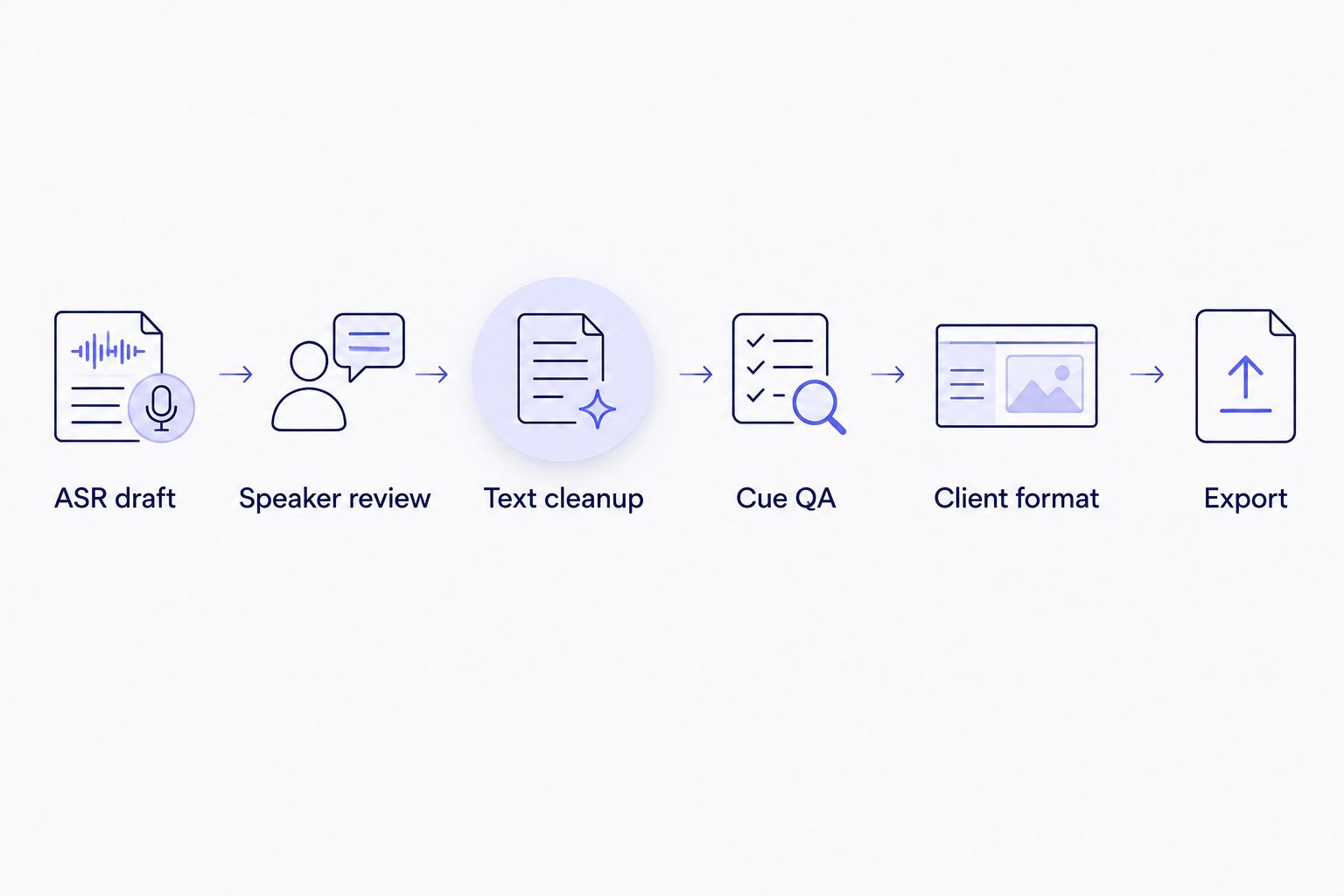
The finished transcript comes after speaker review and QA, not directly after ASR.
This sequence applies whether the first draft comes from free or paid software. The difference is how many steps remain connected. VideoText keeps the transcript, synced cue editor, issue detection, formatting, translation, and exports in the same workflow.
Review a transcript and its cues
Generate timed text, inspect subtitle issues, apply formatting, and export the required file.
Open VideoText
Why the value varies
The value of transcription software changes with the work you deliver. Use these factors instead of treating every recording the same:
- Final output: A rough TXT note needs less tooling than a validated SRT, VTT, DOCX, or structured JSON delivery.
- Speaker count: Interviews, podcasts, and panels require more diarization review than a single-speaker voice recording.
- Client guidelines: Rev, GoTranscript, Scribie, and custom guidelines can require different labels, timestamps, and formatting decisions.
- Subtitle constraints: CPL, CPS, cue gaps, overlaps, scene cuts, line breaks, and drift add checks that do not exist in a plain transcript.
- Language workflow: Translation becomes more involved when subtitle timing must remain attached to every cue. VideoText supports translation across 70+ languages with cue timing preserved.
- File volume: Repeating the same manual conversion and validation process across a queue makes batch processing more useful.
A freelancer working on one short internal note has little reason to build this workflow. A subtitle editor handling recurring client files encounters the same checks on every delivery. That repeated QA work is the point at which dedicated software becomes worth it.
Is free transcription good enough for client work?
Free transcription is good enough for a first draft, but not automatically for final client delivery. You still need to review terminology, speaker labels, formatting, timestamps, and any subtitle constraints in the brief.
If the client only requests readable plain text, the review can be simple. If the client requests an SRT or VTT file, include playback-based timing review and cue validation before delivery.
Does paid transcription software eliminate manual editing?
No. Paid transcription software reduces repetitive editing and presents problems in a structured workflow, but a person still approves the words and editorial choices. Proper nouns, overlapping speech, accents, unclear audio, and specialist terminology require attention in both free and paid workflows.
The useful distinction in 2026 is not automatic versus manual. It is unstructured cleanup versus assisted, repeatable QA.
When should a freelancer switch from free tools?
Switch when the free workflow repeatedly requires separate diarization, cue repair, guideline formatting, translation, or file conversion. You do not need to wait for a specific number of projects; the trigger is repeated production work after the transcript has already been generated.
A simple test is to list every action between ASR output and delivery. If most actions concern formatting and subtitle QA rather than word correction, dedicated transcription software addresses the actual bottleneck.
How to compare transcription software in 2026
Use a sample from your normal work and inspect the full workflow. A clean, single-speaker demo does not expose diarization or subtitle timing problems.
Check these items in order:
- Can you edit timed segments while playing the source media?
- Can you rename speakers after diarization?
- Can the system detect overlaps, gaps, timing drift, and unsuitable line breaks?
- Can you check CPL and CPS against the applicable client guideline?
- Can you switch between full verbatim and clean verbatim without changing meaning?
- Can you apply the required transcript or subtitle format?
- Can you export the exact file type the client requested?
- Can you reopen the exported result and trace each cue back to the media?
Also inspect the limitations. A long feature list does not prove that a tool fits your delivery process. The useful product is the one that removes repeated steps while keeping the final review visible.
FAQ
Is transcription software worth it over free tools in 2026?
Yes, transcription software is worth it when you need speaker diarization, subtitle QA, guideline formatting, translation, or repeatable exports. Free tools remain suitable for one-off notes and rough drafts.
What is the main difference between free and paid transcription tools?
The main difference is the work available after speech becomes text. Paid tools can connect editing, speaker review, subtitle validation, formatting, translation, and export in one workflow.
Can free transcription tools create client-ready subtitles?
A free tool can create a useful subtitle draft, but client readiness requires a separate review. Check words, cue timing, CPL, CPS, overlaps, gaps, line breaks, speaker labels, and the client's formatting rules.
What does speaker diarization do?
Speaker diarization detects when the speaker changes and assigns segments to different speaker labels. A human should still confirm every label and correct ambiguous or overlapping turns.
What is the difference between CPL and CPS?
CPL measures characters per subtitle line, while CPS measures how many characters a viewer must read per second. Both affect subtitle readability, and the accepted limits depend on the delivery guideline.
Does VideoText support subtitle translation?
Yes. VideoText supports transcript and subtitle translation across 70+ languages while preserving timing on subtitle cues.
Which transcript and subtitle formats does VideoText support?
VideoText explicitly supports TXT, SRT, VTT, PDF, DOCX, JSON, and CSV, plus additional export layouts. Select the format required by the client rather than converting after delivery.
Do I still need to proofread an automatic transcript?
Yes. Proofread every automatic transcript that will be published, archived, or delivered to a client. Check proper nouns, specialist vocabulary, punctuation, speaker labels, and unclear audio against the recording.
One last thing
Do not compare transcription tools only by the first ASR draft. Compare the file you can deliver after speaker review, cue repair, guideline formatting, and export.
That is the practical answer for 2026: free tools win when raw text is the destination. VideoText and other dedicated transcription software become worth it when raw text is only the start of the job.
Related guides



