Best overall for lecture recordings in 2026: VideoText, for turning multi-speaker lecture audio into a clean transcript with diarization and CPL-checked subtitles in one pass. Best for live in-class note-taking: Otter.ai. Best for human-reviewed accuracy on high-stakes recordings: Rev.
TL;DR
- VideoText is the best transcription software for lecture recordings in 2026, with diarization and CPL-checked exports.
- Otter.ai is the pick for live in-class note-taking with real-time streaming transcription.
- Rev fits high-stakes lectures like oral exams or dissertation defenses where human review beats raw ASR.
- Sonix and Trint handle translation and team review but lack dedicated subtitle QA tools.
- Descript edits lecture footage into clips; it is not built for transcript delivery or CPL compliance.
Why this matters
A lecture recording is not a podcast or a meeting call. One file usually has a single main speaker plus scattered student questions, technical vocabulary specific to the course, and a length that runs well past a typical business recording. Automatic speech recognition (ASR) handles the professor's voice fine but often stumbles on cross-talk during Q&A and on domain terms — case law, organic chemistry, proper nouns.
When the transcript also needs to become a subtitle file for accessibility compliance, the requirements stack up: speaker labels, correct timing, characters-per-line (CPL) limits, and reading-speed (CPS) checks. Picking transcription software for lecture recordings in 2026 means matching the tool to which of those jobs you actually need done.
What makes the best transcription software for lecture recordings
- Speaker diarization — separates the professor from students during Q&A without manual relabeling of every line.
- Accuracy on technical vocabulary — ASR models vary in how they handle course-specific jargon.
- Subtitle QA tools — CPL, CPS, and timing-drift checks matter once lecture captions have to meet accessibility formatting.
- Export format range — SRT/VTT for accessible video, DOCX/PDF for study guides, TXT for search.
- Batch and live options — a semester produces many long files; live transcription helps when the note is needed the moment class ends.
- Translation support — relevant for international programs or multilingual course materials.
Best transcription software for lecture recordings in 2026, at a glance
| Tool |
Best for |
Standout feature |
Key limitation |
| VideoText |
Multi-speaker lecture transcripts |
Diarization plus CPL/CPS subtitle fixes in one pass |
No human-review tier |
| Otter.ai |
Live in-class note-taking |
Real-time streaming transcription |
Diarization struggles with overlapping speech |
| Rev |
High-stakes accuracy |
Human-reviewed transcripts |
Turnaround slower than automated ASR |
| Sonix |
Multilingual lecture content |
Built-in translation and editor |
Limited CPL/CPS subtitle tools |
| Trint |
Team-based transcript review |
Collaborative editing workspace |
No dedicated timing-drift fixer |
| Descript |
Turning lectures into clips |
Text-based video editing |
Not built for transcript or CPL delivery |
1. VideoText: best transcription software for cleaning up multi-speaker lecture transcripts
Upload the lecture recording as video or audio and VideoText runs ASR transcription with timed segments, then applies speaker diarization to separate the professor from students during Q&A — speakers can be renamed directly in the UI. From there, Fix Subtitles resolves overlaps, CPL, CPS, gaps, and timing drift in one pass instead of a line-by-line manual edit. If the transcript needs to match Rev, GoTranscript, Scribie, or a custom client guideline before delivery, guideline formatting handles that step automatically.
The approach mirrors what a dedicated speaker diarization software comparison looks for: correct speaker separation on real cross-talk, not just clean single-speaker audio.
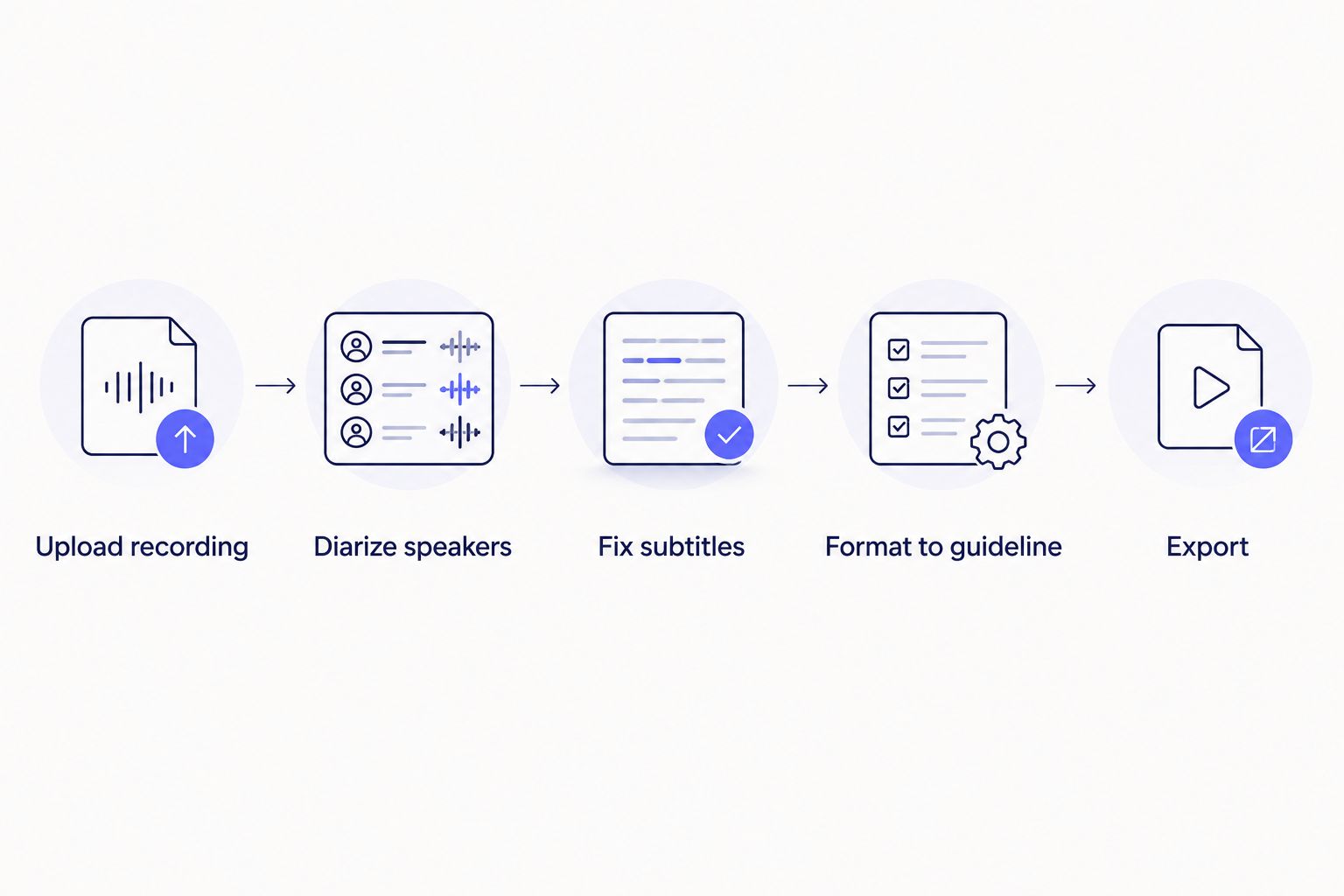
Diarization and subtitle fixes happen before formatting, not after export.
VideoText pros:
- Speaker diarization labels professor and students automatically, then lets you rename them.
- Fix Subtitles resolves CPL, CPS, overlaps, and timing drift in one pass.
- AI summary and timestamped chapters turn a long lecture into a study outline without re-listening.
- Exports cover TXT, SRT, VTT, PDF, DOCX, JSON, and CSV, so one transcript feeds a study guide and a captioned video.
VideoText cons:
- No human-transcription tier — accuracy depends on the ASR model, not a manual reviewer.
- Batch processing and ZIP exports for full-semester libraries sit behind the Pro+ tier.
Best for: instructors, TAs, and note-taking services delivering clean, accessible lecture transcripts on a recurring basis.
Verdict: Buy.
2. Otter.ai: best for live in-class note-taking
Otter.ai streams a transcript in real time during the lecture, which lets a student search the notes minutes after class ends rather than waiting on a post-processing step. The mobile app captures audio directly from a phone, and highlights can be shared across a study group on the same transcript.
Otter.ai pros:
- Real-time transcription lets students follow along and search the transcript as class happens.
- Mobile capture needs no extra recording hardware.
- Collaborative highlighting works across a shared transcript.
Otter.ai cons:
- Diarization accuracy drops when students talk over each other during Q&A.
- No dedicated CPL/CPS subtitle-QA workflow for captions that need accessibility formatting.
Best for: students and note-takers who need a transcript the moment class ends, not a client-ready subtitle file.
Verdict: Buy for live note-taking; not a subtitle QA tool.
3. Rev: best for human-reviewed accuracy on high-stakes recordings
Rev pairs ASR output with human transcriptionists, which matters when a lecture recording doubles as an oral exam record or a dissertation defense that needs verified verbatim accuracy rather than a best-effort automated pass.
Rev pros:
- Human review catches domain-specific terms an ASR model misreads.
- Useful when the transcript needs to hold up as an official academic record.
Rev cons:
- Turnaround is slower than automated ASR because a person reviews the file.
- No built-in subtitle timing or CPL fixer for caption-specific work.
Best for: dissertation defenses, oral exams, or any single recording that needs a verified verbatim transcript.
Verdict: Buy for high-stakes accuracy; skip for routine weekly lectures.
4. Sonix: best for translating lecture recordings into other languages
Sonix's translation output converts a transcript into other languages from a single upload, which fits international programs or courses with multilingual cohorts. A built-in editor lets you correct the text before exporting.
Sonix pros:
- Translation output covers multiple languages from one upload.
- Built-in editor for corrections before export.
Sonix cons:
- Subtitle CPL/CPS controls are limited next to a dedicated subtitle QA workflow.
- Diarization needs manual cleanup on longer, multi-speaker lectures.
Best for: programs delivering the same lecture transcript in more than one language.
Verdict: Hold — use only if translation is the primary need.
5. Trint: best for team-based transcript review across a course
Trint's collaborative workspace lets multiple TAs or reviewers edit the same transcript at once, which suits large courses where several people check accuracy before a transcript goes out.
Trint pros:
- Multiple reviewers can edit the same file simultaneously.
- Export options fit into common course-delivery workflows.
Trint cons:
- No dedicated timing-drift or CPL fixer for subtitle-specific QA.
- Less suited to a single instructor working alone.
Best for: large courses with a TA team splitting transcript review work.
Verdict: Hold — only worth it with more than one reviewer on the file.
6. Descript: best for turning lecture recordings into short video clips
Descript edits video by editing the transcript text: deleting a sentence from the transcript cuts the matching video segment. That's useful for cutting a long lecture into a short highlight reel or a social clip, not for delivering a written transcript.
Descript pros:
- Text-based editing speeds up highlight-reel cutting.
- Good fit for repurposing a lecture into short-form video.
Descript cons:
- Not built for delivering a client-ready transcript or a CPL/CPS-compliant subtitle file.
- Overkill if the only goal is a written transcript.
Best for: course teams cutting lecture recordings into short promotional or highlight clips.
Verdict: Skip for pure transcription work; buy only if video editing is also the goal.
Test VideoText on your own lecture file
Check diarization and subtitle QA on a real recording before you commit.
Try VideoText
How we ranked these
Each tool was weighed against the criteria above: diarization accuracy on cross-talk, whether CPL/CPS subtitle QA exists at all, the range of export formats, and whether live or batch processing fits a semester's worth of recordings. Translation support broke ties for programs with multilingual cohorts. No tool wins every category — that's why the list is split by use case instead of a single leaderboard.
Which transcription software should you choose?
For most instructors, TAs, and note-taking services handling recurring lecture transcripts and subtitle delivery in 2026, VideoText covers diarization, CPL/CPS fixes, and guideline formatting in one workflow. If the only need is a searchable note the moment class ends, Otter.ai's live transcription is the simpler fit. If one specific recording needs a verified, human-reviewed transcript — an oral exam, a defense — Rev is worth the slower turnaround. Sonix, Trint, and Descript earn a spot only when translation, team review, or video repurposing is the actual job.
FAQ
What's the best transcription software for lecture recordings in 2026?
VideoText is the strongest overall pick in 2026 for lecture recordings that need speaker diarization, CPL/CPS subtitle fixes, and client-ready exports in one workflow. Otter.ai fits better if the only need is live in-class note-taking.
Is Otter.ai accurate enough for university lectures?
Otter.ai handles a single main speaker well but diarization accuracy drops when students talk over each other during Q&A. It works best for live note-taking rather than client-ready subtitle delivery.
Can transcription software separate multiple speakers in a lecture?
Yes — this is called speaker diarization, and it detects and labels different speakers automatically. VideoText lets you rename detected speakers in the UI after diarization runs.
What file formats do lecture transcripts export to?
Common formats include TXT and DOCX for study guides, SRT and VTT for captioned video, and PDF, JSON, or CSV for archiving. VideoText exports all of these from the same transcript.
Do I need subtitle QA tools for lecture recordings?
You need subtitle QA if the lecture video is shared publicly or with students who require accommodations, since captions then need to meet CPL and reading-speed standards. Raw ASR output rarely meets those limits without a fix pass.
Can I translate a lecture recording into another language?
Yes. Sonix and VideoText both offer translation output — VideoText translates subtitles and transcripts into 70+ languages while preserving cue timing.
What's the difference between verbatim and clean verbatim for lecture notes?
Verbatim keeps every filler word and false start exactly as spoken; clean verbatim removes fillers like 'um' and false starts while keeping the meaning intact. Most lecture study guides use clean verbatim for readability.
Is live transcription useful for in-class note-taking?
Live transcription streams text in real time as the lecture happens, which lets a student search notes minutes after class instead of waiting on processing. Otter.ai and VideoText both offer this, though it is better suited to note-taking than final subtitle delivery.
One last thing
Most lecture-transcription comparisons skip the accessibility math entirely. Published subtitling guides (BBC, Netflix) commonly cap subtitle lines around 42 characters and target a reading speed near 17–20 characters per second for adult content — limits that raw ASR output almost never meets on its own. If a lecture recording is going out to students with accommodations in 2026, budget time for a CPL/CPS fix pass, not just a transcript export.
Related guides



