Cloud-based AI transcription software does not work without an internet connection, because both the file upload and the automatic speech recognition (ASR) pass run on a remote server. A local speech model installed on your own device — an open-source Whisper build, for example — can transcribe without internet, but it skips the cloud-only steps: automatic speaker diarization, subtitle QA and CPL checks, translation, and guideline formatting for client delivery.
TL;DR
- Cloud-based AI transcription tools require internet for both upload and ASR processing — there's no offline mode.
- can ai transcription work without internet only if you run a local model like Whisper instead of a hosted SaaS tool.
- Local/offline ASR skips speaker diarization, subtitle QA, translation, and automated guideline formatting.
- Live transcription always needs a real-time connection — there's no offline streaming ASR mode in 2026.
- For client-ready subtitles with QA baked in, a cloud tool stays the practical pick even on a spotty connection.
Why this matters
Freelance transcriptionists and subtitle editors often work from hotel Wi-Fi, on flights, or in venues with dead zones. Knowing which parts of your workflow actually need bandwidth — and which don't — decides whether you can keep working or have to stop.
Most commercial ASR, including VideoText, runs as a hosted service: you upload media through a browser, the server runs the transcription model, and results come back over the same connection. That architecture is why an internet connection is required for upload, the ASR pass, and any translation or subtitle burn-in step that follows. Offline capability is a separate, much narrower category with its own limits.
Can AI transcription work without an internet connection?
The answer splits cleanly along where the model runs. Here's how the two paths compare on the things that matter for delivery work:
| Factor |
Cloud-based ASR |
Local/offline ASR |
| Internet required |
Yes, for upload and processing |
No, after the model is downloaded |
| Speaker diarization |
Automatic |
Usually manual or unavailable |
| Subtitle QA (CPL, CPS, timing drift) |
Automated checks |
Manual review only |
| Translation |
Built into the pipeline |
Requires a separate tool |
| Export formats |
TXT, SRT, VTT, PDF, DOCX, JSON, CSV |
Plain text, sometimes basic SRT |
| Setup |
None — browser-based |
Local install, model download, device compute |
The offline column isn't broken — it's just narrower. It handles raw speech-to-text and nothing downstream of it.
Cloud-based transcription: requires a live connection
Every step in a hosted pipeline depends on bandwidth: uploading the source file, running ASR, generating a summary or chapters, translating cues, and exporting a formatted file. Drop the connection mid-upload on a large video file and the job stalls or fails outright. This is the tradeoff for automation — diarization, CPL/CPS fixes, and guideline reformatting (matching Rev, GoTranscript, or Scribie style) all happen server-side because they use models and rule sets too large to run locally in a browser.
Local/offline transcription: works without internet, with tradeoffs
Open-source ASR models such as Whisper can run entirely on a laptop once downloaded, producing a raw transcript with no network call. That covers the core speech-to-text step. It does not cover speaker labeling, subtitle timing validation, translation, or client-guideline formatting — those remain manual tasks you do yourself after the fact, which is exactly the QA workload that eats hours before delivery.
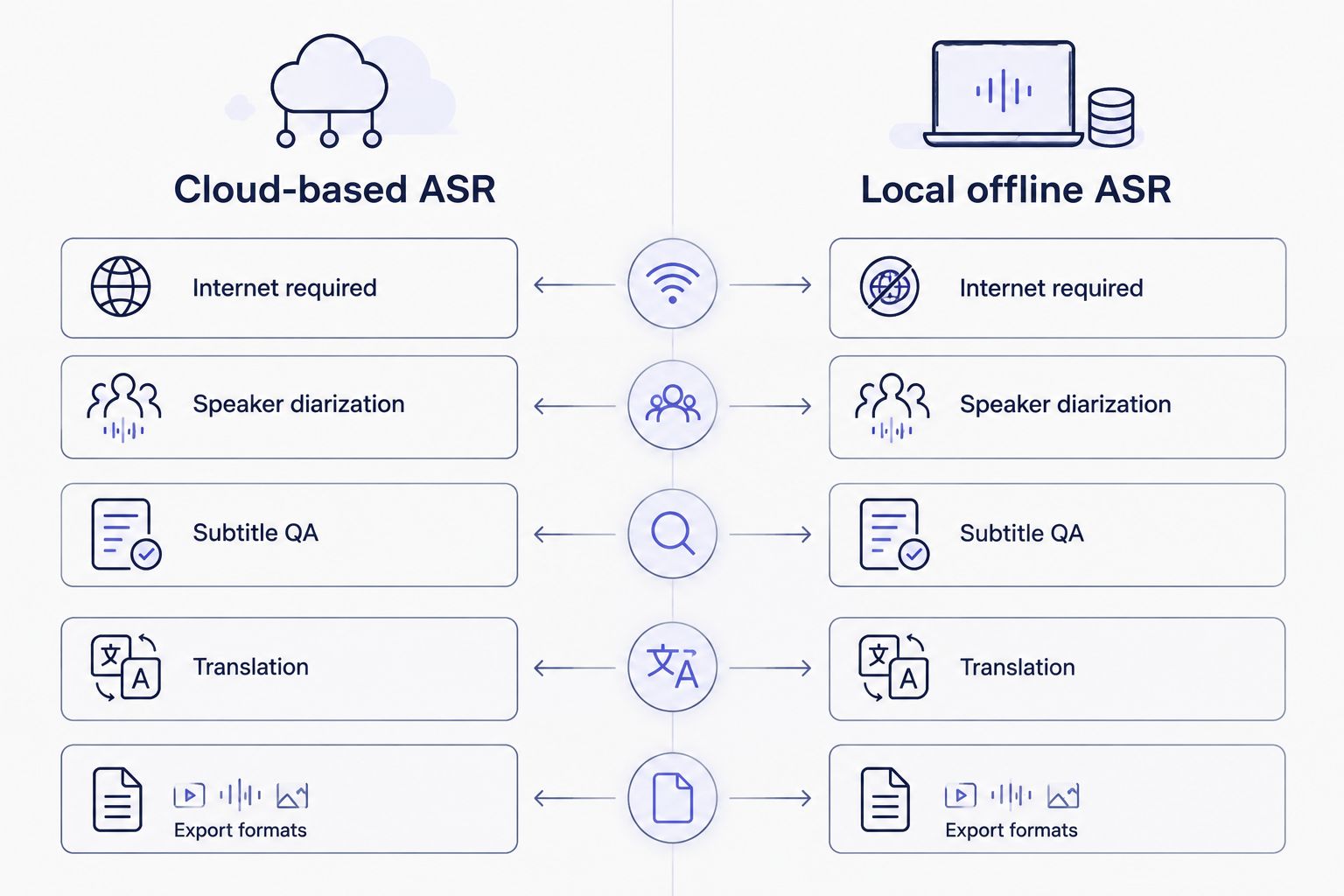
The offline path handles raw speech-to-text; everything downstream of that stays manual.
Why offline transcription trades away features
- Model size vs. device compute — accurate ASR models are large; running them locally means slower processing on consumer hardware compared to server-grade GPUs.
- No built-in diarization — separating and labeling speakers typically requires a second model layered on top of the transcript, which most offline setups skip.
- No automated subtitle QA — checks for CPL, CPS, overlaps, and timing drift are pipeline features, not something a standalone offline model performs.
- No translation step — moving a transcript into another language needs a separate translation model or service, not part of a basic offline ASR install.
- No guideline formatting — reformatting output to match a specific client's style guide is a post-processing rule set, absent from raw offline transcription.
- Files stay local — the one real advantage: nothing leaves your device, which matters for sensitive recordings like legal depositions or interviews.
Does live transcription work without internet?
No, live transcription always requires a real-time connection because it streams audio to an ASR engine as it's spoken and returns text with minimal delay. There's no offline equivalent for real-time captioning — if you need captions during a live event without internet, you're looking at on-site stenography or a delayed post-production workflow instead. Broadcast-grade live captioning accuracy standards are covered in more detail on the live transcription accuracy page.
Can I use AI transcription on an unstable connection?
Yes, but an unstable connection risks failed uploads on large files rather than bad transcription quality — the accuracy of the output doesn't degrade from a weak signal, the upload just times out or has to restart. Smaller files or compressed video upload more reliably on marginal connections than long, uncompressed source files.
Is offline transcription as accurate as cloud-based ASR?
Accuracy depends on the specific model and its size, not on whether it runs locally or in the cloud — a large model run offline can match a comparable cloud model on the same audio. What differs is everything around the transcript: diarization, QA, and formatting are pipeline features that cloud tools bundle and most offline setups don't. More on how AI transcription accuracy is evaluated is covered on the proofreading accuracy page.
Check your file before you upload
See what formats and file lengths process cleanly before you commit bandwidth.
Start a transcript
FAQ
Can AI transcription work without internet in 2026?
Cloud-based AI transcription cannot work without internet because upload and ASR processing happen on a remote server. A local model like Whisper can transcribe offline, but it skips diarization, QA, and translation.
What happens if my connection drops mid-upload?
The upload fails or stalls, and you'll need to resume or restart it once the connection returns. This affects the transfer, not the accuracy of the transcript once processing completes.
Do I need internet for subtitle QA and CPL fixes?
Yes, automated subtitle QA checks for CPL, CPS, overlaps, and timing drift run server-side in most tools, so they require a connection. Manual QA in a text editor can be done offline, just without the automated flags.
Is there an offline version of live transcription?
No, live transcription streams audio to an ASR engine in real time and has no offline equivalent. Delayed, post-recording transcription is the only offline-compatible alternative.
Can I translate subtitles without internet?
Translating subtitles typically requires a connection because translation models run as a separate cloud step tied to the transcription pipeline. Offline translation tools exist but aren't usually bundled with offline ASR.
Does file size affect how much internet transcription needs?
Larger video and audio files need more bandwidth and time to upload, which increases the risk of a failed transfer on a weak connection. Compressing the file before upload reduces that risk.
Is speaker diarization possible offline?
Basic offline ASR setups usually don't include diarization, since separating speakers requires a second model layered onto the transcript. You'd need to label speakers manually after an offline transcription pass.
Does an unstable connection lower transcription accuracy?
No, a weak connection causes upload failures rather than lower transcript accuracy, since accuracy is a function of the ASR model, not the network. The risk is the file failing to transfer, not the output being wrong.
One last thing
If you genuinely need transcription with zero internet access — fieldwork, a plane, a client site with no Wi-Fi — download and test your offline model before you need it, not during the job. Budget extra time for manual diarization and manual subtitle QA afterward, since those are the two steps offline setups drop first, and they're usually the steps that take the longest anyway.
Related guides



