Deepgram, AssemblyAI, OpenAI's Whisper API, Google Cloud Speech-to-Text, Amazon Transcribe, and VideoText's own API cover the main use cases developers hit when picking a transcription API in 2026: live streaming, audio intelligence add-ons, budget batch jobs, cloud-native pipelines, and subtitle-ready delivery.
Best overall for live captioning: Deepgram. Best for audio intelligence beyond plain text: AssemblyAI. Best for turning raw API output into client-ready subtitles: VideoText. Best for teams already on AWS or GCP: Amazon Transcribe or Google Cloud Speech-to-Text.
TL;DR
- Deepgram wins on real-time streaming latency for live captioning in 2026 — pick it if you're embedding transcription into a live product.
- AssemblyAI adds summarization, sentiment, and PII redaction to the transcript step; none of the other five do that natively.
- OpenAI's Whisper API is a batch-only endpoint with no streaming mode and no built-in diarization.
- Every ASR-only API here returns plain text or JSON, not a delivery-ready SRT/VTT file — VideoText's API is built for that step.
- Amazon Transcribe and Google Cloud Speech-to-Text include speaker diarization in their standard response.
Numbers that matter
70+ languages
VideoText subtitle translation coverage
42 characters
Netflix's max CPL for English subtitle lines
Why this matters
A transcription API converts audio to text or timed segments. That's it. None of the six providers below hand back a subtitle file that passes client QA out of the box — someone still has to check line length, reading speed, and timing drift before delivery.
VideoText sits downstream of that gap: it takes raw transcription output (its own or another engine's) and runs it through subtitle fixing, guideline formatting, and translation before export. That's a different job than the five ASR-only APIs are doing, and it's why this list treats them as complementary picks, not five ways to do the same thing.
Picking the wrong one costs hours later. Pick a batch-only API for a live-caption product and you'll be re-architecting in a month. Pick a pure ASR API for a subtitle-delivery workflow and you'll be hand-fixing CPL and timing on every file, every time, in 2026 the same way you were in 2022.
What makes the best transcription API
- Accuracy on real-world audio — accents, cross-talk, background noise, not just clean studio recordings
- Real-time vs. batch support — does the API stream, or does it only accept a finished file
- Speaker diarization quality — separates and labels speakers correctly, not just counts them
- Output format support — JSON, timestamped segments, plain text; rarely a ready-to-ship SRT/VTT
- Language coverage — how many languages the model actually transcribes, not translates
- Developer experience — SDKs, webhook support, rate limits, and how fast you get from signup to a working call
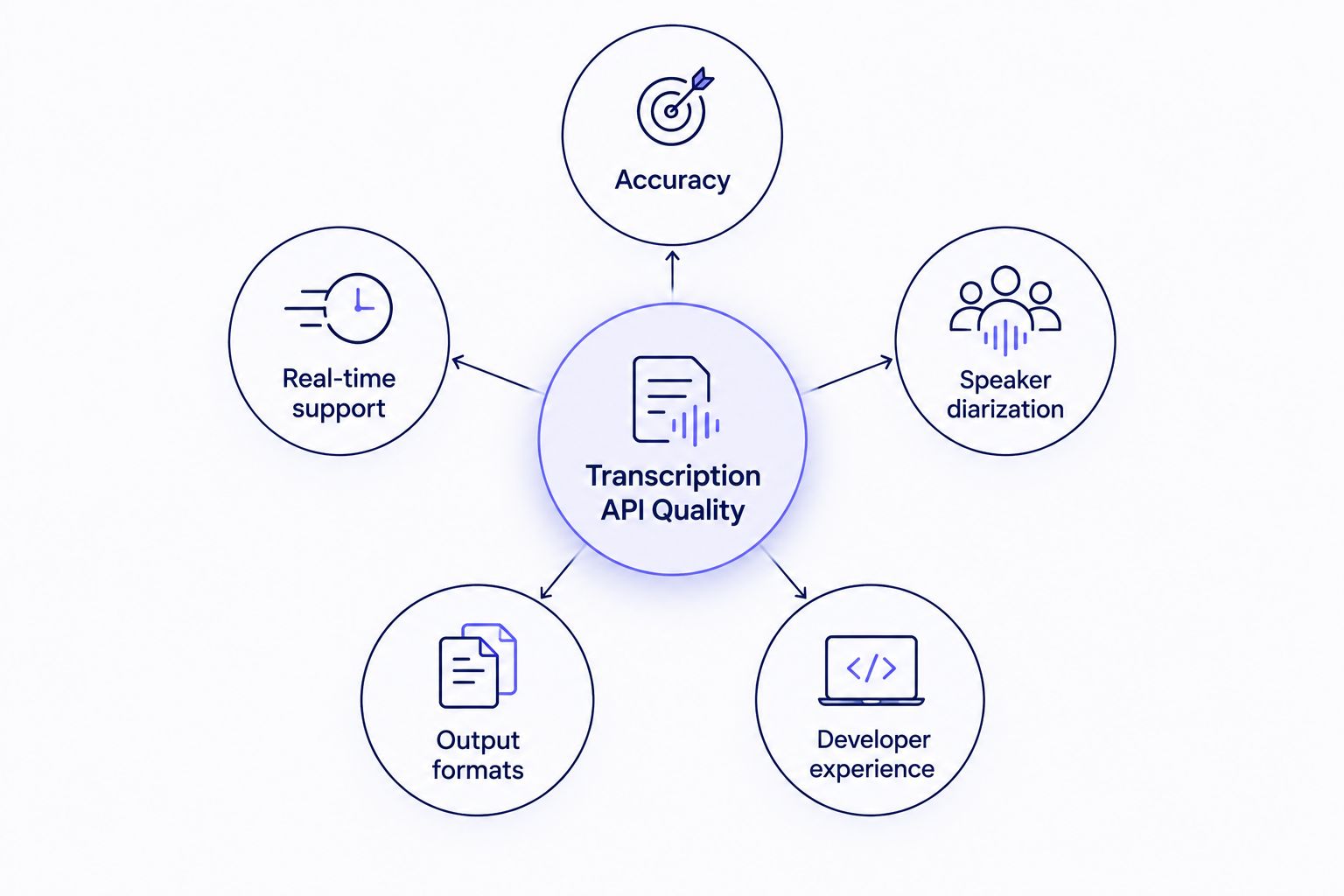
None of these five criteria measure whether the output is a delivery-ready subtitle file.
Best transcription API providers in 2026 — at a glance
| Provider |
Best for |
Standout feature |
Key limitation |
| VideoText |
Subtitle QA and client-ready delivery |
Fixes CPL, CPS, drift; formats to client guidelines; translates cues |
Not a general-purpose ASR model provider |
| Deepgram |
Live streaming and captioning |
Low-latency streaming and batch from one API |
Raw output still needs a subtitle formatting pass |
| AssemblyAI |
Audio intelligence beyond text |
Summarization, sentiment, entity detection, PII redaction in one call |
Intelligence features add processing steps beyond plain transcription |
| OpenAI Whisper API |
Budget batch jobs |
Hosted endpoint for an open-source model |
Batch only — no streaming, no native diarization |
| Google Cloud Speech-to-Text |
GCP-native pipelines |
Streaming and batch with diarization and punctuation built in |
Requires GCP account and IAM setup |
| Amazon Transcribe |
AWS-native pipelines |
Diarization, custom vocabulary, PII redaction, S3 integration |
Tightly coupled to AWS tooling |
1. VideoText: best transcription API for subtitle QA and delivery
VideoText's API takes uploaded video or audio and returns timed transcript segments, SRT/VTT subtitles, speaker labels, and AI summaries. It also exposes the fix-subtitle and guideline-formatting steps — CPL, CPS, overlap, and drift correction — as automatable steps, plus translation across 70+ languages with cue timing preserved.
VideoText pros:
- Fixes overlaps, CPL, CPS, gaps, and timing drift on subtitle files automatically
- Reformats output to Rev, GoTranscript, Scribie, or custom client guidelines
- Translates subtitles and transcripts into 70+ languages without breaking cue timing
- API and Zapier support for chaining transcription, fix, translate, and burn-in steps
VideoText cons:
- Not a proprietary ASR model provider — the underlying transcription accuracy depends on which engine feeds it
- Built for teams whose deliverable is a finished transcript or subtitle file, not for embedding raw transcription into an unrelated product
Automate the subtitle QA step
Run raw transcription output through fix, format, and translate before delivery.
Try VideoText
Best for: freelance transcriptionists, editors, and media teams whose output has to leave the desk client-ready. Verdict: Buy.
2. Deepgram: best transcription API for real-time streaming
Deepgram runs its own end-to-end deep learning speech models and exposes them through a low-latency streaming and batch API. It's built for developers who need transcription inside a live product — meeting tools, call centers, live captioning — rather than a downstream editing workflow.
Deepgram pros:
- Low-latency streaming endpoint built for live use cases
- Batch and real-time transcription from the same API
- Designed to embed directly into applications, not just process files
Deepgram cons:
- Raw JSON output needs separate tooling to become a client-ready SRT file
- No built-in guideline formatting or subtitle QA step
Best for: developers shipping live captioning or transcription inside a real-time product. Verdict: Buy.
3. AssemblyAI: best transcription API for audio intelligence
AssemblyAI transcribes audio and layers audio intelligence features on top — summarization, sentiment detection, entity detection, and PII redaction — through a single API call. It's aimed at developers building products around what's said in the audio, not just the transcript text itself.
AssemblyAI pros:
- Audio intelligence add-ons beyond plain transcription
- PII redaction built into the API response
- Supports both async and streaming transcription
AssemblyAI cons:
- Intelligence features add processing steps beyond plain transcription
- Output still needs subtitle-specific formatting for CPL/CPS-compliant delivery
Best for: developers who need summaries, sentiment, or entity extraction on top of a transcript. Verdict: Buy.
4. OpenAI Whisper API: best transcription API for budget batch jobs
The Whisper API is OpenAI's hosted endpoint for its open-source Whisper speech recognition model. It accepts audio files and returns a transcript, with optional timestamped segments, in a single request.
Whisper API pros:
- Built on a widely used open-source model developers can inspect independently
- Simple single-endpoint integration
- A reasonable starting point for lower-volume batch transcription jobs
Whisper API cons:
- Batch only — no streaming mode as of 2026
- No native speaker diarization or subtitle-specific output formatting
Best for: developers running occasional batch jobs who don't need live transcription. Verdict: Hold.
5. Google Cloud Speech-to-Text: best transcription API for GCP-native pipelines
Google Cloud's Speech-to-Text API supports both streaming and batch transcription with speaker diarization, automatic punctuation, and broad language coverage. It's built to sit alongside other Google Cloud services in a larger data pipeline.
Google Cloud Speech-to-Text pros:
- Streaming and batch transcription from one API
- Speaker diarization included in the standard response
- Fits naturally into existing GCP infrastructure
Google Cloud Speech-to-Text cons:
- Requires GCP account and IAM configuration to get running
- Output still needs conversion into a properly formatted SRT/VTT file for delivery
Best for: teams already running production infrastructure on Google Cloud. Verdict: Buy.
6. Amazon Transcribe: best transcription API for AWS-native pipelines
Amazon Transcribe converts speech to text with built-in speaker diarization, custom vocabulary, and PII redaction, delivered through the AWS SDK and console. It's built to plug into the rest of an AWS stack rather than run standalone.
Amazon Transcribe pros:
- PII redaction and custom vocabulary built in
- Direct integration with S3 and other AWS services
- Supports both batch and streaming transcription
Amazon Transcribe cons:
- Tightly coupled to AWS tooling, which adds setup overhead outside that ecosystem
- Raw output needs the same CPL/CPS cleanup pass as the other API-only providers before it's subtitle-ready
Best for: teams already building on AWS who need diarization and redaction out of the box. Verdict: Buy.
How we ranked
Each provider above is measured against the same six criteria: accuracy on real-world audio, real-time vs. batch support, diarization quality, output format support, language coverage, and developer experience. None of the five ASR-only APIs — Deepgram, AssemblyAI, Whisper, Google Cloud Speech-to-Text, Amazon Transcribe — return a delivery-ready SRT or VTT file without a formatting pass. VideoText ranks highest on that specific step because it's built for it, not because it's competing as a raw speech model.
Which transcription API should you choose?
If you're embedding transcription into a live product, Deepgram wins on streaming latency. If the product needs summaries, sentiment, or entity extraction on top of the transcript, AssemblyAI does that in one call. If you're already running on AWS or GCP, use that vendor's own API rather than adding a new dependency.
If the actual deliverable is a subtitle or transcript file that leaves your desk and has to pass someone else's QA, run the raw output through VideoText's API regardless of which ASR model produced it — that's the step none of the other five are built to do. For a team with no strong infrastructure preference, the practical 2026 stack is Deepgram or Whisper for the transcription step and VideoText for the fix, format, translate, and export step.
FAQ
What's the best transcription API for real-time captioning in 2026?
Deepgram is built for low-latency streaming transcription and is the strongest fit for live captioning in 2026. Google Cloud Speech-to-Text and Amazon Transcribe also support streaming, but Deepgram's models are built specifically for that latency-sensitive use case.
Is AssemblyAI better than Deepgram for accuracy?
Both run their own proprietary speech models, and neither publishes one universal accuracy number that applies across all audio conditions. AssemblyAI adds audio intelligence features like summarization and sentiment detection on top of the transcript, which Deepgram does not build in natively.
Can a transcription API output SRT or VTT files directly?
Most transcription APIs return plain text or timestamped JSON, not a properly formatted SRT or VTT file. VideoText's API is built specifically to take that raw output and turn it into subtitle files with correct CPL, CPS, and timing.
Does OpenAI's Whisper API support real-time streaming?
No. The Whisper API is a batch endpoint — you upload a full audio file and get a transcript back, with no live streaming mode as of 2026.
What's the difference between a transcription API and a tool like VideoText?
A transcription API such as Deepgram, AssemblyAI, Whisper, Google Cloud Speech-to-Text, or Amazon Transcribe converts audio to text or timed segments. VideoText sits downstream of that step, fixing subtitle timing, reformatting to client guidelines, translating cues, and exporting client-ready files.
Do transcription APIs include speaker diarization by default?
Amazon Transcribe and Google Cloud Speech-to-Text include diarization in their standard API response. Deepgram and AssemblyAI support diarization as a configurable option rather than always-on.
Which transcription API integrates with Zapier for automation?
VideoText's API connects to Zapier for automating transcription, subtitle fixing, translation, and burn-in steps. Most pure ASR APIs require custom integration code rather than a no-code Zapier connection.
How many languages do transcription APIs typically support?
Coverage varies by provider and changes as vendors add models, so check each provider's current language list before committing. VideoText's translation step covers 70+ languages with cue timing preserved once a transcript exists.
One last thing
None of the five ASR-only APIs above check subtitle line length against a delivery spec. Netflix's Timed Text Style Guide caps English subtitle lines at 42 characters per line — pull raw text out of Deepgram, AssemblyAI, or Whisper and ship it without reformatting, and the file gets rejected in QA before a viewer ever sees it. That check happens after transcription, not during it, and it's the gap most teams don't budget time for when they wire up a transcription API in 2026.
Related guides



