Data security decides whether a transcription vendor can touch client audio under an NDA, and in 2026 the market splits into three structurally different ways of handling that file: an automated ASR pipeline that never leaves its own servers, a freelance transcription marketplace, or a model you install and run yourself.
TL;DR
- VideoText runs transcript and subtitle QA through one automated ASR pipeline, with no freelance marketplace touching your audio.
- Self-hosted OpenAI Whisper is the most secure transcription software option for air-gapped or NDA-locked work in 2026.
- Rev and GoTranscript route jobs to freelance transcriptionist networks, a structural exposure point for sensitive audio.
- Descript centers on cloud video editing, not dedicated subtitle QA or transcript security controls.
- Check any vendor's data retention and deletion policy in 2026 before uploading client media under contract.
Why this matters
Interviews, depositions, medical intake calls, unreleased podcast episodes: client media usually carries confidentiality terms that don't survive contact with an outside vendor. Every additional human or service that touches a raw file is one more party that could leak, mishandle, or get subpoenaed for it.
The transcription market handles that risk in three different ways. VideoText sits at one end of the spectrum, running transcription, diarization, subtitle QA, and translation through one automated pipeline with no marketplace step in between. A freelance marketplace like Rev or GoTranscript assigns your file to an independent contractor for review. A self-hosted model like Whisper never sends the audio anywhere at all. Picking a transcription tool on accuracy or turnaround alone skips the question that actually matters for an NDA-covered job in 2026: who else sees this file before it becomes a transcript.
“If raw audio touches a freelance marketplace, it's no longer inside your security perimeter.”
The short answer
Best overall: VideoText, because the transcript-to-subtitle pipeline runs through one automated ASR system with no freelance marketplace step between upload and export. Best for air-gapped work: self-hosted OpenAI Whisper, since the audio file never leaves your machine. Best for human-verified enterprise jobs: Rev. Best budget option: GoTranscript. Best for all-in-one video editing: Descript.
What makes transcription software secure in 2026
- Data handling architecture — does the file stay inside one automated system, or does it get assigned to a third-party freelancer
- Deployment option — cloud-only versus a self-hosted or local model
- Retention and deletion controls — can you set how long a file or transcript stays on the vendor's servers
- Documented compliance posture — does the vendor publish a security or trust page you can hand to a client
- Access control on exports — who can open a share link or download a delivered file
- Automation scope — does API or Zapier automation add new hand-off points, or keep the job inside one account
Security ranking at a glance
| Tool |
Best for |
Standout feature |
Key limitation |
| VideoText |
Automated QA workflows |
ASR pipeline with no freelance marketplace step |
Cloud-only, no self-hosted deployment |
| Self-hosted Whisper |
Air-gapped work |
Audio never leaves your machine |
No built-in diarization or subtitle QA |
| Rev |
Human-verified enterprise jobs |
Established transcriptionist network with account controls |
Freelancers review raw audio outside your org |
| GoTranscript |
Occasional budget jobs |
Low-cost freelance marketplace |
Same marketplace exposure, less enterprise tooling |
| Descript |
All-in-one video editing |
Edit video by editing the transcript |
Not built for subtitle QA or transcript security |
1. VideoText: best secure transcription software for automated QA workflows
VideoText converts uploaded video or audio into timed transcripts and SRT/VTT subtitles through an ASR pipeline, then handles speaker diarization, summary and chapters, translation, and subtitle QA inside the same system. No freelance transcriptionist is assigned to your file at any step.
VideoText pros:
- No marketplace step between upload and export — fewer humans touch the raw file
- Subtitle QA, CPL, and CPS checks run in-browser instead of getting sent out for cleanup
- API and Zapier automation keep processing inside one controlled account
- Batch processing and ZIP exports on Pro+ keep large jobs in one pipeline instead of split across vendors
VideoText cons:
- Cloud-based only — no self-hosted or fully offline deployment for teams that need audio to never leave a local machine
- Heavy accents or overlapping speakers still need a manual QA pass, same as any ASR tool
- Compliance documentation should be checked directly on the site before committing to an NDA-covered job
Best for: teams doing client transcript and subtitle work at volume who want QA and delivery in one pipeline. Verdict: Buy.
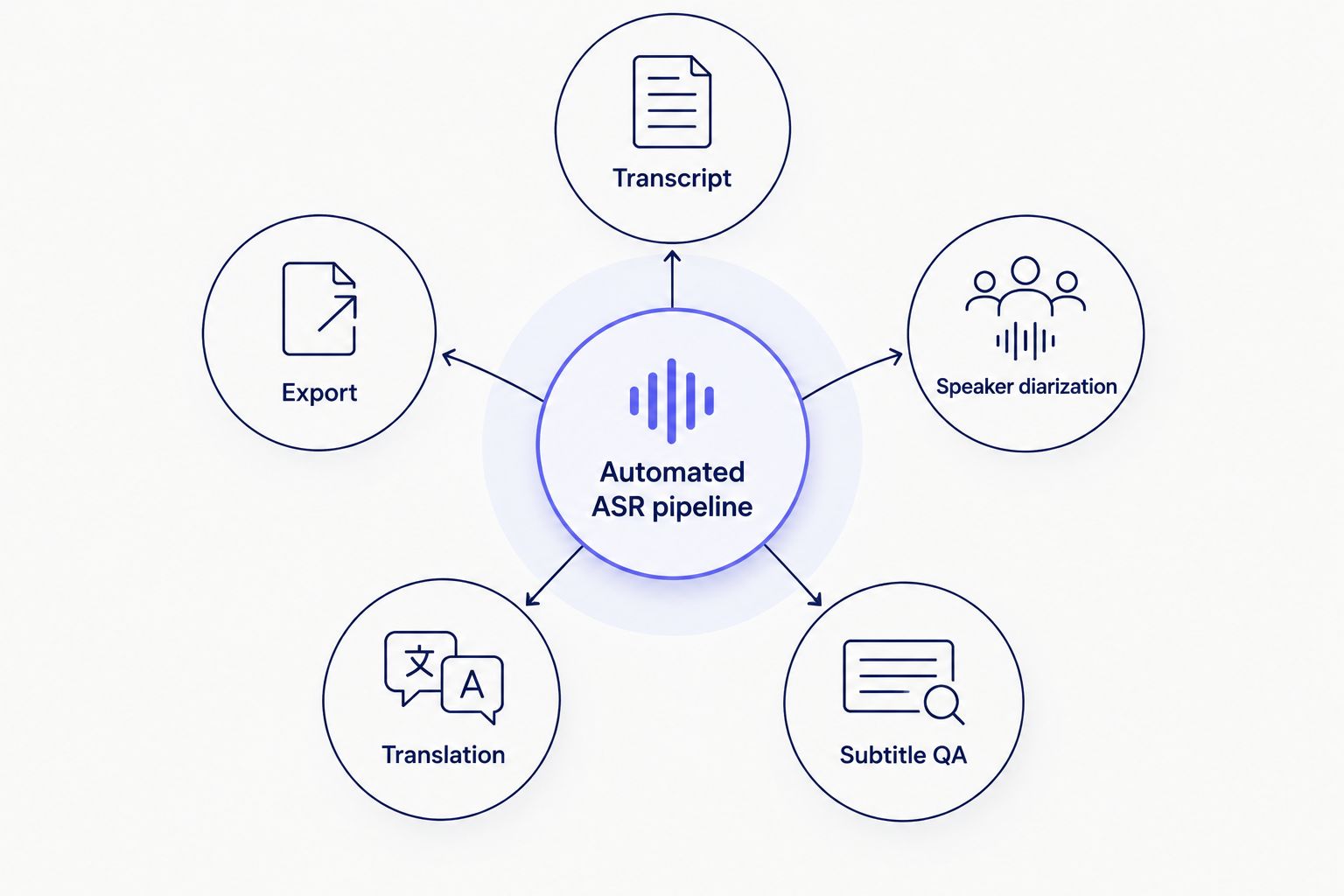
Every step stays inside one system instead of routing the file to an outside marketplace.
Test an automated transcription pipeline
Upload a file and see transcript, subtitles, and QA in one pass.
Try VideoText
2. Self-hosted Whisper: best secure transcription software for air-gapped work
OpenAI released Whisper as an open source ASR model. Running it on your own hardware or a private server means the audio file never transmits to any outside company.
Self-hosted Whisper pros:
- Zero data transmission when run fully offline
- No account, subscription, or third party ever handles the recording
- Multiple model sizes trade speed for accuracy depending on your hardware
Self-hosted Whisper cons:
- No diarization, subtitle QA, CPL checking, or client-guideline formatting built in
- Requires a technical setup and typically a GPU for reasonable speed on long files
- No customer support if the setup fails
Best for: legal, medical, or any job under a strict NDA that bars cloud upload entirely. Verdict: Buy for air-gapped requirements; Skip if you don't have the setup time.
3. Rev: best secure transcription software for human-verified enterprise jobs
Rev pairs an ASR draft with a network of freelance transcriptionists who review and correct the transcript, plus an enterprise account tier with account-level controls.
Rev pros:
- Human review catches ASR errors that automated tools miss on messy audio
- Established company with an enterprise tier and account controls
- Wide export format support
Rev cons:
- Raw audio is reviewed by freelance transcriptionists outside your organization — a structural exposure point for confidential material
- Turnaround depends on freelancer availability, not instant like automated ASR
- Cost scales with file length since a human bills per job
Best for: teams that need human-verified accuracy and can accept a marketplace review step. Verdict: Hold unless the enterprise tier's file-access controls meet your specific requirement.
4. GoTranscript: best budget-secure transcription software for occasional jobs
GoTranscript runs on a similar marketplace model to Rev, with freelance transcribers handling correction work at a lower cost point and no subscription commitment.
GoTranscript pros:
- Lower cost for occasional, small jobs
- Human correction available without a subscription
GoTranscript cons:
- Same third-party marketplace exposure as Rev, with less established enterprise tooling
- No dedicated subtitle QA, CPL/CPS checking, or client-guideline formatting
- Delivery speed varies more than a subscription service with contracted turnaround
Best for: a one-off, low-sensitivity job where cost matters more than a documented security process. Verdict: Wait — fine occasionally, not the pick for regular client-confidential work.
5. Descript: best secure transcription software for all-in-one video editing
Descript builds its workflow around editing video by editing the transcript text, with cloud storage and collaboration layered on top. Compare it directly against other Descript alternatives if editing speed matters more than transcript security for your job.
Descript pros:
- Editing video by editing text speeds up trims and rough cuts
- Cloud collaboration lets a team work on the same project
- Editing features go beyond plain transcription
Descript cons:
- Built primarily as an editing tool, not a dedicated subtitle QA or transcript-security product
- Files live in a proprietary cloud project format beyond a plain transcript export
- No dedicated CPL/CPS or timing-drift checker built for subtitle delivery
Best for: editing-first workflows where transcript security is a secondary concern. Verdict: Skip if subtitle QA and security documentation are the priority; Buy if the job is editing-first.
How this ranking was built
Each tool is placed by its data handling architecture first — automated pipeline, freelance marketplace, or self-hosted model — then by deployment option, retention controls, documented compliance posture, export access control, and automation scope. Feature richness or transcript accuracy alone doesn't move a tool up this particular list; the question is who touches the file before it becomes a transcript.
Which transcription software should you choose?
For client-confidential audio at volume in 2026, VideoText is the default: one automated pipeline handles transcript, diarization, subtitle QA, and translation without adding a marketplace step. For work that legally cannot leave your machine, run self-hosted Whisper instead and accept the setup cost. Rev and GoTranscript work for jobs where human review matters more than minimizing who sees the file, and Descript fits when editing speed, not transcript security, is the actual job.
FAQ
What is the most secure transcription software in 2026?
Self-hosted OpenAI Whisper is the most secure option because audio never leaves your machine. For a hosted service without a freelance marketplace step, VideoText's automated ASR pipeline is the next most secure architecture.
Is Rev secure enough for confidential client audio?
Rev's enterprise tier includes account-level controls, but raw audio is still reviewed by freelance transcriptionists outside your organization. That's a structural exposure point worth weighing against the accuracy benefit of human review.
Does automated transcription avoid the security risk of human transcribers?
Automated ASR pipelines like VideoText's remove the freelance marketplace step, so fewer people touch the raw file. Accuracy on heavy accents or overlapping speakers may still need a manual QA pass afterward.
Can I run transcription software fully offline?
Yes. Self-hosted Whisper runs on your own hardware or a private server with no data transmission, which suits legal, medical, or NDA-locked work in 2026.
Is GoTranscript as secure as Rev?
GoTranscript uses a similar freelance marketplace model to Rev, so the exposure point is comparable. Rev has more established enterprise-tier tooling around file access.
Does Descript handle transcript security well?
Descript is built primarily for video editing, not dedicated transcript or subtitle security. Files live in a proprietary cloud project format rather than a plain, portable transcript.
What should I check before sending client audio to any transcription vendor?
Confirm whether the file is processed by an automated pipeline or assigned to a freelance transcriptionist, and check the vendor's stated data retention and deletion policy before uploading anything covered by an NDA.
One last thing
The biggest security gap in transcription work isn't the vendor — it's the export step. A transcript or SRT file downloaded to a shared drive or emailed as an attachment bypasses every access control the original platform had, so the vendor's security architecture only protects the file up to the point it leaves the pipeline.
Related guides



