AI can generate chapter markers for a video automatically by breaking a transcript into topic segments and assigning a timestamp to the start of each one. The hidden cost most people miss: automatic segmentation gets the timing roughly right but the chapter titles and boundaries usually need a manual pass, especially on interviews with more than one speaker talking over each other.
TL;DR
- AI can generate chapter markers automatically from a transcript's topic shifts and timestamps.
- VideoText produces timestamped chapters as part of its AI summary output, alongside the transcript and subtitles.
- Multi-speaker recordings and low topic density both reduce chapter accuracy without a manual review pass.
- YouTube's native auto-chapters are not the same feature as AI transcription-based chapter generation.
Why this matters
Chapter markers save viewers from scrubbing a 45-minute video to find one section, and they help YouTube's search index surface a video for more queries. For transcriptionists and editors, generating chapters by hand means re-listening to a file and manually typing timestamps into a description box — slow, and easy to get wrong on longer recordings. VideoText builds chapter generation into the same pipeline that produces the transcript and subtitles, so the timestamps come from the same timed segments already used for captions instead of a second manual pass.
Can AI generate chapter markers for a video automatically?
Yes. The AI reads the transcript's timed segments, groups them by topic, and marks the start of each group as a chapter. The table below compares how different tools handle this in 2026.
| Tool |
Chapter method |
Best for |
Verdict |
| VideoText |
AI summary generates timestamped chapters directly from the transcript |
Freelancers and teams who already need a transcript or subtitles |
Buy |
| Descript |
AI scene/topic detection tied to its timeline editor |
Editors already cutting video inside Descript |
Hold |
| Riverside |
Chapter and show-notes generation from recorded sessions |
Podcast teams recording directly in Riverside |
Hold |
| YouTube native |
Auto-chapters appear only when timestamps are typed into the description, or algorithmically on high-view videos |
Creators publishing straight to YouTube with no other tool |
Skip for most uploads |
VideoText generates timestamped chapters as part of its transcript and subtitle workflow, which makes it the practical pick for anyone who needs a transcript anyway — the chapters aren't a separate job.
How AI chapter generation works
The process runs in five steps, whether you're using VideoText or a comparable tool:
- Transcript generation — audio or video is converted into timed text segments using ASR.
- Topic segmentation — the model groups consecutive segments where the subject matter stays consistent.
- Timestamp mapping — the start time of each topic group becomes a chapter marker.
- Title generation — a short label is written for each chapter based on the segment's content.
- Review and export — chapters are checked against the video and exported as a plain list, YouTube-style timestamps, or JSON.
In VideoText, steps 1 through 4 run automatically as part of the same AI summary and chapters output that also produces bullet points and action items, so you don't run a separate tool to get from raw audio to a chapter list. For podcast teams, this same segment-and-summarize approach is what turns a raw recording into show notes automatically instead of someone typing them out after the fact.
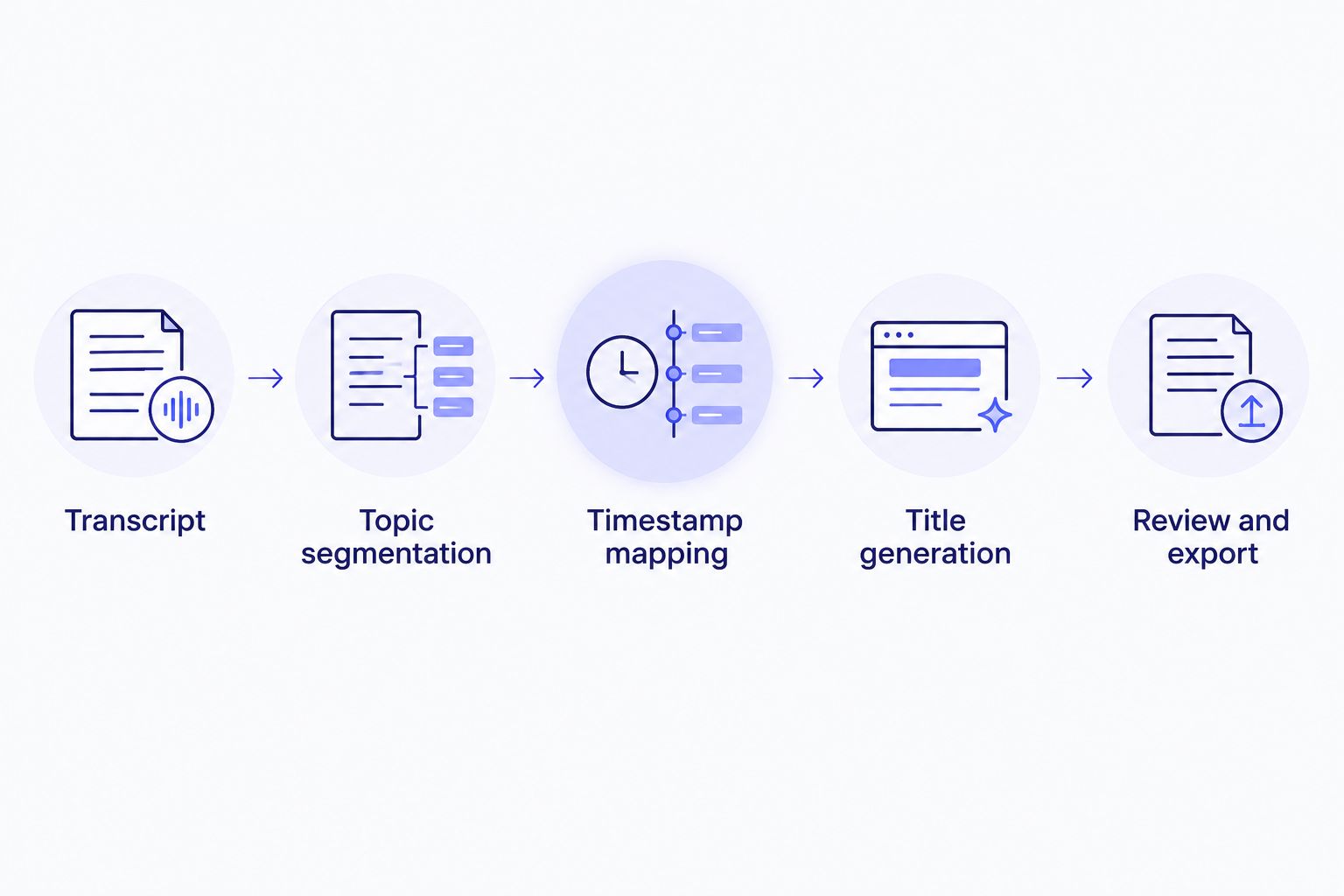
Chapter titles are the one step in this chain that still benefits from a human read-through.
Why chapter accuracy varies
Automatic chapters aren't uniformly reliable. A few factors move the accuracy up or down on any given file:
- Audio quality — background noise or overlapping talk degrades the transcript, which degrades the topic segmentation built on top of it.
- Number of speakers — a two-person interview segments more cleanly than a five-person panel where topics shift mid-sentence.
- Topic density — a video that jumps between many short topics produces more, shorter chapters; a single-topic lecture may produce almost none.
- Transcript cleanliness — filler words and false starts left in a full verbatim transcript can shift a chapter's start timestamp by a few seconds.
- Manual review step — tools that let you drag a marker or rename a chapter title in the UI produce a more accurate final list than a one-shot, unedited export.
Among tools compared above, VideoText vs. Kapwing is a common comparison for teams deciding whether chapter and caption generation should live in the same tool or two separate ones — worth checking if you're also burning subtitles into the same video.
“Chapter markers generated from a transcript are only as accurate as the transcript they're built from.”
Generate chapters from a transcript
Upload a video or audio file to get transcript, subtitles, and timestamped chapters in one pass.
Try VideoTextSee podcast show notes
Do YouTube's automatic chapters use the same technology?
No, YouTube's native auto-chapters are not the same as AI transcript-based chapter generation. YouTube either uses timestamps a creator types into the video description or, on a subset of high-view videos, applies its own algorithmic segmentation — it doesn't run an open transcript-to-chapter pipeline you can trigger on any upload.
Can chapter markers be generated from an existing transcript?
Yes, chapter markers can be generated from an existing transcript without re-processing the original audio, as long as the transcript includes timed segments rather than plain text. That's why transcript-first tools produce chapters faster than editing tools that have to re-analyze the video track from scratch.
Does AI chapter generation work for multi-speaker podcasts?
Yes, but multi-speaker podcasts need speaker diarization working correctly before chapter segmentation is reliable, since topic shifts often line up with who's talking. If speaker labels are wrong, chapter boundaries drift with them — check how speaker labels can be edited after automatic detection before trusting the chapter output on a panel recording.
FAQ
Can AI generate chapter markers automatically in 2026?
Yes, AI generates chapter markers automatically by segmenting a transcript's timed text into topic groups and marking each group's start time. The titles it writes for each chapter still benefit from a quick manual read-through.
Is AI-generated chapter timing accurate enough to publish without editing?
It's usable but not guaranteed accurate without a review pass, since audio quality, speaker count, and topic density all shift the result. A short manual check catches the cases where a chapter starts a few seconds early or late.
Do you need a transcript before you can generate chapters?
Yes, chapter generation runs on top of a timed transcript, not raw audio directly. Tools that already produce a transcript with timestamps can generate chapters as a byproduct instead of a separate job.
Does YouTube generate chapters automatically for every video?
No, YouTube's automatic chapters only appear when a creator types timestamps into the description or, on a subset of high-view videos, when YouTube applies its own algorithmic segmentation. It isn't a general-purpose transcript-to-chapter tool.
Can chapter titles be edited after AI generates them?
Yes, in VideoText and comparable tools chapter titles and timestamps can be renamed or adjusted in the UI after generation. This matters most on multi-speaker files where the AI's first-pass title may be too generic.
What formats can AI-generated chapters be exported in?
Chapter output typically exports as a plain timestamp list, YouTube-description-ready format, or JSON, depending on the tool. Check the export options before committing to a workflow if you need a specific format for a client.
Does multi-speaker audio reduce chapter accuracy?
Yes, multi-speaker recordings with overlapping talk reduce chapter accuracy because topic segmentation depends partly on correct speaker diarization. Mislabeled speakers can shift a chapter boundary by several seconds.
One last thing
The part most people skip: AI chapter generation depends entirely on transcript quality, so a messy verbatim transcript full of filler words and false starts produces messier chapter boundaries than a cleaned-up one. Run the transcript cleanup step first, generate chapters second — not the other way around.
Related guides



