Yes. You can batch process multiple video files for transcription by adding them to one multi-file queue, letting ASR create timed transcript segments, and exporting the completed files together. Batch submission removes repetitive uploads; it does not remove file-by-file checks for speaker labels, subtitle timing, characters per line, reading speed, overlaps, grammar, or line breaks.
TL;DR
- Yes, VideoText batch-processes multiple video files for transcription through a multi-file queue on Pro+.
- Batch processing covers transcription and ZIP export; subtitle QA still happens per file.
- Exports include seven named formats: TXT, SRT, VTT, PDF, DOCX, JSON, and CSV.
- Subtitle and transcript translation supports 70+ languages while preserving cue timing.
- API and Zapier support recurring workflows that do not depend on manual queue submission.
Batch workflow facts
70+ languages
Translation support
7 formats
Named export formats
TXT, SRT, VTT, PDF, DOCX, JSON, CSV
Why this matters
Batch transcription removes repeated file submission from high-volume work. A freelance transcriptionist can place a client delivery in one queue instead of returning to upload the next recording after every completed job. A podcast team or media agency can apply the same intake process across a group of episodes, interviews, or production clips.
The batch transcription software guide is useful when comparing this workflow across tools. Check whether each option offers a real multi-file queue, bulk export, subtitle formats, speaker diarization, and automation. A tool that accepts several files but requires separate downloads only solves part of the problem.
In 2026, the operational gain comes from separating machine processing from human review. ASR can create the first transcript for every queued file. An editor still decides whether speaker names, cue boundaries, punctuation, timing, and client formatting are ready for delivery.
Can you batch process multiple video files for transcription at once?
Yes. Batch processing puts multiple video or audio files into one managed transcription queue. The files pass through ASR transcription, and the completed outputs can be packaged in a ZIP rather than downloaded through a separate manual cycle for every source.
At once refers to submitting and managing the files as one batch. It does not necessarily mean every file is processed simultaneously. The defining features are a multi-file queue, a shared workflow, and grouped export.
| Workflow stage |
What batch processing handles |
What still needs file-level work |
| Intake |
Multiple video or audio files enter one queue |
Confirm each source file is the correct version |
| ASR transcription |
Speech becomes text with timed segments |
Correct recognition errors and punctuation |
| Speaker diarization |
Speakers are detected and labeled |
Rename or correct labels in the editor |
| Subtitle generation |
Timed SRT or VTT cues are created |
Check CPL, CPS, gaps, overlaps, and drift |
| Delivery |
Completed files can be exported in one ZIP |
Confirm the requested client format and layout |
For VideoText batch processing, the multi-file queue and ZIP exports are Pro+ capabilities. The output choices include TXT, SRT, VTT, PDF, DOCX, JSON, and CSV, with timecode and speaker layouts also available. The batch feature controls intake and export; it does not declare every generated transcript client-ready without review.
VideoText batch transcription is best for freelance transcriptionists, subtitle editors, podcast teams, and media agencies that receive files in groups and still perform per-file QA.
Pro+ batch processing: multi-file queue and ZIP export
Batch processing has two distinct stages in 2026: queue processing and delivery preparation. Treating them as separate stages prevents a common production error—assuming a successful transcription job is the same as an approved client file.
Stage one: process the queue
The first stage converts uploaded media into timed transcript segments. Speaker diarization can detect and label speakers. The pipeline can also produce summaries, bullet points, action items, keywords, and timestamped chapters when those outputs are part of the job.
This stage saves operator time because the next source is already waiting in the queue. You do not need to repeat the intake cycle for every recording before ASR can begin processing the batch.
Stage two: prepare each file for delivery
The second stage is editorial. Open each transcript or subtitle file and check the requirements that vary by recording: speaker labels, grammar, filler cleanup, line breaks, subtitle gaps, overlaps, scene-cut spans, CPL, CPS, and timing drift.
Client-guideline formatting also belongs here. Rev, GoTranscript, Scribie, and custom client guidelines do not use one universal transcript layout. A batch can contain recordings for the same client, but each output still needs a final check against the requested standard.
The subtitle QA workflow explains how to move from generated cues to a checked delivery file. In 2026, that QA pass remains necessary when accuracy, readable line breaks, and timing sync matter.
A practical batch transcription workflow
Use the following sequence when a client sends multiple recordings. It keeps source media, generated files, and approved exports separate.
- Prepare the source files. Confirm that every video or audio file belongs to the delivery. Trim unwanted material from the start or end when it should not be transcribed. Compress oversized video when file size needs to be reduced before processing.
- Keep file names unambiguous. Use names that distinguish episodes, speakers, dates, or edit versions. Do not let several files enter the queue with generic names that become hard to match with exported transcripts.
- Add the files to the multi-file queue. Submit the prepared sources as one batch. Batch queuing is a Pro+ feature.
- Let ASR create timed transcripts. The pipeline converts speech to text and creates timed segments. Use speaker diarization when the recording contains several voices that must be separated.
- Review every transcript. Correct words, punctuation, speaker assignments, and formatting. Decide whether the client expects full verbatim, clean verbatim, or another guideline.
- Validate subtitle cues. For SRT or VTT delivery, inspect CPL, CPS, overlaps, gaps, timing drift, scene-cut spans, grammar, and line breaks in the cue editor.
- Apply downstream processing. Translate subtitles or transcripts when required, preserving timing on subtitle cues. Burn open captions only after the text and timing are approved.
- Export the batch. Choose the required output among the seven named formats and package the completed files in a ZIP for delivery.
The critical control point is step six. A valid SRT file can still be hard to read if cues contain poor breaks, overlap, move too quickly, or drift away from the spoken line. Technical validity and editorial readiness are different checks.
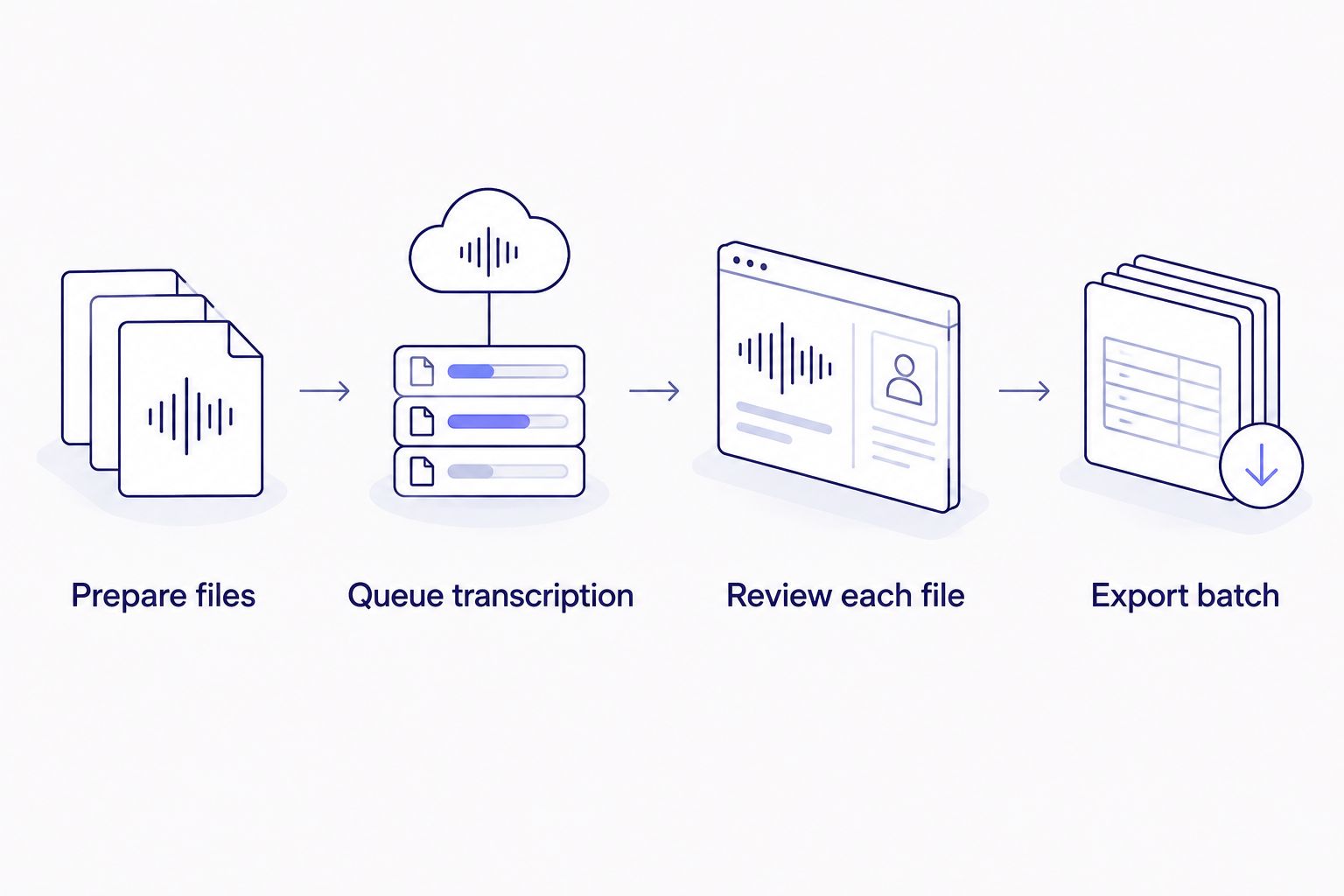
Batch intake reduces repeated uploads, while review remains a file-level task.
Manual queue or automation?
There are two practical ways to handle recurring transcription volume in 2026. A manual batch queue fits a defined set of files already on hand. API or Zapier automation fits an intake that repeats whenever new media arrives.
| Option |
Best for |
Main advantage |
Main limitation |
| Manual multi-file queue |
A backlog, production day, or client delivery |
Keeps several sources inside one managed batch |
Someone must prepare and submit the batch |
| API or Zapier automation |
Recurring podcast, agency, or publishing intake |
Starts a configured workflow when new media arrives |
Requires an integration and clear file-handling rules |
VideoText supports API, Zapier, and Chrome extension workflows for automating transcription, subtitle fixing, translation, burning, and compression. Automation does not change the editorial standard. It changes how media enters the pipeline and how processing steps are triggered.
Choose the manual queue for a finite backlog. Choose API or Zapier when the same intake event repeats throughout 2026.
Start a batch transcription
Queue multiple media files, review timed output, and export the completed batch.
Open VideoText
Why batch turnaround varies
A batch is not one uniform recording. The work required for each file depends on the media and requested outputs.
- File duration and batch size: More source material creates more speech to transcribe and more output to review. Trimming irrelevant openings or endings prevents unnecessary processing.
- Audio conditions: Background noise, unclear speech, and overlapping voices affect ASR output and increase correction work. Batch submission does not normalize the source audio.
- Speaker count: Diarization can detect and label speakers, but an editor still needs to verify the assignments and rename speakers where required.
- Requested deliverables: A plain TXT transcript needs different checks from timed SRT or VTT subtitles. PDF, DOCX, JSON, and CSV serve different client or technical workflows.
- Subtitle requirements: CPL, CPS, overlaps, gaps, timing drift, scene-cut spans, and line breaks require cue-level review. These checks are separate from word correction.
- Translation scope: Translation supports 70+ languages and preserves timing on cues. Every translated file still needs language and subtitle review before delivery.
The reliable planning unit is the individual deliverable, not the number of queue submissions. A single upload action can start the batch, but every client-facing file keeps its own QA status.
Can you batch translate the subtitles after transcription?
Yes. Subtitle and transcript translation supports 70+ languages, and subtitle cue timing is preserved during translation. Review translated line length, reading speed, grammar, and cue breaks per language because translated text can occupy a different amount of space from the source.
Translation belongs after the source transcript has been corrected. Fixing recognition errors before translation prevents those errors from being carried into every translated version.
Does batch transcription remove subtitle QA?
No. Batch transcription removes repeated intake work, not subtitle QA. Each SRT or VTT file still needs checks for CPL, CPS, overlaps, gaps, timing drift, scene-cut spans, grammar, and line breaks before client delivery.
Use the in-browser cue editor with the video visible. That connects every text correction to the corresponding audio and frame timing instead of treating the subtitle file as an isolated document.
Should you use the API instead of a batch queue?
Use the API or Zapier when transcription should start from a recurring event, such as a new recording entering an established media workflow. Use the batch queue when you already have a defined group of files and want to manage them together without building an integration.
Neither route removes proofreading. In 2026, the choice is about intake frequency and workflow control, not whether ASR output needs human review.
FAQ
Can you batch process multiple video files for transcription?
Yes. VideoText supports a Pro+ multi-file queue for video and audio transcription, followed by grouped ZIP export.
Does batch processing mean every file runs simultaneously?
Not necessarily. Batch processing means several files are submitted and managed through one queue; it does not by itself promise simultaneous processing.
Which formats can a transcription batch export?
The seven named export formats are TXT, SRT, VTT, PDF, DOCX, JSON, and CSV. Timecode and speaker layouts are also supported.
Can batch transcription create SRT and VTT subtitles?
Yes. The transcription pipeline can produce timed SRT and VTT subtitles, which should then be checked for cue timing, CPL, CPS, overlaps, and line breaks.
Can a batch include recordings with several speakers?
Yes. Speaker diarization detects and labels speakers, and the labels can be renamed in the editor before export.
Can batch subtitles be translated without losing their timing?
Yes. Translation supports 70+ languages and preserves timing on subtitle cues, but every translated file still needs language and subtitle QA.
Can Zapier start transcription automatically?
Yes. Zapier and API integrations can automate transcription and related processing steps when media enters a recurring workflow.
Is batch transcription enough for client delivery in 2026?
No. Batch transcription creates the initial output, while client delivery still requires checks for recognition errors, formatting, speakers, subtitle readability, and timing.
One last thing
Do not combine transcription status and approval status into one label. A file can be fully processed but still fail client requirements because a speaker name is wrong, a subtitle crosses a scene cut, or cue timing has drifted.
Keep a separate approval checkpoint for every file in the batch. Only place approved outputs in the final ZIP. This small workflow rule prevents a technically completed draft from being mistaken for a client-ready transcript or subtitle file in 2026.
Related guides



