Yes. AI transcription tools export a video transcript directly to Word (DOCX) and PDF without manual copy-paste, alongside TXT, SRT, VTT, JSON, and CSV pulled from the same file. The catch: a plain DOCX export and a DOCX export with timecodes and speaker labels turned on look nothing alike, so the layout you pick before exporting matters as much as the file format itself.
TL;DR
- A video transcript exports directly to DOCX and PDF, plus TXT, SRT, VTT, JSON, and CSV, from a single transcript file.
- DOCX stays editable for review; PDF locks the layout for delivery — pick based on what happens after export, not before.
- Timecodes and speaker labels are optional add-ons on export, not defaults, so a plain export and a layout export from the same file differ.
- SRT and VTT are caption files with cue timing, not documents — they open in a text editor, not Word.
- Batch processing with ZIP export handles multiple files at once on VideoText's Pro tier and above.
Why this matters
A freelance transcriptionist or subtitle editor rarely delivers a raw transcript. Clients ask for Word so an editor can mark it up, or PDF so nothing shifts after final sign-off, or both plus an SRT for the video team. VideoText keeps DOCX, PDF, TXT, SRT, VTT, JSON, and CSV export in the same screen so you're not converting files in a separate app after the transcript is done.
Getting the export format wrong costs a redo cycle. A client expecting speaker labels and timecodes in a Word doc, who instead gets a wall of unattributed text, sends the file back — and that's an hour you don't get paid for in 2026 or any other year.
Can you export a video transcript to Word or PDF directly?
Yes, both are native export formats — no third-party converter needed. The table below shows what each format keeps and what it drops.
| Format |
Editable |
Keeps timecodes/speakers |
Typical use in 2026 |
| DOCX (Word) |
Yes |
Optional, toggle on export |
Client review, editing, markup |
| PDF |
No (locked layout) |
Optional, toggle on export |
Final delivery, legal/deposition records |
| TXT |
Yes, plain |
No |
Quick reference, copy into other tools |
| SRT |
Yes, in a text editor |
Yes, built into the cue |
Video captioning, YouTube upload |
| VTT |
Yes, in a text editor |
Yes, built into the cue |
Web video captioning |
| JSON |
Yes, structured |
Yes, full segment data |
API pipelines, custom formatting |
| CSV |
Yes, spreadsheet |
Yes, one row per segment |
QA tracking, timecode audits |
Seven export formats cover the two document types (DOCX, PDF) and five structured/caption formats. None require you to leave the transcript editor to convert.
DOCX export: editable transcript for review
DOCX keeps the transcript as a live document. A client, editor, or proofreader opens it in Word or Google Docs and marks it up with comments or tracked changes — something a PDF can't do without a separate annotation tool.
Before exporting to DOCX, it's worth checking whether the transcript still has ASR errors a client would flag. You can edit an AI-generated transcript before exporting it so the DOCX that lands in the client's inbox doesn't need a second round of corrections.
DOCX verdict: use it whenever the transcript still needs eyes on it after export.
PDF export: locked-layout delivery format
PDF freezes the page. Fonts, spacing, speaker labels, and timecodes render exactly as set and don't shift when opened on a different device or operating system — which is why legal and compliance deliveries default to PDF over DOCX.
The tradeoff is editability. Once a transcript ships as PDF, fixing a typo means going back to the source file, re-exporting, and re-sending. That's fine for a finished deliverable; it's the wrong choice mid-review.
PDF verdict: use it for the final, signed-off version, not the draft.
SRT and VTT export: caption files, not documents
SRT and VTT aren't Word or PDF alternatives — they're caption formats built for video players, not readers. Each cue carries a start time, an end time, and the text shown on screen for that span. Opening an SRT in Word shows raw timecode syntax, not a formatted transcript.
If the deliverable is captions for YouTube, a client portal, or a broadcast package, SRT or VTT is the correct export — not DOCX converted after the fact. Translating those cues into another language keeps that timing intact when the subtitles are translated without losing timing sync.
SRT/VTT verdict: use for video captioning, never as a substitute for a document deliverable.
Why export format choice varies
The right format depends on who receives the file and what they do with it next:
- Client style guide — some guidelines (Rev, GoTranscript, Scribie-style) specify DOCX with a particular header and timecode interval; others want PDF only.
- Editing stage — a transcript still in review needs DOCX; a transcript already approved needs PDF.
- Accessibility requirement — captioning for ADA or broadcast compliance needs SRT or VTT, not a document format.
- Translation step — multilingual delivery across 70+ languages works cleaner as SRT/VTT (timing preserved on the cue) than as a translated DOCX.
- Batch volume — a single interview exports one file at a time; a podcast season or a lecture series benefits from ZIP batch export on paid tiers.
- Downstream tooling — a client feeding transcripts into another system usually wants JSON or CSV, not a document at all.
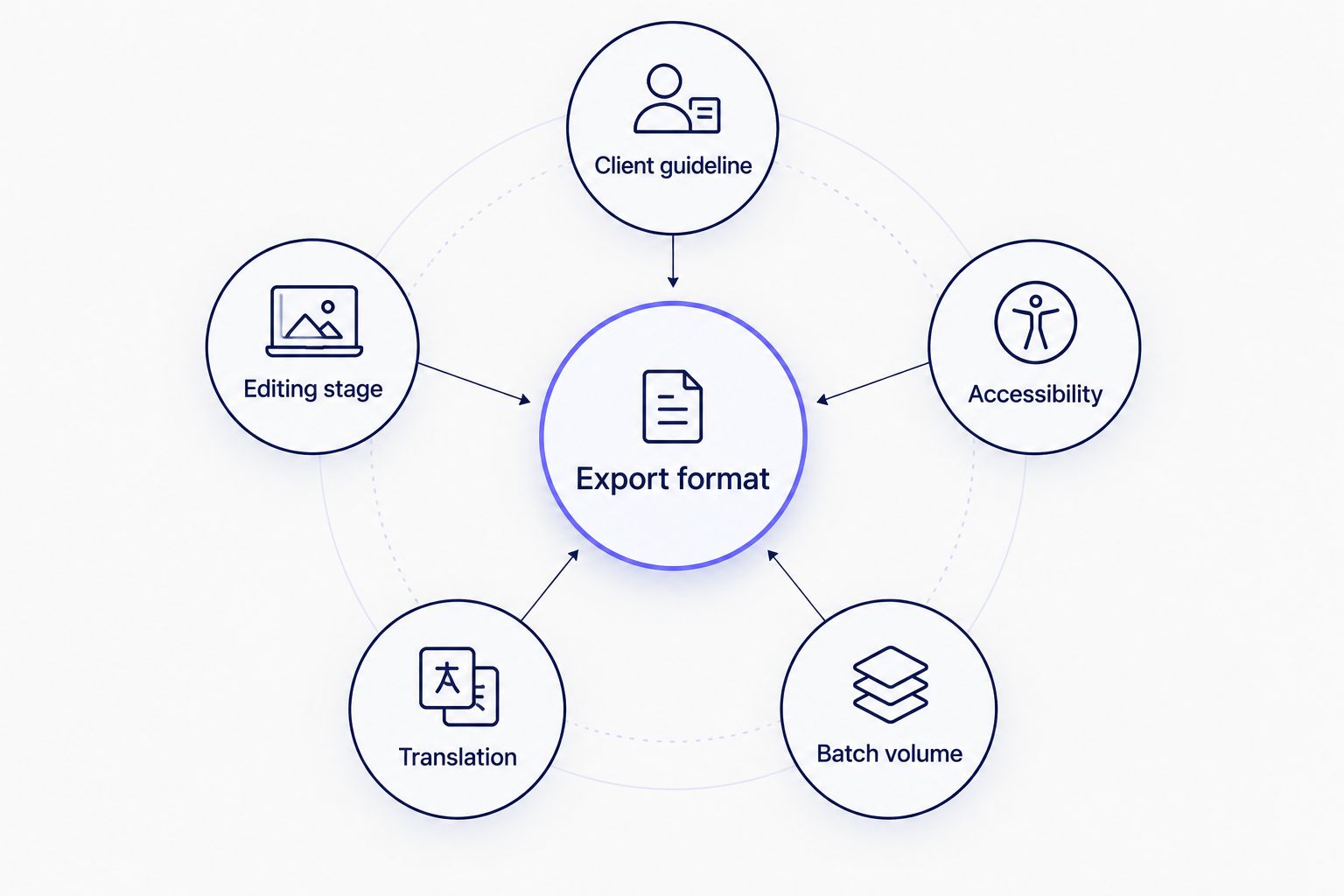
The receiving side of the file decides the format more than the transcript itself does.
Related questions
Does exporting to PDF keep speaker labels?
Speaker labels appear in a PDF export only when the speaker layout is turned on before export — it isn't automatic. Diarization runs first to detect and name speakers, then the label carries into whichever export format you choose, PDF included.
Can you convert an SRT file into a Word document?
An SRT file converts into a Word document by re-exporting the same underlying transcript as DOCX rather than editing the SRT text directly, since SRT syntax (cue numbers, arrow-separated timecodes) isn't meant to sit inside a paragraph. The cleaner path is exporting DOCX and SRT separately from the same transcript.
Do transcript exports include timestamps by default?
Timestamps are not on by default in a plain TXT or DOCX export — they're an option you enable for a timed layout. SRT, VTT, JSON, and CSV always carry timestamps because the format requires them to function.
FAQ
Can you export a video transcript to Word or PDF?
Yes, transcripts export directly to DOCX (Word) and PDF alongside TXT, SRT, VTT, JSON, and CSV. No separate conversion step or third-party tool is needed in 2026.
Which is better for client delivery, DOCX or PDF?
PDF is better for final delivery because the layout locks; DOCX is better mid-review because it stays editable. Pick based on whether the client edits the file after receiving it.
Does DOCX export include speaker names?
DOCX includes speaker names only when the speaker layout is enabled on export, after diarization has detected and labeled the speakers. A plain DOCX export skips speaker attribution.
Can you export SRT and DOCX from the same transcript?
Yes, the same transcript can export as SRT, DOCX, PDF, TXT, VTT, JSON, or CSV without re-transcribing the file. Each export pulls from the same segment data.
Is PDF export accepted for legal transcripts?
PDF is the standard format for legal deposition and interview transcripts because the layout can't shift after sign-off. Check the specific court or firm's formatting requirement before final delivery.
Do you lose timecodes when exporting to Word?
Timecodes carry into a Word export only if the timed layout is selected before exporting; a default plain-text DOCX drops them. Toggle the timed layout on if the client needs timestamps in the document.
Can a transcript be exported in bulk for a whole podcast season?
Batch processing with ZIP export handles multiple files at once on paid tiers, so a season's worth of episodes exports in one pass instead of file by file.
What format should captions be exported in, not the transcript document?
Captions export as SRT or VTT, not DOCX or PDF, because those formats carry cue-level start and end times a video player reads directly.
One last thing
The format most freelancers skip is CSV — and it's the one that catches billing disputes. A CSV export lays out one row per segment with start time, end time, speaker, and text, which turns into a spreadsheet audit trail if a client questions turnaround or word count after delivery in 2026.
Related guides
Export transcripts to Word or PDF
Try DOCX, PDF, SRT, and CSV export on the same transcript file.
Try VideoText



