Yes. Every AI transcription tool worth using in 2026, including VideoText, lets you edit an AI-generated transcript before exporting it — right in the browser, before you pick a format like TXT, SRT, VTT, PDF, or DOCX. The part that takes real time isn't the transcription step; it's fixing speaker labels, filler words, punctuation, and timestamp drift in the AI's first draft before that file goes anywhere.
TL;DR
- Yes, you can edit an AI-generated transcript before exporting it in every serious transcript editor, including VideoText.
- Speaker labels, filler words, and punctuation take more editing time than the transcription step itself.
- Subtitle exports (SRT/VTT) need a separate timing pass for CPL, CPS, and drift on top of text edits.
- Editing before export catches errors that shipping a raw AI draft in 2026 would send straight to the client.
Why this matters
Automatic speech recognition (ASR) produces a first-pass transcript, not a finished one. Word error rate (WER) — the standard measure of how many words an ASR model gets wrong — never hits zero, and it climbs fast with background noise, cross-talk, technical vocabulary, or more than two speakers on the same track.
Exporting straight from ASR without a review pass carries those errors into the delivered file. In VideoText, the transcript opens in an editor synced to the source audio or video the moment ASR finishes processing, so text edits, speaker renaming, and formatting all happen before export instead of after a client sends the file back with corrections marked up.
That order matters for freelance transcriptionists and subtitle editors billing by the job in 2026: catching a misheard name or a mislabeled speaker during the edit pass costs a few seconds. Catching the same error after delivery costs a redo, a client email, and usually a discount.
Can you edit a transcript in VideoText before exporting it?
Yes, and the workflow runs in five steps:
- Upload the file. Upload a video, an audio file, or record directly through the browser voice recorder. VideoText runs ASR transcription and returns timed segments with speaker breaks already detected, so the draft is usable the moment it's ready.
- Edit the text. Fix misheard words, punctuation, and filler words directly in the transcript editor, synced to playback so you can jump to the exact timestamp of anything that looks wrong. Run speaker diarization to detect speakers automatically, then rename them (host, guest 1, guest 2) before export — dedicated speaker diarization software is worth comparing separately if multi-speaker accuracy is the main bottleneck in your workflow.
- Reformat to a client's guidelines, if one applies. Guideline formatting reformats the transcript to Rev, GoTranscript, Scribie, or a custom house style automatically. This is the step that actually cuts QA time on delivery — transcription itself is rarely the slow part.
- Fix subtitle-specific issues, if the export is a caption file. Run subtitle QA review to catch CPL (characters per line) overruns, CPS (reading speed) violations, overlaps, gaps, and timing drift before the file ships. This matters even more for platform-specific delivery; the best subtitle generator tools for YouTube handle CPL and reading-speed checks the same way, before burn-in or export, not after.
- Export. Choose TXT, SRT, VTT, PDF, DOCX, JSON, or CSV, with timecode or speaker layouts included where the format supports them.
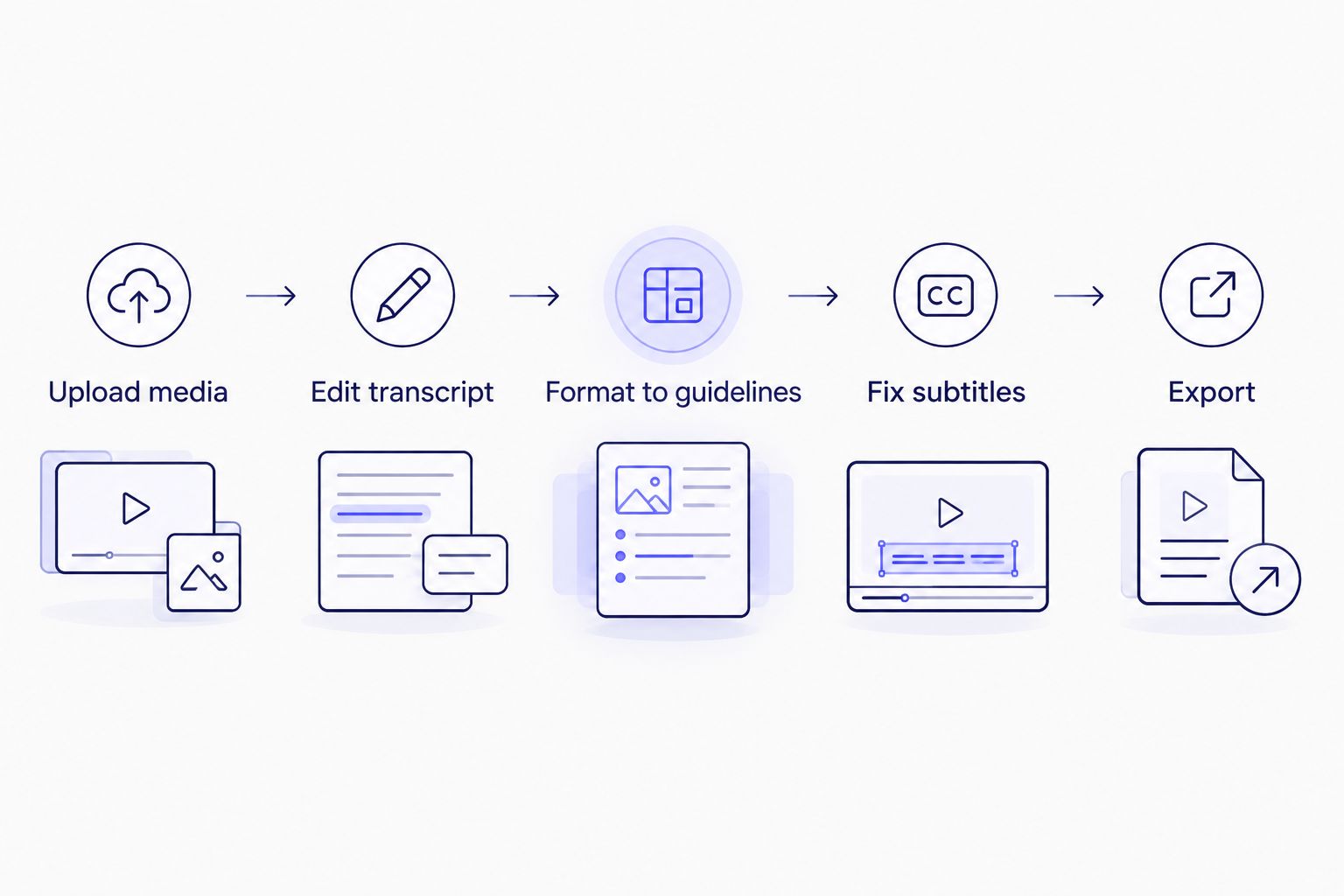
Text edits, guideline formatting, and subtitle timing fixes all happen before export, not after.
Editing before export vs. editing after export
The order you edit in changes how much rework you do later:
| Approach |
Stays synced to audio/video |
Catches subtitle timing issues |
Best for |
| Edit before export |
Yes, inside the transcript editor |
Yes, when paired with subtitle QA review |
Any file with a client deadline |
| Edit after export |
No, editing happens in a separate SRT/VTT/DOCX editor |
Only if that editor displays timing |
Quick single-line fixes on a file already delivered |
Editing before export wins on every file that still has a deadline attached to it — it's the only approach that keeps text and timing fixes in the same pass.
Why transcript editing time varies
Not every file needs the same amount of cleanup. The AI draft is a starting point, and how far it sits from client-ready depends on a handful of factors:
- Speaker count. More speakers means more diarization corrections and more renaming before export.
- Audio quality. Background noise, cross-talk, and low-quality microphones raise the ASR error rate, which raises edit time.
- Technical vocabulary. Jargon, brand names, and acronyms get misheard more often than plain speech and need manual correction.
- Client guideline requirements. A transcript formatted to Rev style needs different edits than one formatted to GoTranscript or Scribie style.
- Verbatim style. Choosing clean verbatim over full verbatim means removing filler words and false starts the AI draft still contains.
- Subtitle constraints. Exporting to SRT or VTT adds a CPL, CPS, and timing-drift pass that a plain text transcript export skips entirely.
Can you edit a transcript after it's already been exported?
Yes, but it costs more time than editing before export. Opening an already-exported SRT, VTT, or DOCX file in a separate editor loses the sync between text and source media that an in-browser transcript editor keeps during the first pass, so errors take longer to locate. Editing while the transcript is still linked to the audio or video is faster and catches more of them.
Does editing a transcript before export fix subtitle timing too?
No, text edits and timing fixes are separate problems. Fixing misheard words and punctuation does not touch CPL, CPS, overlaps, or drift — those need a subtitle QA review pass, run after text edits and before export if the output is SRT or VTT.
Is a clean verbatim transcript edited more than a full verbatim transcript?
Yes, clean verbatim takes more editing than full verbatim, because clean verbatim strips filler words, false starts, and stutters that full verbatim leaves in place. Full verbatim captures speech exactly as spoken, so the AI draft needs less removal before it's ready to export.
Edit your transcript before export
Fix text, speaker labels, and subtitle timing before exporting to SRT, VTT, or DOCX.
Open the editor
FAQ
Can you edit an AI-generated transcript before exporting it?
Yes, every serious transcript editor in 2026, including VideoText, lets you edit text, speaker labels, and formatting before you choose an export format.
What's the best way to fix speaker labels in an AI transcript?
Run speaker diarization first to detect and separate speakers automatically, then rename each speaker label in the editor before export rather than fixing labels manually line by line.
Can you edit transcript text and subtitle timing in the same tool?
Yes, but they're separate passes: text edits happen in the transcript editor, and timing issues like CPL, CPS, and drift get caught in a subtitle QA review before export.
Is it better to edit verbatim transcripts or clean verbatim transcripts before export?
Clean verbatim transcripts need more editing than full verbatim, since clean verbatim removes filler words and false starts that full verbatim keeps in the draft.
Does VideoText let you edit before exporting to SRT or VTT?
Yes, VideoText opens the transcript in an editor synced to the video before export, so text and speaker-label fixes happen before you generate SRT or VTT files.
How do you fix CPL and CPS issues before exporting subtitles?
Run a subtitle QA review that checks characters per line (CPL) and reading speed (CPS) against your target thresholds, then adjust line breaks and cue duration before export.
Can you translate a transcript before or after editing it?
Translate after the text edit pass, not before, since translating an uncorrected AI draft carries the original errors into the new language and doubles the cleanup work.
What file formats can you export after editing a transcript in VideoText?
VideoText exports edited transcripts as TXT, SRT, VTT, PDF, DOCX, JSON, or CSV, with timecode or speaker layouts included depending on the format.
One last thing
Most editing time doesn't go into fixing words — it goes into fixing timing. A transcript with clean, accurate text still fails subtitle QA if the timestamps drift, because CPS violations and overlap issues show up independently of how well the text reads. Run the subtitle QA review as a separate pass after your text edit, not as a substitute for it, whenever the export is a caption file rather than a plain transcript, and you'll ship fewer files that bounce back for corrections in 2026.
Related guides



