A transcript can be converted into SRT captions automatically, but only when the transcript already carries timing data at the segment or word level. Plain-text transcripts with no timestamps need an extra alignment step before they produce a usable SRT file, and that step is where most delay in a 2026 subtitle workflow actually shows up — not in the conversion itself.
TL;DR
- A timestamped transcript converts to SRT automatically in seconds; a plain-text transcript needs forced alignment first.
- VideoText exports timed transcript segments directly as SRT or VTT with no re-timing step.
- Auto-generated SRT files still need a CPL and CPS check against a style guide before delivery.
- Speaker labels and translated cues carry into SRT export, but timing sync should be verified after any edit.
Why this matters
Editors and freelancers lose hours re-typing timecodes by hand when a transcript arrives as flat text instead of timed segments. Knowing which transcript format converts cleanly — and which one needs a fix pass first — decides whether an SRT deliverable takes two minutes or two hours. VideoText builds its export pipeline around timed segments specifically so this conversion doesn't require a manual re-alignment step.
Can a transcript be converted into SRT captions automatically?
Yes, when the source transcript has timing data attached to each segment or word. The conversion follows the same sequence regardless of which tool does it:
- Confirm the transcript has timestamps. Segment-level timing (start/end per sentence or phrase) is the minimum; word-level timing gives tighter cue breaks.
- Run the timed transcript through an SRT export. This maps each timed segment to a numbered SRT cue with a start and end timecode.
- Check line length (CPL) and reading speed (CPS) against a style guide — auto-exported lines routinely run long before this check.
- Fix overlaps, gaps, and timing drift introduced by the export or by any later edits to the transcript.
- Export the final .srt file for delivery or upload.
Steps 1 and 2 are fully automatic when timestamps exist. Steps 3 and 4 are where a QA pass earns its time — auto-conversion produces a technically valid SRT file, not a client-ready one.
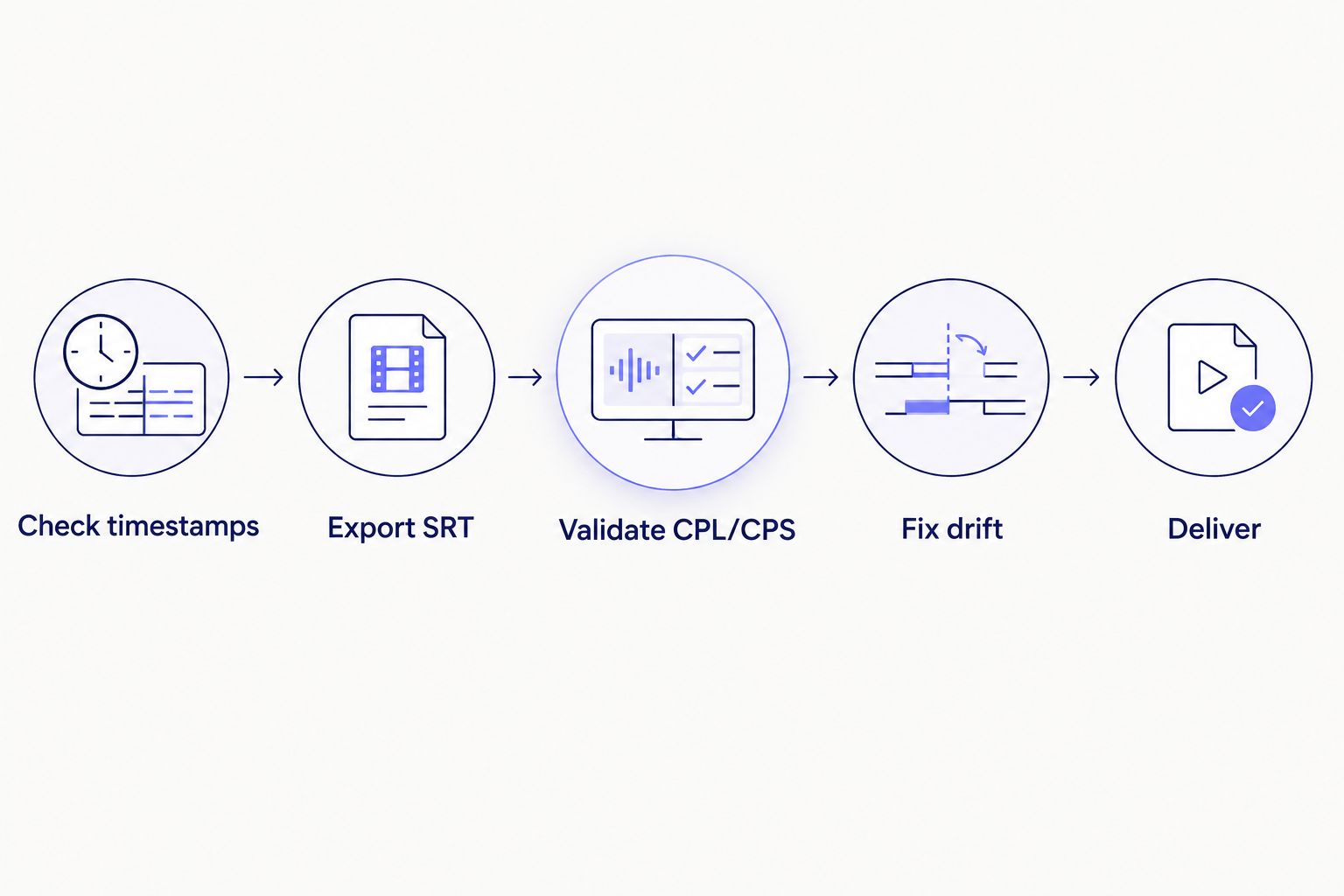
Automatic conversion covers the first two steps; QA covers the rest.
When the transcript has timestamps: conversion is automatic
A transcript exported with segment or word-level timing — the default output from ASR tools like VideoText — converts to SRT without any manual re-timing. The transcript-to-caption step is a formatting operation, not a re-transcription: each timed chunk becomes a numbered cue with its existing start and end codes.
This is the case for most transcripts generated directly from audio or video in 2026, since ASR pipelines attach timing data by design. If you already edited the transcript in VideoText's cue editor, you can edit an AI-generated transcript before exporting it and the timing stays attached through export.
When the transcript is plain text: conversion needs an extra step
A transcript typed from scratch, pasted from a Word document, or exported without timing data has no timecodes to convert. Turning that into SRT requires forced alignment — matching the text back to the audio track to generate timestamps — before an SRT file can exist at all.
This is a different job than SRT export: alignment tools re-listen to the audio and place each word or phrase against the waveform. It's not instant, and accuracy depends on audio clarity and how closely the transcript text matches what was actually said.
Why automatic SRT conversion quality varies
Automatic conversion from a timed transcript is reliable, but the resulting SRT file's readiness for delivery depends on several factors:
- Timestamp granularity — word-level timing gives cleaner cue breaks than segment-level timing.
- Speaker overlap and cross-talk — overlapping speech confuses cue boundaries during export.
- Audio quality and accent — noisy audio or heavy accents shift word boundaries in the source ASR pass, which shifts the resulting cue timing.
- Style guide requirements — CPL and CPS caps differ by client; Netflix's public style guide caps most lines at 42 characters, and a line that fits one guide can exceed another. See the CPL and CPS benchmarks by style guide for the common caps.
- Translation involvement — translating cues after conversion adds re-timing risk since translated text rarely matches the original line length.
- Manual QA before delivery — an unreviewed auto-export is a draft, not a deliverable.
Cut subtitle QA time before delivery
Fix CPL, CPS, and timing drift before you export the final SRT.
See the QA workflow
Related questions
Can a Word or PDF transcript be converted to SRT?
Only if it carries timestamps — a Word or PDF transcript exported without timing data has nothing for an SRT converter to map cues from. Without timestamps, the file needs forced alignment against the original audio before an SRT file can be generated.
Does converting a transcript to SRT keep speaker labels?
Yes, speaker labels carry through automatic conversion when the source transcript has diarization tags attached to each segment. If speakers were renamed in a transcript editor before export, those names appear in the SRT cues exactly as edited.
Is an auto-generated SRT ready for client delivery without editing?
No — an auto-generated SRT is a valid file, not a client-ready one, until it passes a CPL and CPS check against the relevant style guide. Overlaps, timing drift, and lines that exceed character limits are common in unreviewed auto-exports and are exactly what a QA pass catches.
FAQ
Can a transcript be converted into SRT captions automatically?
Yes, when the transcript already has segment or word-level timestamps — the conversion maps each timed chunk into a numbered SRT cue. A plain-text transcript with no timing data needs forced alignment first, which is a separate, slower step.
What's the difference between a transcript and an SRT file?
A transcript is text of what was said, with or without timing. An SRT file is that same text broken into numbered cues, each with a start and end timecode, formatted for caption display.
Does VideoText convert transcripts to SRT automatically?
VideoText's transcription pipeline attaches timed segments to every transcript by default, so SRT and VTT export from that transcript is automatic without a separate alignment step.
How do I convert a transcript with no timestamps into SRT?
Run it through a forced-alignment tool that matches the transcript text against the original audio to generate timecodes, then export the aligned result as SRT.
Is an automatically converted SRT file accurate enough to publish?
It's technically valid but usually needs a CPL and CPS check first — auto-exported lines commonly run past character-per-line caps like Netflix's 42-character guideline before a QA pass fixes them.
Can SRT files be converted back into a plain transcript?
Yes, stripping the cue numbers and timecodes from an SRT file leaves the caption text as a plain transcript, though speaker labels only carry over if they were embedded in the original cues.
Do speaker labels survive automatic SRT conversion?
Speaker labels survive automatic SRT conversion when the source transcript has diarization data attached to each segment before export.
One last thing
The conversion step almost never fails — the drift does. A cue that's timed correctly at export can drift out of sync after a scene cut, a trimmed clip, or a re-encode, and that drift is invisible until someone actually watches the video with captions on. Run the SRT against the video once after export, not just against the transcript text, before calling it delivered.
Related guides



