Yes: a video transcript is plain text, so it searches the same way any document does, and VideoText adds a built-in keyword index that jumps you straight to the timestamp where a word or phrase was spoken.
TL;DR
- Yes, you can search a video transcript for a specific word — transcripts are text files, and text is searchable by definition.
- VideoText's keyword index turns any transcript into a clickable jump-to-term list tied to exact timestamps.
- Ctrl+F works on exported TXT, DOCX, or PDF transcripts; SRT/VTT files need a text editor or subtitle tool because the timecodes sit inline.
- Speaker diarization labels let you scope a search to one person's lines instead of the whole file.
- Clean verbatim transcripts drop filler words like 'um', so a search for those terms returns nothing unless you export full verbatim.
Why this matters
Freelance transcriptionists and editors get asked for the same thing constantly: "find where the guest said X" or "pull every mention of the product name." Scrubbing through a 90-minute recording by ear to find one word wastes an hour you don't get paid for.
Once audio or video is converted to text, that text behaves like any other document. VideoText runs automatic speech recognition (ASR) on uploaded media and produces a timed transcript, then builds a keyword index off that transcript so a word search returns a clickable timestamp instead of a wall of text. This matters most on long-form content: podcasts, depositions, interviews, webinars — anything over 20 minutes where scrubbing by hand isn't realistic.
Can you search a video transcript for a specific word?
Yes, and there are two distinct ways to do it depending on what stage of the workflow you're in.
- Inside a transcription tool with a keyword index — type the word, get a list of every occurrence with a timestamp attached, click to jump the video player to that moment.
- Inside an exported text file — open the TXT, DOCX, or PDF export in any text editor and use standard find (Ctrl+F on Windows, Cmd+F on Mac). The word is highlighted in the flat text, but you lose the timestamp unless the export includes timecodes.
VideoText's Keywords feature covers the first path: it scans the transcript, surfaces terms as a jump-to-term index, and clicking a term moves the video to that exact segment. That's the difference between "the word is in there somewhere" and "the word is at 14:32."
Searching an exported TXT or DOCX transcript
A plain-text export has no structure beyond paragraph breaks, so Ctrl+F works exactly as it would in a Word document. The tradeoff: no timestamp travels with the match unless the export format includes timecodes at the start of each line or speaker turn.
If you need the timestamp attached to every line, export with a timecode/speaker layout instead of a bare TXT — that keeps the time marker next to each spoken line so a text search still resolves to a moment in the recording.
Searching an SRT or VTT subtitle file
SRT and VTT files are structured differently than a flat transcript. Each subtitle cue is a numbered block: a sequence number, an in/out timecode, then the caption text. Searching for a word in a text editor finds the word inside its cue block, and the timecode sits two lines above it — so you get the timestamp, just not automatically linked to a click.
This is where timing drift and CPL (characters per line) issues complicate search: if a cue was split awkwardly across two lines, the word you're searching for might be broken across a line break, which some basic text search tools miss. Cleaning up line breaks and CPL before search-and-replace work reduces that risk.
Searching a YouTube video's transcript
YouTube's own transcript panel supports in-panel keyword search on videos that have captions. The catch: if the captions are auto-generated by YouTube rather than a dedicated ASR engine, accuracy on names, jargon, and cross-talk is inconsistent, which means a search for the exact word can fail simply because YouTube transcribed it wrong. Pulling the video through a purpose-built transcription pipeline and comparing against a subtitle generator tool built for YouTube is the more reliable route when the exact wording matters.
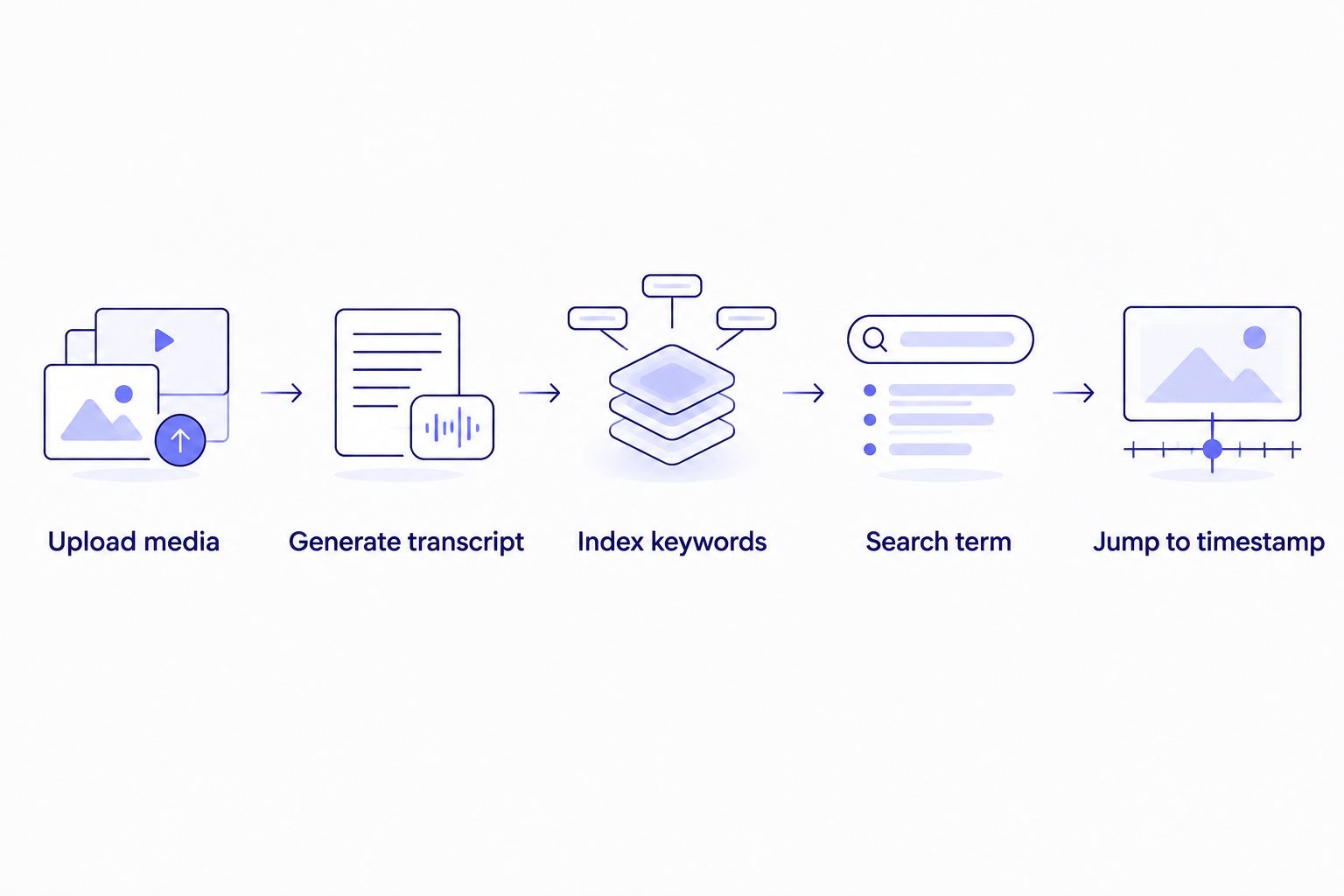
The keyword index is what turns a flat transcript into a searchable, clickable list of timestamps.
Why search results vary by transcript format
A word search that works cleanly in one export can miss matches in another. The gap comes down to a handful of predictable factors:
- Verbatim vs. clean verbatim — clean verbatim strips filler words ('um', 'uh', false starts), so a search for those terms returns zero hits in a cleaned file even though they were spoken.
- Casing and punctuation — most text search is case-sensitive by default in some editors; contractions and hyphenation ('don't' vs 'do not') can split a match.
- Speaker labels — multi-speaker files tagged with names via speaker diarization software let you filter a search to one speaker's dialogue instead of scanning the whole transcript.
- Line breaks in subtitle formats — a word split across two SRT lines by a bad line break can fail a simple text match until the line break is fixed.
- Translation — a translated transcript preserves timing on each cue, but the searchable text is now in the target language, not the original.
- Scene-cut timing drift — a cue that starts before or after the actual cut can shift where a matched word visually lands relative to the video, even though the text match itself is correct.
“A transcript is just text — if you can search a document, you can search a transcript.”
Can you search inside a video for spoken words without a transcript?
No, not directly — a raw video or audio file has no searchable text layer until speech is converted to words. ASR is the step that makes search possible at all; without it, finding a spoken word means scrubbing the timeline by ear.
Does searching an SRT file for a word also give you the timestamp?
Yes, because each match sits inside a numbered subtitle cue that carries an in/out timecode directly above the caption text. Opening that cue block shows you the exact start and end time the word was on screen, even in a plain text editor.
Can you search a transcript in a different language after translating it?
Yes, translated transcripts keep timing on every cue, and VideoText supports translation across 70+ languages without shifting the timestamps. The search term itself has to match the translated language's spelling and grammar, not the original wording, since the source text is fully replaced.
Turn your media into a searchable transcript
Upload video or audio and get a timed transcript with a built-in keyword index.
Try VideoText
FAQ
Can you search a video transcript for a specific word?
Yes, because a transcript is plain text and text is searchable by default. VideoText adds a keyword index on top of the transcript so a search returns the exact timestamp instead of just the surrounding sentence.
How do you search a transcript for a word without special software?
Open the exported TXT, DOCX, or PDF file in any text editor and use Ctrl+F or Cmd+F. This works like searching any document, but the match won't carry a timestamp unless the export includes timecodes per line.
Can you search subtitle files like SRT or VTT for a word?
Yes, each subtitle cue in an SRT or VTT file is a text block with a timecode above it, so a word search in a text editor lands inside the cue and the timestamp sits two lines up.
Why doesn't a search find a filler word like 'um' in my transcript?
Clean verbatim transcription removes filler words and false starts during processing, so 'um' and 'uh' simply aren't in the text. Export a full verbatim version if you need those words searchable.
Can you search a multi-speaker transcript for words from one speaker only?
Yes, once speaker diarization has labeled and separated each speaker's lines, you can scan or filter the transcript to that speaker's dialogue before searching, instead of scanning every line in the file.
Is YouTube's transcript search accurate for finding a specific word?
It depends on the caption source. If the video relies on YouTube's auto-generated captions rather than a dedicated ASR transcription tool, misheard words won't match your search even though the term was spoken.
Do translated transcripts keep the same timestamps as the original?
Yes, VideoText preserves timing on every cue during translation across 70+ languages. The searchable words change to the target language, but the timecodes attached to each line stay put.
One last thing
The format you export changes what's searchable more than most people expect: a clean verbatim TXT file will never surface 'um', 'uh', or a false start, because those were stripped during processing, not because search failed. If a client ever asks "did the speaker actually say X" and X could plausibly be a filler word or a stutter, pull the full verbatim version before you search — searching the wrong export type is the most common reason a word search comes back empty in 2026.
Related guides



