You turn a podcast recording into show notes automatically by running it through an automatic speech recognition (ASR) tool that produces a timed transcript with speaker labels, then feeding that transcript to an AI summarizer that pulls out chapters, bullet points, and quotable lines. The step people skip is guideline formatting — matching the output to how your show or client actually structures notes — which is where most of the manual cleanup time still goes in 2026.
TL;DR
- Turning a podcast recording into show notes automatically means ASR transcription plus AI summarization plus guideline formatting, not just one step.
- Speaker diarization matters more than raw transcript accuracy for multi-host shows because it labels who said what.
- VideoText exports show notes-ready output as TXT, SRT, VTT, PDF, DOCX, JSON, or CSV depending on where the notes end up.
- Translating show notes into one of 70+ supported languages doesn't require re-transcribing the episode from scratch.
- Chapters and a keyword index cut the re-listening time that manual show notes writing usually needs.
Key numbers
70+ languages
Show notes translation coverage
7 formats
TXT, SRT, VTT, PDF, DOCX, JSON, CSV export
Why this matters
Writing show notes by hand means re-listening to an episode to catch timestamps, spell guest names correctly, and pull the two or three quotes worth highlighting. That's the same work a transcript with speaker diarization and an AI summary already does in one pass. VideoText runs that pipeline — transcription, diarization, summary, chapters, keyword index — in a single workspace instead of stitching together a separate transcription tool, a note-taking app, and manual timestamp-hunting.
The reason this matters in 2026 specifically: most podcast hosting platforms (Spotify for Podcasters, Apple Podcasts Connect, Castos) now support chapter markers natively, so notes generated with timestamps drop straight into the episode instead of needing a second formatting pass.
How do you turn a podcast recording into show notes automatically?
The process is the same whether the episode is 20 minutes or two hours — only the cleanup time scales with length and speaker count.
- Upload the raw recording. Most ASR transcription tools accept MP3, WAV, MP4, or MOV directly, so there's no need to convert the file first. If you're picking a tool specifically for podcast work, compare options built for podcast transcription rather than a general-purpose transcriber, since podcast episodes have longer runtimes and more speaker overlap than a typical video clip.
- Run transcription with speaker diarization on. Diarization detects speaker changes and labels them (Speaker 1, Speaker 2, or renamed to actual names), which is what turns a wall of text into a transcript you can pull attributed quotes from. Not every transcription tool diarizes accurately on crosstalk-heavy episodes — see speaker diarization software comparisons if your show has three or more regular hosts.
- Generate the AI summary and chapters. This step converts the raw transcript into a structured summary, a bullet list of talking points, and timestamped chapter markers — the actual bones of the show notes.
- Pull the keyword index. A keyword index flags named entities, product mentions, and repeated terms across the transcript, which saves you from manually scanning for every guest reference or book title mentioned mid-episode.
- Format to your show's guideline. If you publish notes with a fixed structure (intro line, guest bio, timestamped topics, links, credits), reformatting the AI summary to match that template is the step that actually determines how much editing you do before publishing.
- Export and publish. Export the transcript or notes as TXT, DOCX, or PDF for a blog post, or as SRT/VTT if the episode is also a video podcast going to YouTube — in which case check subtitle generator tools for YouTube for caption-specific formatting requirements.
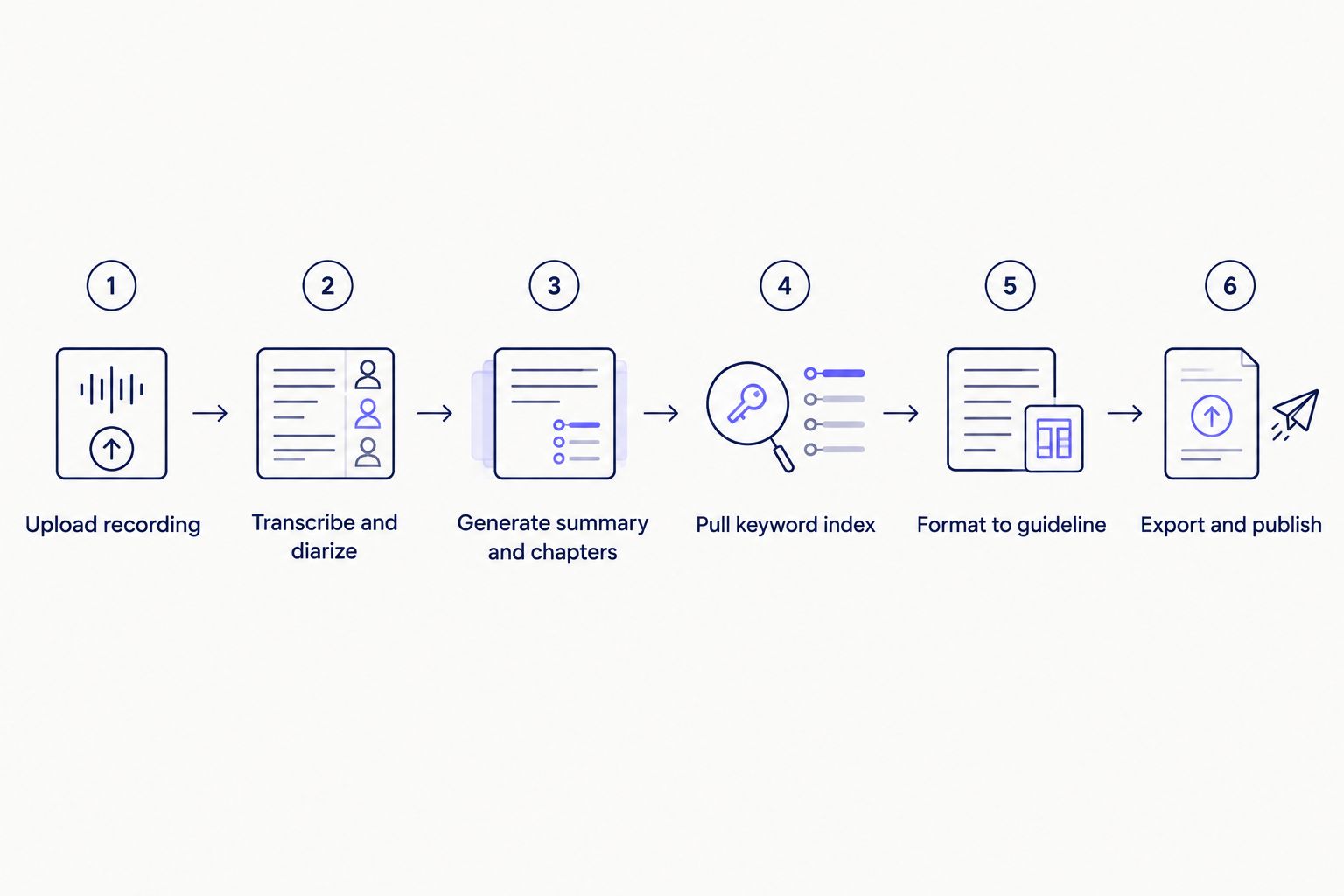
Formatting to a guideline is the step most manual workflows skip, and it's the one that saves editing time.
What show notes actually need to include
A transcript alone isn't show notes. The output that's actually publishable includes a short episode summary (2-4 sentences), a bulleted list of talking points, timestamped chapter markers, a guest bio line if there's a guest, and pulled quotes attributed to the right speaker. Skip any of these and the notes read like an unedited transcript dump, which is the exact problem automating the pipeline is supposed to solve.
Verdict: show notes generated from ASR transcription plus AI summarization and guideline formatting are publish-ready with a light edit pass; show notes generated from a raw transcript alone are not.
Why show notes creation varies episode to episode
- Episode length — a 90-minute interview generates more transcript to summarize than a 15-minute solo episode, which affects how long the chapter list runs.
- Number of speakers — diarization accuracy drops as speaker count rises, especially with crosstalk or overlapping laughter.
- Audio quality — background noise, remote guest audio, or phone-recorded segments increase transcription errors that need manual correction before summarization.
- Technical or niche vocabulary — industry jargon, brand names, and non-English proper nouns often need manual spelling fixes in the transcript before the AI summary runs.
- Guideline complexity — a show notes template with strict formatting (specific timestamp format, required sections, character limits) takes longer to match than a loose bullet-point summary.
- Multilingual audiences — notes that need translation into another language add a step, though translating a finished transcript is faster than re-transcribing in a second language.
Turn your next episode into show notes
Upload the recording and get a transcript, summary, and chapters in one pass.
Try VideoText
How long does it take to turn a podcast recording into show notes?
Turning a podcast recording into show notes automatically takes less hands-on time than writing them by hand, since the transcript, summary, and chapter markers generate in the background instead of requiring a full re-listen. The manual work that remains is editing the AI summary for tone and fixing any misheard names or jargon in the transcript.
Can AI generate podcast show notes for free?
Several ASR transcription tools, including VideoText, offer a free tier for testing the transcription-to-summary pipeline before committing to a paid plan. Free-tier limits (processing minutes, file size, export formats) vary and change over time, so check current limits directly on the tool's site rather than assuming a fixed cap.
Do podcast show notes need timestamps?
Show notes need timestamps if you want chapter markers to work on Spotify for Podcasters, Apple Podcasts, or YouTube, since those platforms read timestamp-formatted chapter lists to build a clickable episode outline. Notes without timestamps still work as a blog post or newsletter summary, just without the jump-to-topic navigation.
FAQ
What's the best way to add timestamps to podcast show notes?
The fastest way is pulling timestamps directly from an AI-generated chapter list rather than manually scrubbing the audio and writing them down. Most ASR transcription tools timestamp each segment automatically, so chapters inherit accurate timing without extra work.
Is AI-generated show notes accurate enough to publish without editing?
AI-generated show notes usually need a light edit pass for tone, misheard names, and technical jargon before publishing. The structure — summary, bullets, chapters — is typically solid; the wording is what needs a human check.
How do you export podcast show notes as SRT or VTT?
Export SRT or VTT directly from the transcription tool once diarization and timing are confirmed correct, since both formats carry the timed cue structure needed for captions. This matters mainly for video podcasts going to YouTube, not audio-only shows.
Can you translate podcast show notes into another language?
Yes, translating a finished transcript into another language is faster than re-transcribing the episode from scratch in that language. VideoText translates subtitles and transcripts across 70+ languages while preserving cue timing.
How do speaker labels get into show notes?
Speaker diarization detects speaker changes in the audio and assigns generic labels like Speaker 1 and Speaker 2, which you then rename to actual names in the transcript editor. Renamed labels carry through to the summary and any quotes pulled for the notes.
What file formats do podcast transcription tools export?
Common export formats include TXT and DOCX for blog-style show notes, SRT and VTT for captions, and PDF, JSON, or CSV for archiving or feeding into other tools. Which format you need depends on where the notes get published.
Is VideoText better than Descript for podcast show notes?
VideoText and Descript both transcribe and diarize podcast audio, but they differ on guideline formatting and subtitle QA depth, which matters if your show notes need to match a specific client or network template. A side-by-side breakdown is easier than a single verdict here — compare feature sets directly before deciding.
One last thing
Pull the keyword index before you write the episode summary, not after. It flags every named entity, product mention, and repeated term in the transcript, which is exactly the list you'd otherwise build by re-listening and taking notes by hand — and it catches guest name spellings and brand mentions that AI summaries sometimes smooth over or drop.
Related guides



