At a glance
| Dimension |
VideoText |
Notta |
| Best for |
Subtitle editors, transcriptionists, creators, podcast teams, and media agencies |
People and teams documenting live meetings |
| Live meeting capture |
Live transcription is supported, but meetings are not the main workflow |
Core workflow for online meetings and call notes |
| Subtitle QA |
Cue editor with overlap, gap, CPL, CPS, timing, grammar, and line-break checks |
Transcript editing and subtitle export without the same QA-centered workflow |
| Client-guideline formatting |
Rev, GoTranscript, Scribie, and custom guideline formatting |
No equivalent set of named client-format presets |
| Subtitle translation |
70+ languages with cue timing preserved |
Translation is centered on transcripts and meeting content |
| Speaker diarization |
Detect, label, and rename speakers in the editor |
Detect and edit speaker labels |
| Automation and outputs |
Batch queue, ZIP exports on Pro+, API, Zapier, and Chrome extensions |
Meeting integrations, workflow connections, and file exports |
| ASR first pass |
Timed transcript from uploaded or recorded media |
Timed transcript from meetings or uploaded media |
| Pricing model |
Plan features vary; batch processing is available on Pro+ |
Plan limits vary by usage and feature access |
| Standout feature |
Cue-level subtitle fixing before delivery |
Live meeting capture and notes |
VideoText is better for delivery; Notta is better for capture
Best for subtitle delivery: VideoText. Its workflow continues after automatic speech recognition creates the first transcript. You can review timed segments, rename speakers, clean fillers, repair subtitle cues, apply a client format, translate the result, and export it.
Best for meeting documentation: Notta. Its public product workflow in 2026 focuses on capturing live conversations, producing transcripts, generating summaries, and making meeting records searchable. That is a more direct fit when the call itself is the source and notes are the final output.
The practical question is not which tool transcribes speech. Both do. Ask what must happen between the ASR draft and delivery.
Notta is the better live-meeting tool by a wide margin
Notta wins when you need a tool organized around scheduled calls and online meeting platforms. It can capture a conversation while it happens, identify speakers, produce a transcript, and turn the discussion into notes or a summary.
VideoText supports live transcription, but its defining controls sit later in the workflow. CPL validation, timing-drift correction, subtitle translation, guideline formatting, burn-in, and cue-level review do not add much value when the final deliverable is a meeting recap.
Notta is the stronger 2026 choice for recruiters, sales teams, consultants, and internal teams documenting calls. Its limitation is the other side of that focus: meeting notes do not require the detailed subtitle checks used for broadcast, social video, course content, or client caption files.
VideoText offers much more subtitle QA
VideoText wins the subtitle QA dimension because the editor checks problems that affect an SRT or VTT after transcription. These include overlapping cues, excessive CPL, excessive CPS, gaps, scene-cut spans, timing drift, grammar, filler cleanup, and poor line breaks.
CPL means characters per line. CPS means characters per second. They measure different problems: CPL controls how much text appears on one line, while CPS controls whether a viewer has enough time to read the cue.
The Netflix English Timed Text Style Guide sets a maximum of 42 characters per line. It also sets reading-speed caps of 20 characters per second for adult programs and 17 characters per second for children's programs. These are style-guide limits, not universal settings; the client's specification still controls the job.
A practical 2026 subtitle workflow has five stages:
- Media upload: Add video, audio, a voice recording, or supported online video input.
- ASR draft: Generate timed text and automatic speaker labels.
- Cue QA: Check CPL, CPS, overlaps, gaps, drift, grammar, and line breaks.
- Guideline formatting: Apply the client's speaker, timestamp, and layout rules.
- Export: Produce the required transcript or subtitle format.
The subtitle CPL and CPS benchmarks matter during stage three. A correct transcript can still fail QA when the cues are too dense or appear for too little time.
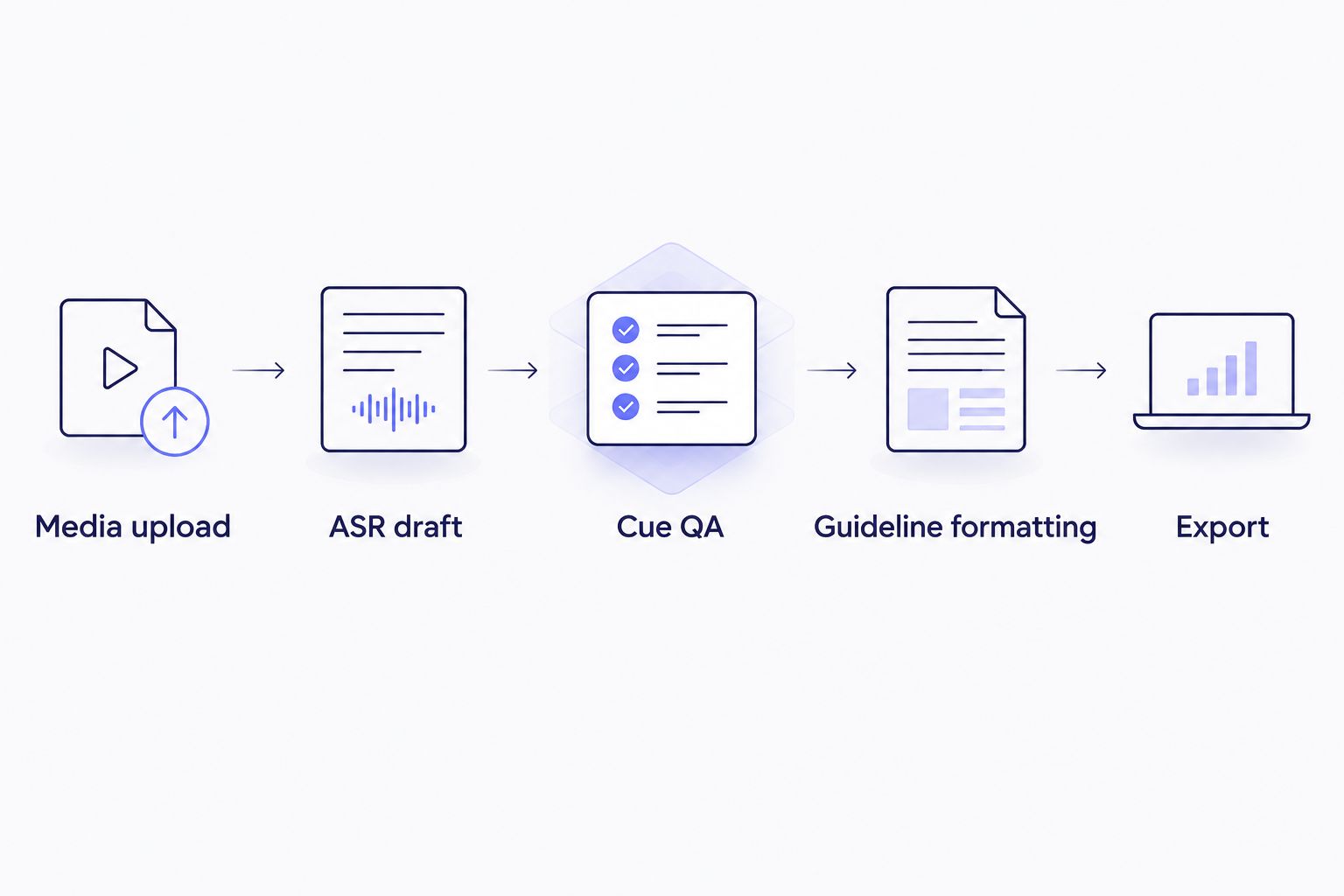
The main difference appears after the ASR draft, where subtitle-specific QA begins.
Notta can create and edit transcripts, and it can export subtitle text. Its workflow is not centered on diagnosing cue-level delivery failures. For an editor who must return a validated subtitle file, VideoText is the clear winner.
VideoText offers direct client-guideline formatting
Client formatting is more than selecting SRT instead of VTT. A delivery specification can define speaker-label syntax, timestamp placement, paragraph structure, filler handling, line breaks, and whether the transcript should be full verbatim or clean verbatim.
VideoText includes formatting for Rev, GoTranscript, Scribie, and custom client guidelines. That reduces the need to copy an ASR draft into a separate document and rebuild its structure by hand.
Notta does not center its product on named transcription-client presets. Its transcript layout is useful for meeting review, but a freelancer still needs to compare that output with the client's specification and reformat any mismatched elements.
Choose VideoText when the transcript must match an external style guide before delivery. Choose Notta when the transcript stays inside a meeting-note workflow and no separate client format is required.
VideoText is better for translated subtitle delivery
Both products address multilingual speech and text, but the required output changes the verdict. VideoText translates subtitles and transcripts into 70+ languages while preserving cue timing. The translated subtitle remains tied to the original timing structure instead of becoming an unsegmented document.
Timing preservation does not guarantee that every translated cue meets the target language's reading-speed or line-length rules. Translation can expand text. German, French, or Spanish cues may need different line breaks after the words change, so the translated SRT still needs a CPL and CPS review.
Notta is a better fit when translated meeting content is the endpoint. VideoText wins when the endpoint is a translated subtitle file that must stay synchronized with the media.
Both handle speaker diarization well
Speaker diarization separates a recording by speaker. It answers who spoke when; it does not determine whether the words are correct.
Both tools detect speakers and let you edit labels. VideoText keeps those labels inside the transcript and subtitle workflow, where they can be renamed before export. Notta uses speaker identification to organize meeting transcripts and notes.
This dimension is a tie because the core function is available on both sides. The better implementation depends on the next task. Subtitle editors need labels that survive formatting and export, while meeting users need labels that make a long conversation searchable and readable.
Automatic labels still require review in 2026. Similar voices, interruptions, crosstalk, and short interjections can produce incorrect speaker assignments even when the transcript words are accurate.
VideoText offers a broader post-production pipeline
The platform covers more steps after transcription. Its listed workflow includes subtitle repair, translation, burn-in, compression, trimming, batch processing, ZIP exports on Pro+, public sharing, embeds, API access, Zapier, and Chrome extensions.
Exports include seven named formats: TXT, SRT, VTT, PDF, DOCX, JSON, and CSV. Timecode and speaker layouts are also available within the export workflow. This range matters when one source file must produce a plain transcript, a client document, and timed captions.
Notta also supports integrations and exports, so automation itself is not exclusive. The difference is the object being automated. Notta automates meeting capture and knowledge workflows. VideoText automates media-to-transcript and subtitle-production steps.
The limitation is clear: batch processing and ZIP exports require Pro+. A solo user processing one recording at a time may not need that tier or the wider pipeline.
Both create useful ASR drafts, so test your own audio
There is no defensible universal accuracy winner without processing the same files through both tools. ASR quality changes with microphone placement, background noise, accents, specialist vocabulary, crosstalk, and the number of speakers.
Run a matched test in 2026. Use the same difficult sample in both tools, then compare proper nouns, numbers, speaker changes, punctuation, and timestamps. Do not judge accuracy from a clean single-speaker clip if your real work contains remote guests, room echo, or overlapping speech.
A low-error transcript can still create a poor subtitle file. Word accuracy does not test cue timing, reading speed, or line breaks. That is why this dimension is a tie while subtitle QA has a clear winner.
Pricing models favor different workloads
Current prices are not listed here because plan figures and limits change. Compare the current plan pages against the workflow you will actually run.
- VideoText: Feature access varies by plan, and batch processing with ZIP exports is available on Pro+. This model fits file-based production where post-processing features affect how quickly work reaches delivery.
- Notta: Feature access and usage limits vary by plan. This model fits meeting-based usage where recording, transcription, summaries, and collaboration determine the required tier.
Check file limits, export access, supported integrations, automation access, and collaboration controls before choosing. A plan is predictable only when its limits match your monthly workload.
Test a subtitle workflow
Upload media, generate timed text, and review subtitle issues before export.
Try VideoText
The standout feature depends on the final deliverable
VideoText's standout feature is the connected QA sequence: generate timed text, find cue problems, apply guideline formatting, translate while retaining timing, and export from one workflow. Notta's standout feature is live meeting capture followed by searchable transcripts, summaries, and notes.
If the final file is SRT or VTT, the subtitle workflow wins. If the final file is a meeting record, Notta wins. That distinction is more useful than comparing generic feature counts.
Final verdict
Choose VideoText if you deliver transcripts or subtitles
VideoText is the named winner for freelance transcriptionists, subtitle editors, content creators, podcast teams, and media agencies. It addresses the work that starts after ASR: speaker cleanup, CPL and CPS validation, timing-drift repair, client-guideline formatting, translation, burn-in, and multi-format export.
The main drawback is focus. Those controls add complexity you do not need when a searchable meeting transcript is the only required output.
Choose Notta if you document live meetings
Notta is the named winner for people who need to capture calls, identify speakers, create notes, and search what was said. It is the more direct 2026 choice when meetings are the source and summaries are the deliverable.
The main drawback is limited depth for professional subtitle QA. Exporting subtitle text is not the same as validating every cue against timing and readability rules.
One-glance scorecard
| Dimension |
Winner |
| Best for subtitle delivery |
VideoText |
| Live meeting capture |
Notta |
| Subtitle CPL/CPS and timing QA |
VideoText |
| Client-guideline formatting |
VideoText |
| Translated subtitle timing |
VideoText |
| Speaker diarization |
Tie |
| Post-production automation |
VideoText |
| ASR first-pass accuracy |
Tie; test your audio |
| Pricing model |
Tie; workload decides |
| Standout workflow |
VideoText for subtitles; Notta for meetings |
FAQ
Which is better in 2026, VideoText or Notta?
VideoText is better for subtitle QA and client delivery, while Notta is better for live meeting capture. Choose according to whether the final output is a validated subtitle file or a meeting record.
Is Notta better than VideoText for meetings?
Yes. Notta is organized around recording online meetings, identifying speakers, producing transcripts, and generating notes or summaries during the meeting workflow.
Is VideoText better than Notta for subtitles?
Yes. VideoText checks CPL, CPS, timing drift, overlaps, gaps, line breaks, and other cue-level issues before SRT or VTT export.
Can VideoText and Notta both export subtitle files?
Yes. Both can produce subtitle output, but export alone does not make the workflows equivalent. VideoText adds rule-based subtitle QA and client-guideline formatting before export.
Can VideoText translate subtitles without losing timing?
Yes. VideoText translates subtitles and transcripts into 70+ languages while preserving the original timing on subtitle cues. The translated text should still be reviewed for CPL, CPS, and line breaks.
Do VideoText and Notta both identify speakers?
Yes. Both support speaker diarization and editable labels. Review automatic labels when recordings contain crosstalk, similar voices, or short interruptions.
Can AI transcription skip human proofreading?
No. ASR output still needs human review for names, numbers, specialist terms, speaker changes, and punctuation. Subtitle delivery also requires timing, CPL, CPS, and line-break checks.
One last thing
Do not use transcript accuracy as a substitute for subtitle QA in 2026. The words can be correct while a cue still breaks the client's specification because it exceeds 42 characters per line, runs faster than 20 characters per second, overlaps another cue, or crosses a scene cut.
Test the complete deliverable, not just the ASR draft. For subtitle work, that means opening the exported SRT or VTT against the video and checking the same rules the client will use during acceptance.
Related guides



