VideoText and Veed both turn video into text, but they're built for different jobs. VideoText is a transcription and subtitle QA platform for people who deliver client-ready captions and transcripts; Veed is a browser-based video editor that adds auto-captions as one feature in a broader editing toolkit.
TL;DR
- VideoText vs Veed in 2026: choose VideoText for subtitle QA, CPL/CPS fixes, and client-guideline formatting.
- Choose Veed if you're editing video for social media and need captions baked into an editing timeline.
- VideoText handles timing drift, overlap detection, and translated subtitles with sync preserved.
- Veed's strength is templates, brand kits, and quick clip production, not subtitle QA depth.
- Both offer speaker diarization and ASR transcription as a starting point, not a finished deliverable.
Why this matters
Anyone comparing videotext vs veed in 2026 is usually solving one of two problems: cleaning up subtitles before they go to a client, or producing an edited video for a channel or campaign. Those are different workflows with different failure points. A transcript with drifted timecodes or a caption line running 48 characters when the style guide caps it at 42 doesn't get fixed by better video editing tools — it gets fixed by QA tools built for exactly that.
VideoText is built around the second half of the pipeline: what happens after ASR (automatic speech recognition) spits out a rough transcript. Overlaps, gaps, reading-speed violations, scene-cut spans that ignore cut points, and formatting that doesn't match Rev, GoTranscript, or Scribie guidelines all eat QA time. Veed, by contrast, is a video editor first — captions are a feature inside a timeline, not a dedicated QA workflow.
At a glance
| Dimension |
VideoText |
Veed |
| Best for |
Subtitle QA, transcript delivery, client-guideline formatting |
Social video editing with auto-captions |
| Pricing model |
Tiered plans with batch processing on higher tiers |
Tiered plans built around editing/export limits |
| Standout feature |
CPL/CPS fixing, timing drift detection, guideline reformatting |
Templates, brand kit, timeline editing |
| Transcription (ASR) |
Yes, timed segments, speaker diarization |
Yes, auto-captions with speaker labels |
| Subtitle QA & timing fixes |
Dedicated cue editor with issue detection |
Basic caption editing inside the timeline |
| Translation |
70+ languages, timing preserved on cues |
Caption translation available |
| Video editing |
Trim, compress, burn subtitles |
Full timeline editing, transitions, effects |
| Export formats |
TXT, SRT, VTT, PDF, DOCX, JSON, CSV |
Exported video files with embedded captions |
| Automation |
API, Zapier, Chrome extension |
Editor-focused, less workflow automation |
VideoText is the subtitle QA and transcript delivery tool; Veed is the video editor that happens to include captions. That's the entire axis of difference — pick based on which side of the pipeline you're solving for.
VideoText wins on subtitle QA and timing drift (by a lot)
VideoText's subtitle QA tools run an in-browser cue editor synced to the video, flagging overlaps, gaps, scene-cut spans, and reading-speed violations automatically. That's a workflow built specifically for people who deliver subtitles for a living, not a side panel bolted onto a video timeline.
CPL (characters per line) and CPS (characters per second) limits vary by client and by style guide — Netflix's TTSC guidelines, for example, cap line length and reading speed differently than a broadcast spec. VideoText's CPL and CPS benchmarks by style guide map those limits directly into the fix workflow, so a cue that's too long or too fast gets flagged before delivery instead of bounced back in a QA round.
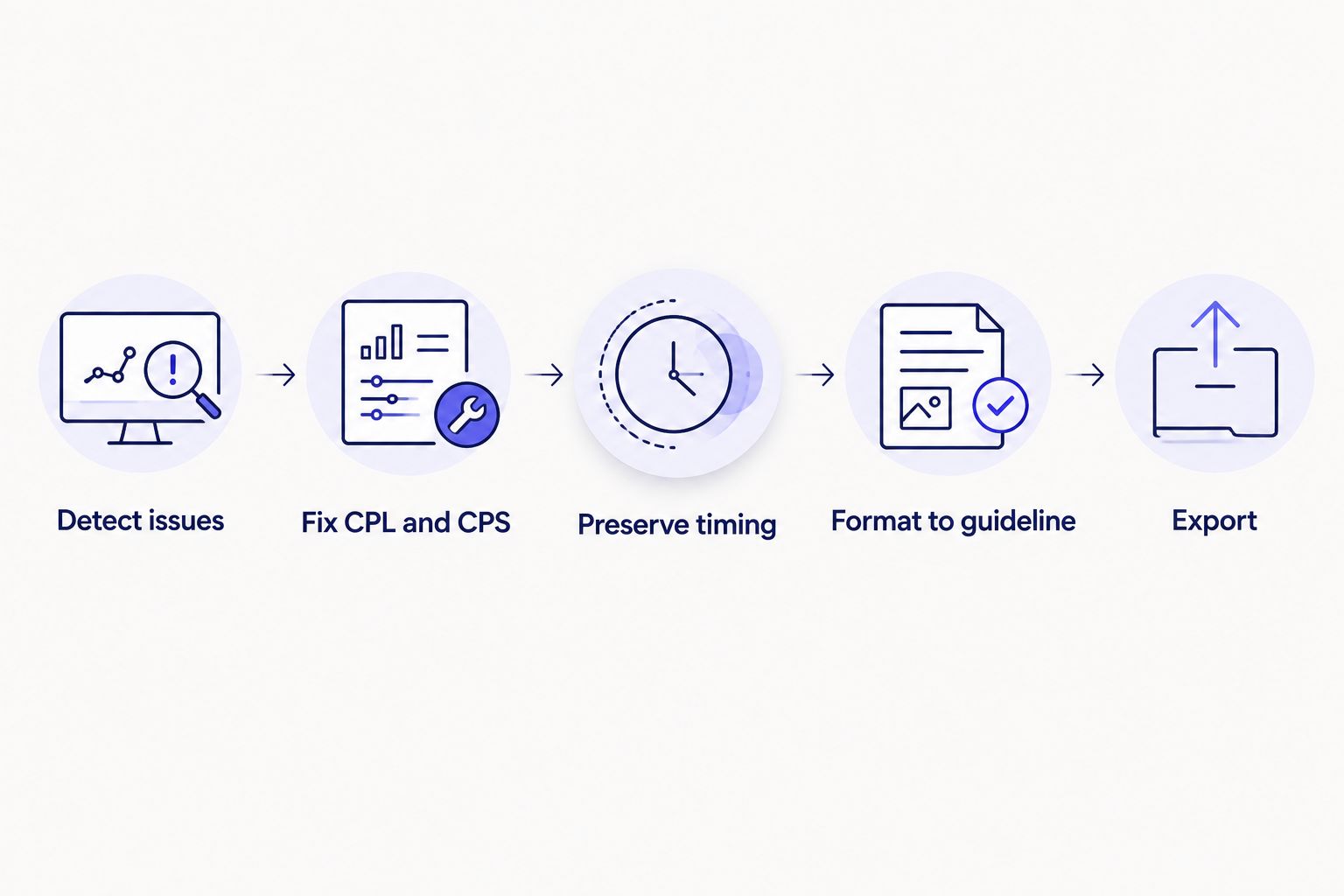
Guideline formatting happens after timing fixes, not before — reordering this step is where most QA time gets wasted.
Veed wins on video editing and templates (by a lot)
Veed is a timeline-based video editor with templates, a brand kit, and effects built for producing finished social video, not just captioned transcripts. If the job is cutting a podcast clip into a vertical short with motion text and a brand-consistent look, that's an editing job — and editing is not what VideoText is built to do beyond trim, compress, and subtitle burn-in.
For a channel producing daily short-form content, an editor with templates saves more time than a subtitle QA tool ever will, because the bottleneck is the cut, not the caption.
Both handle ASR transcription and speaker diarization reasonably well (tie)
Both platforms run automatic speech recognition to generate a first-pass transcript with timed segments, and both detect and label multiple speakers automatically. Neither publishes a verified word-error-rate comparison, so calling one more "accurate" than the other isn't supportable — what differs is what happens to that transcript after ASR runs.
VideoText lets you rename and edit speaker labels directly in the transcript UI, which matters more for interview and podcast transcripts with three or more speakers than for a single-narrator video.
VideoText wins on guideline formatting for client delivery
Professional transcription and captioning work almost always ships against a named style guide — Rev, GoTranscript, Scribie, or a custom client spec with its own line-break and punctuation rules. VideoText's guideline formatting reformats a transcript or subtitle file to match those specs directly, which is what actually reduces QA time before client delivery instead of leaving that reformatting as manual cleanup.
Veed doesn't compete on this dimension — it's not built for freelance transcriptionists delivering against a client's style guide, it's built for people editing their own video.
VideoText wins on translation with timing preserved
VideoText translates subtitles and transcripts into 70+ languages while keeping cue timing intact, so a translated SRT file doesn't need to be re-synced after translation. That's the detail that breaks most translation workflows: translated text runs longer or shorter than the source language, and if timing isn't preserved on the cue level, subtitles drift out of sync the moment they're translated.
Veed offers caption translation as well, but its workflow is built around the editing timeline rather than around subtitle timing integrity as the primary concern.
Pricing: predictability vs flexibility
Neither platform's pricing numbers are being restated here — check current plans on each site directly since tiers and limits change. What's worth understanding is the model difference: VideoText's higher tiers unlock batch processing and ZIP exports, which matters if the job is running dozens of files through QA in one queue rather than editing one video at a time. Veed's plans scale around editing and export limits, which matters more if the output is finished video rather than a transcript or SRT file.
If the work is volume-based transcript and subtitle delivery, a plan built around batch throughput is the more predictable cost. If the work is one polished video at a time, a plan built around editing features and exports fits better.
Test the subtitle QA workflow
Run a file through detection, CPL/CPS fixes, and guideline formatting.
Try VideoText
Final verdict
Choose VideoText if you're a freelance transcriptionist, subtitle editor, or media agency delivering transcripts and captions against a named client style guide, and the recurring cost is QA time spent fixing timing drift and CPL violations by hand.
Choose Veed if you're a content creator or marketer producing edited video for social channels and need captions as one part of a full editing timeline with templates and a brand kit.
Scorecard
| Dimension |
Winner |
| Subtitle QA & timing drift |
VideoText |
| Video editing & templates |
Veed |
| ASR transcription & diarization |
Tie |
| Guideline formatting |
VideoText |
| Translation with timing preserved |
VideoText |
| Pricing predictability for batch work |
VideoText |
| Editing flexibility for social clips |
Veed |
FAQ
Is VideoText better than Veed for subtitles in 2026?
For subtitle QA, CPL/CPS fixing, and client-guideline formatting, VideoText is the stronger choice in 2026. Veed is stronger for editing video with captions as part of a timeline, not for dedicated subtitle QA.
Does Veed fix subtitle timing drift?
Veed's caption editing lives inside its video timeline rather than as a dedicated QA tool for timing drift, overlaps, or reading-speed violations. VideoText's cue editor flags and fixes those issues directly.
Can both tools translate subtitles?
Yes, both offer subtitle translation. VideoText preserves cue-level timing across 70+ languages, which matters when translated text changes line length.
Which tool has speaker diarization?
Both VideoText and Veed detect and label multiple speakers automatically. VideoText lets you rename speaker labels directly in the transcript editor.
Does VideoText support Rev or GoTranscript formatting guidelines?
Yes, VideoText reformats transcripts and subtitles to match Rev, GoTranscript, Scribie, or a custom client guideline directly in the platform.
What export formats does VideoText support?
VideoText exports TXT, SRT, VTT, PDF, DOCX, JSON, and CSV, including timecode and speaker-layout variants.
Is Veed good for social media captions?
Yes, Veed's templates and timeline editor are built for producing captioned social video quickly, which fits short-form content workflows better than dedicated subtitle QA work.
Which tool is faster for batch transcription jobs?
VideoText's batch processing and ZIP exports on higher tiers are built for running multiple files through a QA queue at once, which suits volume-based transcript delivery.
One last thing
The detail most people miss when comparing videotext vs veed: translated subtitles that lose cue-level sync aren't a translation problem, they're a timing problem introduced during translation. If translated captions are part of the job in 2026, check whether the tool preserves timing on the cue itself, not just on the source file.
Related guides



