Choose VideoText if your daily job is subtitle QA — catching CPL violations, timing drift, and overlapping cues before a client sees the delivered file. Choose Happy Scribe if you need a human transcriptionist to produce or verify the transcript itself, not just an AI pass with cleanup tools layered on top.
TL;DR
- VideoText vs Happy Scribe comes down to workflow stage: VideoText fixes and formats subtitles after ASR, Happy Scribe adds a human transcription option.
- VideoText wins subtitle QA: CPL, CPS, timing-drift, and overlap detection run inside one cue editor synced to video.
- Happy Scribe wins when a client contract requires a human-verified transcript, not just AI output with edits.
- Both translate subtitles and transcripts; VideoText preserves cue timing across 70+ languages.
- VideoText exports to 7 formats and adds API, Zapier, and Chrome extension automation on top.
Key numbers
70+ languages
VideoText translation coverage
7 formats
VideoText export options
Why this matters
Freelance transcriptionists and subtitle editors don't choose a tool because it lists more features on a pricing page — they choose it because it shaves minutes off the QA pass before a file goes out the door. VideoText and Happy Scribe both start from ASR (automatic speech recognition) to turn audio into text, but ASR output is never clean on its own: word error rate climbs with cross-talk, accents, and background noise, and every transcript needs some editing pass before delivery.
VideoText is built around fixing what ASR gets wrong in a subtitle file specifically: CPL violations, CPS reading-speed problems, timing drift, gaps, and overlapping cues, then formatting the result to a client's style guide. Happy Scribe is built around getting a clean transcript or subtitle file out in the first place, with an option to route the audio through a human reviewer instead of relying only on the automatic model.
In 2026, most working editors end up needing both capabilities at different points in a job — automatic speed for volume work, human review for the files where a client's contract specifically demands it.
VideoText vs Happy Scribe at a glance
The table below follows the order of the sections that come after it — read it top to bottom for the shape of the comparison before the detail.
| Dimension |
VideoText |
Happy Scribe |
| Best for |
Editors and agencies fixing subtitle QA before delivery |
Teams that want automatic transcription with an optional human pass |
| Pricing model |
Tiered SaaS plans; batch processing and ZIP export on Pro+ |
Automatic and human transcription billed as separate services |
| Standout feature |
Cue editor with CPL/CPS and timing-drift detection |
Human-reviewed transcription as an add-on |
| Subtitle QA |
In-browser review with issue detection, synced to video |
Manual subtitle editor, no automated drift/CPL flagging listed |
| Speaker diarization |
Detects and labels speakers, renameable in the UI |
Detects and labels speakers |
| Translation |
70+ languages, cue timing preserved |
Multi-language subtitle and transcript translation |
| Guideline formatting |
Reformats to Rev / GoTranscript / Scribie / custom specs |
No dedicated guideline-template formatting listed |
| Automation |
API, Zapier, Chrome extension |
API access |
| Live transcription |
Real-time streaming ASR |
Not positioned as a core feature |
VideoText wins on subtitle QA and timing-drift fixes
VideoText's subtitle generator tools run an automated QA pass across a subtitle file: CPL (characters per line), CPS (characters per second, a proxy for reading speed), overlapping cues, gaps between cues, and scene-cut spans where a caption crosses a hard cut. Each issue surfaces individually inside a cue editor synced to the video, so you fix the flagged cue, glance at the clip, and move to the next one instead of scrubbing the full timeline by eye.
Happy Scribe gives editors a subtitle editor to adjust cues by hand — moving timestamps, splitting or merging lines — but it doesn't ship the same layer of automated CPL and timing-drift detection sitting on top of that editor. The difference shows up most on longer files: a 60-minute interview with dozens of speaker changes generates far more drift and overlap issues than a 5-minute clip, and catching those manually eats real time.
If your bottleneck is QA time on subtitles you've already generated, VideoText is the faster path in 2026.
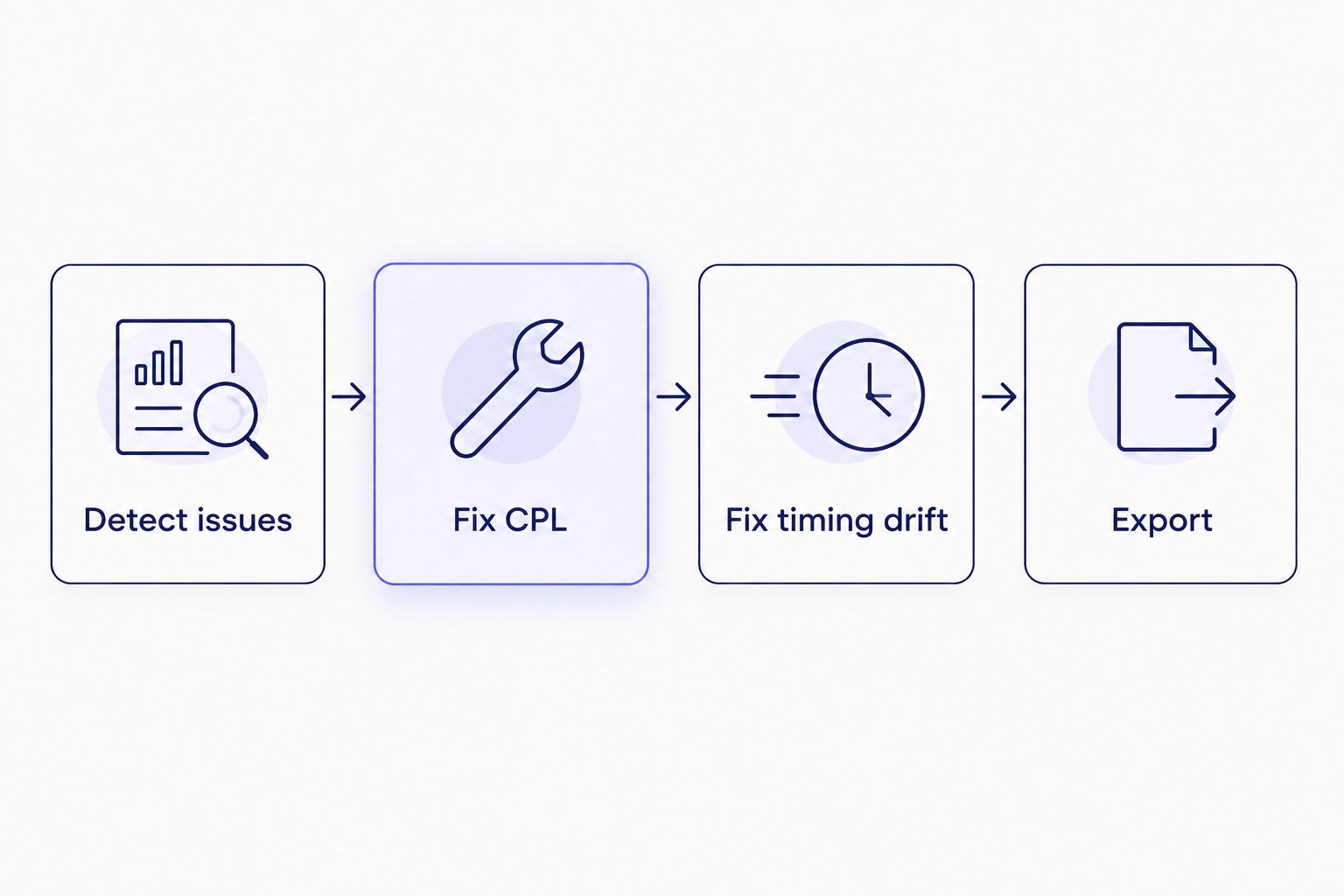
Each flagged cue moves through the same four-step fix before export.
Happy Scribe wins on human-reviewed transcription
Happy Scribe's model includes routing a transcript through a human transcriptionist for review or full manual transcription, as a separate option from its automatic ASR output. That matters for legal depositions, academic research transcripts, and any client contract that specifically requires a human-verified transcript rather than AI output with an editing pass on top.
VideoText's pipeline is AI-first end to end: ASR transcription, then editing, formatting, and translation tools built around that AI output, without a built-in human transcription service behind it. If a contract or a court requires a person to certify accuracy, VideoText's own editing tools don't satisfy that requirement by themselves.
If a human has to sign off on transcript accuracy, Happy Scribe covers that natively in 2026 — VideoText doesn't.
VideoText wins on client-guideline formatting
VideoText reformats transcripts and subtitles to match Rev, GoTranscript, Scribie, or a custom client style guide automatically — line-break rules, speaker-label conventions, and formatting specs applied without manually rebuilding the file for each platform. A freelancer delivering the same interview to two clients with different style guides uses this to skip re-formatting the same transcript twice by hand.
Happy Scribe's stated toolset doesn't include an equivalent guideline-template feature for reformatting output to a named platform's spec.
For freelancers juggling more than one client style guide, this is VideoText's clearest edge over Happy Scribe in 2026.
Translation and speaker diarization are close calls
Both tools translate subtitles and transcripts, and both run speaker diarization — the process of detecting how many speakers are in a recording and labeling which segment belongs to which one. VideoText translates across 70+ languages with cue timing preserved on the translated file, so a translated SRT doesn't need a separate re-timing pass. Happy Scribe also offers multi-language translation for subtitles and transcripts as part of its service.
On diarization, both tools detect speakers automatically and let you assign names to each one; VideoText does the renaming directly inside the same UI you use to fix subtitles, so labeling and QA happen in one pass instead of two separate steps.
Call translation and diarization a tie between VideoText and Happy Scribe — the gap is in workflow integration, not raw capability.
VideoText wins on automation depth
VideoText connects through an API, a Zapier integration, and a Chrome extension, which lets you automate transcription, subtitle fixing, translation, burning, and compression without opening the web app for every single file. It also runs live transcription for real-time streaming ASR, and batch processing with a multi-file queue and ZIP exports on the Pro+ tier — useful for an agency clearing a backlog of client files on the same night.
Happy Scribe offers API access for automatic transcription workflows, but its core toolset doesn't list the same breadth of Zapier and browser-extension automation, or live transcription.
If you're wiring transcription into a larger production pipeline, VideoText's automation surface is wider in 2026.
Pricing: predictable plans vs. pay-per-service
VideoText runs on tiered SaaS plans, with batch processing and ZIP exports gated to the Pro+ tier — your monthly cost stays fixed regardless of how many files you process within your plan's limits. That predictability suits freelancers and agencies carrying a steady, recurring workload month to month.
Happy Scribe prices automatic and human transcription as separate services, which gives you flexibility to pay for human review only on the files that actually need it. The tradeoff: total monthly cost gets harder to predict once your automatic-to-human mix or your volume shifts from one month to the next. Check current plan details on each site before committing — this comparison doesn't quote figures because pricing changes independent of the feature set, and a number printed here in 2026 could be stale by the time you read it.
Try VideoText for subtitle QA
Fix CPL, timing drift, and guideline formatting in one pass.
Try VideoText
Final verdict: VideoText vs Happy Scribe in 2026
Choose VideoText if you're a freelance subtitle editor, podcast team, or media agency spending hours on subtitle QA — fixing CPL, timing drift, and reformatting to client guidelines before every delivery.
Choose Happy Scribe if you're handling audio where a human transcriptionist has to produce or verify the final transcript, and AI-assisted cleanup tools alone won't satisfy the client's accuracy requirement.
Scorecard
| Dimension |
Winner |
| Subtitle QA & timing-drift fixes |
VideoText |
| Human-reviewed transcription |
Happy Scribe |
| Client-guideline formatting |
VideoText |
| Translation |
Tie |
| Speaker diarization |
Tie |
| Automation depth |
VideoText |
| Pricing model |
Depends on workload |
FAQ
Is VideoText better than Happy Scribe for subtitle QA?
Yes, for subtitle QA specifically. VideoText runs automated CPL, CPS, and timing-drift detection inside a cue editor synced to video, which Happy Scribe's editor doesn't list as a built-in check.
Does Happy Scribe offer human transcription?
Happy Scribe offers human-reviewed or fully manual transcription as a service separate from its automatic ASR output. That's the main reason to pick it over an AI-only tool in 2026.
Can VideoText format transcripts to Rev or GoTranscript guidelines?
Yes. VideoText reformats transcripts and subtitles to Rev, GoTranscript, Scribie, or a custom client style guide automatically, applying line-break and speaker-label conventions without manual rework.
How many languages does VideoText support for subtitle translation?
VideoText translates subtitles and transcripts across 70+ languages, and cue timing carries over so the translated file doesn't need re-timing.
Does VideoText have a Chrome extension or API?
Yes. VideoText offers an API, a Zapier integration, and a Chrome extension for automating transcription, fixing, translating, burning, and compressing files.
Which tool is better for podcast transcription in 2026?
It depends on the deliverable. VideoText fits podcast teams needing fast turnaround with chapters, summaries, and clean subtitles; Happy Scribe fits teams that need a human-verified transcript for a specific episode.
Can I burn subtitles into video with VideoText?
Yes. VideoText supports burning subtitles as hardcoded, open-caption text directly into the video file as part of its export options.
Does Happy Scribe support speaker diarization?
Yes, Happy Scribe detects and labels speakers automatically, similar to VideoText's diarization feature, though VideoText lets you rename speakers in the same UI used for subtitle fixes.
One last thing
The detail that separates VideoText from most transcription tools in 2026 isn't the ASR engine underneath — every tool in this category runs on similar speech models. It's the QA layer on top: guideline formatting to Rev, GoTranscript, or Scribie specs sounds narrow, but it's the one feature that removes the manual re-formatting step freelancers actually complain about after delivery.
Related guides



