Cut subtitle QA time by running automated CPL, CPS, and timing-drift checks before any manual read-through — that single change removes most of the line-by-line scrubbing that eats delivery time. The remaining work is a synced cue-editor pass for overlaps and speaker labels, plus one guideline-format check against the client's spec (Rev, GoTranscript, Scribie, or a custom style guide).
TL;DR
- Automated CPL, CPS, and drift checks replace manual read-throughs and cut most QA time before delivery.
- A synced cue editor flags overlaps, gaps, and scene-cut spans directly against the video timeline.
- Guideline formatting for Rev, GoTranscript, or Scribie removes the reformat-then-requalify loop most editors repeat.
- Speaker diarization with in-UI renaming turns speaker QA into a confirmation pass, not a re-listen.
- Reducing QA time on subtitles before delivery means validating first and watching second, not the reverse.
Why this matters
Subtitle QA on a freelance or agency workflow usually means opening the SRT or VTT file, scrubbing the timeline, and checking line breaks by eye. That process doesn't scale past a handful of files a week in 2026, when client turnaround expectations keep shrinking.
VideoText automates that first layer of validation — CPL, CPS, overlaps, and drift get flagged before a human ever needs to watch the video. The manual pass that follows is reserved for judgment calls: grammar, meaning, and speaker attribution edge cases, not counting characters.
How to reduce QA time on subtitles before delivery
- Run an automated CPL and CPS check first. CPL (characters per line) and CPS (characters per second, a proxy for reading speed) are the two limits most client guidelines enforce. Checking these by eye means counting characters line by line — an automated pass flags every violation in the file at once.
- Fix overlaps and timing drift before the manual pass. Overlapping cues, gaps, and scene-cut spans where a cue crosses a hard cut are mechanical errors, not judgment calls. Resolving them automatically means the cue editor pass that follows is reviewing content, not hunting for timestamp problems.
- Confirm speaker labels once. Diarization detects and separates speakers automatically; QA here is renaming "Speaker 1" to the real name once in the UI, not re-listening to confirm who's talking on every cue.
- Apply the client's guideline before review, not after. Reformatting to Rev, GoTranscript, Scribie, or a custom house style changes line breaks and CPL limits. Doing this after the manual QA pass means re-checking the same file twice — apply the guideline first and QA the formatted version once.
- Do a single synced review pass. With mechanical errors already resolved, the remaining QA step is a cue editor synced to the video, checking flagged issues against picture instead of blind-reading the raw file.
- Export last. SRT, VTT, PDF, DOCX, and other formats should come out of a file that already passed QA — exporting first means QA'ing every format separately.
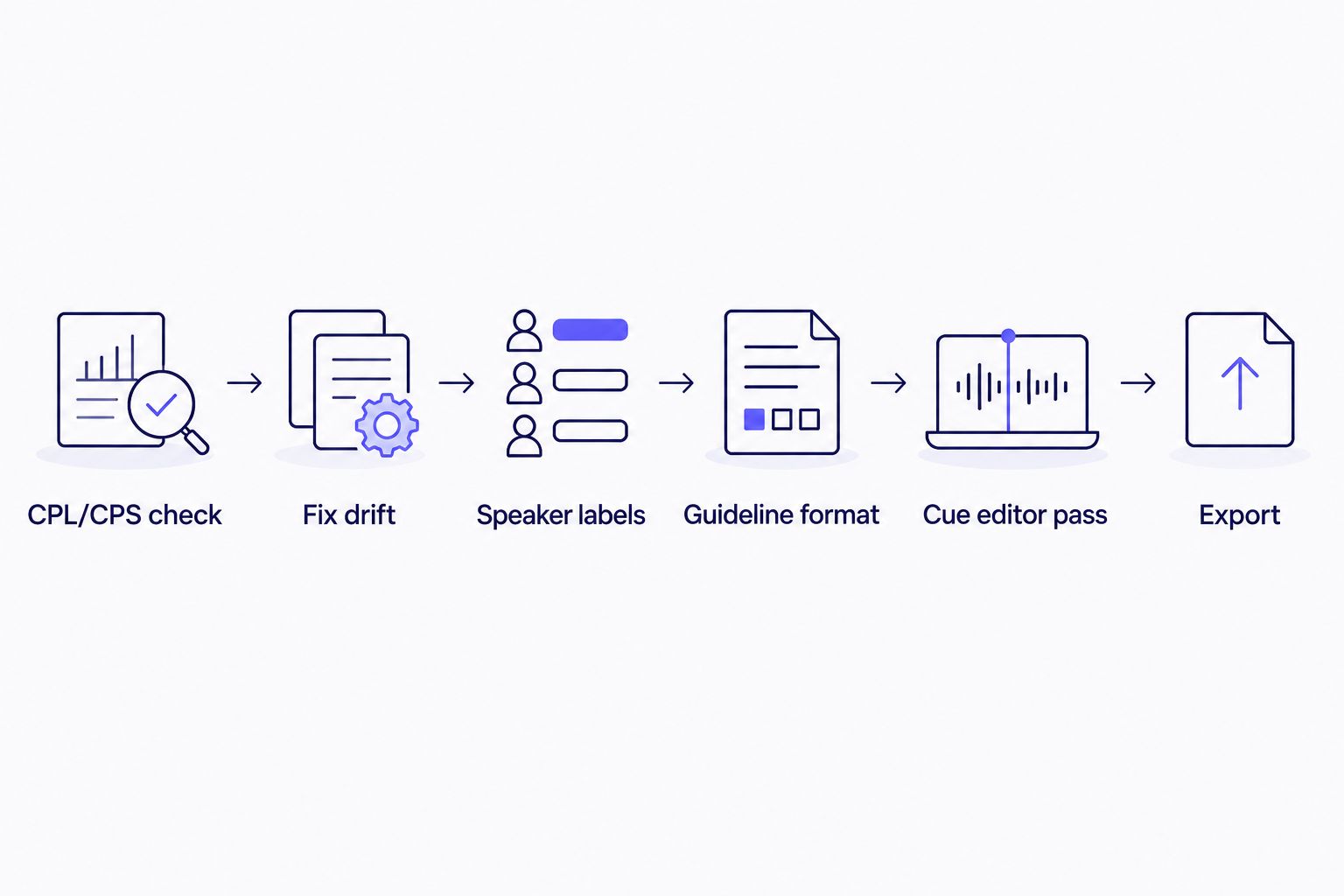
Mechanical checks come before the manual review, not after it.
If the deliverable is a YouTube upload rather than a client SRT, the guideline is usually simpler than broadcast or streaming specs. Compare options in the best subtitle generator tools for YouTube roundup, since YouTube's caption spec doesn't enforce CPL and CPS as strictly as a Netflix TTSC-style checklist does.
Why subtitle QA time varies
Not every file takes the same QA effort, even with the same automated tools running. A few factors drive most of the difference:
- Source audio quality. Crosstalk, heavy accents, or overlapping speakers raise ASR error rates, which increases the number of cues flagged for review.
- File length. A 90-minute file has proportionally more lines to check against CPL and CPS limits than a 10-minute clip.
- Speaker count. More speakers means more diarization labels to confirm during the rename step.
- Guideline complexity. A custom client spec with tighter CPL or line-break rules generates more automated flags than a looser default guideline.
- Translation. Translating subtitles into a new language changes character counts per line even when timing is preserved on the cues, which can trigger new CPL violations that didn't exist in the source language.
- Existing captions. Files that already carry burned-in captions or an outdated SRT need conversion before QA can even start.
“Translating a subtitle file resets its CPL risk — the words change length, the limit doesn't.”
Run this QA workflow automatically
Automated CPL, CPS, drift, and guideline checks in one pipeline.
Try VideoText
What is CPL and why does it slow down subtitle QA?
CPL stands for characters per line — the maximum number of characters allowed on a single subtitle line, set by client or platform guidelines. Checking CPL by eye means counting characters on every cue in the file; an automated CPL check flags every violation in one pass, which is why it's the first step in reducing subtitle QA time before delivery.
How do you check subtitle timing drift without watching the whole video?
Timing drift shows up as cues that start or end out of sync with the audio, overlapping cues, or gaps between cues. An automated drift check flags every instance across the file, and a synced cue editor jumps directly to each flagged timestamp instead of requiring a full watch-through.
Do speaker labels need manual QA after diarization?
Speaker diarization automatically detects and separates speakers in a transcript or subtitle file, so QA on speaker labels becomes a rename-and-confirm step, not a re-listen. The manual work is renaming "Speaker 1" and "Speaker 2" to the correct names once, not verifying every cue against the audio.
FAQ
What's the fastest way to reduce subtitle QA time before delivery?
Run automated CPL, CPS, and timing-drift checks before opening the video for a manual pass. This is the core answer to how to reduce QA time on subtitles before delivery for most freelance and agency workflows in 2026.
Is automated subtitle QA as accurate as manual review?
Automated checks reliably catch mechanical errors like CPL, CPS, overlaps, and gaps. A manual pass is still needed for judgment calls such as grammar, meaning, and speaker-attribution edge cases.
How much time does automated CPL checking save versus manual counting?
There's no single figure across every workflow, but automated CPL checking replaces the character-counting step entirely, which is typically the slowest part of manual QA on longer files.
Does translating subtitles require a new QA pass?
Yes. Translation changes character counts per line even when cue timing is preserved, so a fresh CPL check after translation catches violations that didn't exist in the source language.
What's the difference between CPL and CPS?
CPL is characters per line, a line-length limit. CPS is characters per second, a proxy for how fast a viewer needs to read a cue. Both should be checked automatically before a manual QA pass.
Can speaker diarization replace manual speaker QA?
Diarization detects and separates speakers automatically, so manual QA becomes a rename-and-confirm step rather than a full re-listen to the audio.
Do client guideline formats like Rev or GoTranscript affect QA time?
Yes. Each guideline sets its own CPL, line-break, and formatting rules, so reformatting to the client's spec before QA, rather than after, avoids checking the file twice.
What format should subtitles be QA'd in before export?
QA should happen on the working file before final export to SRT, VTT, PDF, or DOCX. Exporting first means QA has to be repeated separately on every additional format.
One last thing
The QA step editors skip most often is re-checking CPL after translation. A cue that passes CPL in English can fail it in German or Japanese because character counts per word differ — timing stays fixed, but line length doesn't. If translation is part of the delivery, run the CPL check again on the translated file before sending it, not just on the original.
Related guides



