Journalist video transcription is speech from recorded interviews, press conferences, and field footage converted into timestamped text with the aim of publishing accurate, attributable reporting in 2026. Unlike general content teams, newsrooms must preserve exact quotes, identify each speaker, and keep captions synchronized after video edits.
TL;DR
- Video transcription for journalists starts with full verbatim text linked to exact timestamps.
- Verify names, numbers, and direct quotes against the recording before publication in 2026.
- VideoText is best for newsroom video transcription that needs diarization, subtitle QA, translation, and multiple export formats.
- Check CPL, CPS, line breaks, overlaps, and timing drift before publishing captioned news video.
Netflix English guide limits
42 CPL
Maximum line length
2 lines
Maximum per cue
20 CPS
Adult reading speed
Why video transcription matters for journalists
A newsroom transcript connects every direct quote to the original recording. The reporter can search for a statement, open its timestamp, check the wording, and confirm who said it. This matters when AI transcription processes accented English, unfamiliar names, technical language, background noise, or overlapping speech.
A finished story can require several outputs from the same source file. The reporter needs searchable text. The video editor needs timed captions. The producer may need a summary, chapters, or translated subtitles. Creating each output separately repeats work and introduces differences between the transcript and the published clip.
The 2026 newsroom workflow should therefore preserve one verified source transcript. Edited quotes, subtitle files, summaries, and translations should trace back to that record instead of becoming disconnected copies.
How to transcribe newsroom video step by step
The reliable sequence is capture, transcribe, identify, verify, caption, translate, and export. Each stage solves a different failure point. Combining them into one unchecked automatic pass hides errors rather than removing them.
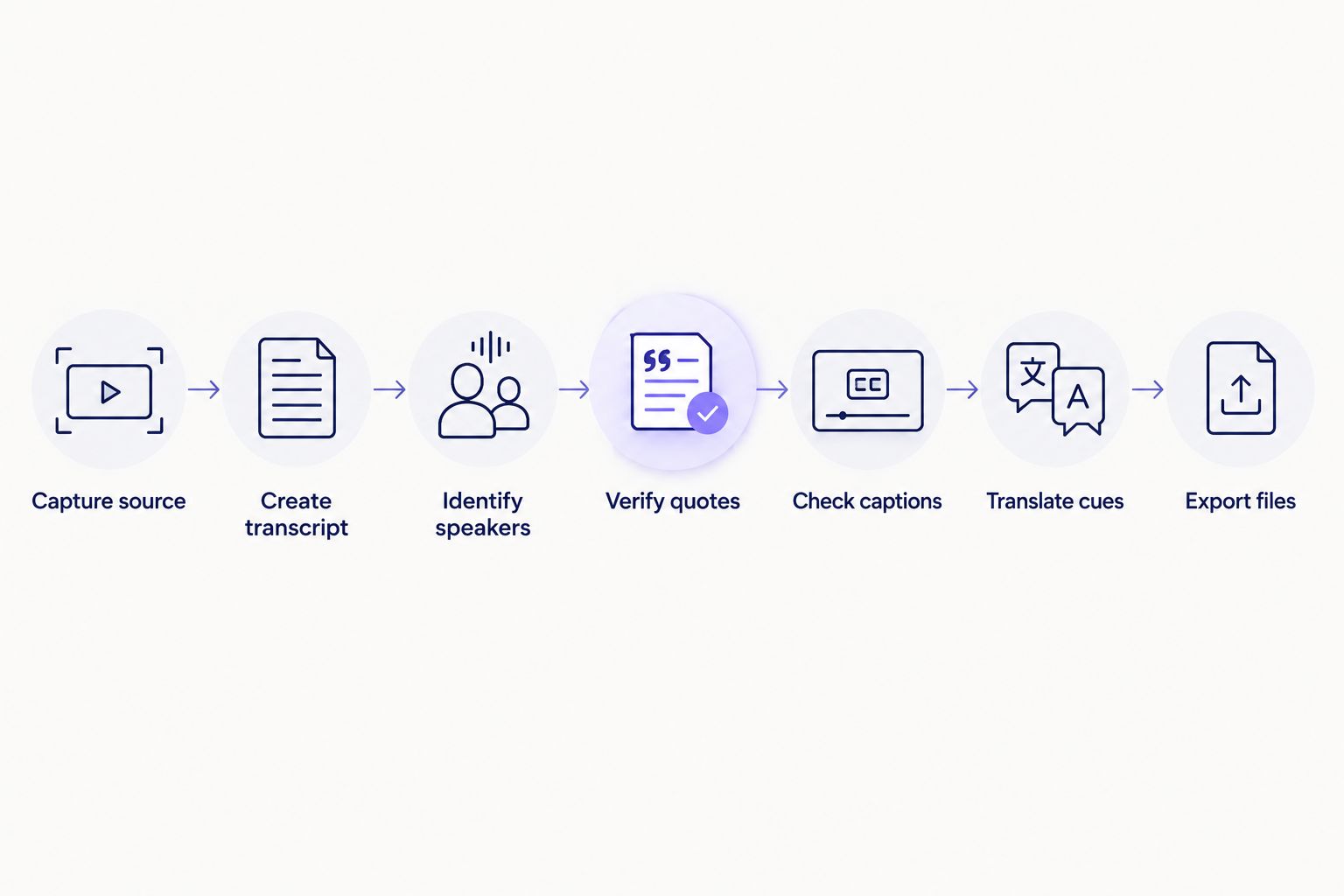
Quote verification happens before captioning, translation, and final export.
Capture the cleanest available recording
Automatic speech recognition, or ASR, converts speech into text. It works from the audio signal it receives. A distant voice, constant background noise, and two people speaking at once make words harder to distinguish before transcription begins.
Keep the original file even if you create a compressed working copy. The original provides the reference for disputed wording, clipped syllables, and timing changes introduced during editing.
- Place the microphone near the primary speaker when access permits
- Record separate channels for interviewer and guest when the equipment supports them
- Monitor for wind, clothing noise, echo, and distorted peaks
- Save the unedited source before trimming or compressing it
- Use a clear file name that identifies the story, source, and recording date
Choose full verbatim before clean verbatim
Full verbatim preserves speech as delivered, including fillers, repetitions, false starts, and incomplete sentences. Clean verbatim removes selected speech disfluencies while retaining the speaker's intended words. The clean version reads faster, but it is not the correct starting record for a direct quote.
Create the full verbatim transcript first in 2026. Make a separate clean copy for scripts, article drafting, or internal review. Do not overwrite the version tied to the recording.
- Retain fillers when they affect meaning, hesitation, or tone
- Preserve false starts until the direct quote has been verified
- Mark inaudible sections instead of guessing the missing words
- Keep timestamps attached to the full verbatim version
- Record editorial changes in a separate working copy
Generate timed text and identify speakers
A timed transcript divides speech into segments connected to positions in the media. Speaker diarization detects changes between voices and assigns labels such as Speaker 1 and Speaker 2. A journalist must replace those generic labels with verified names or roles.
VideoText video transcription generates timed segments and detects speakers. Editors can rename speakers in the interface, search by keyword, and export the result in TXT, SRT, VTT, PDF, DOCX, JSON, CSV, and other supported formats.
- Review the first detected turn for every speaker
- Match each label against reporting notes or an on-camera introduction
- Inspect interruptions and overlapping exchanges manually
- Use one spelling for each name throughout the transcript
- Keep role labels when a person's identity cannot be published
Verify every publishable quote
ASR output is a draft, not source confirmation. A direct quote needs a listening pass at its timestamp. Names, figures, locations, and specialized terms need separate checks because a plausible-looking word can still be wrong.
Work from the recording outward. Listen to the full sentence, compare it with the full verbatim text, and then decide whether the quote needs contextual words around it. Ellipses and bracketed clarifications must follow the newsroom's editorial rules.
- Play the audio before and after the selected quote
- Check names against an authoritative spelling source
- Verify every figure, date, title, and place independently
- Confirm the speaker label before copying text into the story
- Mark uncertain audio for another editor instead of resolving it by assumption
- Preserve the timestamp with the quote during editorial review
Build and validate the subtitle file
A transcript records speech. A subtitle file divides that speech into timed cues designed for reading while the video plays. SRT and VTT store cue text with start and end times, but they do not guarantee readable line length or correct synchronization.
For a public reference, the Netflix English Timed Text Style Guide available in 2026 permits no more than 42 characters per line and 2 lines per cue. Its adult-program reading-speed limit is 20 characters per second. These are Netflix specifications, not universal newsroom rules; apply the outlet's own guide when it differs.
VideoText subtitle QA detects CPL, CPS, overlaps, gaps, scene-cut spans, timing drift, grammar issues, and problematic line breaks. Its in-browser cue editor stays synchronized with the video so the editor can inspect the issue in context.
- Compare each cue against the final edited video, not the raw interview
- Keep names and grammatical phrases together across line breaks
- Remove cue overlaps unless the chosen format requires them
- Check whether a trim changed every later timestamp
- Review reading speed after translating or rewriting a caption
- Export a fresh subtitle file after the final timing pass
Translate cues without replacing their timing
Subtitle translation changes line length even when the meaning remains accurate. A translated cue can exceed the target CPL or CPS limit, and literal wording can misrepresent an idiom. Translation therefore needs both a language review and a new subtitle QA pass.
VideoText translates transcripts and subtitles across 70+ languages while preserving timing on the existing cues. Timing preservation avoids rebuilding every start and end point, but an editor still needs to check terminology, names, line breaks, and reading speed in the target language.
- Keep the verified source-language transcript beside the translation
- Preserve speaker labels across language versions
- Review names, organizations, locations, and quoted terminology
- Recheck CPL and CPS after translation
- Ask a qualified language reviewer to resolve idiom and ambiguity
- Compare the translated cue with the same source timestamp
Export, archive, and automate repeat work
The final output depends on its destination. Article writers often need DOCX, PDF, or TXT. Web video players commonly use VTT. Editing and publishing systems may require SRT, CSV, or JSON. Confirm the destination format before the final export rather than converting an approved file at the last minute.
For recurring programs, batch processing and automation reduce repeated upload and download steps. The source description states that multi-file queues and ZIP exports are available on Pro+, while API, Zapier, and Chrome extension options can automate transcription, fixing, translation, burning, and compression.
- Export a full verbatim transcript and a separate working copy
- Save SRT or VTT beside the exact video version it matches
- Include speaker and timecode layouts when the recipient requires them
- Use batch processing for several interviews from the same assignment
- Test an automated workflow with nonurgent media before using it on breaking news
- Archive the source, verified transcript, caption file, and publication version together
Process your newsroom recording
Create timed transcripts, speaker labels, subtitles, and newsroom-ready exports from one source file.
Start transcribing
Newsroom transcription options compared
The right option depends on whether the job needs a rough reference, a verified quote, timed captions, or real-time text. No option removes the journalist's responsibility to confirm publishable wording.
| Option |
Best for |
Main advantage |
Key limitation |
| Manual transcription |
A short interview requiring close listening |
The reporter hears every passage while typing |
Repeating, timestamping, and formatting the text takes direct editorial time |
| Basic ASR tool |
A searchable first draft of clear single-speaker audio |
Converts speech into text without manual typing |
Diarization, subtitle QA, translation, and export support vary by tool |
| Human transcription service |
Assignments where transcription can be handed to an external reviewer |
Adds a separate human transcription pass |
The handoff separates transcript production from the newsroom editing workflow |
| VideoText |
Newsrooms needing timed text, diarization, subtitle QA, translation, and multiple exports |
Keeps transcript and subtitle correction in one workflow |
Direct quotes still require editorial verification against the recording |
| Live transcription |
Monitoring a press conference or broadcast as it happens |
Produces text while the event is underway |
The changing live transcript is not a verified publication record |
VideoText is best for journalists and newsroom editors who need one 2026 workflow for transcripts, speaker labels, subtitle QA, translations, and exports; it does not replace human quote verification.
Common mistakes journalists make
Cleaning the only transcript copy
Removing fillers and false starts can make a transcript easier to scan, but the edit also changes the source record. Keep full verbatim and clean verbatim as separate files with clear names.
Trusting diarization without identifying speakers
Diarization separates voices; it does not prove a person's identity. Confirm each detected speaker against the recording and reporting notes before attributing a quote.
Captioning the raw cut instead of the final edit
A trim changes cue timing. Captions created against an earlier video version can drift even when the text remains correct. Run the last synchronization check against the exact publication file.
Treating CPL and CPS as the same check
CPL measures characters per line. CPS measures characters per second. A cue can fit within 42 CPL and still disappear too quickly to read, so both checks are required when that style guide applies.
Translating text without repeating QA
Translation changes word order and line length. A source-language subtitle that passes timing and line checks can fail them after translation. Validate each language as its own deliverable.
FAQ
What is the best video transcription workflow for journalists in 2026?
Start with a full verbatim, timestamped transcript, verify speakers and direct quotes, then create captions, translations, and exports from that record. VideoText is suited to this workflow because it combines diarization, subtitle QA, translation, and multiple export formats.
Is AI transcription accurate enough for direct news quotes?
AI transcription is suitable for producing a searchable first draft, but every direct quote must be checked against its source timestamp. Names, figures, accents, crosstalk, and specialized terminology need particular attention.
What is speaker diarization in journalism?
Speaker diarization is the automatic separation of a recording into segments based on detected voices. It creates speaker labels, but a journalist still has to connect each label to a verified person or role.
Should journalists use full verbatim or clean verbatim transcription?
Journalists should keep full verbatim as the source record and create clean verbatim as a separate working copy. Full verbatim preserves fillers, repetitions, and false starts that may matter during quote verification.
What is the difference between a transcript and an SRT file?
A transcript is a written record of speech, while an SRT file divides text into numbered cues with start and end timestamps. An SRT file also needs line-length, reading-speed, overlap, and synchronization checks.
Can newsroom subtitles be translated without losing synchronization?
Yes, translation can retain the original cue timings. The translated version still needs review because new wording can change line length, reading speed, terminology, and natural phrasing.
Do automatic captions need human proofreading in 2026?
Yes, captions used with published journalism need a human review against the final video. The review should cover wording, speaker attribution, CPL, CPS, line breaks, overlaps, gaps, and timing drift.
Which transcript formats should a newsroom keep?
Keep a searchable transcript format and the timed subtitle format used by the publishing system. The available VideoText exports include TXT, SRT, VTT, PDF, DOCX, JSON, and CSV.
One last thing
Do not let the edited article become the only surviving version of an interview. In 2026, the useful archive is a set: original media, full verbatim transcript, verified speaker labels, final subtitle file, and the exact published video. If wording or attribution is questioned later, that set shows what was recorded, what was verified, and what the audience received.
Related guides



