Video captioning for corporate training is the process of syncing SRT or VTT captions to internal training, onboarding, and compliance videos so employees can follow content without audio, in a second language, or with hearing loss. L&D teams caption differently than marketing teams: higher video volume, frequent SME-led recordings with inconsistent audio quality, and Section 508 or ADA deadlines that don't move for a launch date.
TL;DR
- Video captioning for corporate training means ASR transcription plus CPL/CPS fixes before LMS delivery in 2026.
- VideoText handles transcription, timing fixes, speaker labels, and SRT/VTT export for training modules.
- Native LMS and Zoom auto-captions skip QA entirely: skip them for anything compliance-critical.
- Translated captions must preserve cue timing across languages, or lines get cut off mid-sentence on delivery.
Caption benchmarks that apply in 2026
42 characters
Standard CPL limit
17 cps
Standard reading speed
70+ languages
Translation coverage with timing preserved
Why video captioning matters for corporate training and L&D teams
VideoText and similar tools convert raw ASR output into a caption starting point, but L&D volume changes the math on what happens next. A single missed CPL fix on a 40-minute compliance module repeats across every export format the LMS asks for: SRT for one platform, VTT for another, burned-in for a video wall in a break room.
Section 508 and the ADA push captioning from optional to required for a large share of corporate and government-adjacent training content in 2026, and even where it isn't strictly mandated, HR and legal teams treat it as baseline risk mitigation. The failure mode in 2026 isn't missing captions anymore. It's captions that exist but fail QA: garbled acronyms, missing speaker labels on panel recordings, translated versions that drift out of sync with the video.
Build the caption workflow step by step
Audit your training video library for caption gaps
Before fixing anything, find out what's actually broken. Pull every training video the LMS serves and check it against a short list, manually, in a spreadsheet if that's all you have.
- Flag every module missing an SRT or VTT file entirely
- Flag modules with captions but no speaker labels on multi-presenter recordings
- Flag any caption track that was auto-generated and never reviewed
- Flag videos re-cut or updated since captions were last exported
- Flag non-English rollouts where captions were never translated
This audit usually surfaces the highest-risk gaps first: the onboarding video every new hire watches, and the compliance module tied to a renewal deadline.
Transcribe the raw recording before touching captions
Every caption workflow starts with a transcript. Typing a transcript for an hour of training video by hand takes hours on its own, so most teams either use a free auto-caption tool or run the file through automatic speech recognition.
- Type it manually in a text editor if the file is short and audio is clean
- Use a platform's native auto-caption export as a rough first draft
- Run an open-source ASR model locally if the setup time is available
- Upload the file to VideoText, which converts video or audio into a timed transcript with speaker segments in one pass
VideoText's transcription output is the base the rest of this workflow builds on: segments carry timestamps, so nothing needs re-timing from scratch later.
Fix subtitle timing, CPL, and reading speed before delivery
Raw ASR transcripts are not caption-ready. Cue lengths run long, lines break mid-phrase, and reading speed spikes past what a viewer can process while also watching slides. Fix this before anyone reviews the file.
- Cap line length at 42 characters per line, the standard most style guides use
- Keep reading speed near 17 characters per second so viewers aren't racing text
- Close gaps and overlaps between adjacent cues
- Re-break lines at natural phrase boundaries, not mid-clause
- Check scene-cut spans so a cue doesn't straddle a cut
VideoText's fix subtitles tool runs these checks automatically and flags overlaps, gaps, and CPL/CPS violations in one pass. The subtitle CPL and CPS benchmarks by style guide breaks down the exact numbers different guides use if your organization follows a named standard.
Label speakers on multi-presenter training modules
Panel discussions, leadership Q&As, and train-the-trainer sessions need speaker labels or the caption track reads as one confusing block of text.
- Identify each speaker change manually by ear if the file is short
- Use a diarization tool to detect and separate speakers automatically
- Rename detected speakers to real names or role titles, such as Facilitator or SME
- Confirm label changes carry through to every export format
VideoText detects and labels speakers automatically, then lets you rename them in the editor before export.
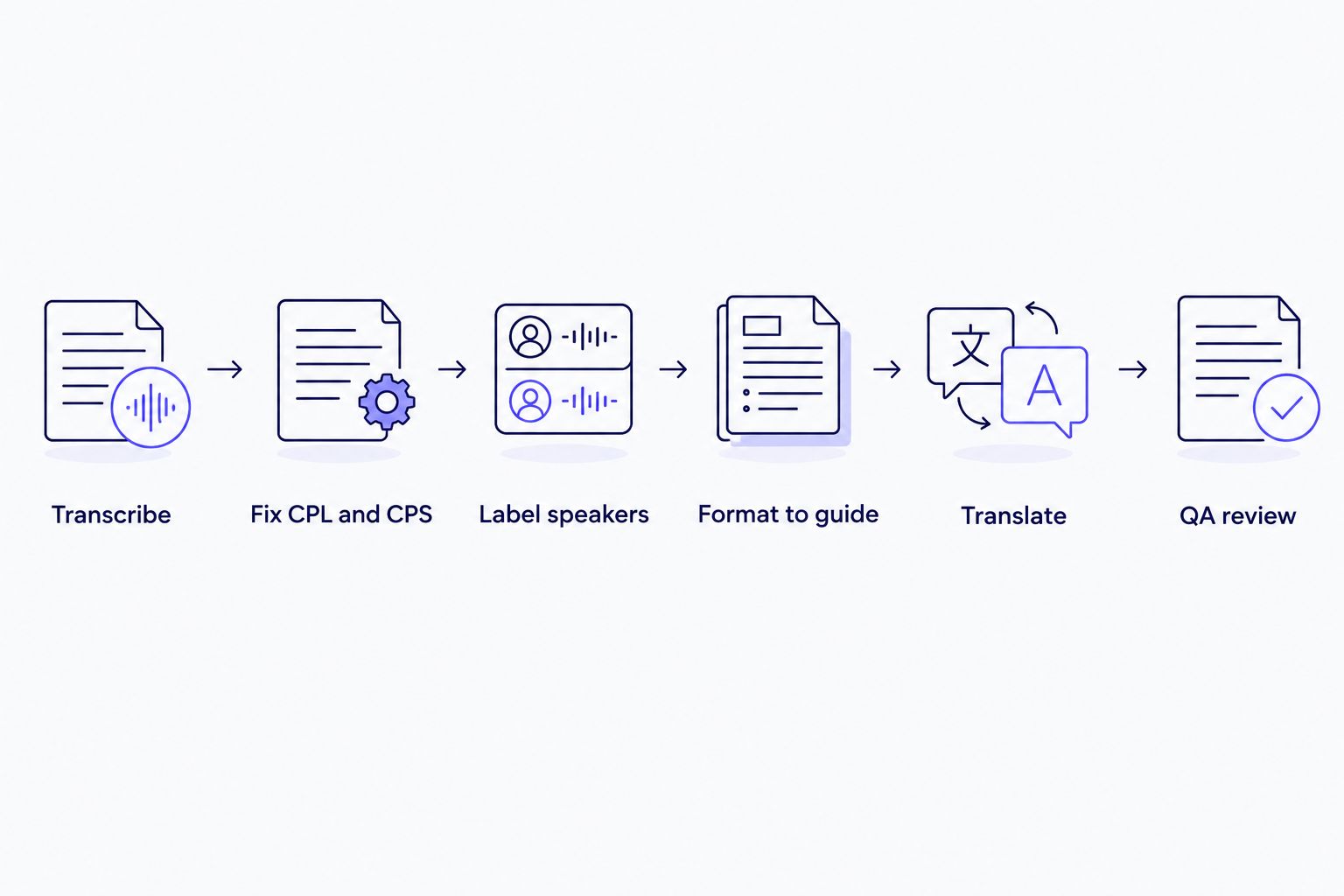
Each step feeds the next; skipping the CPL and CPS fix is where most training caption files fail QA.
Format captions to your LMS or client style guide
Every LMS and every client has formatting rules: max line count, casing, punctuation for sound cues, font-neutral formatting. Getting this wrong means a caption file that plays fine but fails an internal review.
- Match the line-count limits the LMS caption player enforces
- Standardize non-speech cue formatting, such as [MUSIC PLAYING]
- Apply consistent punctuation and casing rules across every module
- Reformat to match a named guideline, whether that's a Rev-style, GoTranscript-style, or custom internal guide
Compliance-heavy sectors like higher education and government training reference published caption guidelines directly. The closed captioning for higher education and ADA compliance guide covers formatting requirements that overlap heavily with what L&D teams run into under Section 508.
Translate captions for global training rollouts
Global companies re-run the same training in multiple languages, and translated captions break in one specific way: timing sync. Translated text runs longer or shorter than the English original, and if the tool doesn't adjust cue duration, lines get cut off before the viewer finishes reading.
- Translate line-by-line manually if the module is short and low-volume
- Use a translation service that preserves the original timecodes
- Re-check CPL and CPS in the target language, since character counts shift between languages
- Spot-check a sample of cues against the video, not just the text file
VideoText translates subtitles and transcripts across 70+ languages while keeping cue timing intact, so translated modules skip a full re-sync pass.
Burn or embed captions based on the delivery channel
Not every training destination handles the same caption format. Decide burn-in versus sidecar file before export, not after the module ships.
- Use SRT or VTT sidecar files for LMS platforms that support toggleable captions
- Burn captions directly into the video for channels with no native caption support
- Keep an un-burned master file so translated versions don't require re-editing the video
- Test playback in the actual delivery environment, not just a local player
QA every cue before publishing to the LMS
The last step is the one most teams skip under deadline pressure: reviewing the finished caption file against the video, cue by cue.
- Check for overlapping or missing cues
- Confirm speaker labels are attached to the right lines
- Verify reading speed doesn't spike on dense technical sections
- Watch the full video with captions on, not just a text pass
VideoText's subtitle QA review syncs the cue editor to the video and flags issues automatically, so this pass takes less time than a manual watch-through.
Options for L&D caption workflows in 2026
| Option |
Best for |
Key limitation |
| Native LMS or meeting-platform auto-captions |
Quick internal drafts, low-stakes recordings |
No CPL/CPS control, no speaker labels, weak on acronyms and product names |
| Freelance transcriptionist or captioner |
Small volume, high-touch review |
Turnaround scales with headcount; style varies vendor to vendor |
| Manual SRT editing in a text editor |
Teams with in-house QA staff and time to spare |
No automated timing-drift or overlap detection; error-prone at scale |
| VideoText |
L&D teams captioning multiple modules monthly with QA, translation, and diarization needs |
Batch processing and ZIP export sit on higher-tier plans |
Verdict: native auto-captions work for a quick internal draft and nothing else — skip them for anything going to a compliance file. VideoText fits teams captioning a recurring library of modules where CPL fixes, speaker labels, and translation all need to happen without redoing QA by hand each time.
Fix training captions before your next QA cycle
Transcribe, fix CPL and CPS, and export SRT/VTT from one workflow.
Try VideoText
Common mistakes L&D teams make with training captions
- Trusting auto-captions as the final delivery. Zoom, Teams, and LMS-native auto-captions have no CPL control, no speaker labels, and consistently garble acronyms and internal product names.
- Captioning once and never revisiting it. Training modules get revised for new policy or product updates, but the caption file rarely gets re-run against the new cut, so it drifts.
- Skipping the translated-caption timing check. Translated lines run longer or shorter than the English source, and cues that aren't re-timed get cut off before employees finish reading.
- No documented style guide across SMEs. One manager delivers all-caps captions, another delivers three-line blocks, and inconsistent CPL formatting slows every review cycle.
- Treating captioning as a compliance checkbox instead of a QA workflow. Files get delivered without checking overlaps, gaps, or reading speed, and the gaps surface during an audit instead of before launch.
FAQ
What is video captioning for corporate training?
Video captioning for corporate training is the process of syncing text captions to internal training, onboarding, and compliance videos so employees can follow content without audio, in a non-native language, or with hearing loss. Most L&D teams need SRT or VTT files formatted to their LMS's caption ingestion rules, not just a caption track baked into the player.
Is closed captioning required for corporate training videos under ADA?
Section 508 and the ADA generally require captions on training video content that is public-facing or tied to federally funded programs. Private internal-only training isn't always covered by the same statutes, but most L&D teams caption everything anyway to reduce risk and support non-native speakers.
What's the difference between captions and subtitles for training videos?
Captions include non-speech audio cues like [phone rings] and are built for viewers who can't hear the audio at all; subtitles assume the viewer can hear but need the dialogue in text, often for a different language. Most corporate training content uses captions, since accessibility compliance is the primary driver.
How long does it take to caption an hour of training video?
Turnaround depends on audio quality, number of speakers, and how much CPL and timing cleanup the file needs, so a single presenter with clean audio takes far less QA time than a five-person panel recording. Automated transcription produces a first draft in minutes; QA time is the variable that decides total turnaround.
Can auto-generated captions meet compliance requirements on their own?
No, raw ASR output almost always needs a CPL and CPS pass and a QA review before it meets accessibility standards. Auto-captions from meeting platforms commonly run over the 42-character CPL guideline and misread acronyms and product names, so compliance requires the QA step, not just the caption track.
What CPL and CPS limits work best for corporate training captions?
42 characters per line and roughly 17 characters per second are the standard reading-speed benchmarks most style guides use, and they apply to corporate training as well as broadcast content. Dense technical or jargon-heavy modules sometimes need a slightly lower CPS to stay readable.
Can training video captions be translated without losing timing sync?
Yes, but only if the translation tool adjusts cue duration instead of just swapping text, since translated languages often run longer or shorter than the English source. Tools that preserve timing sync keep the same cue start and end points and re-flow line breaks rather than pushing text past the original cut.
What caption export format does an LMS need?
Most modern LMS platforms accept SRT or VTT files as sidecar captions, though some older systems only support burned-in captions. Check the LMS's caption ingestion documentation before choosing burn-in over a sidecar file, since burned-in captions can't be toggled off or translated after export.
One last thing
The caption gap that costs the most in 2026 isn't the missing file, it's the untranslated one. A module fully captioned in English still fails accessibility review the moment it rolls out to a non-English-speaking office, and by then the video's already been re-cut twice since the original caption pass.
Related guides



