Transcription for market research firms means converting focus groups, in-depth interviews (IDIs), and usability sessions into full verbatim transcripts with speaker labels, formatted for import into qualitative coding software. A market research transcript has to survive a client audit and a coder's line-by-line review, not just read smoothly on a page.
TL;DR
- Transcription for market research firms means full verbatim output with moderator/respondent labels, not a readable summary.
- Full verbatim preserves hesitations and false starts that qualitative coders use for sentiment and discourse analysis.
- VideoText exports TXT, DOCX, CSV, and JSON with speaker layout for direct import into NVivo or Dedoose in 2026.
- Speaker diarization auto-labels turns, but renaming Speaker 1 to Moderator or Respondent A still takes a manual QA pass.
- Batch processing multiple focus-group files at once removes the one-file-at-a-time upload bottleneck on multi-session studies.
Why transcription matters for market research firms
Qualitative research runs on the transcript, not the recording. Coders in VideoText or NVivo tag phrases, pauses, and turn-taking as data, so a transcript that smooths over hesitations or mislabels a moderator as a respondent corrupts the coding pass before it starts.
Market research firms also work on tighter reporting cycles than most transcription buyers. A 10-session study needs consistent formatting across every file before a coder opens session one, and a stakeholder deck due in days doesn't leave room for re-transcribing a garbled speaker label on session 7.
Confidentiality adds a second constraint most other transcription buyers don't carry. Respondent consent forms often specify how identifying information is handled, which means transcription workflow decisions in market research are also data-handling decisions.
The market research transcription workflow, step by step
Choose full verbatim over clean verbatim for coding
Full verbatim keeps every filler, false start, and pause. Clean verbatim strips them for readability. Qualitative coding depends on the first one — a stripped transcript looks cleaner but throws away the signal a coder needs for sentiment or discourse analysis.
- Default to full verbatim for any transcript headed into NVivo, Dedoose, or manual thematic coding
- Reserve clean verbatim for executive summaries and quote pull-outs, not the coding file
- Flag inaudible or overlapping speech with a consistent marker instead of guessing at words
- Keep filler words ("um," "like," "you know") intact — coders often tag hesitation markers separately
- Note nonverbal cues (laughter, long pauses) in brackets if your coding scheme uses them
Label speakers correctly for moderator and respondent turns
A transcript with "Speaker 1" and "Speaker 2" instead of "Moderator" and "Respondent A" forces a coder to relisten before they can tag anything. Get the labeling right before the file leaves the transcription stage.
- Confirm moderator identity in the first 30 seconds of the recording, then label consistently for the rest of the session
- Assign respondent letters or numbers (Respondent A, Respondent B) rather than names, per most consent agreements
- Re-check speaker turns at crosstalk moments — automatic diarization tools misattribute overlapping speech most often
- Standardize the label format across every session in a study before a coder starts, not session by session
- Rename detected speakers in the transcript editor rather than doing a manual find-and-replace after export
Standardize timestamp and file format before coding starts
A study with 12 sessions and 12 different timestamp formats slows down every coder who has to cross-reference a quote back to the recording. Fix formatting once, at the transcript stage, instead of once per coder.
- Pick one timecode format (HH:MM:SS or MM:SS) and apply it to every session file in the study
- Export in the format your coding software actually imports cleanly — CSV and DOCX both work in most qual tools, TXT is safest for plain import
- Include a header row with session ID, date, and moderator name on every file
- Keep file naming consistent (study-name_session-number) so a batch import doesn't require manual sorting
Automate the transcript-to-coding handoff for multi-session studies
Manually uploading and labeling one session at a time works for a 3-interview pilot. It stalls on a 20-session omnibus study. This is where a batch pipeline earns its place, not before you've settled on verbatim style and labeling conventions.
VideoText's batch processing queues multiple audio or video files and runs transcription, speaker diarization, and export in one pass, with ZIP exports for the full batch. Speaker diarization detects and labels turns automatically; renaming Speaker 1 to Moderator still takes a manual pass, but it replaces relistening to the whole session.
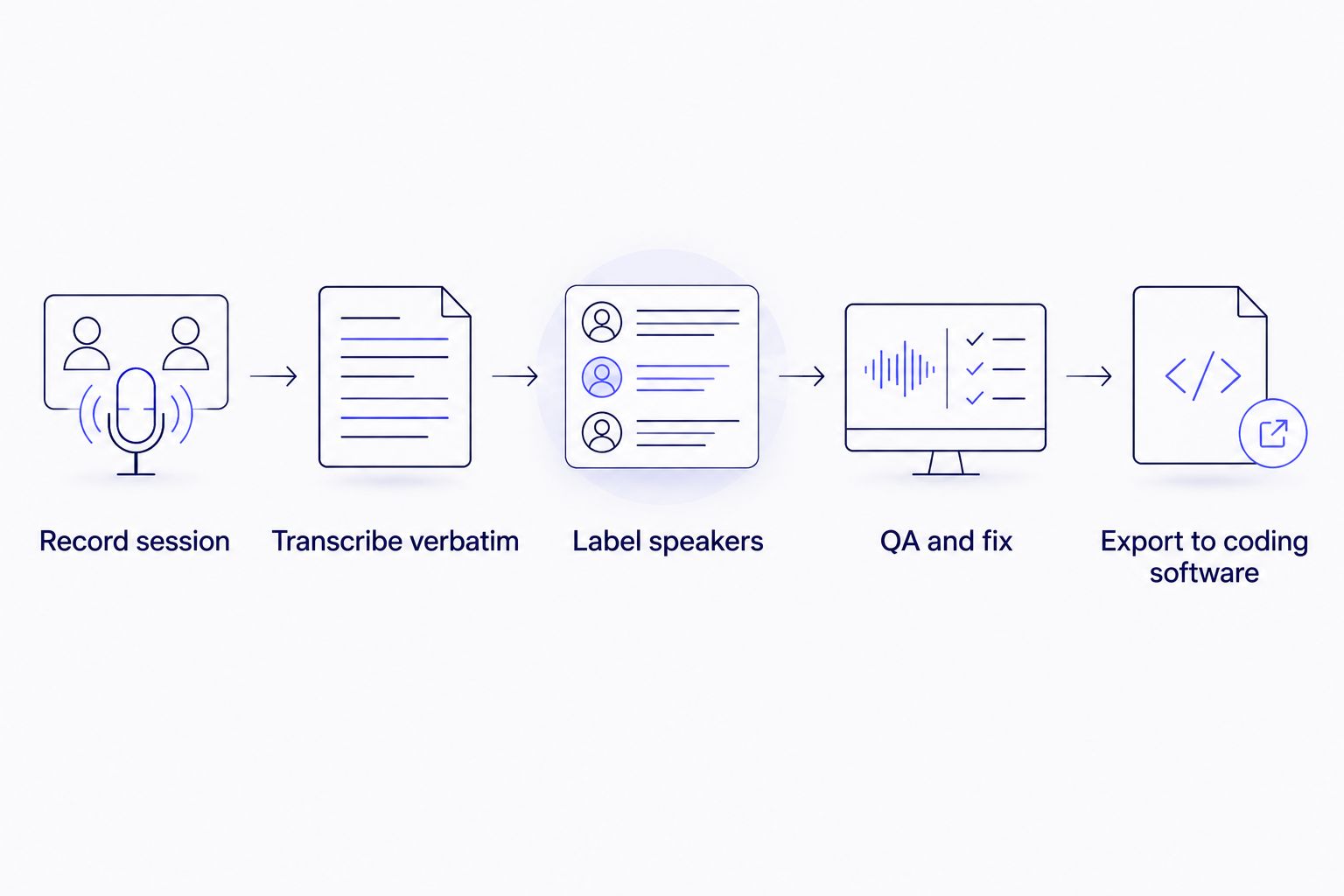
Each step is a checkpoint a coder shouldn't have to redo after the file lands in their queue.
Run a QA pass before a transcript reaches a client or coder
AI transcription and diarization handle the first-pass conversion. Market research transcripts still need a human check on terminology, speaker identity, and any client-specific formatting guideline before delivery — skipping this step is how a mislabeled moderator turn ends up coded as respondent sentiment.
- Check that every speaker label is consistent from the first line to the last
- Verify domain terminology (brand names, product SKUs, category jargon) against a client-supplied glossary if one exists
- Confirm the transcript is clean enough for client delivery before it moves to the coding stage
- Spot-check two or three minutes against the audio for a study with sensitive or technical subject matter
- Reformat to the client's stated guideline (verbatim style, timestamp interval, speaker naming) rather than your team's default
Translate transcripts for multi-market studies
A global brand tracking sentiment across five countries needs transcripts in a shared analysis language, and if video clips get shared with stakeholders, caption timing has to survive translation. VideoText translates transcripts and subtitles across 70+ languages with cue-level timing preserved, so a translated clip doesn't drift out of sync with the recording.
- Translate the coding-ready transcript, not just the summary, if analysts across markets need to compare quotes directly
- Keep a bilingual version (original plus translation side by side) for any quote that goes into a client-facing report
- Check caption timing after translation if the deliverable includes video clips, since sentence length changes across languages
Protect respondent confidentiality across the whole workflow
Consent forms in market research typically restrict how respondent identity moves between the research team and the client. That constraint should shape which transcription setup a firm uses, not just how the final file is redacted.
- Replace respondent names with codes at the transcript stage, not after the file has already circulated
- Confirm where uploaded audio and transcripts are stored and who can access them before choosing a transcription tool for sensitive studies
- Strip identifying details from any transcript segment quoted in a public-facing report
- Review vendor data-handling practices against the study's consent language before a single file gets uploaded
Comparing transcription options for market research firms
| Option |
Best for |
Key limitation |
| Freelance human transcriptionist |
Small, highly sensitive studies needing manual judgment on ambiguous speech |
Turnaround scales with headcount — slow past 5-10 sessions |
| Consumer ASR apps (free tiers) |
One-off internal listening, not client delivery |
No diarization control, no guideline formatting, no batch export |
| VideoText |
Firms running multi-session qual studies needing speaker labels, coding-ready exports, and a QA pass before delivery |
Full verbatim still needs a human check for interpretation-level nuance |
| Full-service transcription agency |
Firms outsourcing the entire formatting and QA step |
Turnaround tied to the agency's queue, not on demand |
Verdict: VideoText fits firms coding 5 or more sessions per study who need consistent speaker labels and coding-software-ready exports without a manual relabeling pass on every file. Firms with a single sensitive interview and no coding software in the mix are better served by a freelance transcriptionist working file by file.
Batch-transcribe your next study
Queue multiple sessions, label speakers, and export coding-ready files.
Try VideoText
Common mistakes market research firms make
- Coding from clean verbatim. Stripping fillers and false starts before coding throws away the hesitation markers a discourse or sentiment coding scheme depends on.
- Leaving generic speaker labels in the export. "Speaker 1" and "Speaker 2" instead of Moderator and Respondent A forces every coder to relisten before tagging a single line.
- Mixing timestamp formats across a study. A 12-session study with 12 different timecode conventions slows down cross-referencing quotes back to the recording.
- Skipping redaction until the report stage. Respondent names circulating in raw transcripts before redaction violates most consent agreements, even if the final report is clean.
- Assuming AI accuracy claims cover terminology. A high accuracy percentage on general speech doesn't guarantee correct handling of brand names, category jargon, or a client's specific glossary — that needs a manual check regardless.
FAQ
What is transcription for market research firms?
Transcription for market research firms converts recorded focus groups, IDIs, and usability sessions into text transcripts for coding and reporting. Firms typically need full verbatim output with speaker labels because qualitative coding software reads pauses and turn-taking as data, not just words.
Is verbatim or clean verbatim better for qualitative coding in 2026?
Full verbatim is better for qualitative coding because it preserves fillers, false starts, and pauses that signal hesitation or emphasis. Clean verbatim strips those markers, which reads cleaner but loses signal coders use for sentiment or discourse analysis.
Can transcripts be exported directly into coding software like NVivo?
Yes. VideoText exports transcripts as TXT, DOCX, CSV, and JSON with speaker layout, and those formats import into NVivo, Dedoose, and similar qualitative coding tools without reformatting the file first.
How do market research firms handle multi-language studies?
Firms translate the coding-ready transcript before cross-market analysis, keeping cue-level timing intact if video clips are shared with clients. VideoText translates transcripts and subtitles across 70+ languages while preserving cue timing.
How long does transcription take for a batch of focus groups?
Turnaround depends on file length and queue size rather than a fixed number. Batch processing multiple session files at once removes the manual step of uploading and transcribing one file at a time, which is the main bottleneck on multi-session studies.
Do respondent identities need to be redacted from transcripts?
Yes, in most cases. Consent agreements in market research commonly require replacing or removing respondent names before a transcript circulates beyond the research team, especially before it reaches a client or third-party analyst.
Is AI transcription accurate enough to skip human proofreading for market research?
No. AI transcription and speaker diarization handle the first-pass conversion, but market research transcripts still need a human QA pass on speaker labels, terminology, and any client-specific glossary before they're coding-ready.
What file formats do market research firms need from a transcription tool?
Most qualitative coding software imports TXT, DOCX, or CSV cleanly, and firms sharing clips with clients also need SRT or VTT for captions. A transcription tool that exports all of these avoids a manual reformatting step per study.
One last thing
The step firms skip most isn't transcription accuracy — it's speaker relabeling QA. A transcript with correct words but "Speaker 1" instead of "Moderator" still costs a coder a full relisten before they can tag a single line, and that cost repeats across every session in a study. Fix the label, not just the words, before a transcript leaves the pipeline.
Related guides



