A trained human takes about 5 hours on average to transcribe a one-hour video, with a common planning range of 4 to 6 hours in 2026. Once processing starts, automatic speech recognition processes the same file in less than its 1-hour runtime, but neither estimate includes a full subtitle QA and client-formatting pass.
TL;DR
- How long does it take to transcribe a one hour video? Plan 4 to 6 hours for manual transcription.
- AI transcription processes a one-hour file faster than real time once processing starts.
- Speaker count, audio quality, verbatim rules, and subtitle formatting determine the final delivery time.
- Videotext is best for editors who need transcription, subtitle repair, QA, and export in one workflow.
Why this matters
Transcription time and delivery time are different numbers. Transcription converts speech into text. Delivery also requires proofreading, speaker-label checks, formatting, and sometimes subtitle validation.
That distinction affects quotes and deadlines. If you estimate only the first ASR pass, you omit the work required to fix names, punctuation, overlapping cues, line breaks, characters per line, and reading speed.
A tool such as Videotext combines the initial transcript with timed segments, speaker diarization, subtitle repair, client-guideline formatting, and multiple export formats. The remaining time depends on how much correction the source file needs.
Videotext is best for freelance transcriptionists and subtitle editors who need to turn raw media into a reviewed transcript or subtitle file without moving the job between separate tools. Its advantage is workflow coverage. Its limit is the same as every ASR system: unclear speech still requires human review.
How long does it take to transcribe a one-hour video?
Use 5 hours as the manual point estimate and 4 to 6 hours as the working range for a clear one-hour recording in 2026. Use less than the 1-hour runtime as the AI processing estimate once the file reaches the ASR stage. Uploading, queueing, proofreading, and subtitle QA sit outside that processing figure.
| Method |
Time for a one-hour video |
Best for |
Main limitation |
| Manual transcription |
About 5 hours; usually 4 to 6 hours |
Full verbatim work and difficult recordings |
Slowest method and sensitive to fatigue |
| AI transcription |
Less than 1 hour of processing |
Fast drafts, timed transcripts, and batch workflows |
Requires review when speech is unclear |
| Live transcription |
Runs during the 1-hour event |
Meetings, streams, and live captions |
Limited opportunity to correct speech before display |
The table separates processing from cleanup. A fast transcript can still take substantial editing time when the client requires named speakers, exact timecodes, clean verbatim text, or subtitle cues that meet a specific style guide.
A one-hour video also contains visual information that audio-only transcription does not capture automatically. If the assignment requires on-screen text, sound-effect labels, or speaker identification from the picture, add those tasks to the brief before estimating the job.
A practical five-step estimate
- Prepare the file. Confirm that the correct video is complete, playable, and ready for upload. Trim irrelevant material before transcription when the brief excludes it.
- Generate the draft. Type the transcript manually or process the file with ASR. This is the 4-to-6-hour manual stage or the faster-than-real-time automated stage.
- Edit the transcript. Correct names, punctuation, false starts, and speaker labels. Apply full verbatim or clean verbatim rules consistently.
- Validate subtitles. Review cue timing, overlaps, gaps, CPL, CPS, line breaks, and timing drift when the deliverable includes SRT or VTT.
- Export the delivery files. Check the requested format, timecode layout, speaker layout, and client guideline before sending the final version.
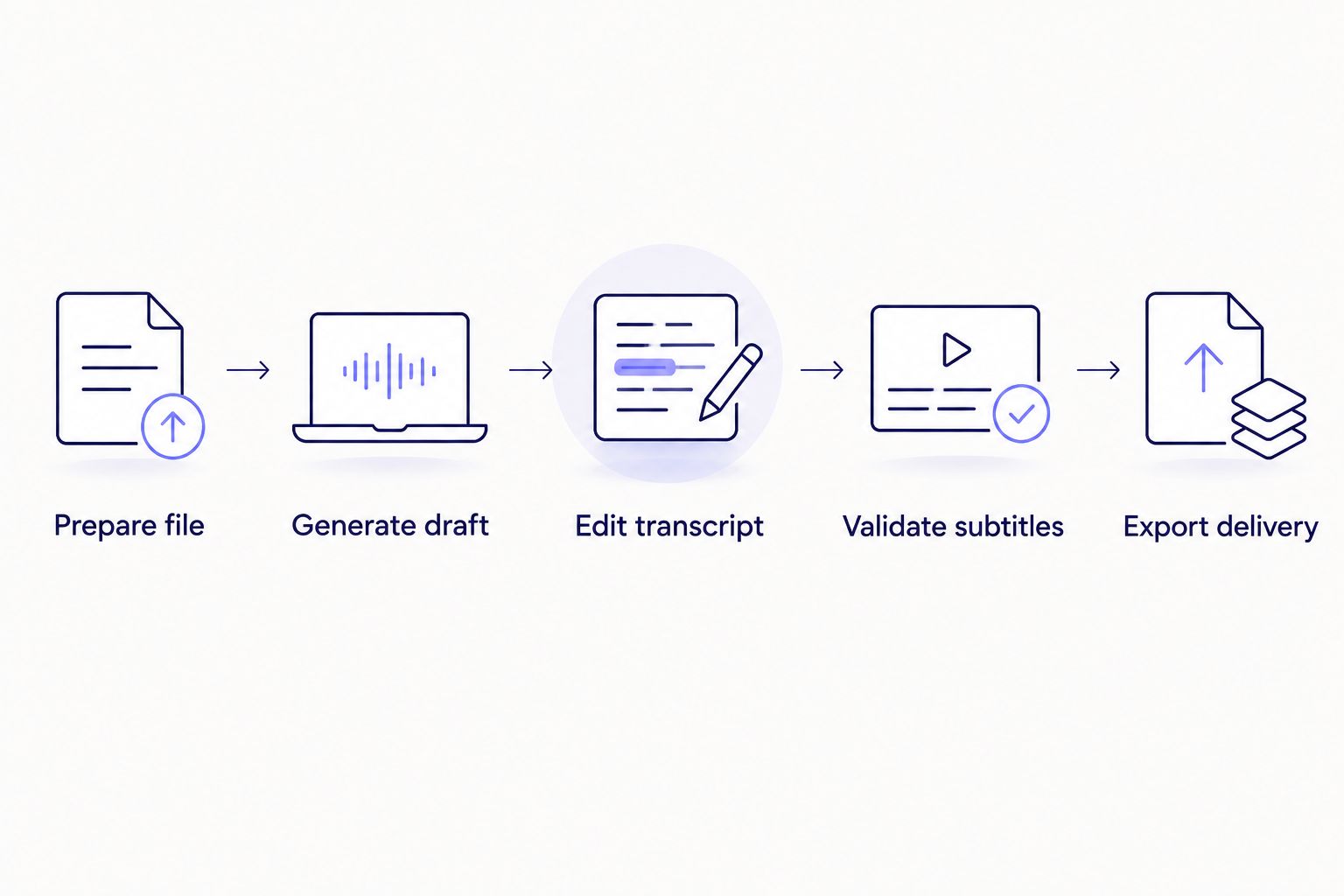
The draft is only one stage; editing and subtitle validation determine when the file is ready to deliver.
This sequence prevents a common estimating error in 2026: treating ASR completion as job completion. The transcript exists after step 2. The client-ready deliverable exists after step 5.
Transcribe your next video
Create a timed transcript, review subtitle issues, and export the required format.
Try Videotext
Manual transcription: about 5 hours
A common professional planning ratio is 4 to 6 hours of work for each recorded hour. The midpoint is 5 hours, which gives freelancers a practical starting point for a clear interview with limited overlap.
Manual transcription requires repeated listening. You pause, type, rewind, confirm uncertain words, apply punctuation, and identify speakers. Full verbatim work adds filler words, repetitions, false starts, and non-speech events. Clean verbatim removes selected disfluencies while preserving the speaker's meaning.
The lower end fits clear speech, a consistent recording level, and a simple formatting brief. The upper end fits multiple speakers, interruptions, technical terminology, or inconsistent audio. A separate proofreading pass extends the delivery time beyond the initial 4-to-6-hour transcription window.
Manual transcription has a clear strength: a trained editor can interpret context while typing. It also has a clear limit: every additional minute of source media creates more listening, typing, and checking work.
Choose manual transcription for difficult audio or briefs that require detailed human judgment. Skip an all-manual workflow when the source is clear and the deadline makes 4 to 6 hours per recorded hour impractical.
AI transcription: less than the 1-hour runtime
ASR converts speech into text automatically. Once processing begins, it handles a one-hour recording in less than the recording's 1-hour runtime. The exact completion time depends on the service, file size, processing queue, and selected operations, so a universal minute estimate would be misleading.
AI transcription reduces the time spent creating the first draft. It does not remove the need to review proper nouns, numbers spoken in the recording, speaker changes, punctuation, and passages affected by noise or overlapping speech.
Videotext returns timed transcript segments and supports speaker diarization. Diarization is the process of detecting when the speaker changes and assigning labels to those segments. Editors can rename the detected speakers in the interface rather than rebuilding the transcript around each voice change.
For subtitle work, Videotext also supports SRT and VTT output, cue editing, overlap checks, CPL and CPS review, timing-drift correction, filler cleanup, and client-guideline formatting. Those functions address the work that begins after ASR processing finishes.
The strength of AI transcription is speed at the draft stage. The limitation is uncertainty: the model cannot confirm a person's name, an uncommon term, or a client's preferred formatting rule unless the output is reviewed against the source and brief.
Choose AI transcription for clear recordings, repeatable workflows, and jobs that require timed text. Do not send unreviewed output when accuracy, accessibility, or client formatting is part of the deliverable.
Why transcription time varies
Audio quality
Clear, close-mic speech reduces rewinding and correction. Echo, clipping, low volume, background music, and room noise obscure words. A human has to replay those passages, while ASR produces more uncertain text for the editor to verify.
Audio quality affects cleanup time even when processing time stays short. The useful estimate is therefore not just time to transcript. It is time to reviewed transcript.
Speaker count and overlap
A single speaker requires fewer label changes. Interviews, panels, and podcasts add diarization checks, especially when participants interrupt one another or have similar voices.
Automatic speaker labels provide a starting structure. They still need review because a change point can be misplaced during crosstalk, short acknowledgements, or rapid exchanges.
Full verbatim or clean verbatim
Full verbatim captures speech as spoken, including fillers, repetitions, and false starts when the brief requires them. Clean verbatim removes selected disfluencies without rewriting the speaker's meaning.
The choice changes both transcription and QA. Full verbatim contains more tokens to type or review. Clean verbatim requires editorial decisions about what to remove while preserving the original statement.
Transcript or subtitle delivery
A transcript organizes speech as readable text. Subtitles divide speech into timed cues that appear on screen. The same words can pass transcript review and still fail subtitle review because of poor line breaks, excessive reading speed, overlaps, gaps, or drift.
SRT and VTT files therefore require a timing and formatting pass after the words are corrected. Burning subtitles into the video adds another output stage because the captions become part of the picture rather than a separate text file.
Client guidelines
Clients can specify speaker labels, timestamp intervals, punctuation, non-speech notation, line limits, reading-speed limits, and export layouts. A reusable guideline reduces repeated decisions. A new or unclear brief increases review time because the editor has to resolve formatting choices before delivery.
Videotext can reformat transcripts and subtitles for Rev, GoTranscript, Scribie, or custom client guidelines. The editor still needs to confirm that the selected guideline matches the actual assignment.
Translation
Translation adds language review after transcription. Subtitle translation also has to preserve cue timing while fitting the translated text into readable lines. A phrase that fits one cue in English can require a different line break in another language.
Videotext supports transcript and subtitle translation across more than 70 languages while preserving cue timing. Human review remains necessary for names, terminology, tone, and line readability.
Related questions
How long does it take to transcribe a 30-minute video?
A trained human takes about 2.5 hours on average to transcribe a 30-minute video, with a planning range of 2 to 3 hours. ASR processes the file in less than its 30-minute runtime once processing begins, before proofreading and formatting.
How long does it take to transcribe a two-hour video?
A two-hour video takes about 10 hours manually, using the 4-to-6-hour range per recorded hour. Plan 8 to 12 hours before adding a separate proofreading or subtitle QA pass.
Does adding subtitles take longer than transcription?
Adding subtitles takes longer than producing transcript text because each subtitle also needs timing, line breaks, and reading-speed validation. The extra work depends on cue quality and the client's subtitle guideline, not only the video's runtime.
FAQ
How long does it take to transcribe a one hour video manually?
Manual transcription takes about 5 hours on average, with a common range of 4 to 6 hours per recorded hour. Difficult audio, multiple speakers, and full verbatim rules move the job toward the upper end.
How long does AI take to transcribe a one-hour video?
AI transcription processes a one-hour video in less than its 1-hour runtime once processing starts. Upload time, queueing, proofreading, and subtitle QA are separate stages.
Is AI transcription faster than manual transcription?
AI transcription is faster at generating the first draft. Manual transcription takes 4 to 6 hours per recorded hour, while ASR processes the recording faster than real time before human review.
Does speaker diarization reduce editing time?
Speaker diarization reduces the work required to locate speaker changes and build labels from scratch. The detected labels still need review when speakers overlap or sound similar.
What is the difference between transcription time and subtitle time?
Transcription time covers converting speech into text, while subtitle time also covers cue timing, line breaks, CPL, CPS, gaps, and overlap checks. A finished transcript is not automatically a finished subtitle file.
Should I proofread an AI-generated transcript?
Yes, proofread an AI-generated transcript before professional delivery. Check names, terminology, speaker labels, punctuation, unclear passages, and every requirement in the client brief.
Can a one-hour transcript be completed on the same day?
Yes, a one-hour transcript can be completed on the same day with either a 4-to-6-hour manual workflow or a faster AI draft followed by review. The actual deadline depends on audio complexity and delivery requirements.
Does translating subtitles add more time?
Yes, subtitle translation adds language review and line-fitting work while the cue timing is preserved. Names, terminology, reading speed, and line breaks need another check in the target language.
One last thing
Use separate estimates for draft generation and final QA in every 2026 quote. For a one-hour video, write the manual transcription estimate as about 5 hours with a 4-to-6-hour range, then list proofreading, subtitle validation, translation, and client formatting as separate tasks.
That structure makes the deadline measurable. It also prevents an automated processing estimate from being mistaken for a finished deliverable. Videotext shortens the draft and correction workflow, but the editor remains responsible for confirming that the exported transcript or subtitle file matches the source and the client's rules.
Related guides



