Why this matters
A bilingual transcript can look grammatically plausible while replacing a short phrase with similar-sounding words from the dominant language. That error can survive a quick visual scan because the sentence still appears complete.
Subtitle work adds another layer. Correcting the words can change line length, line breaks, characters per line (CPL), and characters per second (CPS). A language correction is not finished until the updated cue is checked against its timing and subtitle guidelines.
Speaker separation is the first useful control. A speaker diarization software comparison helps distinguish systems that label speaker turns from systems that only return a continuous transcript. Diarization answers who spoke when; language identification answers which language was spoken.
Terms you need before processing bilingual audio
Multilingual ASR
Multilingual automatic speech recognition is an ASR model that can transcribe more than one supported language. Support for both languages does not guarantee reliable switching inside every segment. The model still needs enough audio context to identify the language associated with the spoken words.
Language identification
Language identification selects or predicts the language used in an audio file or segment. File-level detection assigns one language to the recording. Segment-level detection can reconsider the language after the audio is divided into smaller sections.
The detection level matters. If the system selects one language for the whole file, a second language can be rendered as phonetic text in the first language. If the system detects language by segment, clear speaker turns are easier to process separately.
Speaker diarization
Speaker diarization divides audio into speaker turns and assigns labels such as Speaker A and Speaker B. It does not identify real names unless a person renames the labels, and it does not inherently prove which language each speaker uses.
Diarization is useful when Speaker A consistently speaks English and Speaker B consistently speaks Spanish. Once the labels are checked, each speaker's segments can be processed with the correct language setting.
Code-switching
Code-switching is a change from one language to another within the same conversation, speaker turn, or sentence. Switching between speaker turns is easier to isolate. Switching inside one sentence requires the transcript editor to check where the language changes and whether the ASR output preserved both languages.
Two speakers, two languages: split by speaker
Use diarization when each speaker mainly stays in one language. This creates a repeatable workflow for interviews, podcasts, recorded calls, and panel discussions in 2026.
- Preserve the original recording. Keep an unchanged source file so every correction can be checked against the same audio.
- Run the first transcription pass. Generate timed segments rather than plain text without timestamps.
- Detect speakers. Apply diarization and review where Speaker A and Speaker B begin and end.
- Name speakers. Replace generic labels only after confirming each voice.
- Split turns by language. Group the English turns separately from the Spanish, French, or other language turns.
- Set the language explicitly. Reprocess uncertain segments with the correct language selected instead of depending on file-level auto-detection.
- Merge the corrected text. Restore the original chronological order and retain the timestamps.
- Validate the deliverable. Check names, punctuation, cue boundaries, overlaps, gaps, CPL, CPS, and line breaks.
VideoText supports timed transcription, speaker diarization, speaker renaming, subtitle correction, and exports including TXT, SRT, VTT, PDF, DOCX, JSON, and CSV. Its translation workflow supports 70+ languages while preserving timing on subtitle cues.
VideoText is best for freelance transcriptionists and subtitle editors who need to turn diarized bilingual media into checked transcript and subtitle files. Its practical strength is keeping transcription, cue editing, translation, and export in the same workflow. Its limitation is the same one editors face with any ASR output: mixed-language words, names, and technical terms still need review against the recording.
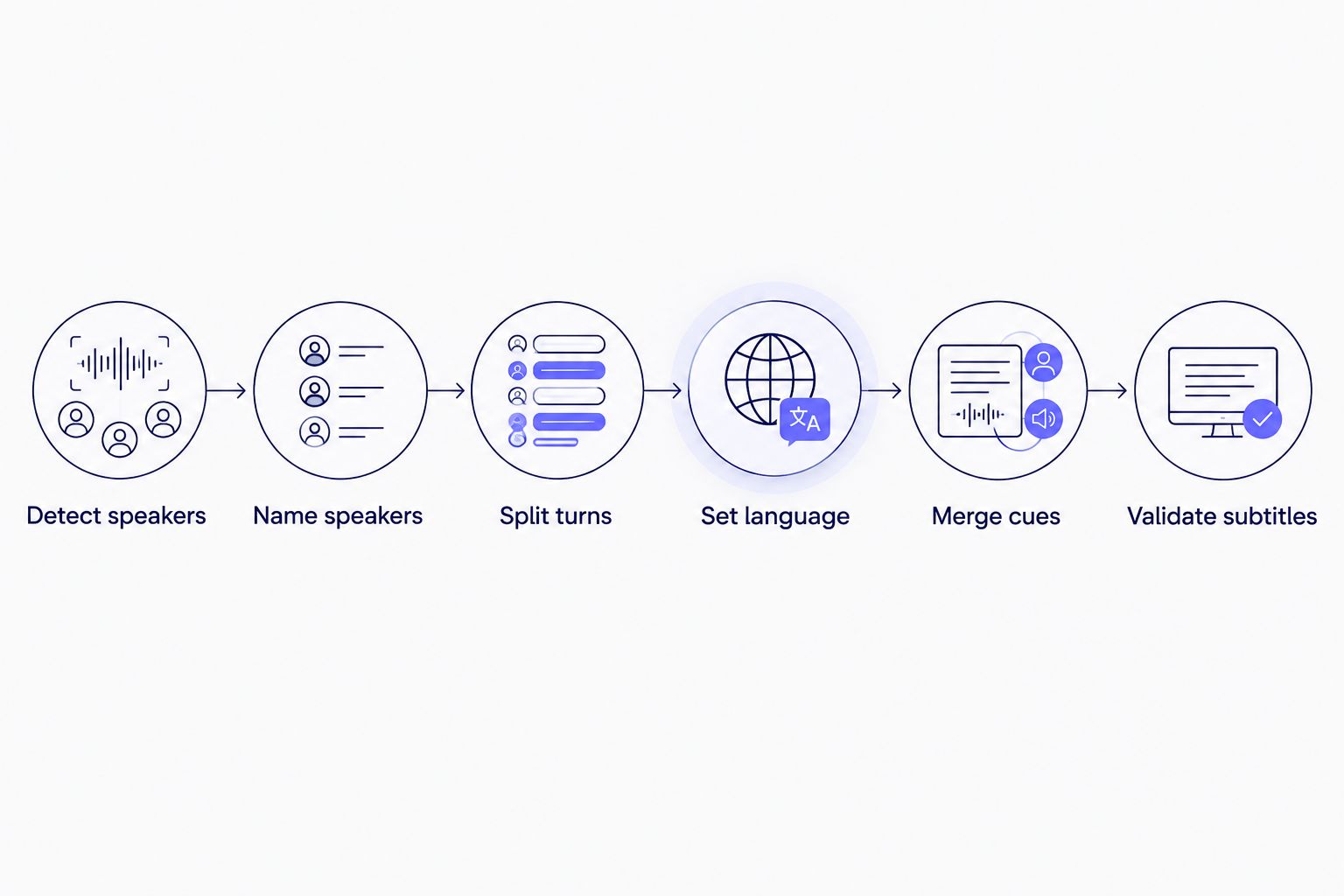
Assign the language after speaker turns are checked, then validate the merged subtitle file.
The merged transcript should preserve the source language unless the client requested a translated deliverable. Do not silently replace one speaker's language with a translation. That changes the transcript from a record of what was said into a translated adaptation.
Process bilingual audio
Create timed transcripts, review speaker turns, translate cues, and export subtitle files.
Open VideoText
One speaker, two languages: mark code-switching
Diarization cannot separate languages when the same person uses both. The speaker label remains unchanged, so the editor must find the language boundary inside that speaker's turn.
Use this workflow for mid-sentence code-switching:
- Generate a timestamped transcript in the dominant language.
- Read while listening and mark words that sound inconsistent with the surrounding sentence.
- Extend the review window around each marked phrase so you hear its full grammatical context.
- Correct the second-language phrase without translating it unless the deliverable requires translation.
- Preserve names, accents, and punctuation according to the client's transcript rules.
- Recheck subtitle cue length and reading speed after the wording changes.
Short borrowed words need special attention. A term from another language can be a proper noun, product name, place, greeting, or established loanword rather than a full language switch. The editor must decide whether to preserve the source spelling, add punctuation, or translate it based on the requested deliverable.
For subtitle files, avoid dividing the phrase only because the language changes. Cue boundaries should still follow speech timing, readable line breaks, and the applicable client guidelines. A language boundary and a subtitle boundary solve different problems.
Transcription and translation are separate steps
Transcription writes the spoken words in their source language. Translation rewrites those words in a target language. A bilingual recording can therefore produce several valid deliverables:
- A source transcript that preserves both languages.
- A translated transcript written entirely in one target language.
- An original-language subtitle track with mixed-language cues.
- Separate translated SRT or VTT files for each target language.
- A transcript with speaker labels, timestamps, and the original language switches retained.
Always correct the source transcript before translation. If the ASR system substitutes an incorrect English word for a Spanish phrase, translating that incorrect word carries the error into the translated file. The translator then works from text that does not match the recording.
Keep each subtitle track in its own file when the client needs different target languages. This makes cue validation, revision, and delivery clearer than placing two full translations inside every cue.
Why bilingual transcription results vary
- Language boundary: A switch between speakers is easier to isolate than a switch inside one word group.
- Speaker overlap: When two people speak at once, diarization and language identification must separate competing voices from the same time span.
- Recording quality: Background sound, clipping, distant microphones, and compressed speech make word recognition harder before language selection is considered.
- Segment length: Language detection needs useful context. A very short phrase can resemble a name, loanword, or sound from the dominant language.
- Names and terminology: Personal names, place names, abbreviations, and technical vocabulary can be incorrect even when the general language is identified correctly.
- Deliverable type: A readable transcript, verbatim transcript, translated subtitle file, and client-formatted caption file require different editing decisions.
Do not apply one accuracy claim to every bilingual file. Evaluate the actual language pair, speaker pattern, audio quality, and required output. A controlled sample from the recording is more useful than a general percentage that ignores those variables.
Can automatic language detection identify every switch?
No. Automatic language detection can identify a dominant language at the file or segment level, but it does not guarantee word-level detection for every switch. In 2026, editors should review short second-language phrases and any segment where the transcript sounds plausible but does not match the audio.
Should I split a bilingual recording before transcription?
Split it first when the language boundaries are already known and the split will not damage timing continuity. If the boundaries are unknown, generate timed segments and diarization first, then isolate only the uncertain turns. This avoids unnecessary manual cutting while preserving the original timeline.
Can I translate bilingual subtitles after transcription?
Yes. Correct the source transcript first, then translate the subtitle cues while preserving their timing. After translation, check CPL, CPS, cue overlaps, line breaks, and scene-cut spans because translated text can require different formatting.
How to review the final bilingual transcript
Use a structured QA pass rather than reading the text once from top to bottom.
- Confirm every speaker change against the audio.
- Verify that each language switch begins and ends at the correct word.
- Check names, places, acronyms, and client terminology separately.
- Confirm whether the requested style is full verbatim or clean verbatim.
- Make sure translation has not replaced source-language text in a source transcript.
- Review every corrected subtitle cue for timing, overlaps, gaps, CPL, CPS, and line breaks.
- Export the requested format and inspect the exported file, not only the editor preview.
For 2026 client work, keep the source transcript, corrected bilingual transcript, and translated version as distinct files. Clear file naming prevents an editor or client from treating a translation as the verbatim record.
FAQ
Can AI transcription handle two languages in one recording?
Yes, AI transcription can handle two languages when speaker turns or language segments are clearly separated. Mid-sentence code-switching still needs bilingual review in 2026.
What is the best workflow for two speakers using different languages?
Diarize the recording, verify the speaker labels, group each speaker's turns by language, and transcribe uncertain segments with the correct language specified. Merge the corrected timed segments before final QA.
Does speaker diarization detect language?
Speaker diarization detects who spoke when, not necessarily which language was spoken. Pair diarization with language identification and manual verification.
Can AI transcribe code-switching inside one sentence?
AI can produce an initial transcript, but short language switches inside one sentence can follow the segment's dominant language. Check those phrases against the recording and correct them manually.
Should bilingual subtitles contain both languages in one cue?
Not by default. Preserve the spoken language in a source subtitle track, or create separate translated tracks when the client requests target-language subtitles.
Can VideoText translate bilingual subtitles?
VideoText translates subtitles and transcripts across 70+ languages while preserving subtitle cue timing. Correct the source transcription before translating and validate the resulting cues afterward.
Which subtitle formats work for bilingual recordings?
SRT and VTT both support timed text for bilingual recordings. The format does not solve language detection, so speaker labels, wording, timing, and line breaks still require review.
How do I check a bilingual transcript before delivery?
Verify speaker turns, language boundaries, names, terminology, and the requested verbatim style against the audio. For subtitles, also check overlaps, gaps, CPL, CPS, timing drift, and line breaks.
One last thing
Never overwrite the source-language transcript with its translation. Keep both files and preserve the timed original as the QA reference. That single separation makes later subtitle corrections traceable when a client questions a translated word in 2026.
Related guides



