Subtitle timing drift gets fixed by identifying whether the offset is constant or progressive, then applying a single time shift or a proportional stretch to the whole cue list, and rechecking sync at every scene cut and splice. A blanket shift clears constant drift in seconds; progressive drift needs a stretch correction or the error reappears by the end of the file.
TL;DR
- How to fix subtitle timing drift starts with diagnosing whether the offset is constant or progressive.
- Constant drift needs one time shift applied to every cue; progressive drift needs a stretch correction across the file.
- Scene cuts and re-encoded splices introduce local drift that a global shift or stretch does not touch.
- VideoText's fix subtitles tool detects drift, overlaps, and gaps automatically and applies shift or stretch corrections in one pass.
Why this matters
Timing drift is the biggest reason subtitle QA runs longer than the transcript pass itself. A transcript with a few wrong words costs you a proofread; a subtitle file where every cue sits 400 milliseconds off costs a full re-sync, because every overlap check and every CPL and CPS benchmark has to be re-verified after the correction lands.
Drift compounds, too. A file trimmed by two seconds after the transcript was generated pushes every downstream cue two seconds late, and reading-speed math, gap detection, and speaker labels tied to timestamps all break in the same pass. Catching drift as its own QA step in 2026, instead of folding it into a general proofread, is what keeps a delivery on schedule.
How do you fix subtitle timing drift after transcription?
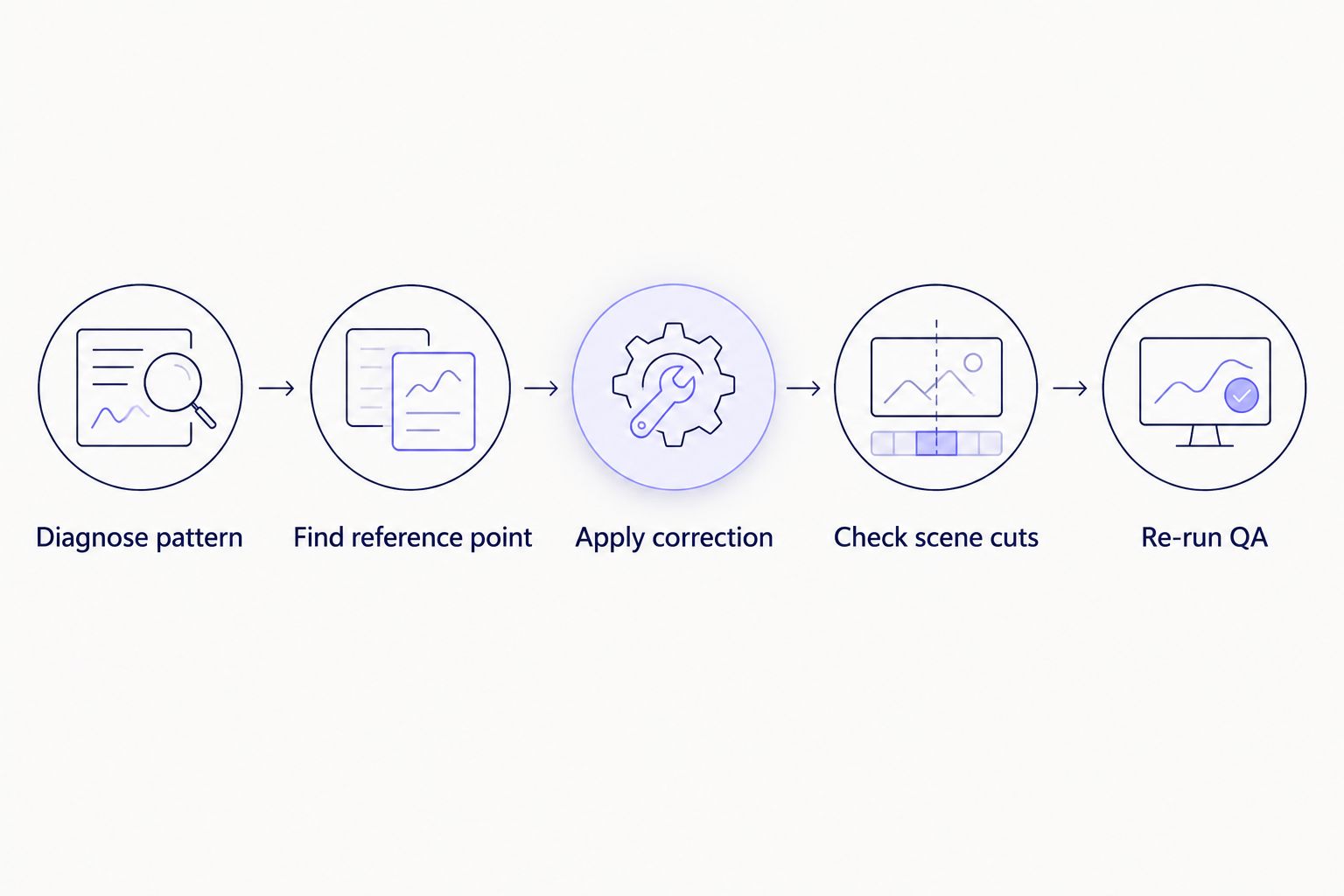
Fixing subtitle timing drift is a five-step process: diagnose the pattern, find a clean reference point, apply the right correction, check the cuts, then re-run QA.
- Diagnose the pattern. Pull three timestamps: the first cue, a cue near the middle, and the last cue. Compare each against the actual audio. If the offset is identical at all three points, drift is constant. If the offset grows from start to end, drift is progressive.
- Find a clean reference point. Anchor on the first clearly spoken word in the audio, not the first cue timestamp in the SRT file. ASR segment starts commonly lag actual speech onset by 100 to 300 milliseconds, especially over background noise or cross-talk, so anchoring on the cue instead of the waveform bakes that lag into every correction that follows.
- Apply the correction. Constant drift gets one time shift applied uniformly across every cue. Progressive drift needs a stretch, also called a linear time-scale correction, because the offset at minute one and the offset at minute forty are different numbers — a flat shift only fixes one point and leaves the rest wrong.
- Check scene-cut spans separately. Hard cuts, inserted B-roll, and re-encoded splices introduce local drift a global correction never touches. Re-check sync in a 5 to 10 second window around every cut point, even after the global shift or stretch checks out everywhere else.
- Re-run the full QA pass. Shifting every cue's start and end time can create new overlaps, new gaps, or push a line past its reading-speed limit. Treat the corrected file as a new file for QA purposes — the earlier pass no longer holds once timestamps move.
Most drift fixes fail at step three: a flat shift gets applied to a file that actually has progressive drift, so the correction looks clean at the start and drifts right back out by the closing credits.
Skipping the diagnosis step is the most common reason a drift fix doesn't hold to the end of the file.
Why subtitle timing drift happens
Drift isn't random. It traces back to a small set of causes, and most files only have one or two of these at once:
- Frame rate mismatch. Timestamps computed against 25fps and applied to a 23.976fps master (or the reverse) drift because the two rates aren't the same fraction of a second per frame.
- Trimmed or re-cut source file. A transcript generated before the final edit list locks means every cue after the cut point is off by the length of whatever got removed or added.
- ASR segment lag. Automatic speech recognition timestamps often mark the start of a spoken segment a few hundred milliseconds after the actual speech onset, especially with overlapping speakers or background noise.
- Manual text edits without timing adjustments. Splitting or merging a cue's text without touching its start and end time leaves the timing tied to the old text, not the new line breaks.
- Rounding error over long runtimes. Small per-cue rounding differences accumulate over a 60-minute file in a way they never show up in a 5-minute clip.
“Constant drift needs a single shift; progressive drift needs a stretch — apply the wrong one and the error just moves somewhere else in the file.”
Why does subtitle drift get worse toward the end of a video?
Drift that grows over the runtime is almost always progressive, caused by a frame-rate mismatch or accumulated rounding error rather than a one-time trim. The classic case: content mastered at 25fps with timestamps meant for 23.976fps drifts by roughly 4% of the runtime, which on a 45-minute episode adds up to close to two minutes of offset by the end, even though the first few cues look perfectly synced. Fixing it needs a stretch correction across the whole file, not a shift.
Is subtitle timing drift the same problem as subtitle overlap?
No — drift is a timing offset relative to the audio, while overlap is two cues occupying the same moment on screen regardless of whether either one is synced correctly. A file can have zero overlaps and still be badly drifted, and a well-synced file can still have overlaps if two speakers talk over each other. Fixing drift is a separate QA pass from fixing overlaps, and running one doesn't clear the other.
Can you fix subtitle drift automatically, or does it need manual re-timing?
Automatic correction handles constant and progressive drift across an entire cue list without retyping any text, which covers most of the correction work. VideoText's fix subtitles tool detects drift, overlaps, and gaps in the same pass and applies a shift or stretch correction to the whole file at once. Scene-cut spans still deserve a manual spot-check afterward, since local drift at hard cuts doesn't always follow the same pattern as the rest of the file.
Fix drift without retyping cues
Detect overlaps, gaps, and timing drift automatically, then export clean SRT or VTT.
Try VideoText
FAQ
What causes subtitle timing drift after transcription?
Subtitle timing drift after transcription is usually caused by a frame-rate mismatch, a source file trimmed or re-cut after the transcript was generated, or ASR segment starts lagging actual speech onset. Rounding error over long runtimes can also add small drift that only shows up after 20 to 30 minutes.
How do you know if subtitle drift is constant or progressive?
Compare the offset at the first cue, a middle cue, and the last cue against the actual audio. If the offset is the same number of milliseconds at all three points, it's constant; if it grows from start to end, it's progressive.
Does frame rate affect subtitle timing drift?
Yes. A file mastered at 25fps with timestamps meant for 23.976fps drifts by roughly 4% of the total runtime, which compounds the longer the file runs. This is one of the most common causes of progressive drift.
Can you fix subtitle drift without retiming every cue by hand?
Yes, a single time shift fixes constant drift and a stretch correction fixes progressive drift across an entire file in one pass. VideoText's fix subtitles tool applies either correction automatically without requiring you to retype cue text.
Why does subtitle drift get worse at scene cuts?
Hard cuts and inserted B-roll introduce local timing offsets that a global shift or stretch correction doesn't reach, so a file can be perfectly synced everywhere except a 2 to 3 second window around each cut.
Is subtitle drift the same as subtitle overlap?
No. Drift is a timing offset against the audio; overlap is two cues occupying the same timestamp regardless of sync. A file can have one problem without the other.
How much time shift is normal to fix subtitle drift?
There's no fixed normal amount — the correct shift is whatever offset exists between the first spoken word and the first cue's timestamp, commonly in the 100 to 500 millisecond range for ASR-generated files, but larger after a source trim.
Do translated subtitles drift differently than the original language?
Translated subtitles inherit the same cue timing as the source language, so if the original timing was corrected before translation, the translated file stays in sync. Translating before fixing drift just carries the same offset into every language.
One last thing
A frame-rate mismatch between 25fps and 23.976fps runs at roughly a 4% conversion factor, which is why a file that looks fine for the first ten minutes can be nearly two minutes off by the end of a 45-minute episode. Check the source frame rate before you touch a single cue — a shift fixes the wrong problem if the real cause is a rate mismatch, and you'll be back re-syncing the same file in 2026 after the client sends it back.
Related guides



