What to expect from this guide: it explains honest limits. If you need speech-aligned times for show notes, chapters, or publishable captions, the conversion path is Video to Transcript, not a plain-text upload. Fix Transcript fits keeping cue times in an SRT/VTT or adding presentation markers you label as not verified against audio.
You can put times on a transcript you already have. Those times are accurate only if they were already in the file, or if you type them. A plain TXT or DOCX does not contain the information needed to know when each sentence was spoken. Fix Transcript will say so before it places any markers.
AudioMaktube’s explanation is the short version of the same fact: a timestamp is the result of matching words to the recording. Without that match, a clock time written next to a paragraph is a label, not a cue.
Three different things people call “timestamps”
| What you have |
What you can honestly produce |
Where |
| SRT or VTT |
The cue times already in the file, kept while you edit the words |
Fix Transcript |
| Plain text, and you know the duration |
Presentation markers spread across that duration by how long each block of text is |
Fix Transcript, Timecodes tab |
| The recording, and you need times that follow the words |
A new transcript with segment times, and SRT or VTT if you need captions |
Video to Transcript |
Presentation markers are even slices of a duration you supply, weighted by how much text is in each block. A long paragraph gets a longer slice than a one-line reply. They are useful as a reading aid in a DOCX (“about ten minutes in”). They are not safe to burn onto a video or upload to YouTube as captions.
Fix Transcript does not include a forced-alignment engine. The align request does not rewrite your draft to match the waveform. If a message on the page says the times are presentation markers, that is the product telling you the truth, not a temporary limitation in the wording.
If the file is already an SRT or VTT
Upload it to Fix Transcript. Each cue comes in with its start and end. You can correct the words without touching those times.
On the Timecodes tab you can show elapsed timestamps or calculated SMPTE in the document export. SMPTE needs a frame rate and the timecode you want on the first frame. VideoText does not assume that a timecode burned into the picture matches the timecode in the file. You type the first-frame value you want. Supported rates include the exact 24/1.001 and 30/1.001 fractions, not a rounded shortcut.
SRT and VTT download stay available because every line already has subtitle timing. Editing a line’s start and end switches that line to manual timing. Every line still needs a start, an end, and an end after the start, or the subtitle download is refused.
For a whole caption file that is early, late, overlapping, or too fast to read, use Fix Subtitles or the review steps in Edit subtitles after you generate them. Fix Transcript is the document, not a subtitle sync tool.
If the file is plain text
- Upload the TXT or DOCX, or paste it, at Fix Transcript.
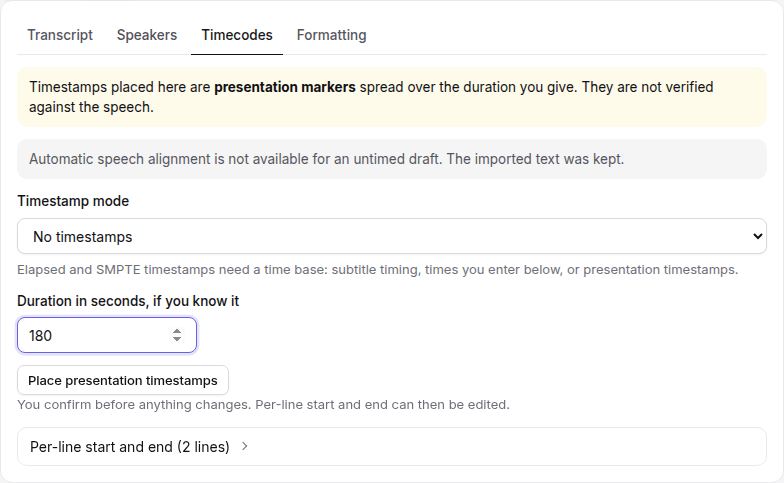
- Open Timecodes. The notice at the top says timestamps placed there are presentation markers spread over the duration you give, and that they are not verified against the speech.
- Enter the duration in seconds if you know it. You can also attach the recording so the duration can be read from the file. Attaching it does not align the words.
- Choose Place presentation timestamps. Confirm the dialog. The dialog repeats that the times are not speech-aligned and that you can undo.
- Elapsed timestamps can then appear in the TXT, DOCX, or PDF at an interval you pick (or a custom number of seconds). Calculated SMPTE is available once a time base exists.
Those markers do not, by themselves, unlock an SRT or VTT download. Subtitle export requires every segment to have subtitle timing or manual timing. You can type a start and end on each line. Those typed values are whatever you entered. The page does not check them against the audio.
Free exports include a one-line watermark. One free Fix Transcript job is included per UTC day. Files over 20 MB are refused.
When you should transcribe instead
Use Video to Transcript when a reader or an editor will click a time and expect to land on those words. That includes:
- Show notes that link to moments in the episode
- A paper edit, where the cut list has to match the recording
- Captions, chapters, or any SRT/VTT you will publish
- A client who asked for SMPTE that reflects the soundtrack, not a document label
Upload the audio or video. Free files can be up to 30 minutes and 2 GB. Pro files can be up to 4 hours and 10 GB. The result can be exported as TXT, DOCX, PDF, SRT, or VTT, with timestamp spacing you choose on that page. Those times come from the transcription, which is the thing a text-only file cannot reconstruct.
If you already paid for a human transcript that has no times, and you still have the media, transcribing again is still the way to get real cue times. Editing the human’s words into the new timed draft is often faster than pretending the untimed document can grow them.
What not to ship
Do not upload presentation markers to YouTube as captions. Viewers will see lines at the wrong moment, and the error grows more obvious the longer the video is.
Do not tell a client that SMPTE on a plain document was read from the picture. Calculated SMPTE is math from the first frame you entered and the duration you supplied. If the picture has burned-in timecode and you need that, the workflow is the one in BITC timecode transcription, starting from the video, not from a TXT.
Do not “fix” drift in a real SRT by replacing it with presentation markers. Drift has its own repair, described in How do you fix subtitle timing drift after transcription?.
Frequently asked questions
Can I add timestamps to a plain-text transcript?
You can add presentation markers spread over a duration you enter. They are labels in the document, not verified against speech, and they do not unlock SRT or VTT export by themselves.
I already have an SRT. Can I edit the words and keep the times?
Yes. Upload the SRT or VTT to Fix Transcript. Cue start and end times stay with each line unless you change them on the Timecodes tab.
When do I need Video to Transcript instead?
When someone will click a time and expect to land on those words—captions, chapters, paper edits, or client deliverables that must match the recording.