You can call the VideoText API directly from your pipeline instead of uploading files by hand every time a new episode, deposition, or client video lands in your queue. Instead of manually dragging files into the VideoText dashboard, waiting on a job, then downloading an SRT, wire the API into your existing storage or CMS so a new file automatically triggers transcription, subtitle generation, and export.
TL;DR
- VideoText API integration replaces manual uploads with an automated call-and-poll or webhook workflow in 2026.
- Authentication uses a single API key header on every request — no OAuth dance required.
- Jobs accept video or audio and return transcript, SRT/VTT, and JSON output once processing finishes.
- Batch processing and ZIP exports are available on Pro+ plans for teams pushing multiple files a day.
- Zapier covers the no-code version of the same workflow if your team doesn't want to write request code.
Why this matters
Manual transcript handling doesn't scale past a handful of files a week. If you're a freelance transcriptionist juggling five clients or an agency processing a daily podcast feed, every file you upload by hand is a few minutes of dead time that adds up across a month. A VideoText API integration moves the upload-transcribe-export sequence into your existing pipeline — a storage bucket, a CMS webhook, a podcast host's RSS feed — so the transcript and subtitle files show up where your team already works, without a person clicking through the dashboard.
This matters more in 2026 than it did two years ago because client-guideline formatting and subtitle QA now eat more of a transcriptionist's billable hour than the ASR pass itself. Automating the intake and export legs of the job frees that hour for the QA work that actually needs a human — checking speaker labels, verifying CPL and CPS against a style guide, confirming timing didn't drift after a translation pass.
Before you start
- An active VideoText account with API access enabled. API access is tied to your plan tier — confirm it's active before you start writing request code, not after your first call fails.
- A generated API key from your account settings. Treat it like a password: store it in an environment variable, never hard-code it into a script you'll commit to a repo.
- The gotcha: jobs are asynchronous. The API accepts your file and returns a job ID immediately — it does not return the finished transcript in that same response. If your pipeline code expects a synchronous reply and tries to read transcript text off the initial POST, it will fail every time. Build for polling or a webhook callback from the start, not as a fix after testing breaks.
Set up your API credentials
- Log into your VideoText account and open Settings.
- Navigate to the API tab and click Generate API Key.
- Copy the key immediately — it's shown once. Store it as an environment variable (
VIDEOTEXT_API_KEY or similar) rather than pasting it into your codebase.
- Confirm the key works by sending a test request to the account status endpoint with the key in the
Authorization header.
Expected result: a 200 response confirming your account and plan tier. If you get a 401, the key wasn't copied correctly or wasn't included in the header at all.
Configure the transcription request
- Point your pipeline at the job-creation endpoint and submit either a file upload or a publicly accessible file URL — video and audio are both accepted.
- Set the language parameter if you know the source language in advance; leaving it unset triggers auto-detection.
- Specify the output formats you want returned once the job finishes — TXT, SRT, VTT, PDF, DOCX, JSON, and CSV are all available, so request only what your downstream system actually consumes.
- Enable speaker diarization in the request if the source has multiple speakers you'll need labeled and, later, renamed in the UI.
- Submit the request.
Expected result: the API returns a job ID and a status of "queued" or "processing." No transcript text yet — that's normal.
Handle the webhook or poll for status
Pick one of two patterns depending on how your pipeline is built.
Webhook pattern:
- Register a callback URL in your account settings under the API tab.
- When a job completes, VideoText sends a POST request to that URL with the job ID and status.
- Your endpoint receives the callback and triggers the next step in your pipeline — pulling the finished files.
Polling pattern:
- Store the job ID returned from the creation request.
- Call the job-status endpoint on an interval — every 15-30 seconds is reasonable for most file lengths.
- Stop polling once status returns "completed" or "failed."
Expected result: your pipeline knows the moment a job is done without a person checking the dashboard.
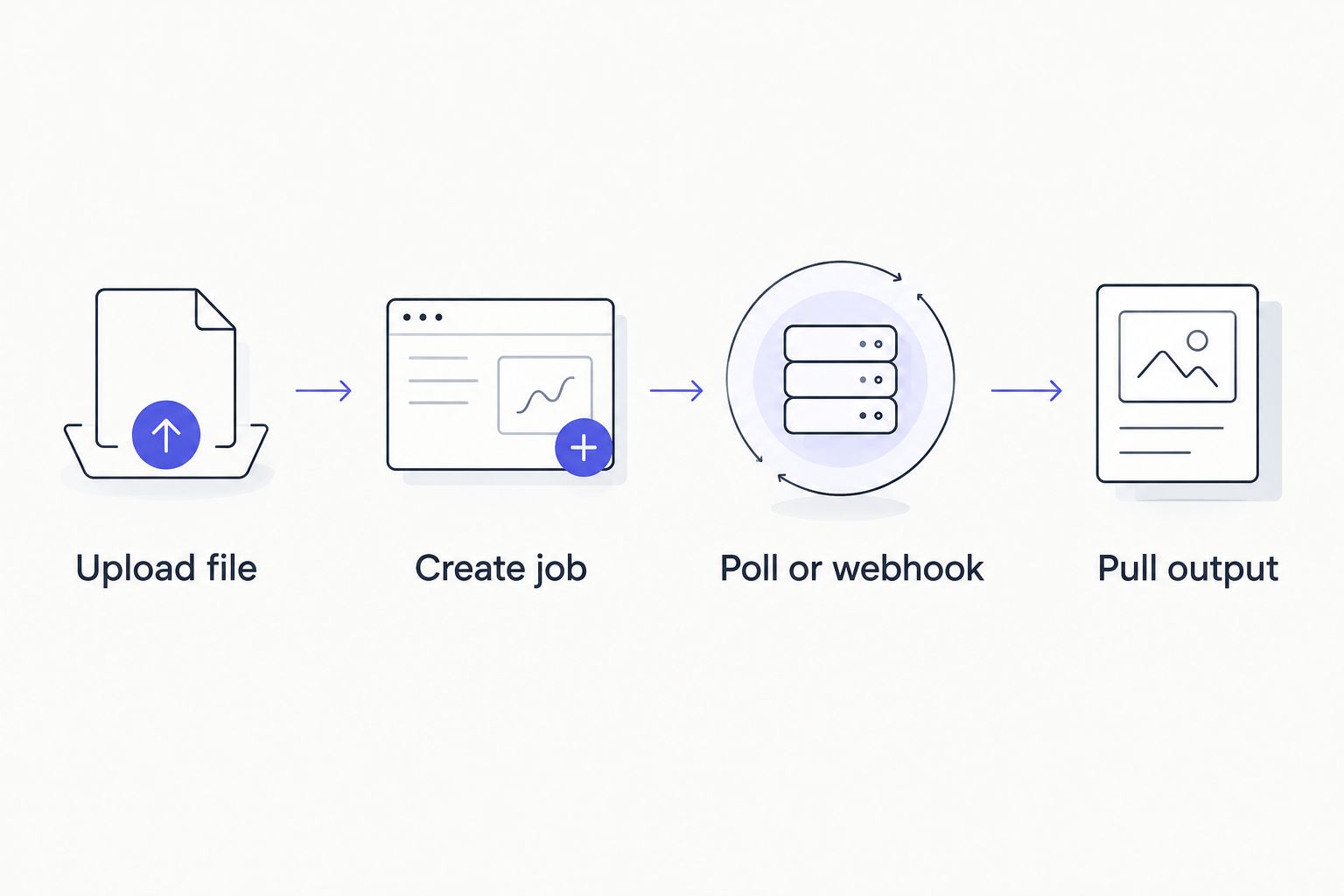
The job stays asynchronous end to end — nothing in this pipeline waits on a synchronous response.
Pull QA-ready output
- Once the job status is "completed," call the export endpoint with the job ID and the format you requested at creation.
- For subtitle files, check CPL and CPS against your client's style guide before delivery — the API returns raw cues, not pre-validated ones.
- Route the SRT or VTT into your subtitle QA review step if timing drift, overlaps, or reading-speed issues are a recurring problem on that client's files.
- Save the JSON output alongside the transcript if your pipeline needs timestamped segments or speaker labels for downstream indexing.
Expected result: transcript and subtitle files land in your storage or CMS automatically, formatted the way your pipeline requested them.
Automate the same workflow without code, via Zapier
If your team doesn't want to maintain request code, the same intake-to-export sequence runs through Zapier instead. Set a trigger on a new file landing in Google Drive, Dropbox, or your podcast host, connect it to the VideoText action step, and map the output fields to wherever the transcript needs to go next. The trade-off: Zapier adds a scheduling layer between the trigger and the action, so it's a better fit for daily-batch workflows than for anything needing near-real-time turnaround. The full setup is covered in the guide to connecting VideoText to Zapier.
Troubleshooting
- 401 Unauthorized on every request. The API key is missing from the header, expired, or copied with a trailing space. Regenerate the key and confirm it's set exactly in the environment variable your code reads.
- Job stuck in "processing" far longer than expected. Check the file itself first — corrupted files or unsupported codecs stall jobs rather than failing them outright. Re-upload a known-good file to isolate the problem.
- Webhook never fires. Confirm the callback URL is publicly reachable and returns a 200 response quickly. A callback endpoint behind auth or a slow database write can cause VideoText to treat the delivery as failed.
- SRT output has CPL or CPS violations against your client's style guide. The API returns raw cue timing and text — it does not auto-format to a specific guideline. Run the output through the fix-subtitles step or check it against CPL and CPS benchmarks by style guide before delivery.
- Speaker labels come back generic ("Speaker 1," "Speaker 2"). Diarization detects and separates speakers automatically but doesn't know names. Rename them in the UI, or map them programmatically once you know which speaker is which for a recurring client.
See the full API reference
Compare VideoText's API against other transcription providers before you build.
Compare API providers
Customize your workflow
Once the base pipeline runs, extend it in a few directions:
- Add a translation step after export if you're delivering subtitles in multiple languages — timing on cues stays preserved across 70+ supported languages.
- Batch multiple files through a single queue and pull a ZIP export if you're on a Pro+ plan and processing more than a handful of files a day.
- Insert a manual review checkpoint before final delivery if your client requires human sign-off — pull the transcript back into the editor to edit a transcript before exporting it a second time.
A basic version of this pipeline — one trigger, one job, one export — can be running within an afternoon once your API key and callback endpoint are set up. The version worth building toward adds the QA checkpoint and the translation branch, since those are the two steps that still eat the most manual time on a typical transcription job in 2026.
FAQ
What is the VideoText API used for?
The VideoText API lets you submit video or audio files programmatically and receive transcripts, SRT/VTT subtitles, summaries, and chapters back without using the dashboard. It's built for teams automating intake from storage, a CMS, or a podcast host.
Is VideoText's API synchronous or asynchronous?
Asynchronous. A job-creation request returns a job ID immediately, not the finished transcript, so your pipeline needs to poll a status endpoint or register a webhook callback.
Do I need to code to automate VideoText?
No. The API is the code-based route, but VideoText also connects through Zapier for a no-code trigger-and-action setup, covered in the Zapier integration guide.
What file formats does the VideoText API return?
TXT, SRT, VTT, PDF, DOCX, JSON, and CSV are all available as export formats, requested per job at creation time.
Does the API support speaker diarization?
Yes. Enable diarization in the job request and the output labels speakers generically; rename them to real names afterward in the UI.
Can I batch multiple files through the API at once?
Batch processing with multi-file queues and ZIP exports is available on Pro+ plans, useful for teams processing more than a few files daily.
Does the API translate subtitles?
Yes, subtitle and transcript translation covers 70+ languages with cue timing preserved, so translated files don't need a separate re-sync pass.
Why is my webhook callback not firing?
The most common cause is a callback URL that isn't publicly reachable or doesn't return a fast 200 response. Confirm the endpoint is live and not sitting behind authentication VideoText can't pass.
One last thing
The asynchronous design is the single detail that breaks most first integrations — teams write the request code, get a job ID back, and assume something went wrong when the transcript text isn't in that same response. Build the polling loop or webhook handler before you test the upload step, not after, and the rest of the pipeline goes together in a few hours instead of a few days.
Related guides



