Automatic filler-word removal runs a transcript through an ASR (automatic speech recognition) pass that flags disfluencies — "um," "uh," "like," "you know" — and strips them when you export in clean verbatim mode, instead of you running a manual find-and-replace pass. The catch: automatic removal can also delete words that aren't fillers at all, like "well" used as a sentence connector or "so" used to introduce a conclusion, so a review pass before export still matters in 2026.
TL;DR
- Clean verbatim mode removes filler words automatically during transcription; full verbatim keeps every word spoken.
- VideoText strips um, uh, and like automatically on export when clean verbatim is selected, no manual editing required.
- Automatic filler removal can delete meaningful words like well or so used as connectors, not just disfluencies.
- Manual find-and-replace still catches niche filler phrases an ASR model wasn't trained to flag.
Why this matters
Filler words pad a transcript's word count without adding meaning, and clients paying for a clean deliverable don't want to read forty "ums" in a 20-minute interview. Manually deleting each one in a text editor works, but it's slow on a one-hour file with a talkative speaker, and it's the kind of QA task that eats freelance transcriptionist margin. VideoText treats filler removal as part of the transcription step itself, not a separate cleanup pass, which means the transcript comes out clean verbatim on export instead of needing a second editing round.
The distinction that matters here is verbatim versus clean verbatim. Full verbatim transcription captures every filler, false start, and repeated word exactly as spoken — required for legal depositions and some research transcripts. Clean verbatim keeps the speaker's actual words and meaning but drops the fillers, false starts, and stutters. Automatic filler removal only works correctly when you know which mode you actually need before you export.
How do you remove filler words from a transcript automatically?
Follow these steps to strip fillers without manual editing:
- Upload the file. Video, audio, or a voice recording all feed the same transcription pipeline.
- Select clean verbatim, not full verbatim. Clean verbatim is the setting that triggers automatic filler removal; full verbatim preserves every "um" and "uh."
- Run the transcription pass. The ASR model transcribes speech and flags disfluencies — repeated words, false starts, and common filler terms — for removal in the same pass.
- Review the output before export. Automatic filler removal is not perfect; scan for any word the model dropped that actually changes meaning, then fix it in the editor before exporting.
- Export in the format you need. TXT, SRT, VTT, DOCX, PDF, and other formats all carry the filler-free text once the clean verbatim pass has run.
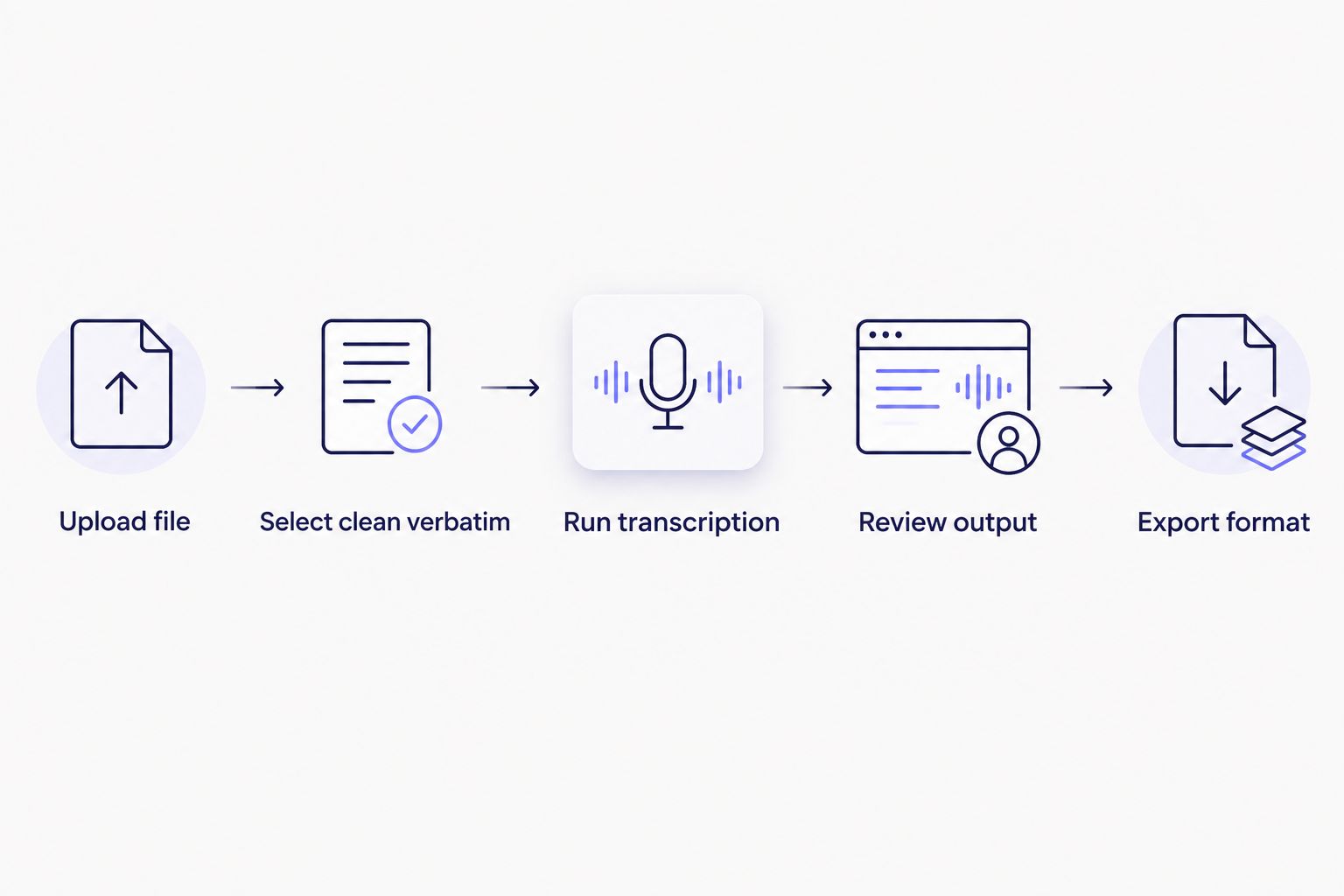
Filler removal happens at step two, when clean verbatim is selected, not as a separate cleanup pass afterward.
Automatic clean verbatim transcription: removes fillers during processing
This is the fastest method because filler removal happens inside the transcription step, not after it. You upload the file, pick clean verbatim, and the fillers are gone by the time the transcript is ready to review. It's the right default for podcast show notes, interview write-ups, and any deliverable where the client wants readable text rather than a verbatim court record. Verdict: use this as your default.
Manual find-and-replace: removes fillers without ASR
Opening a finished transcript in a text editor and running find-and-replace for "um," "uh," and "like" still works, and it catches filler phrases that are specific to one speaker's habits ("so yeah," "kind of," "I mean") that a general ASR filler list might miss. It's slow on long files and error-prone if a filler word appears inside a real word or name. Verdict: use it as a backup pass on niche phrasing, not as your primary method.
Subtitle QA pass: removes fillers left in a caption file
Fillers sometimes survive into the subtitle stage even after a clean verbatim transcript, especially when captions are generated from a different source file or an earlier draft. A subtitle QA pass checks each cue for leftover disfluencies at the same time it checks timing drift, CPL, and CPS, so filler cleanup and subtitle validation happen together instead of as two separate rounds. Verdict: run this whenever captions are generated separately from the transcript.
Why filler removal accuracy varies
- The filler word list the tool uses. Some tools only flag "um" and "uh"; others also catch "like," "you know," and repeated words.
- Speaker accent and speech pattern. A fast talker with regional speech habits produces different filler patterns than a slow, deliberate speaker.
- Audio quality. Background noise and overlapping speakers lower ASR confidence, which makes disfluency detection less reliable.
- Whether the word is a filler or a connector. "Well" and "so" are fillers in some sentences and meaningful connectors in others — automatic removal can't always tell the difference.
- Source language. Filler word patterns differ across languages; a tool that supports 70+ languages for translation doesn't necessarily apply the same filler list to each one.
- Whether the transcript started as full verbatim or clean verbatim. Converting a full verbatim transcript to clean verbatim after the fact is a bigger cleanup job than transcribing directly in clean verbatim mode.
Does removing filler words break subtitle timing sync?
Removing filler words can shift subtitle timing if the cue's start and end times were built around the spoken duration including the filler. A subtitle QA pass that checks timing drift after filler removal catches this before delivery, rather than leaving a caption that runs ahead of or behind the audio.
Should legal or research transcripts have fillers removed?
No — legal depositions, court transcripts, and most academic research transcripts require full verbatim, meaning every filler, false start, and repeated word stays in the text exactly as spoken. Clean verbatim with fillers removed is for readability-focused deliverables like interviews, podcasts, and video captions, not records that need to reflect exactly what was said.
Can you undo automatic filler removal after export?
You can't un-delete fillers from an already-exported clean verbatim file, but you can re-run the same source audio in full verbatim mode to get every word back. That's why it's worth deciding verbatim versus clean verbatim before the first export, not after.
Clean a transcript automatically
Clean verbatim mode strips filler words on export, no manual pass needed.
Start a transcript
FAQ
How do you remove filler words from a transcript automatically?
You select clean verbatim mode during transcription, which flags and strips disfluencies like um, uh, and like as the transcript is generated. Review the output before export since automatic removal can occasionally drop meaningful words.
What's the difference between full verbatim and clean verbatim?
Full verbatim keeps every filler, false start, and repeated word exactly as spoken. Clean verbatim keeps the speaker's meaning but removes fillers, making it the mode that triggers automatic filler removal.
Does automatic filler removal work on any language?
It depends on whether the tool's filler word list covers that language; filler patterns differ across languages, so a transcription tool supporting translation into 70+ languages doesn't automatically apply the same filler detection to each one.
Is manual find-and-replace still necessary after automatic removal?
Manual find-and-replace catches speaker-specific filler phrases an automatic pass might miss, like habitual phrases such as "kind of" or "I mean." Use it as a backup check, not your primary method.
Can filler removal break subtitle timing?
Yes, removing a filler word can shift a cue's timing if the original duration included the spoken filler. Run a subtitle QA pass after filler removal to catch any resulting timing drift before delivery.
Should podcast transcripts have fillers removed?
Most podcast show notes and episode transcripts use clean verbatim, since readers want readable text rather than every um and uh from the recording. Full verbatim is reserved for legal or research use cases.
Do all transcription tools support clean verbatim mode?
Not all do; some tools only output full verbatim and require a separate manual cleanup pass. Check whether clean verbatim is a selectable mode before assuming filler removal happens automatically.
One last thing
The most common mistake with automatic filler removal isn't a missed "um" — it's assuming clean verbatim and full verbatim are interchangeable settings. Pick the mode before the first export in 2026, not after a client asks why a legal transcript is missing false starts, or why a podcast transcript still reads like a verbatim court record.
Related guides



