Flixier is a browser-based video editor built for fast social-clip turnaround, and it does that job well: no install, drag-and-drop timeline, and one-click auto-captions on the same screen where you're already cutting the clip. The ceiling shows up the moment captions need to leave that screen clean — Flixier generates caption cues but doesn't check CPL, CPS, or timing drift, and it has no path to reformat a transcript against Rev, GoTranscript, or Scribie guidelines before a client sees it. The best Flixier alternative in 2026 is VideoText if your work is subtitle QA and client-ready delivery; Descript if you need text-based video editing with voice cloning.
TL;DR
- VideoText wins on subtitle QA: CPL/CPS drift detection, guideline reformatting, and speaker diarization Flixier doesn't have.
- Flixier stays the right call for quick browser edits and social clips where caption accuracy isn't checked line by line.
- Descript replaces the timeline with a text editor for the video itself, including voice cloning via Overdub.
- Kapwing is the closest match to Flixier's browser-first workflow, built more for team collaboration.
- Riverside solves a different problem entirely: it records the call before anyone edits or captions it.
Why this matters
Flixier's auto-captions are generated from the same ASR pass as the edit, which is fast but shallow. There's no reading-speed check, no line-break logic tuned to a style guide, and no built-in way to rename detected speakers before export. For a freelancer or media agency delivering to a client with formatting rules, that gap becomes manual QA work — reading every cue, counting characters per line by eye, fixing overlaps one at a time.
That's the exact workflow VideoText is built around: upload the video, get timed transcript segments, subtitle output, speaker labels, and an AI summary with chapters — then run the fix pass for CPL, CPS, overlaps, and timing drift before reformatting to a client's guideline. If your bottleneck is QA time rather than the initial cut, that's a different tool than the one Flixier is solving for.
Flixier alternatives at a glance
| Tool |
Best for |
Standout feature |
How it differs from Flixier |
| Flixier |
Quick browser edits with auto-captions |
One-click caption generation inside the editing timeline |
Baseline for this comparison |
| VideoText |
Subtitle QA and client-ready delivery |
CPL/CPS drift detection plus guideline reformatting |
Flixier ships caption cues without a QA pass; VideoText's fix step catches overlaps, drift, and reading-speed before export |
| Descript |
Text-based video editing |
Edit the video by editing the transcript, including Overdub voice cloning |
Flixier edits on a timeline; Descript edits by deleting words from a document |
| Kapwing |
Team video creation with captions |
Browser-based collaborative editing with caption styling |
Closest structural match to Flixier — both are browser-first — but built more around shared team projects |
| Riverside |
Remote podcast and video recording |
Local recording capture that avoids call-compression artifacts |
Flixier doesn't record; Riverside captures the raw session before anyone edits or captions it |
1. VideoText: best for subtitle QA and client-ready delivery
VideoText takes uploaded video or audio and produces a timed transcript, SRT/VTT subtitles, speaker diarization, and an AI summary with chapters in one pipeline. The part that separates it from a general editor like Flixier is the fix step: it detects overlapping cues, CPL and CPS violations, gaps, scene-cut spans, and timing drift, then lets you reformat the whole file to a specific client guideline — Rev, GoTranscript, Scribie, or a custom spec — instead of rebuilding it by hand.
The workflow runs in a fixed order: transcribe, detect issues, fix CPL/CPS and drift, format to guideline, translate if needed, then export or burn. That sequence is what cuts QA time on a batch of client files, because each step catches problems the previous one would otherwise pass through silently.
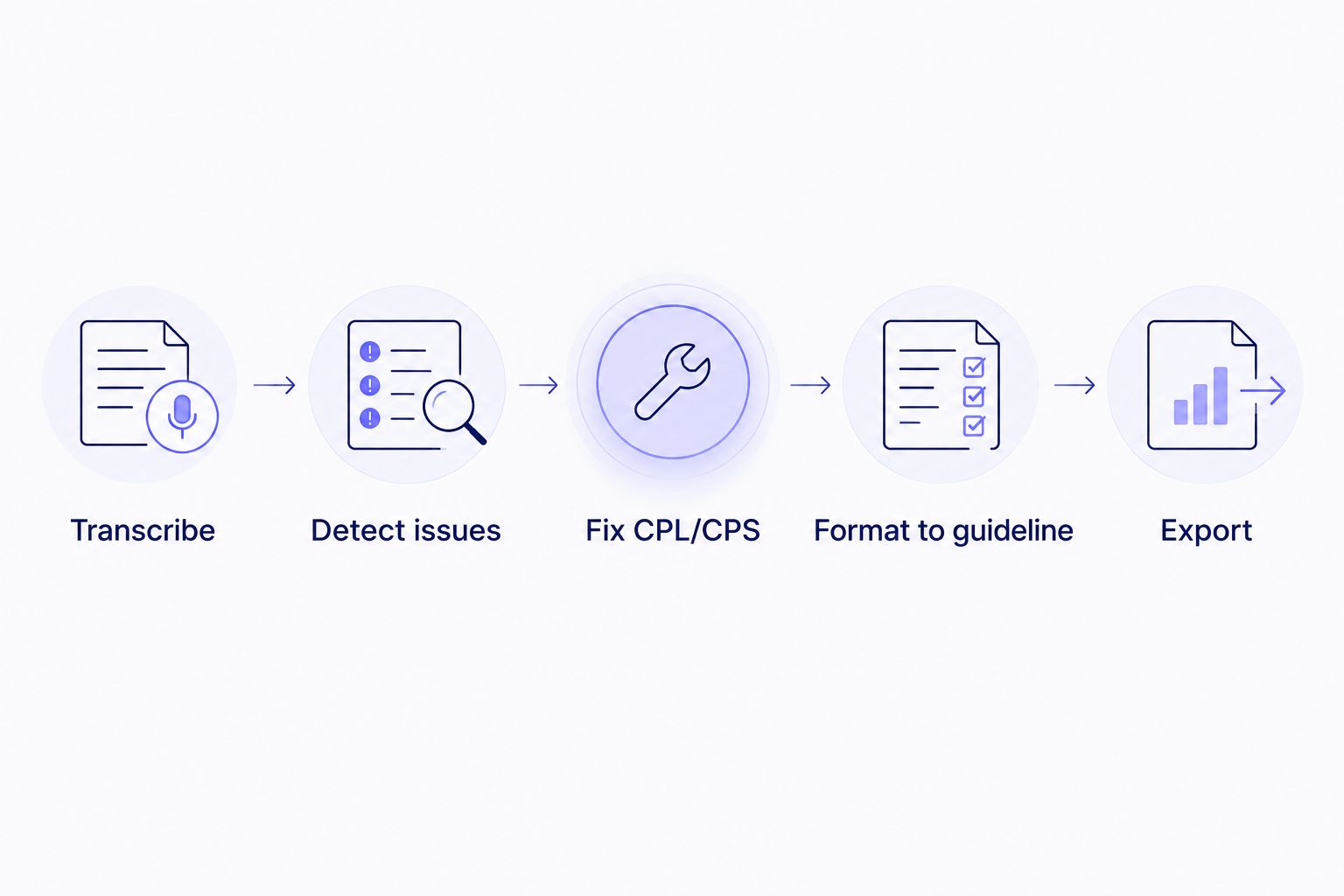
Each step catches what auto-captions alone skip past: drift, overlaps, and guideline formatting.
Where VideoText shines:
- CPL/CPS and timing-drift detection built into the fix pass, not a separate manual pass
- Guideline formatting for Rev, GoTranscript, Scribie, or custom client specs
- Speaker diarization with in-UI renaming, plus translation across 70+ languages with cue timing preserved
- Batch processing and ZIP export for multi-file client deliveries
Where VideoText falls short:
- No timeline video editor — it's not a cutting tool, so B-roll, transitions, and multi-track edits stay outside its scope
- No built-in recording or call capture, unlike a tool such as Riverside
Best for: freelance transcriptionists, subtitle editors, and media agencies delivering client-ready captions on a deadline.
|
VideoText |
Flixier |
| Subtitle QA (CPL/CPS/drift) |
Built-in fix pass |
Not included |
| Client-guideline formatting |
Rev / GoTranscript / Scribie / custom |
Not included |
| Speaker diarization |
Yes, with renaming |
Not included |
| Timeline video editing |
Not included |
Core feature |
2. Descript: best for text-based video editing
Descript replaces the cut-by-timestamp workflow with a document: delete a sentence in the transcript and the corresponding video frames go with it. Overdub, its voice-cloning feature, lets you fix a flubbed line by typing the correction instead of re-recording.
Where Descript shines:
- Editing video by editing text removes the need to scrub a timeline for small cuts
- Overdub covers minor script fixes without a re-record
Where Descript falls short:
- Subtitle QA — CPL, CPS, and guideline formatting — isn't the focus, so client-ready caption delivery still needs a separate check
Best for: solo creators and podcasters who want to edit by deleting text rather than scrubbing a timeline. Editors specifically hunting for a Descript replacement can check the full breakdown on Descript alternatives.
3. Kapwing: best for team video creation with captions
Kapwing sits closest to Flixier structurally — both are fully browser-based, no install, timeline-plus-captions in one tab. Kapwing leans further into shared team projects and caption styling for social formats.
Where Kapwing shines:
- Collaborative editing with shared project links, useful for teams handing off a clip mid-edit
- Caption styling options built for short-form social output
Where Kapwing falls short:
- Same gap as Flixier on subtitle QA: caption cues generate without a CPL/CPS check or guideline reformatting step
Best for: small teams producing social clips that need shared editing access more than caption precision. A direct feature comparison is up at VideoText vs Kapwing.
4. Riverside: best for remote podcast and video recording
Riverside solves the step before editing: it records each participant locally on a call, avoiding the compression artifacts that come from recording over a video call connection. It's not an alternative to Flixier's editor so much as a different stage of the same pipeline.
Where Riverside shines:
- Local recording capture keeps audio and video quality intact through a remote session
Where Riverside falls short:
- Editing and subtitle QA still happen downstream in a separate tool
Best for: podcast hosts and interview-based shows recording remote guests before any editing starts. If Riverside isn't the fit, the Riverside alternatives list covers other recording-first options.
Why people switch from Flixier
- Caption cues need a manual line-by-line check. Flixier's auto-captions generate without a CPL/CPS pass, so reading-speed and overlap issues surface only when someone reviews the file by eye.
- No guideline reformatting. A client spec — Rev-style, GoTranscript-style, or a custom in-house guide — has to be applied by hand after export.
- No speaker diarization step. Multi-speaker files come out without labeled or renameable speakers, which matters for interviews and panel recordings.
Run a subtitle QA pass on your next file
Upload a video and check CPL/CPS and drift before delivery.
Start with VideoText
When Flixier is still the right call
If the deliverable is a social clip with no client caption spec to hit, Flixier's one-tab edit-and-caption flow is faster than moving a file through a separate transcription tool first. The moment a client guideline, a multi-speaker interview, or a CPL/CPS requirement enters the job, that speed advantage stops covering the QA work it skips.
FAQ
What is the best Flixier alternative for subtitle QA in 2026?
VideoText is the best Flixier alternative for subtitle QA in 2026 because it detects CPL, CPS, overlap, and timing-drift issues and reformats output to a client guideline before export, which Flixier does not do.
Is Flixier good for client-ready caption delivery?
Flixier generates caption cues from its editing timeline but doesn't check CPL, CPS, or reading speed, so client-ready delivery still needs a separate QA pass in a tool built for that step.
Does Flixier support speaker diarization?
Flixier's caption generation doesn't include speaker diarization or labeling. VideoText detects and labels speakers with in-UI renaming as part of the transcript output.
Is Descript better than Flixier for editing?
Descript edits video by editing the transcript text, including voice-cloning fixes through Overdub, while Flixier uses a standard timeline. Which is better depends on whether you prefer editing by deleting text or by scrubbing a timeline.
What's the difference between Kapwing and Flixier?
Kapwing and Flixier are both browser-based editors with built-in captions, but Kapwing leans further into shared team projects while neither includes CPL/CPS subtitle QA.
Can VideoText translate subtitles without breaking timing?
VideoText translates subtitles and transcripts across 70+ languages while preserving cue timing, so translated captions keep their original sync.
Does Riverside replace a video editor like Flixier?
No. Riverside records remote calls locally to avoid compression artifacts; editing and captioning still happen in a separate tool afterward.
Can VideoText format subtitles to a specific client guideline?
Yes. VideoText reformats transcripts and subtitles to Rev, GoTranscript, Scribie, or a custom client guideline as part of its fix step.
One last thing
Auto-generated captions that look fine on playback can still fail a CPL/CPS check the reader never notices until a client rejects the file — Flixier's caption output has no reading-speed check built in, so run it through a validator before delivery if the client spec includes one.
Related guides



