ScriptMe handles fast automatic transcription and one-click subtitle export for creators posting short-form video. The best ScriptMe alternative in 2026 depends on what happens after the transcript comes back: if you're delivering client-ready SRT files that need CPL, CPS, and timing-drift QA, VideoText is the stronger pick; if you're editing a podcast by cutting text instead of a timeline, Descript fits better. Read the comparison table before you commit to a switch — the gap between tools shows up in the QA step, not the transcription itself.
TL;DR
- VideoText adds a dedicated subtitle QA pass (CPL, CPS, overlaps, timing drift) that ScriptMe's core flow doesn't cover.
- Descript is the better ScriptMe alternative for text-based video editing, not subtitle-file QA.
- Sonix and Trint solve different problems: bulk translated exports and newsroom collaboration.
- Rev adds a human-review option most automated tools, including ScriptMe, skip by default.
- VideoText translates subtitles and transcripts across 70+ languages while keeping cue timing intact.
Why this matters
A transcript is a first draft. Turning it into a subtitle file a client will accept means checking line length, reading speed, and timing drift — work most transcription tools, ScriptMe included, leave to you. VideoText builds that check into the pipeline instead of treating it as a manual cleanup pass after export. That's the axis every alternative on this page gets measured against in 2026.
Best ScriptMe alternatives at a glance
| Tool |
Best for |
Standout feature |
How it differs from ScriptMe |
| ScriptMe |
Solo creators needing fast turnaround |
One-click transcript to subtitle export |
Baseline — no dedicated QA layer for CPL, CPS, or timing drift |
| VideoText |
Editors and agencies delivering client-ready subtitles |
Fix Subtitles QA pass plus guideline formatting |
Adds a dedicated QA and client-guideline-formatting layer to the same transcript-to-subtitle flow |
| Descript |
Podcast and video editors who edit by editing text |
Transcript-based multitrack editing |
Built around editing the recording itself, not around subtitle-file QA |
| Sonix |
Teams that need many language outputs from one upload |
Wide translation and export language list |
Similar translation breadth but no CPL/CPS or guideline-formatting tools |
| Rev |
Teams that want a human reviewer on the transcript |
Human transcription and captioning option |
Adds a human-review path that isn't a default step elsewhere on this list |
| Trint |
Newsrooms and media teams collaborating on one transcript |
Collaborative transcript editor with roles |
Built for editorial collaboration, not subtitle-file QA |
1. VideoText: best for subtitle QA and client-ready formatting
VideoText turns uploaded video, audio, or a browser voice recording into a timed transcript, SRT/VTT subtitles, labeled speakers, and an AI summary with chapters. The subtitle side runs a Fix Subtitles pass that checks overlaps, CPL (characters per line), CPS/reading speed, gaps, scene-cut spans, and timing drift, then opens a cue editor synced to the video for a manual QA review. Guideline formatting reformats the same output to Rev, GoTranscript, Scribie, or a custom client spec, which is the step that usually eats the most QA time before delivery.
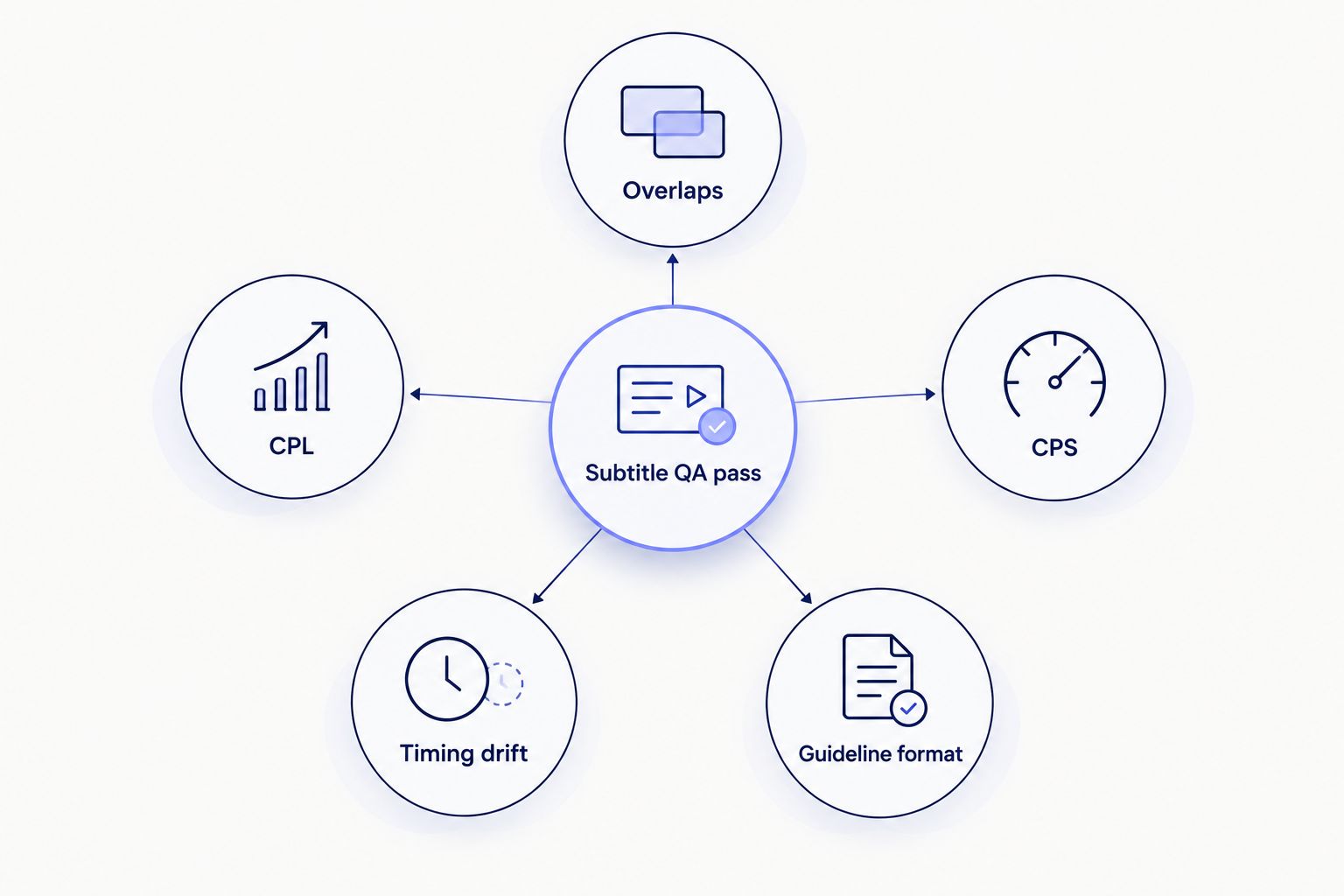
Every subtitle file runs through the same five checks before it's marked client-ready.
Where VideoText shines:
- Fix Subtitles catches CPL, CPS, overlap, and timing-drift issues before a client rejects the file, not after.
- Guideline formatting reformats a transcript to Rev, GoTranscript, or Scribie specs, or a custom one, without manual reformatting.
- Translates subtitles and transcripts across 70+ languages while keeping cue timing intact.
- Exports cover TXT, SRT, VTT, PDF, DOCX, JSON, and CSV, including timecode and speaker layouts.
- API, Zapier, and Chrome extension support for automated transcription, fix, translate, and burn runs.
Where VideoText falls short:
- Batch processing and ZIP exports sit on the Pro+ tier, not the base flow.
- No text-based video editor — VideoText fixes subtitles and transcripts, it doesn't reassemble a video by deleting words in a document the way Descript does.
- The added QA step is overhead a solo creator doing one quick caption job may not need.
Best for: editors, freelance transcriptionists, and agencies delivering subtitle files that have to clear a client's CPL/CPS spec, not just look right on a phone screen.
| Dimension |
VideoText |
ScriptMe |
| Subtitle QA (overlaps, CPL, CPS, drift) |
Dedicated Fix Subtitles pass plus a cue editor |
Not a dedicated step in the core flow |
| Guideline formatting (Rev/GoTranscript/Scribie/custom) |
Built in |
Not part of the core flow |
| Speaker diarization |
Detect, label, rename in the UI |
Available, without a rename-in-UI QA loop |
| Translation |
70+ languages, timing preserved on cues |
Narrower language list |
Try the subtitle QA pass
Run a transcript through Fix Subtitles before you commit to switching.
Start a transcript
2. Descript: best for transcript-based video editing
Descript turns a transcript into a document you edit — delete a filler word in the text and the matching clip cuts from the timeline. It's built around editing the recording, not around checking a subtitle file against a CPL or CPS spec. If your workflow ends at a finished cut, not a delivered SRT, that's a real advantage over ScriptMe's export-only flow.
Where Descript shines:
- Editing by editing text speeds up rough cuts on interviews and podcasts.
- Screen recording and overdub-style correction cover production, not just transcription.
Where Descript falls short:
- Subtitle CPL/CPS QA and client-guideline formatting aren't the focus — exports still need a separate pass for broadcast or streaming caption specs.
- Heavier tool than ScriptMe if all you need is a transcript and a caption file.
Best for: podcasters and video editors who want to cut a recording by editing its transcript. Read the full breakdown on the Descript alternatives page if that's your primary workflow.
3. Sonix: best for multilingual AI transcription
Sonix is built around bulk uploads and translated exports across a wide language list, closer to a transcription library than an editing tool.
Where Sonix shines:
- Broad language coverage from a single upload.
- Searchable transcript library across projects.
Where Sonix falls short:
- No dedicated CPL/CPS or timing-drift QA pass for subtitle files.
- No built-in guideline-formatting presets for Rev, GoTranscript, or Scribie specs.
Best for: teams turning one upload into several language transcripts fast, without a downstream QA requirement.
4. Rev: best for human-verified transcripts
Rev pairs automated transcription with an option to route the file to a human transcriber or captioner for review before delivery.
Where Rev shines:
- A human-review path most automated tools, ScriptMe included, don't offer as a default step.
- Established captioning conventions built around that human pass.
Where Rev falls short:
- Adding a human reviewer changes turnaround time compared to an automated QA pass.
- No self-serve CPL/CPS fixer for teams that want to run their own QA instead of paying for a human one.
Best for: teams that want a second set of human eyes on a transcript before it ships, including podcast teams weighing transcription options for podcasters.
5. Trint: best for newsroom and media team workflows
Trint is built for collaboration — multiple editors working the same transcript with roles and comments, closer to a shared document than a subtitle pipeline.
Where Trint shines:
- Team roles and comments on one shared transcript.
Where Trint falls short:
- Subtitle-file QA (CPL, CPS, overlaps, timing drift) isn't the core workflow.
Best for: newsrooms and media teams editing one transcript together rather than shipping individual subtitle files.
Why people switch from ScriptMe
- Need to check a subtitle file against CPL/CPS limits before a client sees it, not after.
- Need to reformat a transcript to a Rev, GoTranscript, or Scribie spec without redoing it by hand.
- Need speaker labels renamed in the UI instead of left as generic tags.
- Need translated subtitles that keep cue timing intact across 70+ languages.
- Need batch or API automation for a recurring queue of files rather than one-off uploads.
When staying with ScriptMe is the right call
If you're a solo creator posting short-form video with no client QA requirement and no guideline spec to hit, the extra QA step other tools add is overhead you don't need in 2026. ScriptMe's fast transcript-to-subtitle flow is built for exactly that case.
FAQ
What's the best ScriptMe alternative for subtitle QA in 2026?
VideoText is the best ScriptMe alternative for subtitle QA in 2026 because it runs a dedicated Fix Subtitles pass checking overlaps, CPL, CPS, and timing drift before delivery.
Is VideoText better than ScriptMe for client deliverables?
VideoText adds guideline formatting to Rev, GoTranscript, Scribie, or a custom client spec, which ScriptMe's core flow doesn't include, making it a stronger fit for client-facing work.
Does VideoText support translation the way ScriptMe does?
VideoText translates subtitles and transcripts across 70+ languages while preserving cue timing, which covers a wider language range than most single-purpose transcription tools.
Is Descript a replacement for ScriptMe?
Descript replaces ScriptMe for text-based video editing but not for subtitle-file QA — it's built around cutting a recording by editing text, not checking CPL or CPS.
What's the difference between a transcript and a subtitle file?
A transcript is plain text of what was said; a subtitle file adds timed cues in SRT or VTT format that must clear line-length and reading-speed limits like CPL and CPS.
Which alternative handles speaker diarization best?
VideoText detects and labels speakers automatically and lets you rename them directly in the UI, which speeds up review compared to tools that only tag speakers generically.
What file formats do these tools export?
VideoText exports TXT, SRT, VTT, PDF, DOCX, JSON, and CSV, including timecode and speaker layouts; other tools on this list vary in which formats they support natively.
One last thing
Before switching anything, run a ScriptMe export through a free CPL/CPS checker. Netflix's Timed Text Style Guide, one of the most cited public caption specs, caps English subtitles at 42 characters per line and around 20 characters per second for adult content — if your file already clears both, you may not need a dedicated QA layer for that job in 2026.
Related guides



