Can AI detect and label multiple speakers accurately?
AI can accurately detect and label multiple speakers when voices are clear, turns are distinct, and the recording preserves enough acoustic detail to separate one voice from another. Accuracy becomes less dependable when people interrupt each other, share a distant microphone, speak for only a moment, or sound alike.
| Recording condition |
What AI can usually determine |
Required QA focus |
| Distinct voices with clear turns |
Speaker changes and consistent voice clusters |
Check names and occasional boundary errors |
| Separate microphone channels |
Which channel contains each speaker |
Confirm channel mapping and exported labels |
| Shared room microphone |
Voice clusters based on the mixed recording |
Review quiet speakers and distant voices |
| Frequent cross-talk |
A primary speaker for some mixed segments |
Replay every overlapping section |
| Short acknowledgements |
Words such as yes, right, or agreed |
Check whether the line belongs to the previous speaker |
| Noisy or compressed audio |
Speech regions with reduced voice detail |
Verify labels and transcription together |
The accurate 2026 answer is conditional: AI diarization is a strong first pass, not a substitute for speaker-label QA. The transcript can contain the correct words while assigning them to the wrong speaker, because transcription and diarization solve different problems.
What speaker diarization actually labels
Speaker diarization answers the question: who spoke when? The system detects speech, finds likely speaker-change boundaries, groups segments with similar voice characteristics, and assigns an anonymous label to each group.
A normal first result uses labels such as Speaker 1 and Speaker 2. It does not inherently know that Speaker 1 is the host or that Speaker 2 is a named guest. Connecting a detected voice to a real identity is a separate step called speaker identification, which requires identity information or manual naming.
Automatic speech recognition, or ASR, performs another task. ASR converts speech into words. Diarization assigns those words or timed segments to voice clusters. A file can therefore contain accurate wording and inaccurate labels, or accurate labels around wording that still needs correction.
Speaker detection, diarization, and identification
These terms describe related but different operations:
- Speaker detection confirms that speech is present and can help distinguish speech from silence or other audio.
- Speaker-change detection marks the boundary where one voice appears to stop and another begins.
- Speaker diarization groups speech segments by voice and creates anonymous speaker labels.
- Speaker identification connects a voice cluster to a known person.
- Speaker-label editing lets an editor rename or reassign the automatic result.
For freelance transcription work, diarization is usually the useful automation layer. The client still expects actual names, consistent spelling, and correct attribution in the final file.
Which recordings produce the clearest labels?
A controlled interview is easier to diarize than a remote call with compression, background noise, and interruptions. The difference comes from the audio signal, not the job title of the speakers or the subject being discussed.
Clear turn-taking
Diarization works better when each person finishes before the next begins. Clean boundaries give the model a distinct point at which one voice ends and another starts. Fast interruptions can create a segment containing more than one voice.
Separate microphones or channels
Separate inputs preserve more information about each speaker. A mixed room recording combines voices, reflections, and background sound before the model receives the file. Separate channels do not remove the need for review, but they make speaker separation more direct.
Longer speech samples
A full sentence contains more voice information than a short acknowledgement. Brief lines such as yes or right can be absorbed into the surrounding speaker cluster, especially when both speakers have similar pitch or cadence.
Limited cross-talk
Overlapping speech is the central limitation. When two people speak simultaneously in a mixed audio segment, the system must separate concurrent voices while also recognizing the words. Editors should treat every overlap as a required review point in 2026.
How to review automatically detected speakers
Use a fixed workflow instead of reading the transcript from top to bottom and hoping label errors stand out.
- Confirm the expected speaker list. Write down the known participants before editing. Include the host, guests, moderator, interpreter, and any off-camera voice that appears in the recording.
- Listen to the opening 60 seconds. Match each anonymous label to a real person while introductions make identities easier to confirm.
- Rename the labels. Replace Speaker 1 and Speaker 2 with the required display names. Follow the client guideline for full names, surnames, roles, or generic labels.
- Search for rapid speaker changes. Replay interruptions, one-word responses, laughter, and places where several short segments appear together.
- Review another 60 seconds near the middle. This catches label drift that does not appear during the opening.
- Review the final 60 seconds. Confirm that the same voice retains the same label through closing remarks and sign-offs.
- Check the export. Verify that the selected TXT, SRT, VTT, PDF, DOCX, JSON, or CSV layout preserves the speaker information the client needs.
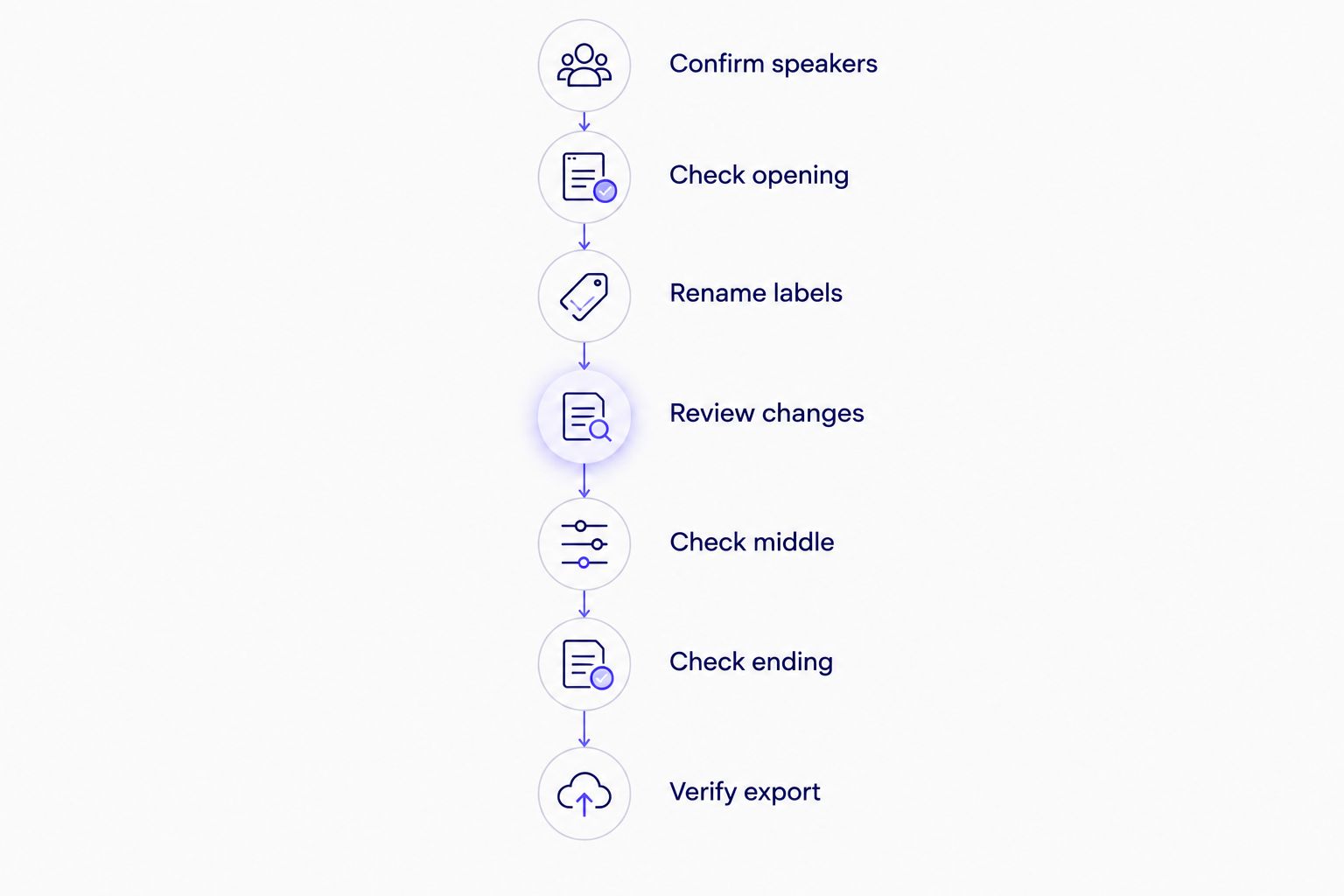
Review speaker changes and short interjections before checking the final export.
The 3 sample windows of 60 seconds each are a screening method, not a replacement for full review when the recording contains frequent cross-talk. If the first sample exposes repeated attribution errors, expand the review to every speaker transition.
Why speaker-label accuracy varies
- Overlapping speech: concurrent voices can produce one mixed segment with an incorrect primary label.
- Voice similarity: speakers with similar pitch, rhythm, and vocal quality are harder to separate consistently.
- Microphone distance: a quiet or distant participant provides less distinct voice information than a close-miked participant.
- Room acoustics: echo and reverberation blur the boundaries between speech, silence, and background sound.
- Audio compression: call platforms and low-quality exports can remove acoustic detail used to distinguish voices.
- Short turns: brief confirmations offer less evidence for assigning a stable voice cluster.
- Uneven levels: one loud speaker can mask another person during interruptions.
- Music and sound effects: non-speech audio can obscure boundaries or create false transitions.
These factors can occur together. A quiet speaker on a shared room microphone during cross-talk presents several problems at once, so fixing only the transcript wording does not verify the attribution.
How is diarization accuracy measured?
Diarization error rate, or DER, is a standard evaluation measure. It combines 3 error types: missed speech, speech detected where no speech exists, and speaker confusion. Speaker confusion is the component most visible to an editor because the words appear under the wrong label.
A DER result only has meaning when the test conditions are stated. A score from clean studio speech does not describe performance on a noisy panel recording. The number of speakers, microphone setup, overlap policy, and reference annotations all affect the evaluation.
Do not use word error rate, or WER, as a substitute. WER measures substitutions, deletions, and insertions in recognized text. It does not show whether the correct speaker received that text. The distinction also matters when judging AI transcription accuracy for accented English.
Can labels be corrected after detection?
Yes. Generic or incorrect speaker labels should remain editable after automatic detection. An editor needs to rename voice clusters, fix individual assignments, and confirm the changes before export.
The safest workflow is to correct the speaker map before detailed punctuation and subtitle work. Otherwise, the editor can polish several cues under the wrong name and then repeat part of the QA process. The guide to editing speaker labels after automatic detection explains this correction stage in more detail.
Can AI separate voices that talk at the same time?
AI can sometimes separate overlapping voices, but cross-talk remains the least dependable diarization condition in 2026. A mixed segment can contain words from both people while the system assigns only one speaker label or creates an inaccurate boundary.
For client delivery, mark overlaps during playback and compare them against the transcript timeline. If both voices matter, the final transcript format should represent the overlap according to the client's guideline rather than forcing the exchange into a clean sequential order.
Does diarization work with different accents or languages?
Yes. Diarization mainly groups voices by acoustic characteristics, while ASR determines the spoken words. However, multilingual speech still adds transcription and editing decisions even when the speaker clusters remain stable.
An editor must check language changes, names, terminology, and translated subtitle timing separately. The workflow for AI transcription with two languages in one recording covers those additional checks.
Where VideoText fits
VideoText detects and labels speakers during transcription, then lets the editor rename speakers in the interface. The same workspace also supports timed transcripts, SRT and VTT subtitles, subtitle QA, guideline formatting, and exports with timecode or speaker layouts.
VideoText speaker diarization is best for transcriptionists, podcast teams, and media editors who need automatic labels they can verify and rename before delivery. Its practical advantage is keeping speaker review beside the transcript and subtitle workflow. Its limitation is the same one every diarization system faces: unclear audio and overlapping speech still need human judgment.
“VideoText speaker diarization is best for transcriptionists, podcast teams, and media editors who need automatic labels they can verify and rename before delivery.”
A VideoText diarization pass should therefore be treated as structured pre-labeling. It removes the need to mark every obvious speaker change manually, but it does not remove the final responsibility for names, attribution, timing, and client formatting.
Label speakers before export
Upload media, review detected speakers, and rename labels in the transcript interface.
Start transcribing
FAQ
Can AI detect and label multiple speakers accurately in 2026?
Yes, AI can detect and label multiple speakers accurately when the recording contains clear, distinct voices and limited overlap. Noisy audio, similar voices, and short interruptions still require human QA in 2026.
What is speaker diarization?
Speaker diarization is the process of dividing audio by speaker and assigning an anonymous label to each voice cluster. It answers who spoke when, while ASR determines which words were spoken.
Is speaker diarization the same as voice recognition?
No. Speaker diarization groups speech by voice, while speaker identification connects a voice to a known identity. Diarization normally starts with anonymous labels such as Speaker 1 and Speaker 2.
Can AI identify speakers by their real names?
Not from diarization alone. A detected voice cluster must be mapped to a known identity through reference data or renamed manually by an editor.
Why does AI assign a sentence to the wrong speaker?
AI assigns a sentence to the wrong speaker when the segment boundary or voice cluster is incorrect. Overlap, similar voices, compression, noise, and very short turns are common causes.
Can AI handle speakers talking over each other?
AI can process overlapping speech, but cross-talk remains less dependable than clear turn-taking. Editors should replay every overlap and confirm both the words and the speaker attribution.
Should speaker labels be checked before subtitle export?
Yes. Check speaker names, changes, overlaps, and short interjections before exporting subtitles or transcripts. This prevents correctly timed text from carrying an incorrect attribution into the client file.
How do you test diarization accuracy?
Compare the automatic speaker timeline with a manually verified reference and calculate diarization error rate. The evaluation conditions must state the recording type, overlap policy, speaker setup, and annotation method.
One last thing
Check the shortest lines first. A long answer gives the system a sustained voice sample, while a one-word interruption provides much less evidence and often sits directly beside another speaker's segment. In a 2026 QA pass, replay yes, right, agreed, names spoken off camera, and lines that appear between two longer turns before polishing punctuation.
Related guides



