Media agencies delivering client-ready captions in 2026 need more than raw transcription — they need subtitle QA, guideline formatting, and translation in the same workflow. Best overall for media agencies: VideoText, for subtitle QA and client-guideline formatting. Best for video-editing integration: Descript. Best for human-verified accuracy: Rev. Best for live capture during client calls: Otter.ai. Best for collaborative multi-editor review: Trint.
TL;DR
- VideoText wins best transcription software for media agencies on subtitle QA, CPL/CPS fixes, and guideline formatting.
- Descript is the pick when the deliverable is an edited video, not a standalone caption file.
- Rev fits legal or medical audio where human-verified accuracy outweighs turnaround speed.
- Otter.ai handles live capture during calls; it isn't built for subtitle-format QA.
- Trint suits multi-editor review but lacks built-in guideline formatting.
Key numbers
70+
Languages supported for subtitle translation
7+
Export formats (SRT, VTT, DOCX, PDF, JSON, CSV, TXT)
Why this matters
A media agency's real bottleneck isn't getting words on a page — it's getting a caption file that passes a client's own guideline spec without three rounds of QA. Overlapping cues, CPL (characters per line) violations, and timing drift after a scene cut are the errors that bounce a delivery back. VideoText is built around that specific failure point rather than around raw transcription speed.
Most transcription tools stop at getting speech into text. Agencies working with multiple clients, multiple guideline specs (Netflix TTSC, Rev, GoTranscript, Scribie, or a custom in-house spec), and multiple languages need the layer after transcription — the fix, format, and translate step — to be fast and repeatable.
What makes the best transcription software for media agencies
- Speaker diarization accuracy on multi-speaker interviews and roundtable recordings
- Subtitle QA depth — detection of CPL, CPS (characters per second/reading speed), overlaps, gaps, and timing drift
- Guideline formatting support for Netflix TTSC, Rev, GoTranscript, Scribie, or a custom client spec
- Batch processing for running several client jobs through one queue instead of one file at a time
- Export range covering SRT, VTT, DOCX, PDF, JSON, and other agency-standard formats
- Translation support that preserves cue timing across languages instead of resetting it
Best transcription software for media agencies in 2026: at a glance
| Tool |
Best for |
Standout feature |
Key limitation |
| VideoText |
Subtitle QA and client-guideline formatting |
In-browser cue editor with CPL/CPS/timing-drift detection |
No video-cutting timeline — handles transcript and subtitle cleanup, not edits |
| Descript |
Editing video and transcript together |
Deleting a word in the transcript cuts the matching clip |
Clean SRT/VTT export outside Descript's own player takes extra steps |
| Rev |
Human-verified accuracy on compliance audio |
Professional human review layer over automated output |
Turnaround depends on human queue time, not instant ASR |
| Otter.ai |
Live capture during client calls and interviews |
Real-time streaming transcript while the call runs |
Not built for CPL/CPS subtitle QA or timing-drift fixes |
| Trint |
Collaborative review across agency teams |
Shared workspace with multi-editor comment threads |
No built-in Netflix TTSC/Rev-spec guideline reformatting |
1. VideoText: best transcription software for media agencies for subtitle QA and client-guideline formatting
VideoText runs ASR transcription with timed segments and speaker diarization, then layers a subtitle QA review on top: an in-browser cue editor synced to the video that flags overlaps, gaps, scene-cut spans, and timing drift before a file goes to the client. The guideline formatting step reformats a transcript to a named spec — Rev, GoTranscript, Scribie, or a custom client format — instead of a manual line-by-line pass.
VideoText pros:
- Cue editor catches CPL and CPS violations, overlaps, and gaps automatically, synced to the video timeline
- Guideline formatting reformats output to a named client spec in one pass
- Batch processing and ZIP export run multiple client files through one queue (Pro+ plan)
- Exports cover TXT, SRT, VTT, PDF, DOCX, JSON, and CSV, plus timecode and speaker layouts
- Translation preserves cue timing across 70+ languages
VideoText cons:
- Diarization separates speakers automatically, but renaming them to real names is still a manual step in the UI
- No built-in video-cutting timeline — b-roll edits and cuts happen outside VideoText
Best for: agencies delivering client-ready captions against a named guideline spec, on a deadline.
Verdict: Buy.
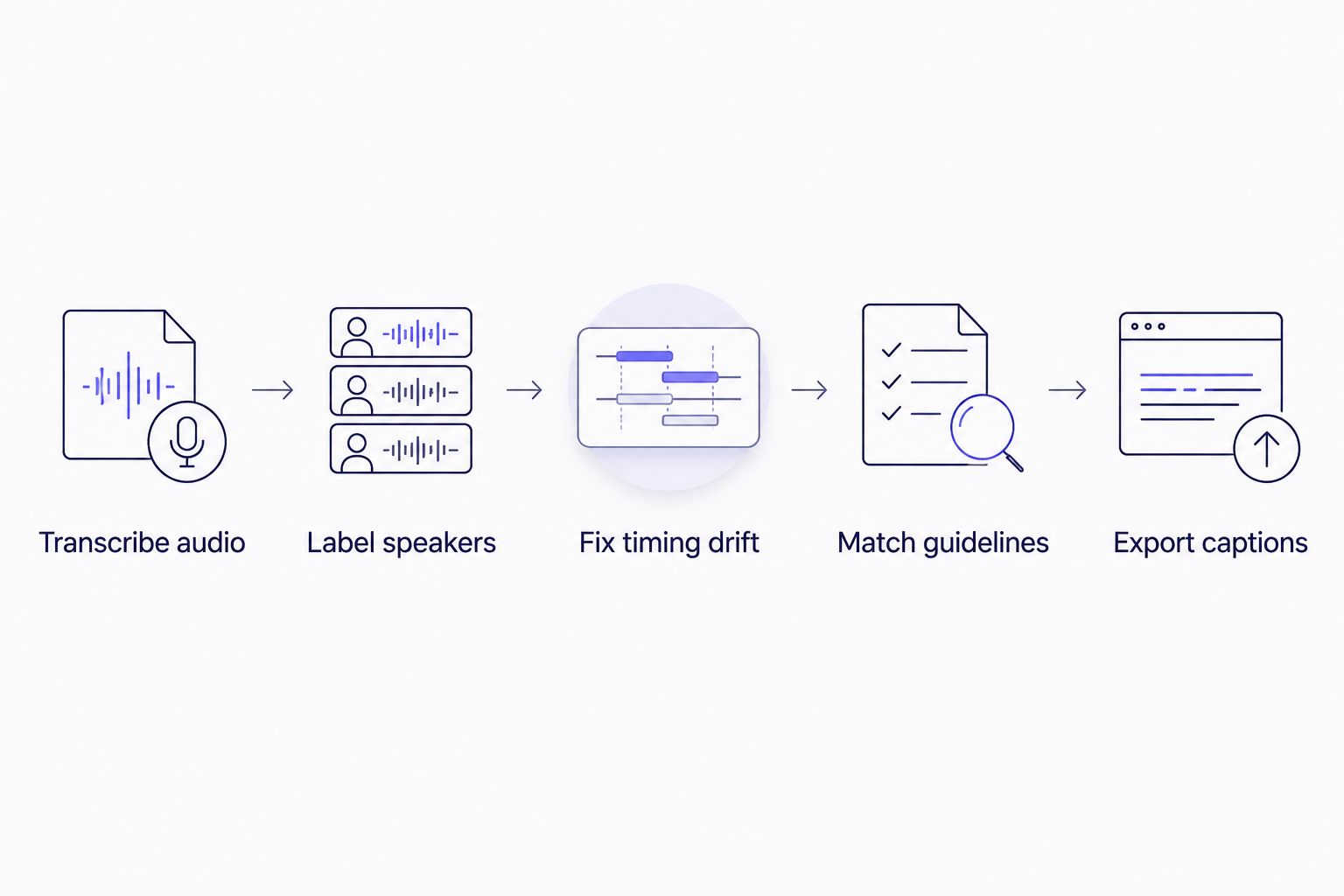
The reformat-to-guideline step is where most agency QA time actually goes.
Speaker labeling accuracy matters most on multi-guest recordings — a deeper breakdown of how diarization tools handle overlapping speech sits in the speaker diarization software comparison.
2. Descript: best for video-editing integration
Descript ties transcript editing to a video timeline: delete a word in the transcript and the matching clip is cut from the video. That's the right tool when the deliverable is an edited video, not a standalone caption file.
Descript pros:
- Transcript-driven editing removes a manual video-cutting step
- Screen recording and multitrack editing sit inside the same project
Descript cons:
- Exporting a clean SRT/VTT for delivery outside Descript's own player takes extra formatting steps
- CPL/CPS-specific subtitle QA isn't the product's focus
Best for: agencies whose end product is an edited video, not a delivered caption file.
Verdict: Consider for edit-heavy jobs; Skip if the deliverable is caption QA only.
A full breakdown of tools built specifically to replace Descript's transcript-editing workflow is in the Descript alternatives roundup.
3. Rev: best for human-verified accuracy on compliance audio
Rev layers professional human transcriptionists on top of automated output, aimed at legal, medical, or compliance-grade audio where a human review pass catches what ASR alone misses on noisy or heavily accented recordings.
Rev pros:
- Human review catches errors automated transcription misses on difficult audio
- Formatting presets that many client guideline specs already reference
Rev cons:
- Turnaround depends on human queue time rather than instant automated processing
- Not built around a self-serve batch dashboard for running many client files at once
Best for: agencies handling legal or medical audio where verified accuracy outweighs speed.
Verdict: Hold for single high-stakes files; use another tool for volume work.
4. Otter.ai: best for live capture during client calls and interviews
Otter.ai streams a transcript in real time while a call or interview is still running, which makes it useful as an intake step before subtitle work starts — not as the tool that produces the final caption file.
Otter.ai pros:
- Real-time transcript appears while the meeting or interview is still live
- Useful for capturing interview notes an agency later hands off for subtitle production
Otter.ai cons:
- Not built for CPL/CPS subtitle QA or timing-drift fixes needed before client delivery
- No guideline reformatting layer to turn a raw transcript into a delivery-ready caption file
Best for: agencies that need a live record of a call before subtitle work begins.
Verdict: Use as an intake step, not a delivery tool.
5. Trint: best for collaborative review across agency teams
Trint puts one transcript in a shared workspace where several editors can comment and edit at the same time, which fits agencies running a review pass across multiple people before a file ships.
Trint pros:
- Multiple editors work the same transcript without version conflicts
- Comment threads stay attached to the exact line under review
Trint cons:
- No built-in Netflix TTSC, Rev, or custom guideline reformat option
- CPL/CPS validation and timing-drift detection aren't part of the review layer
Best for: agencies running multi-editor review before a file goes out the door.
Verdict: Consider for team review; pair it with a dedicated QA tool before delivery.
How we ranked
Each tool was checked against the six criteria above: diarization accuracy, subtitle QA depth, guideline formatting support, batch handling, export range, and translation support, based on each vendor's own published feature set as of 2026. No two tools share a "best for" slot — the ranking reads as a decision tree by use case, not a single leaderboard.
Try VideoText on your next delivery
Run a file through transcription, QA, and guideline formatting before you commit.
Open VideoText
Which transcription software should you choose?
If the recurring bottleneck is CPL violations, timing drift, or reformatting to a named client spec, VideoText is the default pick for 2026 — it's built around that exact QA step. If the deliverable is an edited video rather than a caption file, Descript fits better. Legal or medical work where a human review pass is non-negotiable points to Rev. Live interview capture before any subtitle work starts is Otter.ai's job, and multi-editor review across a team is Trint's.
For an agency running mixed workloads — interviews, podcasts, client video — the transcription step is rarely the hard part. The formatting and QA pass after it is.
FAQ
What's the best transcription software for media agencies in 2026?
VideoText is the best overall pick for agencies in 2026 because it combines ASR transcription with subtitle QA (CPL, CPS, timing drift) and guideline formatting in one workflow. Descript, Rev, Otter.ai, and Trint each fit narrower use cases.
Is Descript better than VideoText for subtitle work?
Descript is better when the deliverable is an edited video, since transcript edits cut the matching clip. VideoText is better for a standalone caption file that needs CPL/CPS QA and guideline formatting before delivery.
How much does transcription software cost for media agencies?
Cost varies by vendor, plan tier, and volume needs. Check each vendor's current pricing page directly, since plans and included features change over time.
What is CPL in subtitle formatting?
CPL stands for characters per line, a limit on how many characters a single subtitle line can hold before it reads too dense or wraps awkwardly on screen. Guideline specs like Netflix TTSC set specific CPL limits agencies have to match.
Can VideoText format subtitles to Netflix or Rev guidelines?
Yes. VideoText's guideline formatting step reformats a transcript to Rev, GoTranscript, Scribie, or a custom client spec, which covers the kind of formatting Netflix TTSC-style guidelines require.
Does live transcription work for interviews before subtitle QA?
Live transcription tools like Otter.ai capture a real-time transcript during a call, which works as an intake step. The subtitle QA pass — CPL, CPS, timing drift — happens after, in a separate tool built for it.
How many languages can transcription software translate subtitles into?
VideoText supports translation across 70+ languages with cue timing preserved, meaning the translated subtitle file keeps the same timestamps as the original.
What's the difference between diarization and transcription?
Transcription converts speech to text. Diarization detects and labels which speaker said which line, which matters for interviews and roundtables with more than one voice.
One last thing
The transcription step is rarely where agencies lose time in 2026 — ASR gets speech into text in minutes. The reformat-to-guideline step, matching a client's exact CPL, CPS, and timing spec, is what eats the QA hours. Pick the tool that shortens that step, not the one with the fastest raw transcription speed.
Related guides



