Rotate Video Online — Fix a Sideways Video
Turn a sideways or upside-down video the right way up, or mirror it. The preview shows the result before you rotate.
Fixing a phone video? Add subtitles to it with AI →
Choose a video or drop it here
MP4, MOV, WebM, MKV, AVI — processed in your browser, never uploaded
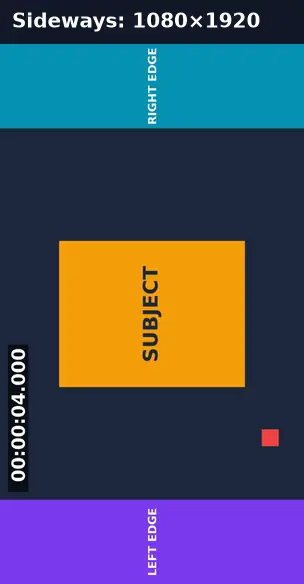
Before and after: a sideways recording turned upright
A video saved sideways (1080×1920 with the picture on its side) rotated 90° clockwise.
Before
After
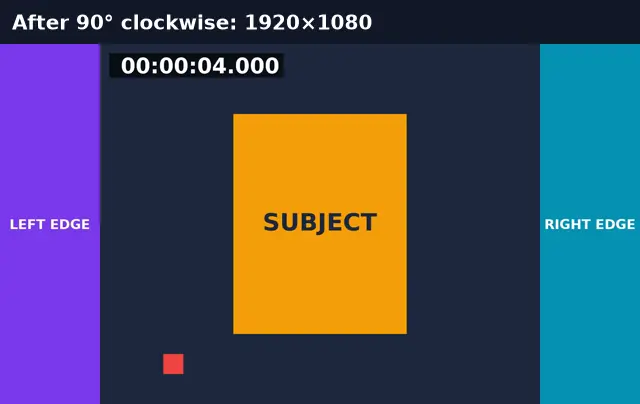
Real run of this tool in Chrome on an 8-second 1920×1080 test clip with a burned-in timecode, measured with ffprobe. No mock-ups.
Rotate vs crop vs flip
Rotating turns the whole picture; it never cuts anything off.
| Rotate 90° | Rotate 180° | Flip | Crop | |
|---|---|---|---|---|
| Picture content | All kept | All kept | All kept, mirrored | Edges removed |
| Width × height | Swapped | Same | Same | Smaller |
| Fixes | Sideways video | Upside-down video | Selfie mirror, backwards text | Wrong shape for the platform |
Why phone videos play sideways
Phones often save an orientation flag instead of turning the pixels. Some players and editors ignore the flag. Rotating here writes the pixels upright, so every player shows the video the same way. Rotating doesn’t crop: a 1080×1920 sideways video becomes 1920×1080.
Rotate Video: troubleshooting
- It’s still sideways in one app
- That app may apply the old orientation flag. Try the other 90° direction.
- Text in the video reads backwards
- Use Flip horizontal to undo a selfie-camera mirror.
- It takes a while
- Rotating re-encodes every frame. Trim first if you only need part.
Privacy and file limits
FFmpeg runs inside this browser tab, so your files are never uploaded. There is no account, watermark, or usage limit; the size limit is your device’s memory: about 750 MB on a laptop and 250 MB on a phone. Re-encoding long videos can take minutes, and the page shows an estimate first.
How to use Rotate Video
- 1
Choose a video
The sideways, upside-down, or mirrored one.
- 2
Pick the rotation
90° clockwise, 90° counter-clockwise, 180°, or a flip. The preview turns.
- 3
Rotate and download
The picture is re-encoded upright, so it plays the same in every player.
Frequently Asked Questions
- How do I rotate an MP4 90 degrees?
- Choose 90° clockwise or counter-clockwise, check the preview, and press Rotate video.
- Does rotating crop the video?
- No. A 90° turn swaps width and height (1080×1920 → 1920×1080) and keeps the whole picture.
- Does rotating reduce quality?
- The picture is re-encoded with H.264 at a high-quality setting. The sound is copied.
- What’s the difference between rotate and flip?
- Rotate turns the picture; flip mirrors it, which fixes reversed text from a front camera.
- Can I rotate a MOV from an iPhone?
- Yes. The result is an MP4.
Most social video is watched on mute
Upright — now captioned
Generate subtitles from the speech and burn them in for social.
- ✓Timed SRT and VTT subtitles from the speech in your video
- ✓Translate the subtitles into any of 104 languages
- ✓Burn styled captions in for TikTok, Reels, and Shorts