Crop Video Online — Landscape to Vertical, No Black Bars
Cut away the edges of a video and keep the part that matters. Pick 9:16 for TikTok and Reels, 1:1 or 4:5 for the feed, or a free shape to remove black bars, then slide the frame onto your subject.
Making it vertical for Reels or Shorts? Add readable subtitles with AI →
Choose a video or drop it here
MP4, MOV, WebM, MKV, AVI — processed in your browser, never uploaded
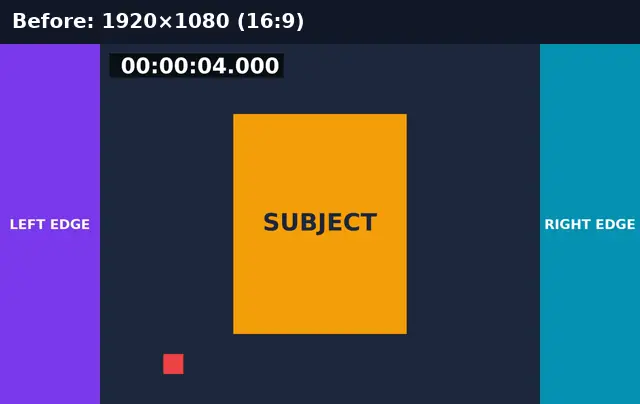
Before and after: landscape to vertical without black bars
A 16:9 clip cropped to 9:16 with the frame centred on the subject. The edges are cut away; nothing is stretched.
Before
After
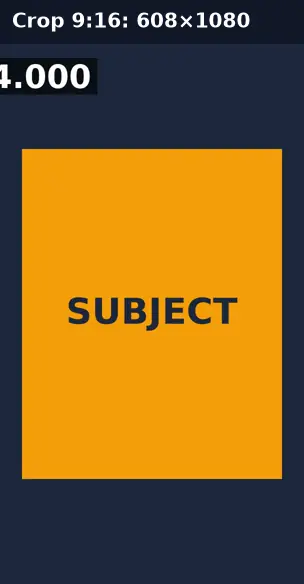
Real run of this tool in Chrome on an 8-second 1920×1080 test clip with a burned-in timecode, measured with ffprobe. No mock-ups.
Crop vs resize: which one fixes your video?
They solve different problems. Crop changes what is in the frame; resize changes the frame’s pixel size.
| Crop | Resize (fit) | Resize (fill) | |
|---|---|---|---|
| Keeps the whole picture | No — edges are cut | Yes | No — edges are trimmed |
| Black bars | Removes them | Adds them where shapes differ | None |
| Output size | The cropped area (e.g. 608×1080) | Exactly the target (e.g. 1080×1920) | Exactly the target |
| Stretching | Never | Never | Never |
| Use it when | The subject is in one part of the frame, or bars are baked in | Nothing may be cut off | You need the platform size and the subject is centred |
Which shape for which platform
9:16 is TikTok, Instagram Reels, and YouTube Shorts. 4:5 is the tallest Instagram feed post. 1:1 works for feeds on Instagram, LinkedIn, and Facebook. 16:9 is YouTube and most players. Cropping keeps the source pixels, so a 1080p landscape video cropped to 9:16 becomes 608×1080; use Resize Video afterwards if a platform asks for exactly 1080×1920.
Crop Video: troubleshooting
- The subject is cut off
- Move the horizontal slider until the subject is inside the bright box, or choose a wider shape such as 4:5.
- I want to remove black bars
- Choose Free and shrink the width or height until the bars sit outside the box.
- The video looks soft after cropping to 9:16
- Cropping keeps only part of the frame, so the output has fewer pixels (608×1080 from 1080p). Start from 4K footage for a sharper vertical crop.
- The crop box doesn’t appear
- Your browser can’t preview this format, so the box can’t be placed. Convert to MP4 first.
Privacy and file limits
FFmpeg runs inside this browser tab, so your files are never uploaded. There is no account, watermark, or usage limit; the size limit is your device’s memory: about 750 MB on a laptop and 250 MB on a phone. Re-encoding long videos can take minutes, and the page shows an estimate first.
How to use Crop Video
- 1
Choose a video
The first frame appears with a crop box on it.
- 2
Pick a shape
9:16, 1:1, 4:5, 16:9, 4:3, or Free to trim black bars by percentage.
- 3
Frame the subject
Move the box with the horizontal and vertical sliders. The dimmed area is what will be removed.
- 4
Crop and download
The browser re-encodes only the area inside the box.
Frequently Asked Questions
- How do I crop a 16:9 video to 9:16?
- Choose 9:16, move the box onto the subject, and press Crop video. The result is a vertical video with no black bars.
- How do I remove black bars from a video?
- Pick Free, then reduce the width (for bars on the sides) or height (for bars at the top and bottom) until the bars are outside the box.
- Why is my cropped video 608×1080 and not 1080×1920?
- Cropping keeps the original pixels inside the box. A 9:16 slice of a 1920×1080 frame is 608×1080. Resize Video can scale it to 1080×1920 if a platform requires it.
- Does cropping stretch or squash the picture?
- No. The shape you choose is cut out of the frame at its true proportions.
- Is the sound kept?
- Yes. The audio is copied when possible, or converted to AAC when the source uses a codec MP4 can’t hold.
Most social video is watched on mute
Vertical video needs captions
Generate subtitles from the speech, then burn them into the cropped video so they show on every platform.
- ✓Timed SRT and VTT subtitles from the speech in your video
- ✓Translate the subtitles into any of 104 languages
- ✓Burn styled captions in for TikTok, Reels, and Shorts