How Subtitle Fixers Silently Make Files Worse (and What a Safe Fix Looks Like)
VideoText editorial team · Published · Updated · 5 min read
You run a subtitle file through an auto-fixer. The overlap warnings disappear. The file imports cleanly. You deliver it.
Then a reviewer watches it and finds a cue that flashes by too fast to read. The fixer did exactly what it was built to do. That is the problem.
This post is about a failure that is easy to miss: a fixer that clears the error list by creating a worse error that nothing reports. It is also about what a published benchmark found when we measured it.
The cue that got "fixed" into unreadable
Overlaps are the most common timing defect in SRT files. Cue 2 starts before cue 1 has ended. Players handle it badly and platform validators reject it.
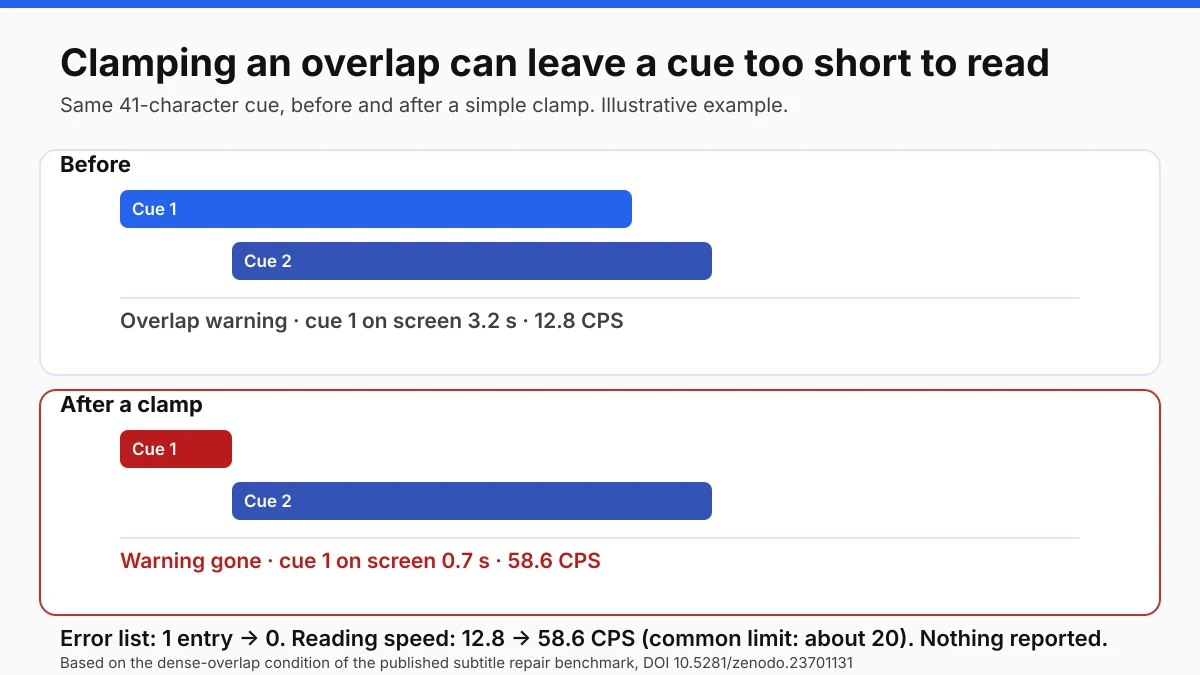
The obvious repair is to clamp cue 1's end time to cue 2's start time. Here is an illustrative case, built to match the benchmark's dense-overlap condition:
| Before | After a simple clamp | |
|---|---|---|
| Cue 1 text | "Nobody told me the train would be so late" (41 characters) | same |
| Cue 1 on screen | 10.0 s → 13.2 s (3.2 s) | 10.0 s → 10.7 s (0.7 s) |
| Reading speed | 12.8 characters per second | 58.6 characters per second |
| Overlap warning | yes | gone |
The overlap is resolved. The cue is now on screen for 0.7 seconds with 41 characters in it. Most delivery specs cap reading speed around 17 to 21 characters per second. This cue reads at nearly three times the common 20 CPS limit.
The error list went from one entry to zero. The file got worse.
What the benchmark measured
VideoText published a reproducible benchmark of its subtitle engine: 2,000 synthetic English SRT files, 11,597 injected defects, scored by an independent rule checker (42 characters per line, 2 lines, 20 CPS, a 1.5 second minimum for cues over 20 characters, no overlaps). We compared the engine with two simple baselines:
- Baseline A: clamp overlaps, wrap long lines.
- Baseline B: the same, plus extend cues that read too fast when the neighbouring gap has room.
We also built three stress conditions, where the defect has no in-place repair. One of them is the case above: the next cue starts 0.3 to 0.8 seconds after a cue of more than 30 characters.
In that dense-overlap condition, across 200 files and 1,200 overlaps:
- Both baselines clamped anyway. They turned all 1,200 overlaps into 1,200 cues at 38 characters per second or more, and reported nothing.
- The VideoText engine refused to create those cues. It kept the 1,200 overlaps, reported each one with a suggested action, and marked all 200 files for review.
Neither the baselines nor the engine produced a compliant file here. Making these files compliant means moving the next cue's start time or rewriting text, and the engine does neither unless asked. The difference is what each tool tells you. One of them hands back a file with a new, unreported problem. The other hands back a file with the old problem and a note saying so.
The other silent failure: a clean-looking pass
There are two ways a fixer can mislead you.
- It breaks something and says nothing. The clamp above.
- It reports success when the file is not compliant. The fixer says "passed" and the output still has violations.
In the benchmark, the engine's reporting held up on both counts:
- All 10,322 fixes it claimed were present in the exported files.
- Zero violations were left in the export without a finding or warning.
- Zero files were marked "passed" while non-compliant.
- The word sequence was preserved in all 2,000 files, and running the fix a second time changed nothing.
The baselines report nothing at all, so every violation they leave is silent: 3,597 for Baseline A and 6,607 for Baseline B.
Where the simple fixer wins
The benchmark is not a clean sweep, and it would be wrong to say so.
- On defects that have room to repair, Baseline B made 100% of files compliant. The engine made 99.2% (1,190 of 1,200). Ten of its 12 remaining violations come from keeping the author's line breaks: a three-line cue is split into two cues, and occasionally one piece gets less than 1.5 seconds on screen. The engine reported every one.
- In the dense-fast condition, where the gap to the next cue is 0.04 seconds, no fixer could change anything. Only the engine reported the 1,200 cues.
The engine's real advantage is narrower than "it fixes more". It fixes cues that overflow two lines of 42 characters by splitting them within the original time interval, which neither baseline did (200 of 200 files against 0 of 200). And it does not trade one error for another without telling you.
How to tell a safe fixer from a quiet one
You do not need our tool to apply this. Test any fixer you rely on:
- Give it an overlap where the cue is long and the next cue starts very soon. Check the reading speed of the cue afterwards. If it jumped past your limit and the report is silent, the fixer is quiet.
- Count what it says it fixed against what changed. Diff the input and output. Every claimed fix should be visible in the file.
- Run it twice. A safe fixer's second pass changes nothing.
- Check that the words did not change. A subtitle fixer should not edit your text unless you asked it to.
- Look for a way to say "I could not fix this". A tool that can only succeed will eventually claim a success it did not earn.
- Re-check the output against your spec, not against the tool's own report. A reading-speed check against 20 CPS (or 17 for stricter specs) is quick with any independent checker.
Limits of this evidence
This is a technical note published by VideoText, and the author develops VideoText. It has not been independently peer reviewed. The files are synthetic English SRT built from public-domain text, and the rules are explicit and fixed. The results describe the Fix Subtitles engine, its API, and its fix_subtitles tool. They do not describe the lighter free check_subtitles tool, and they say nothing about transcription accuracy.
The corpus, scoring code, baselines and per-file results are public under CC BY 4.0, so anyone can rerun it or find the cases we got wrong. The paper, with methods and limitations, is at videotext.io/research/subtitle-repair-benchmark (DOI 10.5281/zenodo.23701131).
FAQ
Why does fixing an overlap make a subtitle too fast to read?
Trimming the earlier cue to the next cue's start shortens its time on screen. If that cue has a lot of text and the next one starts soon, the remaining time is too short for the characters in it, so the reading speed rises past the limit.
What reading speed should subtitles stay under?
Common delivery specs use about 17 to 21 characters per second, with 20 as a frequent default. Check the spec for the platform or client you are delivering to. A tool's preset is a threshold, not a certification.
Can an automatic subtitle fixer guarantee a compliant file?
Not in every case. Some defects have no repair that keeps the text and the start times. A trustworthy fixer leaves those cues as they are and reports them. In the benchmark's dense stress conditions, no fixer tested produced a compliant file.
Does the benchmark cover transcription accuracy?
No. It measures subtitle checking and repair on files with injected defects, not how well speech is turned into text.
Related tools and guides
- Fix Subtitles
Repair timing, overlap, and line breaks in an SRT or VTT you already have.
- Translate Subtitles
Translate an SRT or VTT file. Translation supports 104 languages.
- Vimeo videos to translated subtitles: complete 2026 workflow
- Can subtitles be burned into a video without losing video quality?
- Can subtitles be translated without losing timing sync?
- SRT File Not Working? 9 Causes and How to Fix Each
- Manual Timestamp Fixing Is Wasting Hours of Your Week